Step by step perfect maze generation with php
This is a project I made for teaching purpose.
First of all, let's see what is a perfect maze.
From Maze Works: A perfect maze is defined as a maze which has one and only one path from any point in the maze to any other point. This means that the maze has no inaccessible sections, no circular paths, no open areas.
This is a perfect maze

This is not a perfect maze
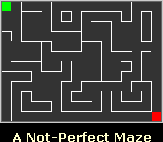
With the script I provide, you can generate perfect mazes with a given length and height, and the cute thing is that the script will "think loud" its actions in order to explain how does it work.
It uses backtracking.
The program, like most maze generators, starts off by building a maze with all the walls between the cells intact.
Then chooses a random cell where to start and mark the current cell as 'Visited';
If the current cell has any neighbour cells which have not been visited
- Randomly choose one of these cells
- Knock down the wall between current and choosen cells
- Make the chosen cell the current cell
- Mark the new current cell as visited
else
- Go to your previoulsy visited cell
Until all cells are visited
So, you can use it both for generating perfect mazes, and to show how would you generated a perfect maze.
In the example, the script executed with a 5x5 maze.
Later I will explain the code, meanwhile here it is:
-
<?php
-
-
$dim_x = 5;
-
$dim_y = 5;
-
-
$cell_count = $dim_x*$dim_y;
-
-
// MAZE CREATION
-
-
for($x=0;$x<$cell_count;$x++){
-
$maze[$x] = "01111"; // visted, NSEW
-
}
-
-
-
$html .= "My start position is randomly set at $pos<br>";
-
-
$maze[$pos]{0} = 1;
-
$visited ++;
-
-
// determine possible directions
-
while($visited<$cell_count){
-
$possible = "";
-
$possible .= "W";
-
}
-
$possible .= "E";
-
}
-
if((($pos+$dim_x)<$cell_count) and ($maze[$pos+$dim_x]{0}==0)){
-
$possible .= "S";
-
}
-
if((($pos-$dim_x)>=0) and ($maze[$pos-$dim_x]{0}==0)){
-
$possible .= "N";
-
}
-
$html .= "I am in $pos and I can go to: $possible<br>";
-
if($possible){
-
$visited ++;
-
$html .= "I randomly choose to go $direction";
-
switch($direction){
-
case "N":
-
$maze[$pos]{1} = 0;
-
$maze[$pos-$dim_x]{2} = 0;
-
$pos -= $dim_x;
-
break;
-
case "S":
-
$maze[$pos]{2} = 0;
-
$maze[$pos+$dim_x]{1} = 0;
-
$pos += $dim_x;
-
break;
-
case "E":
-
$maze[$pos]{3} = 0;
-
$maze[$pos+1]{4} = 0;
-
$pos ++;
-
break;
-
case "W":
-
$maze[$pos]{4} = 0;
-
$maze[$pos-1]{3} = 0;
-
$pos --;
-
break;
-
}
-
$maze[$pos]{0} = 1;
-
}
-
else{
-
$html .= "No possible moves, I have to perform a backtracking<br>";
-
}
-
$html .= "<table style = \"border:2px solid black\"; cellspacing = \"0\" cellpadding = \"0\">";
-
for($x=0;$x<$cell_count;$x++){
-
if($x % $dim_x == 0){
-
$html .= "<tr>";
-
}
-
$style = $maze[$x]{2}.$maze[$x]{3};
-
if($x!=$pos){
-
$html.= "<td class = \"$style\">$x</td>";
-
}
-
else{
-
$html .= "<td class = \"$style\"><strong>$x</strong></td>";
-
}
-
if(($x % $dim_x) == ($dim_x-1)){
-
$html .= "</tr>";
-
}
-
}
-
$html .= "</table>";
-
}
-
$html.= "Hooray, that's the final maze";
-
-
-
?>
-
<html>
-
<head>
-
<style>
-
body{line-height:25px;}
-
td{text-align:center;}
-
.00{width:50px;height:50px;border:0px;}
-
.01{width:50px;height:50px;border:0px;border-right:1px solid black;}
-
.10{width:50px;height:50px;border:0px;border-bottom:1px solid black;}
-
.11{width:50px;height:50px;border:0px;border-bottom:1px solid black;border-right:1px solid black;}
-
strong{color:red;}
-
-
</style>
-
</head>
-
<body>
-
</body>
-
</html>
Enjoy it and give me feedback.
4 Responses to “Step by step perfect maze generation with php”
Leave a Reply
Trackbacks
-
Perfect maze generation with AS3 : Emanuele Feronato on
November 28th, 2008 4:38 pm
[...] already talked about perfect mazes a couple of years ago with Step by step perfect maze generation with php and Perfect maze generation with Flash actionscript, but now it’s time to make it with AS3 and [...]
Posts
- Rick Triqui: my first PlayCrafter game
- Prototype of a Flash game like Meeblings
- Games for the game developers!
- The art of debugging
- How to embed a text file in Flash
- Create a Flash game in minutes with PlayCrafter
- Upgrade your Flash CS4 to 10.0.2
- Play Mazeroll, my latest Box2D game
- Triqui MochiAds Arcade plugin for WordPress Released!!
- The MochiAds funnel
- Flash game creation tutorial - part 1
- Create a Lightbox effect only with CSS - no javascript needed
- Flash game creation tutorial - part 2
- Make a Flash game like Flash Element Tower Defense - Part 2
- Flash game creation tutorial - part 3
- Create a flash draw game like Line Rider or others - part 1
- Create a Flash Racing Game Tutorial
- Make a Flash game like Flash Element Tower Defense - Part 1
- Create a flash artillery game - step 1
- Create a flash draw game like Line Rider or others - part 5
- Flash game creation tutorial – part 5.2


(4.9 out of 5) - Flash game creation tutorial – part 3


(4.86 out of 5) - Creation of a platform game with Flash – step 2


(4.84 out of 5) - Create a survival horror game in Flash tutorial – part 1


(4.82 out of 5) - Create a flash artillery game – step 1


(4.82 out of 5) - Create a Flash Racing Game Tutorial


(4.8 out of 5) - Create a flash artillery game – step 2


(4.75 out of 5) - New tile based platform engine – part 6 – ladders


(4.74 out of 5) - Flash game creation tutorial – part 2


(4.73 out of 5) - The experiment – one year later


(4.7 out of 5)


Excellent bit of work! I was looking for something to randomly generate a dungeon for each user for one of the quests in my game, and your code turns out to be a really nice jumping-off point. (:
Note: firefox doesn’t like class names that start with a number in stylesheets, and thus doesn’t render your pretty maze correctly. You can fix this in your code by adding a letter to the class name:
Line 78:
Line 81:
Line 98: .c00{width:50px;
ditto with line 99,100,101.
Thanks!
Hey… im not a expert in PHP, but i wanna ask:
Whats does $maze[$pos]{0} = 1; do?
and $maze[$pos]{2} = 0;?
and $maze[$pos+1]{4} = 0;?
etc…
i dont catch those lines!
please, help!
$maze is the variable.
[$pos] is the area of the array
{2} designates one character versus the whole string at postition 2.
