
Step by step perfect maze generation with php

This is a project I made for teaching purpose.
First of all, let's see what is a perfect maze.
From Maze Works: A perfect maze is defined as a maze which has one and only one path from any point in the maze to any other point. This means that the maze has no inaccessible sections, no circular paths, no open areas.

This is a perfect maze
Perfect maze

This is not a perfect maze
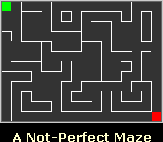
Not a perfect maze

With the script I provide, you can generate perfect mazes with a given length and height, and the cute thing is that the script will "think loud" its actions in order to explain how does it work.
It uses backtracking.

The program, like most maze generators, starts off by building a maze with all the walls between the cells intact.
Then chooses a random cell where to start and mark the current cell as 'Visited';

If the current cell has any neighbour cells which have not been visited

else

Until all cells are visited

So, you can use it both for generating perfect mazes, and to show how would you generated a perfect maze.

In the example, the script executed with a 5x5 maze.

Later I will explain the code, meanwhile here it is:

PHP:
  1. <?php
  2.  
  3. $dim_x = 5;
  4. $dim_y = 5;
  5.  
  6. $cell_count = $dim_x*$dim_y;
  7. $moves = array();
  8.  
  9. // MAZE CREATION
  10.  
  11. for($x=0;$x<$cell_count;$x++){
  12.         $maze[$x] = "01111"; // visted, NSEW
  13. }
  14.  
  15. $pos = rand(0,$cell_count-1);
  16.  
  17. $html .= "My start position is randomly set at $pos<br>";
  18.  
  19. $maze[$pos]{0} = 1;
  20. $visited ++;
  21.  
  22. // determine possible directions
  23. while($visited<$cell_count){
  24.     $possible = ""
  25.     if((floor($pos/$dim_x)==floor(($pos-1)/$dim_x)) and ($maze[$pos-1]{0}==0)){
  26.         $possible .= "W";
  27.     }
  28.     if((floor($pos/$dim_x)==floor(($pos+1)/$dim_x)) and ($maze[$pos+1]{0}==0)){
  29.         $possible .= "E";
  30.     }
  31.     if((($pos+$dim_x)<$cell_count) and ($maze[$pos+$dim_x]{0}==0)){
  32.         $possible .= "S";
  33.     }
  34.     if((($pos-$dim_x)>=0) and ($maze[$pos-$dim_x]{0}==0)){
  35.         $possible .= "N";
  36.     }
  37.     $html .= "I am in $pos and I can go to: $possible<br>";
  38.     if($possible){
  39.         $visited ++;
  40.         array_push($moves,$pos);
  41.         $direction = $possible{rand(0,strlen($possible)-1)};
  42.         $html .= "I randomly choose to go $direction";
  43.         switch($direction){
  44.             case "N":
  45.                 $maze[$pos]{1} = 0;
  46.                 $maze[$pos-$dim_x]{2} = 0;
  47.                 $pos -= $dim_x;
  48.                 break;
  49.             case "S":
  50.                 $maze[$pos]{2} = 0;
  51.                 $maze[$pos+$dim_x]{1} = 0;
  52.                 $pos += $dim_x;
  53.                 break;
  54.             case "E":
  55.                 $maze[$pos]{3} = 0;
  56.                 $maze[$pos+1]{4} = 0;
  57.                 $pos ++;
  58.                 break;
  59.             case "W":
  60.                 $maze[$pos]{4} = 0;
  61.                 $maze[$pos-1]{3} = 0;
  62.                 $pos --;
  63.                 break;
  64.         }
  65.         $maze[$pos]{0} = 1;
  66.     }
  67.     else{
  68.         $html .= "No possible moves, I have to perform a backtracking<br>";
  69.         $pos = array_pop($moves);
  70.     }
  71.     $html .= "<table style = \"border:2px solid black\"; cellspacing = \"0\" cellpadding = \"0\">";
  72.     for($x=0;$x<$cell_count;$x++){
  73.         if($x % $dim_x == 0){
  74.             $html .= "<tr>";
  75.         }
  76.         $style = $maze[$x]{2}.$maze[$x]{3};
  77.         if($x!=$pos){
  78.             $html.= "<td class = \"$style\">$x</td>";   
  79.         }
  80.         else{
  81.             $html .= "<td class = \"$style\"><strong>$x</strong></td>"
  82.         }
  83.         if(($x % $dim_x) == ($dim_x-1)){
  84.             $html .= "</tr>";
  85.         }
  86.     }
  87.     $html .= "</table>";
  88. }
  89. $html.= "Hooray, that's the final maze";
  90.  
  91.  
  92. ?>
  93. <html>
  94. <head>
  95. <style>
  96. body{line-height:25px;}
  97. td{text-align:center;}
  98. .00{width:50px;height:50px;border:0px;}
  99. .01{width:50px;height:50px;border:0px;border-right:1px solid black;}
  100. .10{width:50px;height:50px;border:0px;border-bottom:1px solid black;}
  101. .11{width:50px;height:50px;border:0px;border-bottom:1px solid black;border-right:1px solid black;}
  102. strong{color:red;}
  103.  
  104. </style>
  105. </head>
  106. <body>
  107.     <?php echo $html; ?>
  108. </body>
  109. </html>

Enjoy it and give me feedback.

Improve the blog rating this post
Tell me what do you think about this post. I'll write better and better entries.
1 Star2 Stars3 Stars4 Stars5 Stars (2 votes, average: 5 out of 5)
Loading ... Loading ...

3 Responses to “Step by step perfect maze generation with php”

  1. T Munk on September 1st, 2006 9:10 pm

    Excellent bit of work! I was looking for something to randomly generate a dungeon for each user for one of the quests in my game, and your code turns out to be a really nice jumping-off point. (:

    Note: firefox doesn’t like class names that start with a number in stylesheets, and thus doesn’t render your pretty maze correctly. You can fix this in your code by adding a letter to the class name:

    Line 78:
    Line 81:
    Line 98: .c00{width:50px;
    ditto with line 99,100,101.

    Thanks!

  2. Leo on November 2nd, 2006 6:18 pm

    Hey… im not a expert in PHP, but i wanna ask:

    Whats does $maze[$pos]{0} = 1; do?
    and $maze[$pos]{2} = 0;?
    and $maze[$pos+1]{4} = 0;?
    etc…

    i dont catch those lines!

    please, help!

  3. Jahn on January 28th, 2007 2:43 am

    $maze is the variable.
    [$pos] is the area of the array
    {2} designates one character versus the whole string at postition 2.

Leave a Reply