Flash game creation tutorial – part 6a
Welcome with the 6th part.
I have to warn you, things start getting terribly serious from now on.
First, if you haven’t done it yet, read all steps from 1st to 5th, then here we go.
Time to make a small, still unfinished, but playable game.
It’s called Kira in a Bubble.
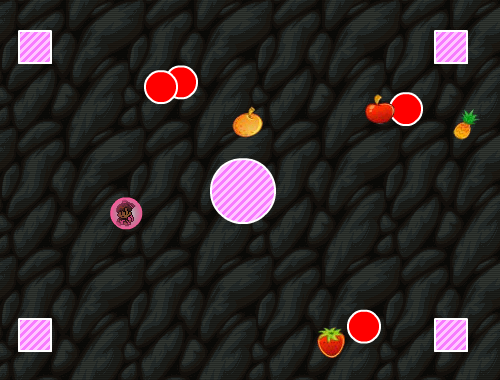
Play it some minutes, then come back and read the tutorial. For the (few) ones that will read until the end (or will jump straight to the end), well… a little surprise.
Before explaining how I did it, let me tell you WHAT I did.
Game features:
- Random stuff generation (fruits or “bombs”)
- Every kind of fruit has its score
- Bonus points if you grab a fruit at high speed
- When you die it’s not Game Over but you lose a life
- When you die you are invincible for a few seconds (like in “real” acrades)
- Well… play some more and watch it yourself… :)
The only interesting frame is the second, where the entire game engine resides. Please note that the entire game is about 180 lines… brackets included!! That’s why I love Flash, making game has never been so much fun (I remember a song… do you?).
Well, let me show you the actionscript
_root.attachMovie("kira", "kira", 10000);
_root.attachMovie("ground", "ground", 10002);
ground._x = 275;
ground._y = 200;
kira.yspeed = 0;
kira.yspeed = 0;
kira.xspeed = 0;
kira.wind = 0.00;
kira.power = 0.65;
kira.gravity = 0.1;
kira.upconstant = 0.75;
kira.friction = 0.99;
kira._x = 20;
kira._y = 20;
kira.bubbles = 0;
number = 0;
scores = 0;
bcollected = 0;
bmissed = 0;
bscore = 0;
blives = 3;
function bubble_on_stage() {
	_root.number++;
	_root.number = _root.number%100;
	_root.attachMovie('item', 'item'+_root.number, _root.number);
	_root['item'+_root.number]._x = random(500)+25;
	_root['item'+_root.number].speed = Math.random()*2;
	kind_of_item = random(1320)+1;
	if (kind_of_item<1320) {
		frame = 9;
	}
	if (kind_of_item<660) {
		frame = 8;
	}
	if (kind_of_item<595) {
		frame = 7;
	}
	if (kind_of_item<525) {
		frame = 6;
	}
	if (kind_of_item<450) {
		frame = 5;
	}
	if (kind_of_item<370) {
		frame = 4;
	}
	if (kind_of_item<285) {
		frame = 3;
	}
	if (kind_of_item<195) {
		frame = 2;
	}
	if (kind_of_item<100) {
		frame = 1;
	}
	_root['item'+_root.number].gotoAndStop(frame);
	_root['item'+_root.number].onEnterFrame = function() {
		this._y += this.speed+1;
		if (this._y>416) {
			if (this._currentframe<9) {
				_root.bmissed++;
				_root.missed.text = "Bubbles missed: "+_root.bmissed;
				if (_root.bmissed>10) {
					_root.gotoAndStop(3);
				}
			}
			unloadMovie(this);
			_root.kira.bubbles--;
		}
		if (this.hit.hitTest(_root.kira.hit)) {
			unloadMovie(this);
			_root.kira.bubbles--;
			if (this._currentframe == 9) {
				die();
			} else {
				_root.bcollected++;
				_root.collected.text = "Bubbles collected: "+_root.bcollected;
				score(this._x, this._y, this._currentframe);
			}
		}
	};
}
function score(x, y, number) {
	speed = Math.sqrt((_root.kira.yspeed*_root.kira.yspeed)+(_root.kira.xspeed*_root.kira.xspeed));
	bonus = 1;
	if (speed>10) {
		bonus = 2;
	}
	_root.scores++;
	_root.scores = _root.scores%100;
	_root.scores_item = 500+_root.scores;
	_root.attachMovie('score', 'score'+_root.scores_item, _root.scores_item);
	_root['score'+_root.scores_item]._x = x;
	_root['score'+_root.scores_item]._y = y;
	_root['score'+_root.scores_item].count = 0;
	_root['score'+_root.scores_item].points.text = 100+number*10;
	if (bonus == 2) {
		_root['score'+_root.scores_item].points.text = (2*(100+number*10))+"\nSPEED BONUS";
	}
	_root.bscore = _root.bscore+(100+number*10)*bonus;
	_root.scoretxt.text = "Score: "+_root.bscore;
	_root['score'+_root.scores_item].onEnterFrame = function() {
		this.count++;
		this._y -= 0.5;
		if (this.count>50) {
			unloadMovie(this);
		}
	};
}
kira.onEnterFrame = function() {
	if (this._alpha<100) {
		this._alpha += 0.5;
	}
	if ((this.bubbles<10) and (random(50) == 1)) {
		bubble_on_stage();
		this.bubbles++;
	}
	if (Key.isDown(Key.LEFT)) {
		this.xspeed -= this.power;
	}
	if (Key.isDown(Key.RIGHT)) {
		this.xspeed += this.power;
	}
	if (Key.isDown(Key.UP)) {
		this.yspeed = this.yspeed-this.power*this.upconstant;
	}
	if (Key.isDown(Key.DOWN)) {
		this.yspeed = this.yspeed+this.power*this.upconstant;
	}
	this.xspeed = (this.xspeed+this.wind)*this.friction;
	if (this.xspeed>0) {
		this.kira.gotoAndStop(1);
	} else {
		this.kira.gotoAndStop(2);
	}
	this.yspeed = this.yspeed+this.gravity;
	if (this.yspeed>15) {
		this.yspeed = 15;
	}
	if (this.xspeed>15) {
		this.xspeed = 15;
	}
	if (this.yspeed<-15) {
		this.yspeed = -15;
	}
	if (this.xspeed<-15) {
		this.xspeed = -15;
	}
	this._y += this.yspeed;
	this._x += this.xspeed;
	if (this._y<0) {
		this._y += 400;
	}
	if (this._y>400) {
		this._y -= 400;
	}
	if (this._x>550) {
		this._x -= 550;
	}
	if (this._x<0) {
		this._x += 550;
	}
	if ((_root.ground.hitTest(this._x+10, this._y, true)) or (_root.ground.hitTest(this._x-10, this._y, true)) or (_root.ground.hitTest(this._x, this._y-10, true)) or (_root.ground.hitTest(this._x, this._y+10, true))) {
		die();
	}
};
function die() {
	if (_root.kira._alpha == 100) {
		_root.attachMovie("explosion", "explosion", 10001);
		_root.explosion._x = _root.kira._x;
		_root.explosion._y = _root.kira._y;
		_root.blives--;
		if (_root.blives<1) {
			unloadMovie(_root.kira);
			unloadMovie(_root.ground);
			_root.gotoAndStop(3);
		}
		_root.lives.text = "Lives: "+_root.blives;
		_root.kira._alpha = 10;
	}
}
stop();
Line 1: I attach the "kira" object on the stage. Unlike in previous tutorial, I have no objects on the stage, I create them "on the fly" in this way. Why? Because I think it keeps the script cleaner. In order to do this, you need to select your object in the library window, right-click then "properties", then check "Export for Actionscript" and give it a name (in my case, kira).
Look at these two screenshots:

They should explain the thing.
Line 2: Same thing for the ground
Lines 3-4: Position of the ground in the center of the game area
Lines 5-14: These are the definitions of hero's (Kira's) gravity, speed... as seen on previous tutorials. The only difference is that now they are declared on the main frame. Notice I have to specify Kira's x and y position too, as I didn't drag/dropped her on the scene like I did on previous tutorials
Lines 16-21: Some other declarations, we'll see them in depth later on this tutorial
Now we jump to lines 110-166 because the explanation is simpler if I start from here.
Line 110: Function executed every time kira enters in a frame
Lines 111-113: If the alpha (transparency) of kira is less than 100 (fully opaque), then increment the alpha of 0.5. If you played the game, you should remember that Kira is a bit transparent when she "dies". You'll see later how transparency affects invulnerability.
Lines 114-117: If bubbles variable is less than 10 (the maximum amout of items - fruits or bombs - I want on the game at the same time) and a random number between 1 and 50 is equal to 1 (to give some randomness to the falling objects), then calls the bubble_on_stage (which you'll see it will put an item on the stage) function and increments bubbles variable (because an item will be added).
Lines 118-130: Same old movement routines you havre already seen on previous tutorials
Lines 131-135: According to xspeed (horizontal speed) value, I show a frame of kira facing left or facing right.
Line 136: Already seen on previous tutorials
Lines 137-148: I want to put a limit to kira's x and y speed. So if x or y speed are greater than 15, I will cap speed to 15 (or -15, that means the same speed in the opposite direction).
Lines 149-150: Already seen
Lines 151-162: This time I want kira's movement to "wrap around" the stage, so if kira leaves the stage on the left, she will appear from the right... same thing if she leaves from the top, she appears from the bottom... and so on.
Line 163: This is the ground collision test. If you remember previous tutorials, you will know that the collision test with the ground was made only checking the center of the player... I mean the (_x,_y) position. This time I wanted something more accurate so I am checking 4 collision points. It's not the best way to do it, but it's another way to check collisions.
Line 164: If the previous collision test is true, Kira dies (oh, nooo!!!) and I call the function die
The function die() goes from line 167 to line 181 and determines the actions to do when Kira dies
Line 168: Checks if kira's alpha is 100. Do you remember? If kira's alpha is 100 means that is vulnerable, so she can die. If kira's alpha is less than 100, it means that she's still invulnerable because she died recently. You can see that if kira's alpha is less than 100, the whole function is not executed (and kira does not die).
Lines 169-171: Attachs the explosion object on the stage and puts its center to kira's center.
Line 172: Decrement kira's lives. She died, so she lost a life.
Lines 173-177: Checks if kira's lives reached zero. If true, removes kira and ground ojects from the stage and goes to frame 3 (the game over screen).
Line 178: Updates the lives text on the stage
Line 179: Sets kira's alpha to 10. Now she is invulnerable.
Ok, it's all for today. Next time I will explain the rest of the script, meanwhile try to understand by yourself how it's done.
This is the complete source code, have a good time and give me feedback.
