
Create a flash draw game like Line Rider or others - part 4

March 31st update: part 5 released

Here we go with the 4th part. Read steps 1, 2 and 3 and you're ready to go.

In the last example in step 3 we had our bouncing ball but some of you noticed that sometimes the ball appears to be "stuck" in the ground, making some fake bounces.

Let's understand why.

In the next movie, I created another movieclip instanced as "last_hit".

Let's see what happens.

ACTIONSCRIPT:
  1. onClipEvent (load) {
  2.     yspeed = 0;
  3.     xspeed = 0;
  4.     gravity = 0.2;
  5.     radius = 5;
  6.     friction = 0.90;
  7.     precision = 360;
  8.     bounces = 0;
  9. }
  10. onClipEvent (enterFrame) {
  11.     if (_root.go == true) {
  12.         collisions = 0;
  13.         sum_x = 0;
  14.         sum_y = 0;
  15.         yspeed = yspeed+gravity;
  16.         for (x=1; x<precision; x++) {
  17.             spot_x = _x+radius*Math.sin(x*360/precision);
  18.             spot_y = _y-radius*Math.cos(x*360/precision);
  19.             if (_root.terrain.hitTest(spot_x, spot_y, true)) {
  20.                 collisions++;
  21.                 sum_x += spot_x;
  22.                 sum_y += spot_y;
  23.             }
  24.         }
  25.         if (collisions>0) {
  26.             _root.last_hit._x = _x;
  27.             _root.last_hit._y = _y;
  28.             bounces++;
  29.             _root.collisions.text = "Bounces: "+bounces;
  30.             ball_dir = Math.atan(yspeed/(xspeed*-1))/(Math.PI/180);
  31.             if ((xspeed*-1)<0) {
  32.                 ball_dir += 180;
  33.             }
  34.             if ((xspeed*-1)>=0 && yspeed<0) {
  35.                 ball_dir += 360;
  36.             }
  37.             spot_x = sum_x/collisions;
  38.             spot_y = sum_y/collisions;
  39.             x_cat = spot_x-_x;
  40.             y_cat = spot_y-_y;
  41.             ball_coll = Math.atan(y_cat/x_cat)/(Math.PI/180);
  42.             if (x_cat<0) {
  43.                 ball_coll += 180;
  44.             }
  45.             if (x_cat>=0 && y_cat<0) {
  46.                 ball_coll += 360;
  47.             }
  48.             ground_rotation = ball_coll-90;
  49.             if (ground_rotation<0) {
  50.                 ground_rotation += 180;
  51.             }
  52.             bounce_angle = 180-ball_dir-2*(ground_rotation);
  53.             if (bounce_angle<0) {
  54.                 bounce_angle += 360;
  55.             }
  56.             speed = Math.sqrt((yspeed*yspeed)+(xspeed*xspeed));
  57.             xspeed = speed*Math.cos(bounce_angle*Math.PI/180)*friction;
  58.             yspeed = (speed*Math.sin(bounce_angle*Math.PI/180))*-1*friction;
  59.         }
  60.         _y = _y+yspeed;
  61.         _x = _x+xspeed;
  62.     }
  63. }

On lines 26-27 I assign to last_hit _x and _y the position where we checked the collision between the ball and the ground

As you can see, sometimes the black ball (last_hit) seems to "sink" in the ground, and that's when an error may occur. If the ball sinks, and after the first bouncing frame is still inside the ground, the script will believe the ball encountered another wall and make it bounce again. Look at this picture:
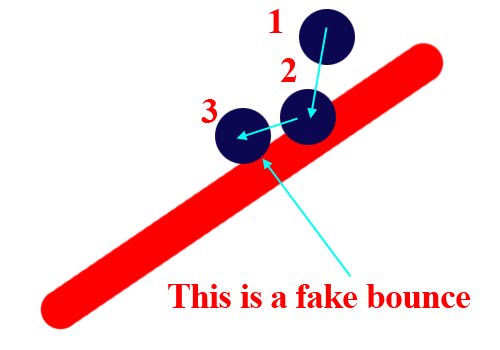
Fake bounce

If the ball sinks too much into the ground, line in position 2, during the bounce may collide again with the ground causing a fake bounce.

There are several ways to fix this issue, we could check the collision again and verify if there is a fake bounce.

Remember, though, that we are already doing a quite CPU expansive task, so determining twice (or more) in a frame all fake bounces may cause the game to slow down too much.

I found a way that roughly approximates the right way to avoid fake bounces and that works well, specially if you consider we are creating a game and not an accurate simulation.

I just "remember" the last _x and _y position where there wasn't any collision and set the collision point at that point.

The physics works in the same way, but the bounce won't start from the ground but from the last spot the ball was sighted before it touched the wall.

ACTIONSCRIPT:
  1. onClipEvent (load) {
  2.     yspeed = 0;
  3.     xspeed = 0;
  4.     gravity = 0.2;
  5.     radius = 5;
  6.     friction = 0.90;
  7.     precision = 360;
  8.     bounces = 0;
  9. }
  10. onClipEvent (enterFrame) {
  11.     if (_root.go == true) {
  12.         collisions = 0;
  13.         sum_x = 0;
  14.         sum_y = 0;
  15.         yspeed = yspeed+gravity;
  16.         for (x=1; x<precision; x++) {
  17.             spot_x = _x+radius*Math.sin(x*360/precision);
  18.             spot_y = _y-radius*Math.cos(x*360/precision);
  19.             if (_root.terrain.hitTest(spot_x, spot_y, true)) {
  20.                 collisions++;
  21.                 sum_x += spot_x;
  22.                 sum_y += spot_y;
  23.             }
  24.         }
  25.         if (collisions>0) {
  26.             _root.last_hit._x = old_x;
  27.             _root.last_hit._y = old_y;
  28.             bounces++;
  29.             _root.collisions.text = "Bounces: "+bounces;
  30.             ball_dir = Math.atan(yspeed/(xspeed*-1))/(Math.PI/180);
  31.             if ((xspeed*-1)<0) {
  32.                 ball_dir += 180;
  33.             }
  34.             if ((xspeed*-1)>=0 && yspeed<0) {
  35.                 ball_dir += 360;
  36.             }
  37.             spot_x = sum_x/collisions;
  38.             spot_y = sum_y/collisions;
  39.             x_cat = spot_x-_x;
  40.             y_cat = spot_y-_y;
  41.             ball_coll = Math.atan(y_cat/x_cat)/(Math.PI/180);
  42.             if (x_cat<0) {
  43.                 ball_coll += 180;
  44.             }
  45.             if (x_cat>=0 && y_cat<0) {
  46.                 ball_coll += 360;
  47.             }
  48.             ground_rotation = ball_coll-90;
  49.             if (ground_rotation<0) {
  50.                 ground_rotation += 180;
  51.             }
  52.             bounce_angle = 180-ball_dir-2*(ground_rotation);
  53.             if (bounce_angle<0) {
  54.                 bounce_angle += 360;
  55.             }
  56.             speed = Math.sqrt((yspeed*yspeed)+(xspeed*xspeed));
  57.             xspeed = speed*Math.cos(bounce_angle*Math.PI/180)*friction;
  58.             yspeed = (speed*Math.sin(bounce_angle*Math.PI/180))*-1*friction;
  59.             _x = old_x;
  60.             _y = old_y;
  61.         }
  62.         else{
  63.             old_x = _x;
  64.             old_y = _y;
  65.         }
  66.         _y = _y+yspeed;
  67.         _x = _x+xspeed;
  68.     }
  69. }

Lines 62-65 assign the actual _x and _y position to a couple of variables called old_x and old_y in case the ball didn't hit the terrain, while lines 59-60 set the _x and _y ball position to old_x and old_y. Now the ball is not on the ground so we cannot have any fake bounce.

You will notice sometimes there are about 2 or 3 pixels of error, but this can be tolerated in a game where fun is more important than simulation.

Ok, let's resume the drawing

This is a draw game but it's since part 1 we aren't drawing. To put all together, I created a GO! button that will release the ball and added the drawing capability.

To do this, I changed the actions in frame 1

ACTIONSCRIPT:
  1. go = false;
  2. createEmptyMovieClip("terrain", 1);
  3. terrain.lineStyle(10, 0xdd00dd, 100);
  4. imdrawing = false;
  5. onMouseDown = function () {
  6.     if (imdrawing == false) {
  7.         terrain.moveTo(_xmouse, _ymouse);
  8.         imdrawing = true;
  9.     }
  10.     if (imdrawing == true) {
  11.         onEnterFrame = function () {
  12.             terrain.lineTo(_xmouse, _ymouse);
  13.         };
  14.     }
  15. };
  16. onMouseUp = function () {
  17.     onEnterFrame = function () {
  18.         imdrawing = false;
  19.     };
  20. };

To start drawing as seen in tutorial 1, and put this actionscript in the button

ACTIONSCRIPT:
  1. on (release) {
  2.     go = true;
  3. }

to release the ball.

Now I want to stop drawing when the "GO!" button is pressed (it would be too easy if you could draw once in game, you have to foresee the ball bounces!), and I want a "RESET!" button to start drawing again.

To reset the stage, simply add a rest button with this actionscript:

ACTIONSCRIPT:
  1. on (release) {
  2.     _root.ball._x = 27;
  3.     _root.ball._y = 47;
  4.     _root.ball.xspeed = 0;
  5.     _root.ball.yspeed = 0;
  6.     _root.go = false;
  7.     _root.terrain.clear();
  8.     _root.terrain.lineStyle(10, 0xdd00dd, 100);
  9. }

Lines 2-3: Reset ball position

Lines 4-5: Reset ball speed

Line 6: The go variable is set to false (the ball is not moving)

Lines 7-8: Clear the stage and start drawing again

Finally, I want to stop drawing when the ball is running... and of course I want...

The exit

I created another movieclip instanced as exit

First, let's see how to prevent the player from drawing once the ball is going.

The actions on frame 1 are:

ACTIONSCRIPT:
  1. go = false;
  2. createEmptyMovieClip("terrain", 1);
  3. terrain.lineStyle(10, 0xdd00dd, 100);
  4. imdrawing = false;
  5. onMouseDown = function () {
  6.     if (!go) {
  7.         if (imdrawing == false) {
  8.             terrain.moveTo(_xmouse, _ymouse);
  9.             imdrawing = true;
  10.         }
  11.         if (imdrawing == true) {
  12.             onEnterFrame = function () {
  13.                 terrain.lineTo(_xmouse, _ymouse);
  14.             };
  15.         }
  16.     }
  17. };
  18. onMouseUp = function () {
  19.     onEnterFrame = function () {
  20.         imdrawing = false;
  21.     };
  22. };

Line 6 Simply checks the go variable and let the player draw only if go is false

About the exit, the ball actionscript will be:

ACTIONSCRIPT:
  1. onClipEvent (load) {
  2.     yspeed = 0;
  3.     xspeed = 0;
  4.     gravity = 0.2;
  5.     radius = 5;
  6.     friction = 0.90;
  7.     precision = 360;
  8.     bounces = 0;
  9. }
  10. onClipEvent (enterFrame) {
  11.     if (_root.go == true) {
  12.         if (_root.exit.hitTest(_x, _y, true)) {
  13.             xspeed = 0;
  14.             yspeed = 0;
  15.         } else {
  16.             collisions = 0;
  17.             sum_x = 0;
  18.             sum_y = 0;
  19.             yspeed = yspeed+gravity;
  20.             for (x=1; x<precision; x++) {
  21.                 spot_x = _x+radius*Math.sin(x*360/precision);
  22.                 spot_y = _y-radius*Math.cos(x*360/precision);
  23.                 if (_root.terrain.hitTest(spot_x, spot_y, true)) {
  24.                     collisions++;
  25.                     sum_x += spot_x;
  26.                     sum_y += spot_y;
  27.                 }
  28.             }
  29.             if (collisions>0) {
  30.                 _root.last_hit._x = old_x;
  31.                 _root.last_hit._y = old_y;
  32.                 bounces++;
  33.                 _root.collisions.text = "Bounces: "+bounces;
  34.                 ball_dir = Math.atan(yspeed/(xspeed*-1))/(Math.PI/180);
  35.                 if ((xspeed*-1)<0) {
  36.                     ball_dir += 180;
  37.                 }
  38.                 if ((xspeed*-1)>=0 && yspeed<0) {
  39.                     ball_dir += 360;
  40.                 }
  41.                 spot_x = sum_x/collisions;
  42.                 spot_y = sum_y/collisions;
  43.                 x_cat = spot_x-_x;
  44.                 y_cat = spot_y-_y;
  45.                 ball_coll = Math.atan(y_cat/x_cat)/(Math.PI/180);
  46.                 if (x_cat<0) {
  47.                     ball_coll += 180;
  48.                 }
  49.                 if (x_cat>=0 && y_cat<0) {
  50.                     ball_coll += 360;
  51.                 }
  52.                 ground_rotation = ball_coll-90;
  53.                 if (ground_rotation<0) {
  54.                     ground_rotation += 180;
  55.                 }
  56.                 bounce_angle = 180-ball_dir-2*(ground_rotation);
  57.                 if (bounce_angle<0) {
  58.                     bounce_angle += 360;
  59.                 }
  60.                 speed = Math.sqrt((yspeed*yspeed)+(xspeed*xspeed));
  61.                 xspeed = speed*Math.cos(bounce_angle*Math.PI/180)*friction;
  62.                 yspeed = (speed*Math.sin(bounce_angle*Math.PI/180))*-1*friction;
  63.                 _x = old_x;
  64.                 _y = old_y;
  65.             } else {
  66.                 old_x = _x;
  67.                 old_y = _y;
  68.             }
  69.             _y = _y+yspeed;
  70.             _x = _x+xspeed;
  71.         }
  72.     }
  73. }

Lines 12-14 stop the ball if it touches the exit.

Now you should be ready to create your first ball drawing game... why don't you send me your works? I will publish on this site.

The tutorial is not over of course... we still have to see how to advance levels, how to change the ball with a car or a guy, and so on.

Meanwhile, download source codes and give me feedback, then proceed to part 5

Other Resources: casino game

Improve the blog rating this post
Tell me what do you think about this post. I'll write better and better entries.
1 Star2 Stars3 Stars4 Stars5 Stars (7 votes, average: 4.86 out of 5)
Loading ... Loading ...

» Flash Templates provided by Template Monster are pre-made web design products developed using Flash technology.
They can be easily customized to meet the unique requirements of your project.

68 Responses to “Create a flash draw game like Line Rider or others - part 4”

  1. Steve on March 5th, 2007 11:05 am

    Is it just me, or are the movies not loading?

    But anyway, nice tut man! Can’t wait for the rest!

  2. Ben on March 5th, 2007 12:08 pm

    Just a quickie to note that I love the tutorials and can’t wait to see more from you. Thanks a lot for putting the time into these - they’re most appreciated.

  3. mousey on March 5th, 2007 6:04 pm

    ACE, what will we be learning to do inthe next tutorial?

  4. Alex on March 5th, 2007 11:27 pm

    why do some of the tutorials not work in other versions of flash

  5. Greg on March 6th, 2007 9:38 am

    Those ‘2 or 3 pixels of error’ are quite pronounced in my version if I increase the size of the ball and the radius associated with it. I’ve noticed it is worse when the collision detection takes place on the left hand side of the ball with steep line slopes. Flat lines and ones that go up and to the right seem to work alright. Any suggestions? Thank you!

  6. abhilash on March 6th, 2007 11:12 am

    Hey man nice tut cant wait for the next

  7. byitdude on March 7th, 2007 5:54 am

    hey,whats the actionscript to make to ball move when Go is clicked?

  8. abhilash on March 8th, 2007 9:23 am

    in reply to byitdude:
    code for the button(’GO’) is

    on(release) {
    go=true;
    }
    put this code in the button u make.
    **************************************
    my problem:
    with me, everything is alright except the reset button when I press the button the ball stops where it is & when the GO button is again pressed it falls with the power it had before the RESET was pressed. PLEASE HELP

  9. tim on March 8th, 2007 9:25 am

    Hurry up and post part 5 as fast as you can, i just cant wait

    oh and by the way the game still needs alot of work, the ball wont roll, it just bounces

  10. Freaky-freak-freaker on March 11th, 2007 1:26 am

    Hey, in one of these, can you maybe show us how to make it so that if the character or ball hits the grounds too hard, it resets? I would like that for a future game of mine.

  11. ISA 4 Te Win on March 13th, 2007 11:59 pm

    i fink the games sucks

  12. I Need Help on March 15th, 2007 2:27 am

    lol it works fine but maybe a moving shadow and when u have like 5 bounces and hit reset it errases ur lines and stuff but it still has 5 bounces

  13. eblup on March 15th, 2007 2:29 am

    you know the ball can ride the line and not bounce if you put the ball like a car and have it fase the angle of the line you det det de

  14. martin on March 15th, 2007 12:14 pm

    hi can some on help me when the ball touches the box how can you make it go onto another frame if some one can help iot will be much appreciated

  15. uhhhhhh on March 15th, 2007 5:00 pm

    eblup what hapnes when you change angle?? and its de de u dee

  16. mnmn on March 15th, 2007 5:01 pm

    isa i dont “fink” these games suck

  17. hey on March 15th, 2007 10:38 pm

    can u guys post another game but do it more spectific and post the easy game and short..? thank you help me plz

  18. hey on March 15th, 2007 10:42 pm

    my problem is i dont know how to do the wall. plz post for me another simple game and short or u guys can teach me how to do the wall ore bountri plz help thank you

  19. Smartz on March 17th, 2007 10:13 pm

    Once again, great tut! 2 Problems:
    1: The ball never stops moving.
    2: This is supposed to be a linerider game, not a ball bouncing game…;-)
    Keep up the good work!

  20. jordanleffl on March 18th, 2007 8:57 am

    ~~~~~~~~~~~~~~~~~~~~~~~~~~~~~~~~~~~~~
    MARTIN:
    hi can some on help me when the ball touches the box how can you make it go onto another frame if some one can help iot will be much appreciated
    ~~~~~~~~~~~~~~~~~~~~~~~~~~~~~~~~~~~~~
    just put in collision with exit:

    gotoAndStop(2)

    2 refering to what frame :-)

  21. martin on March 18th, 2007 4:49 pm

    so what you say jordanleffl all you have to do is put gotoAndStop(2) on the exit and that is it

  22. Kieron on March 19th, 2007 10:16 pm

    Yes Martin. Where you have your hit test for the exit, simply add “gotoAndStop(’frame_number’)”. But… If you are testing if the ball hits in the exits actions, then you need “_root.gotoAndStop(’frame number’)”. So, root on the exit, no root on the frame. Makes sense?

  23. martin on March 21st, 2007 4:17 pm

    i am a begginer at flash and can someone give me the hit test i need you all have been helpful thanks

    please check out my website

  24. Julianrocks on March 22nd, 2007 9:10 pm

    WOW! I Love this! I mad a quick little game out of this…
    http://img221.imageshack.us/my.php?image=linebouncerdp0.swf

    I cant wait for part five!

  25. fatattak on March 28th, 2007 12:42 pm

    hey i love the tutorials, but was wondering how do you make the object roll or slide on the line instead of bounce?

  26. gabssnake on March 29th, 2007 8:28 am

    hey, this is just great. I’m goona use some of what I learned here in a project for my college. keep it up, I’ll be checking!!!

    regards,

  27. Jordan on April 15th, 2007 4:34 am

    ty very much i made a pretty cool game because of this tut.

  28. Daniel on April 20th, 2007 9:15 am

    In Adobe Flash Or Macromedia ????

  29. Fire on April 23rd, 2007 10:50 pm

    how do u stop the ball from flying off the screen without having to draw a box while in game?

  30. Derrick Niehaus on April 25th, 2007 2:10 am

    BAHAHAHAHH someone stole your tutorial completely and made it into a game.. here
    thats so funny! they didnt even change the line color.. or get rid of the bouce counter.. or the circle where the ball had been

  31. N00b on May 10th, 2007 6:23 pm

    How do you get rid of the part that shows the last bounce and the bounces count?
    I have an idea but I always encounter many errors!
    I’ve also made an artillery game and it works! I’m really pleased and the tutorials are amazing!
    Much thanks! ^^

  32. Darth Turtle on May 16th, 2007 8:22 am

    For some reason, My game lags a lot. When i try to draw, sometimes the line doesn’t show up.
    Can someone help me?
    Oh and by the way, I’m using Flash MX educational.

  33. abhilash on May 19th, 2007 6:13 am

    in reply to darth turtle:
    check the frame rate of the movie.To do that just press CTRL J
    and change the FPS(frames per second)

  34. E th on May 19th, 2007 11:58 am

    **Error** Line 1: Clip events are permitted only for movie clip instances
    onClipEvent (load) {

    **Error** Line 10: Clip events are permitted only for movie clip instances
    onClipEvent (enterFrame) {

  35. abhilash on May 29th, 2007 11:51 am

    in reply to Eth:
    I think you have copied action script given for the ball to the frame.
    ~~~~~~~~~~~~~~~~~~~~~~~~~~
    For everybody:
    To rotate the ball just add
    “_rotation = xspeed;” below the
    “_x = _x xspeed;” in the ball AS

  36. E th on June 9th, 2007 2:22 am

    Yeah, actually how DO you get rid of the ball count? lol

  37. Todd Clark on July 15th, 2007 10:50 am

    Finally, drawn line collisions. I don’t know if you realize that this is probably one of a very few places that has a tutorial about this. Screw vector based tile grids for collisions. Now I can finally have very dynamic point to point coordinates for walls, etc.. instead of the complex tiles and endless modularity. Good job being awesome.

  38. Marius on July 26th, 2007 5:03 pm

    Thanks again for your great tutorial! But I’d like to see how one can make the ball ROLL down a line without bouncing… How can it be done? Thanks

  39. Carl on August 5th, 2007 8:39 am

    Hi! Thanks for your tutorials, they’re the best, I’m sooo excited making my little ball game hehe ^^ but I’m facing one trouble when I want to make a thing for two balls, and one of them start to float in space.. really strange. Do I have to change the variable names or something? Thanks again!

  40. Carl on August 8th, 2007 6:46 pm

    Actually got that one allready, and voila! my game’s finished! :) If you (or someone else)’d like to download it, it’s here: http://rapidshare.com/files/47444843/_Pelota_.exe
    //it’s in spanish :)

  41. SlimJim on November 17th, 2007 3:20 am

    We got a thousand and nine Bounces

  42. Dalez on November 19th, 2007 7:34 pm

    Hey, this is a great tut! But how do you make it slide down the line and not bouce? All so, how do you make it so you can rub a bit of the line out?
    Also, one more question… how do you make it so that you can move over to the next screen with with a hand? Like the real Linerider, where you click the hand and you can move the frame a bit down. Thanks very much, and very good tut!

  43. Alexis on November 24th, 2007 10:02 pm

    I l