Create a flash movie like Linkin Park one

When I was looking at Linkin Park homepage, I was impressed by the intro. It’s very simple but very nice.
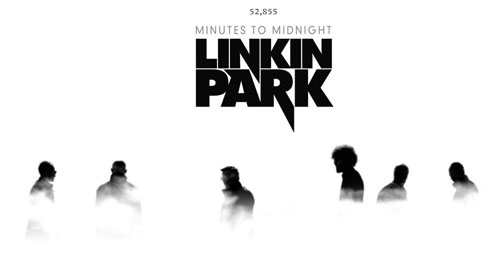
Linkin Park

To do something similar, we need four elements:

1) A b/w photo with an high contrast
2) PhotoShop
3) Flash
4) An awesome music track

Finding the photo

It’s quite easy to find (or shot) a photo… just remember it should have an high contrast between the white background and the black foreground.

I browsed some photos at flickr and found this one.
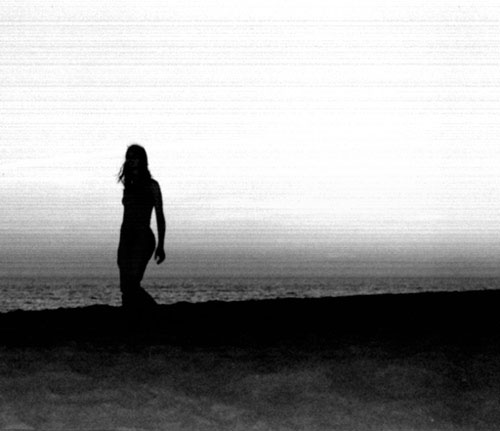
Very nice.

Now it’s time to open…

PhotoShop

What we need is a cloudy seamless semi-transparent background.

Let’s begin with the “cloudy seamless”.

To have a cloudy samless background, we need to create a document whose x and y sizes are divisible by 256.

Since we need to remove the seam only to the horizontal size, let’s create a 1024*800 document. Then press “D” to restore default foreground and background colors (or have them to black and white in any ohter way) and apply a Filter -> Clouds filter.

You should have something like this

Then, create a new layer and fill it with white. Add a layer mask to it and with the gradient tool make it transparent about in the vertical middle of the image. Then press Ctrl-E to merge layers.

Now you should have something like this:

Now, create a new layer and paint it black. Add a layer mask and do the same thing as before, but make it transparent in the last upper quarter ot the image. Then press Crtl-E to merge layers.

This is what I have now:

Now Ctrl-I to invert the image, Ctrl-A to select the entire image, Ctrl-C to copy it, then select the Channels palette and click on “Create new channel”.
A new channel named “Alpha 1″ should be created. Select it and Ctrl-V to paste the image.

Return to the Layer palette, create a new layer and fill it with white. Then on Photoshop menu go to Select -> Load Selection and in the dialog box under “Channel:” choose “Alpha 1″ then press “OK”.

Then press “Del” on your keyboard to delete the selection. Make this layer the only layer visibie in the document.

You should have something like that:
(note: the red/green squares means the document transparenct)

Save this image as PNG-24 with transparency and close Photoshop.

Flash

Create a new document with the same size of the “flickr” image and import the image on stage.

Then create a new movieclip and import the “fog” image you created. Duplicate the movieclip to have 2 “fogs” and from now on it’s just motion tweening with a initial tween to lower the fog and then a loop to cycle between the first moving for and the second one.

Basically, when a fog starts leaving the main scene, because it is moving to the left, the second one comes from the right. When the second is leaving to the left, the first comes back from the right… and so on, in this way

Now you only need an awesome music like the one Linkin Park can play… but I am not sure I will be able to write a tutorial about it… so download the source code (with the png file) and give me feedback.

Rate this post: 1 Star2 Stars3 Stars4 Stars5 Stars (6 votes, average: 5.00 out of 5)
Loading ... Loading ...
Flash Templates provided by Template Monster are pre-made web design products developed using Flash technology.
They can be easily customized to meet the unique requirements of your project.
Be my fan on Facebook and follow me on Twitter! Exclusive content for my Facebook fans and Twitter followers

This post has 20 comments

  1. akeem

    on April 8, 2007 at 6:48 pm

    The demo was decent. Alerting me to the new Linkin Park album was awesome .

  2. Keith Peters

    on April 8, 2007 at 9:48 pm

    You could also use a Perlin noise filter on a bitmap for the cloud effect.

  3. Scott Barnes

    on April 9, 2007 at 5:16 am

    That’s tidy! :)

    (Linkn Park’s new album is long overdue, i can only listen to remixs of hybrid theory for only so much longer..)…

    -
    Scott Barnes
    Developer Evangelist
    Microsoft.

  4. atr_lp

    on April 14, 2007 at 9:50 pm

    Now you’rw trying to copy LP’s stuffs?
    Ah, well, they won’t notice that, do they?

    And, finally, Linkin Park rocks!!!
    So vote him on http://www.battleofthevideos.com

  5. Firos

    on May 5, 2007 at 3:27 am

    Why do you have to bash the guy for making a tutorial that -helps- other people? Anyway, great tut. Thanks.

  6. great

    on May 7, 2007 at 8:33 am

    For me this tutorials is great. It helped me to learn new things which are vary much useful.

  7. Marius

    on May 7, 2007 at 5:01 pm

    This tutorial owned. Thank you so much.

  8. Juan David

    on May 9, 2007 at 9:58 am

    Muchas gracias, el tutorial es perfecto, me salvó la vida. Lo hubiera visto antes no habría trasnochado pero encontrarlo me permitió dormir al menos un poco.

    Gracias nuevamente y nos vemos luego.

  9. Albert

    on May 10, 2007 at 2:49 am

    loved the tutorial man thanx

  10. Pranjit

    on May 15, 2007 at 12:45 pm

    Best Work done by u

  11. SteeL

    on May 28, 2007 at 8:11 am

    I really appreciate the work, as someone said above u could use Perlin Noise filter, but I must say this one is Best, cause it’s without Perlin. :D

    This Tut Rocks.
    check out some of my webDesigns at http://www.SteeL-it.co.nr

  12. zeuss

    on May 29, 2007 at 12:46 pm

    Great..next time try to solve the copyright thing…it’s just a suggestion ;)

  13. Stephanie

    on June 5, 2007 at 4:25 pm

    I’m having trouble finding pictures suitable for this. Could you let me know what specific keywords might help me a bit? Thanks.

  14. Stephanie

    on June 6, 2007 at 10:35 pm

    Also… a bit more information about the tweening stuff in Flash? You just sorta dump us off into Flash… It’d be helpful.

  15. behzad

    on August 10, 2007 at 7:23 pm

    This was one of the greatest tutorials ever, but i have sum questions. ok… i understand the photoshop part and all but i don’t know how to make the actual animation in flash cuz i’m just a beginner.

  16. Powr

    on August 11, 2007 at 6:31 pm

    Yeh dude, i’m having a hell of a lot of trouble pulling this linkin park one off. I’m a big fan of em and i love the intro effect. I get past the first few steps, past the alpha part but can’t seem to get the same fog effect at all like you are. If you or anyone else can explain this stuff in alot of detail just drop me a line. I’m a beginner, complete beginner in photoshop and flash so ya.

  17. jackie

    on September 7, 2007 at 7:35 pm

    how do i import it into the flash program.. i cant find it

  18. shiv1411

    on December 20, 2007 at 4:46 pm

    i like it.

  19. SAL

    on September 12, 2008 at 11:10 am

    Superb buddy ! Amazing work… just that i was too l8 to see this… very informative… i suppose of you could come up with more of something like this… Gr8 Job dude !

  20. Create a flash movie like Linkin Park one | Tutorial Collection

    on June 30, 2009 at 3:36 am

    [...] View Tutorial No Comment var addthis_pub="izwan00"; BOOKMARK This entry was posted on Tuesday, June 30th, 2009 at 7:06 am and is filed under Adobe Flash Tutorials. You can follow any responses to this entry through the RSS 2.0 feed. You can leave a response, or trackback from your own site. [...]