
Create a flash game like Security - part 1
Filed Under Flash •
April 29th update: part 2 released
July 27th update: part 3 released
Some days ago a reader told me about Security 2 game. It's a simple game: navigate through a level by using the arrow keys avoiding security traps and guards.

I found the game so easy do develop but so interesting about artificial intelligence that I decided to start a tutorial about it.
In this part we'll see how to create and manage the player and the guard/cop.
The player
Creating the player is very easy, especially if you read the first part of Flash game creation tutorial - part 1.
All you have to do is to create an movieclip where you draw a ball, drag the movieclip on the stage and assign it this actionscript
-
onClipEvent (load) {
-
power = 3;
-
}
-
-
onClipEvent (enterFrame) {
-
if (Key.isDown(Key.LEFT)) {
-
_x -= power;
-
}
-
if (Key.isDown(Key.RIGHT)) {
-
_x += power;
-
}
-
if (Key.isDown(Key.UP)) {
-
_y -=power;
-
}
-
if (Key.isDown(Key.DOWN)) {
-
_y +=power;
-
}
-
}
I won't comment this actionscript because you can find all explainations in Flash game creation tutorial - part 1.
The walls
To create the walls, I created another movieclip and filled it with some squares, the "walls". Then I moved to the stage and instanced it as "wall".
The player actionscript changed this way:
-
onClipEvent (load) {
-
power = 3;
-
}
-
onClipEvent (enterFrame) {
-
if (Key.isDown(Key.LEFT)) {
-
if (!_root.wall.hitTest(_x-power, _y, true)) {
-
_x -= power;
-
}
-
}
-
if (Key.isDown(Key.RIGHT)) {
-
if (!_root.wall.hitTest(_x+power, _y, true)) {
-
_x += power;
-
}
-
}
-
if (Key.isDown(Key.UP)) {
-
if (!_root.wall.hitTest(_x, _y-power, true)) {
-
_y -= power;
-
}
-
}
-
if (Key.isDown(Key.DOWN)) {
-
if (!_root.wall.hitTest(_x, _y+power, true)) {
-
_y += power;
-
}
-
}
-
}
As you can see in lines 6, 11, 16 and 21, I check the hit test between the center of the player and the wall before moving him. If I "foresee" the player's center will hit the wall, I don't move him.
Now the player can move through the scene, but I don't like the player can partially disappear behind a wall. That's due to the way I made the hit test. Testing with the center of the player, that's what I got.
Time to change a bit the actionscript
The walls - part 2
In this second attempt, I introduced the concept of radius.
Knowing the radius of the player allowed me to determine the hit test not relatively to the player's center but on the player's edges.
-
onClipEvent (load) {
-
power = 3;
-
radius = 6;
-
}
-
onClipEvent (enterFrame) {
-
if (Key.isDown(Key.LEFT)) {
-
if (!_root.wall.hitTest(_x-power-radius, _y, true)) {
-
_x -= power;
-
}
-
}
-
if (Key.isDown(Key.RIGHT)) {
-
if (!_root.wall.hitTest(_x+power+radius, _y, true)) {
-
_x += power;
-
}
-
}
-
if (Key.isDown(Key.UP)) {
-
if (!_root.wall.hitTest(_x, _y-power-radius, true)) {
-
_y -= power;
-
}
-
}
-
if (Key.isDown(Key.DOWN)) {
-
if (!_root.wall.hitTest(_x, _y+power+radius, true)) {
-
_y += power;
-
}
-
}
-
}
Line 3: Determining the radius of the player
Then on lines 7, 12, 17 and 22 I performed the same hit test as before but not relatively to the center.
If, for example, the player is going left, the hit is performed on the player _x position (the center) minus the power minus the radius.
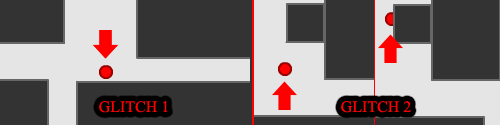
This allowed me to get a more accurate movement, but with some glitches (the same affecting the original Security 2 game).
In some cases you may notice the player stops some pixel before touching a wall, and in some other cases the player can walk through a wall if the wall it's not in the direction the player is walking (this one don't affect Security 2).
The first glitch appens because I move the player of 3 pixels/frame.
Imagine that the player has a radius of 6 pixels and is 8 pixels far from the wall. The test is performed on the pixel that is 9 pixels from the center (6+3) and it is a successful test, so I do not move the player. The player just stops 2 pixels away from the wall. How bad!
The second glitch happens because every time I go in a direction, I perform the hit test only in that direction, so if the player is very close to a wall corner, he can walk through a wall. Look at the picture to understand both glitches:
So I needed to try another way
The walls - part 3
This is the new idea: I do not care about hit test when I move the player, but when I am about to display the frame
Look:
-
onClipEvent (load) {
-
power = 3;
-
radius = 6;
-
}
-
onClipEvent (enterFrame) {
-
if (Key.isDown(Key.LEFT)) {
-
_x -= power;
-
}
-
if (Key.isDown(Key.RIGHT)) {
-
_x += power;
-
}
-
if (Key.isDown(Key.UP)) {
-
_y -= power;
-
}
-
if (Key.isDown(Key.DOWN)) {
-
_y += power;
-
}
-
while (_root.wall.hitTest(_x, _y+radius, true)) {
-
_y--;
-
}
-
while (_root.wall.hitTest(_x, _y-radius, true)) {
-
_y++;
-
}
-
while (_root.wall.hitTest(_x-radius, _y, true)) {
-
_x++;
-
}
-
while (_root.wall.hitTest(_x+radius, _y, true)) {
-
_x--;
-
}
-
}
As you can see, in lines 6-17 I move the player without caring about hit tests, then at lines 18-29 I perform the test and move back the player of one pixel in a direction every time the hit test is detected in that direction. Since player's speed is 3, the while loop won't be executed more than 3 times, that is not CPU expensive.
The only thing I can say about this script is that the player can walk a bit through a corner, but it is not affecting the gameplay if the player has small size.
Now it's time to design better levels
Designing a level
To design a level, I suggest you not to draw some boxes around the screen. Draw instead a big square covering all the stage then remove the parts you want to be walkable. Refer about designing levels for the game Tunnelball in this tutorial for more information about this way of drawing levels (or become a regular reader of this blog...)
Here it is a level designed in the new way
Now it's time to add the guard/cop
The cop
The "line of sight" of Security 2 cops may seem awesome, but there is not artificial intelligence in it: I can do the same in a single movieclip.
As you may see, I simply designed the cop with his line of sight and managed it as a simple movieclip
-
onClipEvent (load) {
-
power = 3;
-
radius = 6;
-
_x = 35;
-
_y = 40;
-
}
-
onClipEvent (enterFrame) {
-
if (Key.isDown(Key.LEFT)) {
-
_x -= power;
-
}
-
if (Key.isDown(Key.RIGHT)) {
-
_x += power;
-
}
-
if (Key.isDown(Key.UP)) {
-
_y -= power;
-
}
-
if (Key.isDown(Key.DOWN)) {
-
_y += power;
-
}
-
while (_root.wall.hitTest(_x, _y+radius, true)) {
-
_y--;
-
}
-
while (_root.wall.hitTest(_x, _y-radius, true)) {
-
_y++;
-
}
-
while (_root.wall.hitTest(_x-radius, _y, true)) {
-
_x++;
-
}
-
while (_root.wall.hitTest(_x+radius, _y, true)) {
-
_x--;
-
}
-
if ((_root.cop.hitTest(_x, _y+radius, true)) or (_root.cop.hitTest(_x, _y-radius, true)) or (_root.cop.hitTest(_x+radius, _y, true)) or (_root.cop.hitTest(_x-radius, _y, true))) {
-
_x = 35;
-
_y = 40;
-
}
-
}
Line 32 performs the test in the four sensible spots of the player and, if checked, moves the player to his initial position (defined at lines 4 - 5 and 33 - 34)
Try to go through the "line of sight" and you'll see by yourself.
Now all you have to do is move the cop along a defined path and you're done.
During next tutorials I will explain how to make a real line of sight, how to add more stuff (patrolling cameras, traps, terminals etc).
Download all examples (I included a in-progress example too, not mentioned in this tutorial), give me feedback and enjoy, then proceed to part 2.
Tell me what do you think about this post. I'll write better and better entries.
They can be easily customized to meet the unique requirements of your project.
86 Responses to “Create a flash game like Security - part 1”
Leave a Reply

Ciao
sounds really cool. Did you try to make it for mobile phones using Flash Lite 2?
Alessandro
I made an alteration to the first code on the page to make him run.
onClipEvent (load) {
power = 1.5;
}
onClipEvent (enterFrame) {
if (Key.isDown(Key.LEFT)) {
_x -= power;
}
if (Key.isDown(Key.RIGHT)) {
_x = power;
}
if (Key.isDown(Key.UP)) {
_y -=power;
}
if (Key.isDown(Key.DOWN)) {
_y =power;
}
if (Key.isDown(Key.SHIFT)) {
power = 3;
}
if (Key.isToggled(Key.SHIFT)) {
power = 1;
}
}
Notice how i add:
if (Key.isDown(Key.SHIFT)) {
power = 3;
}
if (Key.isToggled(Key.SHIFT)) {
power = 1;
}
this makes him run when you press shift and walk when you press it again.
What do you think?
Great!
I could make the player to be more “visible” when running to add a bit of a “stealth” to the action.
Great! i’ll wait for the rest!
my guy “pops” thogh a wall. help me.
one question. do u use slash MX
or flash profesional 8?
i mean Flash not slash.
woops =o
Thanks for the first part of the tutorial!
Cant wait for the next bit!
cool!
i wanted a tut like this
Wow great tut, i also made some cctv camers (just duplicated the cop and changed the graphics and gradient color) And simple added ‘cop’ as an instance name also what im trying to do is make an exit (ive been reading the other tutorial linerider taking idea from that action script) But could anyone help !!!!
also im going to give a link to what ive done so far soon !
oh and i forgot to mention i added a motion tween to the cop so he moved !
nice tut
but i didnt learn anything come with some new things instead
I used some codes of other tuts for cop to follow the hero this is the code
“onClipEvent(enterFrame){
tx = this._x;
mx = _root.man._x;
rx = tx - mx;
if(this.hitTest(_root.man)){
this.gotoAndStop(2);
}else{
if(rx >= 1 && rx-300){
this._x = 1;
}
this.gotoAndStop(1);
}
ty = this._y;
my = _root.man._y;
ry = ty - my;
if(this.hitTest(_root.man)){
this.gotoAndStop(2);
}else{
if(ry >= 1 && ry-300){
this._y = 1;
}
this.gotoAndStop(1);
}
}”
now the cop is moving but through the walls!!
can you help me?
I just added a motion path to the cop so it moved.
Hi,
I have alittle problem with the wall. I would like lines to make wall from, but the guy simply walk through the line. (I tried it with squares, and he walks through it too. ). I copied and pasted the codes you wrote, but it doesnt work for me. I use flash 8 prof. Any ideas how can i fix it? Or does it work with lines at all?
Looking forward for your answer.
i luv it!!!
[...] This is the second part of the creation of a flash game like Security. In the first part we saw how to create the maze, the player and the “cop”. [...]
hey i did this tutorial but when i added the code for the walls my guy still walks through them to the other side!! WHY?
YOU **** ****!!!!! REPLY NOW!!!!!!
(edited by Emanuele Feronato)
flashcrazy: 1st and last warning. Don’t ask 4 explainations in this way. Respect other readers
cooooooooooooooool
to all who are having problem:please check that you have given the instance of”wall” to the wall
Wow, thats wierd, we were just starting to make a game just like this for our website, we have one that we coded ourselves but yours seems to be very good. The only difference is we have added the ability to disarm the guards, who will find their flashlights in a designated amount of time, by using a weapon. (Note: anybody who tries this themselves, we suggest don’t use the pen to draw walls, use only 90 degree angles, if you create the ability to disarm there can be MANY glitches, i hope the authoer adds a possibility of disarming guards in the future.
I tried to make my own a while ago but only just found this!
My attempt is here: My Attempt
What do ya think?
Thanks
Matt: did u mean “cross that border”?
I like it, what about sharing your source code with a line or two (or fifty) of explaination?
hey long time no talk.
i think thesis people want more than just that and they don’t want to wait so if you want ill send you flash games and you can make tutoreals for them. OK?
pls help I can,t understand
on the last piece about the cop when i treid playing it it said there was an error saying “**Error** Scene=Scene 1, layer=Layer 1, frame=1:Line 36: Unexpected ‘}’ encountered”
what should i do
also i made the ball bouce off the walls just to add excitment
… sorry that part was wrong tut but i need help on this 1 i done every thing tothe word but the guy walks thru the walls and yse i have instaced them as wall
I dont know how old this is but if you still check it I was
wondering how to add more levels.
how the heck do you change the instance??
Dont understand anything
if ((_y radius)>400) {
_y -= 3;
}
if ((_y-radius)400) {
_x -= 3;
}
if ((_x-radius)
i just can’t do it
like, the cops move with the player
and they start at the same position(almost)
my player walks trough walls
and i can’t do the level…
can anyone help me?
Can you help me please? I have Adobe flash CS3. Whenever I try to put the first Actionscript in and run it, it comes up with: Clip events are only permitted for MovieClip Instances for lines 1 5. I made sure I had it under symbol description too. Thank you!
P.S.—I just downloaded your examples. Mine is exactly the same except for the fact that when I open up the script editor, your circle seems to be recognized as a movie clip, while mine does not. Thanks again!
i need some help im making a game like this, but i need to make an exit to move to the nest level but i donr know how to do that. i think that your suppose to make it with a hit test but i dont know how to, i tryed to but it didnt work.
if you know how to do that please e mail me.
David_sheets4@hotmail.com
or post how to here lol
This is a nice tutorial.
but for the hit test you wrote:
if ((_root.cop.hitTest(_x, _y radius, true)) or (_root.cop.hitTest(_x, _y-radius, true)) or (_root.cop.hitTest(_x radius, _y, true)) or (_root.cop.hitTest(_x-radius, _y, true)))
cant you just write this:
if ((_root.cop.hitTest(this))
it will be a lot simpler.
Art: no, it’s not simpler, it’s wrong because of the bounding box.
i need to make a finish so if it hits is it will go to
another frame heres what ive tryed
if(this.hitTest(_root.finish)){
this.gotoAndStop(’2′);
post a message if you now how to solve this Thx
very good
hey emanuele, another arsome tut. have u ever played Dead Marshes? (type it into Google) I was trying yesterday to create a really simple version like it, just with the scrolling walls and the boat but I failed miserably — I couldn’t get 2 different hitpoints rotating, ect, ect.
So anytime you feel like mking a tutorial for Dead marshes that would be nice…
It was worth a try.
I was trying to add on a few levels and as a kind of cheat i wanted to make a pass word that got you to the next level i used…
on (press) {
if (_root.cheat.text == bankpro) {
gotoAndStop(’lvl2′);
}
}
with this code it will accept any password
please help!!
Emanuele, in the next tut, can you make a finish? everyones complaining, and in your other tuts, they don’t work with this code. Oh, and thanks. i’ve been trying to make a game forever, and they were always filled with glitches. now, there not.
[...] First of all you should read parts 1 and 2, then follow me and learn to create some interesting things. [...]
What program do you need for this?
Hey Guys!
I have got a problem creating the walls. As you described it it does not work. I do not know y.
Maybe there is somebody who can help me
what the?
well whoever did this tutuorial did go and all it’s just that hey should of made it a little more advanced like if you get caught 4 times you go to a gameover screen and make the security guard move.
that would be worth while…
there is some flaus in your action script.
[...] you continue, I suggest you to read Create a flash game like Security - part 1 [...]
can you make a rock paper scissors game tutorial. I made one so that you choose rock, paper, or scissors and it shows it in a box. then when you press ready, the comp randomly chooses a hand. i am stuck on how to make the comp recognize if you have won or lost.
i tried to something like
var cpu:Number = random(3)
if(cpu == 1){
tellTarget(”cpuChoice”){
gotoAndStop(2)
}
}
etc
if(cpu == 1 && playerChoice._currentFrame ==3){
gotoAndStop(’win’)
}
i would be REALLY grateful if you did a tut or sent me the way that you would do it…(whole thing)
thnx =)
Hello, trying to use this tut to get it to work, but apparently javasccript hates me more than most…The cop moves with the player and both move through the walls, need some help if you could give it, please.
I have a question:
This is the first time I have ever tried to create a game using flash, so all of this is new to me….
When I try to insert the code into the first frame, i get an error that says that clipevents are only permitted for movie clip instances… and i really don’t understand what that is supposed to mean….
Can anyone please reply with some kind of solution or just tell me what i’m doing wrong.
Thanx.
i understood, and did this tutorial, but im trying to make a simple game from this, and i suck at any scripting, but how do i make it to where the character can run into two(or more) “different” wall objects
nvm i found out how to.
i am having a problem with making the cameras when the player moves through the camera the player is not rest how can i fix this problem
[...] Create a flash game like Security - Part 1 :: Part 2 :: Part 3 [...]
Mike, change the ‘lvl2′ in the brackets to just ‘2′. that should change it to that frame.
Hey nice tutorial i was having trouble my walls would follow with my hero, i found out that i typed in the script to the wall >.< so wall would follow, thank god you have downloads!, well i get it nice tut m8!! 5/5
After making the movie clip i added the script to the hero there was an error:
**Error** Scene=Scene 1, layer=Layer 1, frame=1:Line 1: Statement must appear within on/onClipEvent handler
There are a lot of others having the same problem, so could you please tell all of us what program you are using and what might cause these problems?
[...] Break is an interesting game made by Joshua Thong starting from my Create a flash game like Security [...]
im using adobe flash and my guy wont go through the left wall but goes right through the right.
p.s. i made it so that he could only go left or right for this game
Hey i wanted to know how to make the cop move or keep him from pretty much ?doing me?….. well n-e-wayz how else do I make The cop do what he’s supposed to do?
ive made many flash games buti cant get the walls to work(on any game ive made). do i have to put any action script for the wal or just leave it blank and idk this is what ive got my man programmed as right now:
onClipEvent(load){
fight = false;
}
onClipEvent(enterFrame) {
if (fight == false) {
if (Key.isDown(Key.LEFT) && fight != true) {
_rotation = 270;
this._x -= 5
}
else if (Key.isDown(Key.RIGHT) && fight != true) {
_rotation = 90;
this._x += 5
}
if (Key.isDown(Key.UP) && fight != true) {
_rotation = 0;
this._y -= 5
}
else if (Key.isDown(Key.DOWN) && fight != true) {
_rotation = 180;
this._y +=5
}
}
}
onClipEvent (enterFrame) {
if (Key.isDown(Key.LEFT) && Key.isDown(Key.DOWN)) {
_rotation = 225;
}
if (Key.isDown(Key.RIGHT) && Key.isDown(Key.UP)) {
_rotation = 45;
}
if (Key.isDown(Key.RIGHT) && Key.isDown(Key.DOWN)) {
_rotation = 135;
}
if (Key.isDown(Key.LEFT) && Key.isDown(Key.UP)) {
_rotation = 315;
}
}
onClipEvent (enterFrame) {
if (this.hitTest(_root.hero)) {
_root.hero._y -=5;
}
}
onClipEvent (enterFrame) {
if (this.hitTest(_root.hero)) {
_root.hero._y +=5;
}
}
onClipEvent (enterFrame) {
if (this.hitTest(_root.hero)) {
_root.hero._x +=5;
}
}
onClipEvent (enterFrame) {
if (this.hitTest(_root.hero)) {
_root.hero._y -=5;
}
}
sorry its long cud u maybe email me a more correct 1 all the humbo jumbo is my best attempt at a rotating character so i can make a real man not a circle and it will make him look the way hes moving..from ariel view
also if the wall soes need actonscripting plz email that to me too- johnnyracket@yahoo.com
onClipEvent (enterFrame) {
if (this.hitTest(_root.hero)) {
_root.hero._y -=5;
}
}
onClipEvent (enterFrame) {
if (this.hitTest(_root.hero)) {
_root.hero._y +=5;
}
}
onClipEvent (enterFrame) {
if (this.hitTest(_root.hero)) {
_root.hero._x +=5;
}
}
onClipEvent (enterFrame) {
if (this.hitTest(_root.hero)) {
_root.hero._y -=5;
}
}
^^^^^^^^^^^^
thats the prob with man i think idk its not stopping him from walking thru walls!?
sprry guys i fixed it i just looke dover my script its to messy i perfected this will allow a much better man that can walk thru walls and emanuele if u cud maybe perfect my hit test id liek i thanks
onClipEvent (load) {
power = 3;
radius = 16;
}
onClipEvent (enterFrame) {
if (Key.isDown(Key.LEFT)) {
_rotation = 270;
_x -= power;
}
if (Key.isDown(Key.RIGHT)) {
_rotation = 90;
_x += power;
}
if (Key.isDown(Key.UP)) {
_rotation = 0;
_y -= power;
}
if (Key.isDown(Key.DOWN)) {
_rotation = 180;
_y += power;
}
while (_root.wall.hitTest(_x, _y+radius, true)) {
_y–;
}
while (_root.wall.hitTest(_x, _y-radius, true)) {
_y++;
}
while (_root.wall.hitTest(_x-radius, _y, true)) {
_x++;
}
while (_root.wall.hitTest(_x+radius, _y, true)) {
_x–;
}
if (Key.isDown(Key.SHIFT))
power = 1.5
if (Key.isToggled(Key.SHIFT))
power = 3
}
onClipEvent (enterFrame) {
if (Key.isDown(Key.LEFT) && Key.isDown(Key.DOWN)) {
_rotation = 225;
}
if (Key.isDown(Key.RIGHT) && Key.isDown(Key.UP)) {
_rotation = 45;
}
if (Key.isDown(Key.RIGHT) && Key.isDown(Key.DOWN)) {
_rotation = 135;
}
if (Key.isDown(Key.LEFT) && Key.isDown(Key.UP)) {
_rotation = 315;
}
}
^^^^^^^
there ya go guys have fun playing with my killer nub scripting =)
hey, u didnt explain how to make the cop go on a defined path, i tryed to do it myself and i have no errors but he wont move… this is my code (keep in mind, im only trying to go up and down)
onClipEvent (load) {
ystart = _y;
speed = 6;
radius = 8;
gameend = false;
topwall = 60;
up = true;
down = false;
}
onClipEvent(enterFrame){
while (gameend=false) {
while ((_yystart)&&(up=false)){
_y -= speed;
}
up = true;
}
}
if you can, email any responses to bballman4l15@optonline.net. thanks!!!
… i dont know why this didnt get copied but this is in there too.
while ((_y<topwall) && (up=true)) {
_y += speed;
}
up = false;
it dosnt work i put the scripts in and what hapens when i move the man the wall moves!!!
can any one help me?
:(
Hi,
this website has opened my eyes and taught me better than my tutor; I’ve based my project on the illustration here, however, the movements are very tricky;it’s going through walls in some cases(lol); How can I solve this problem??
Any AS3 GURU please help me ASAP!!
Hi can u make a whole deatailed tutorial on this http://www.mofunzone.com/online_games/magic_pen.shtml plsz explain physics i will wait for reply Your tutorial line rider dosen’t have these physics as this game have so plsz make one point is simulating physics actually i am making motorbike game so i need to understand
my guy just goes through the walls how do i i fix this?
I love the fact that you’re trying to help us make this game, but it doesn’t work for me. even after I put in all of the codes, my character still goes through the walls, and the security guard is attached to the character.
I need some help, my dude walks fine and can exit a level but i cant make the cops detect him, he can just pass trough them.
Heres my code:
onClipEvent (load) {
power = 2;
radius = 6;
_x = 32;
_y = 34;
}
onClipEvent (enterFrame) {
if (Key.isDown(Key.LEFT)) {
_x -= power;
}
if (Key.isDown(Key.RIGHT)) {
_x += power;
}
if (Key.isDown(Key.UP)) {
_y -= power;
}
if (Key.isDown(Key.DOWN)) {
_y += power;
}
while (_root.levels.wall.hitTest(_x, _y+radius, true)) {
_y–;
}
while (_root.levels.wall.hitTest(_x, _y-radius, true)) {
_y++;
}
while (_root.levels.wall.hitTest(_x-radius, _y, true)) {
_x++;
}
while (_root.levels.wall.hitTest(_x+radius, _y, true)) {
_x–;
}
if (_root.levels.exit.hitTest(_x, _y, true)) {
_root.levels.gotoAndStop(2);
}
if ((_root.cop.hitTest(_x, _y+radius, true)) or (_root.cop.hitTest(_x, _y-radius, true)) or (_root.cop.hitTest(_x+radius, _y, true)) or (_root.cop.hitTest(_x-radius, _y, true))) {
_x = 32;
_y = 34;
}
}
all those codes are wrong they contain errors cmon please put the good one..
my hero dont get followed by the cop
no idea how to do it
i try the walls thing and my player just walks through the walls! help!
plz ansewr!!!!!!!!!!!!!!!!!!!!!!!!!!!!!!!!!!!!!!!!!!!
um it works and all, but when i test the movie,the guy starts like off the little viewing screen, but once i manage to get him in, he gets caught and goes back to that unknown place.
??????????
PLZ HELP ME!!!!!
love it, i made a game called “pickel’s adventure” out of this =]
hi when ever my guy walks he just alks under the wakks could someone help me?? email me if you can stickdude45@hotmail.com
i am trying to get the character to go into “stealth” mode:
onClipEvent (load) {
power = 3;
radius = 10;
_x = 35;
_y = 40;
}
onClipEvent (enterFrame) {
if (Key.isDown(Key.LEFT)) {
_x -= power;
}
if (Key.isDown(Key.RIGHT)) {
_x += power;
}
if (Key.isDown(Key.UP)) {
_y -= power;
}
if (Key.isDown(Key.DOWN)) {
_y += power;
}
while (_root.wall.hitTest(_x, _y+radius, true)) {
_y–;
}
while (_root.wall.hitTest(_x, _y-radius, true)) {
_y++;
}
while (_root.wall.hitTest(_x-radius, _y, true)) {
_x++;
}
while (_root.wall.hitTest(_x+radius, _y, true)) {
_x–;
}
if (Key.isDown(Key.SHIFT)) {
this._root.energy -=1;
this.gotoAndPlay(”stealth”);
if(_root.energy < 0){
_root.energy = 0;
_root.gotoAndStop(3);
}
}
}
it all works perfectly, except either the enemy “sees” the character, both stealth mode and normal, or he doesn’t. here is the code for the cop;
onClipEvent(enterFrame){
if (_root.char.hitTest)
_root.energy -=150;
}
what the shift button does, it moves to a frame inside the mc “char” that is visible the opacity 25% and the instance name is changed to “char-stealth” so the cop doesn’t interact.
could you help me in any way?
i could send you the source file if you would like ;)
I think I found a correction. I checked for errors, and it said something about the _x and _y parts. They’re actually inverted, meaning that _y is left and right, and _x is up and down.
Oh wait, I was wrong.
How did you make the walls work like that. When I make my walls, the whole bounding box triggers the hit.test and the character can’t move.