Create a flash artillery game – step 1

May 25th update: 2nd part released
October 29th update: modification with a bounce effect developed by Massimo M.

Here we are with the beginning of a new tutorial. We are going to create a flash artillery game. Something like Worms. Or similar.
Well… the first thing we need in an artillery game is…

The crosshair

I created a movieclip linkaged as “crosshair”, then on the first frame of the main scene entered this actionscript:

1
2
3
4
5
6
Mouse.hide();
attachMovie("crosshair", "crosshair", 1);
crosshair.onEnterFrame = function() {
	this._x = _xmouse;
	this._y = _ymouse;
};

Line 1: Hiding the mouse

Line 2: Attaching the movie “crosshair” instanced as “crosshair” at depth 1

Lines 3-5: Every time the crosshair is in the stage, its position is updated to _xmouse and _ymouse coordinates. This means you will move the crosshair with the mouse.

Looks simple… it will get (much) more complicated.

The second thing we need in an artillery game is…

The tank

The tank is the core of an artillery game. You will love your tank. Of course I love mine.

Of course, every tank has its cannon. A big cannon. Size matters.

I created a new movieclip linkaged as “tank” and inside this movieclip I created another one instanced as “cannon”. Look at the picture to understand how I placed the movieclips.
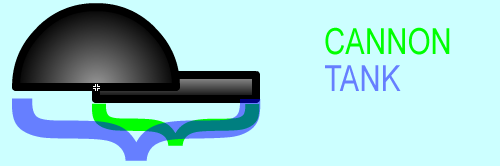
Tank

Then the actionscript is:

1
2
3
4
5
6
7
8
9
10
11
12
13
14
15
16
17
18
19
Mouse.hide();
attachMovie("crosshair", "crosshair", 1);
attachMovie("tank", "tank", 2, {_x:230, _y:350});
crosshair.onEnterFrame = function() {
	this._x = _xmouse;
	this._y = _ymouse;
};
tank.onEnterFrame = function() {
	mousex = _xmouse-this._x;
	mousey = (_ymouse-this._y)*-1;
	angle = Math.atan(mousey/mousex)/(Math.PI/180);
	if (mousex<0) {
		angle += 180;
	}
	if (mousex>=0 && mousey<0) {
		angle += 360;
	}
	this.cannon._rotation = angle*-1;
};

Line 3: places the cannon on the stage

Lines 9-10 determine the x and y distance between the crosshair and the tank

Lines 11-17 determine the angle with trigonometry. This concept is explained in the tutorial called Create a flash draw game like Line Rider or others – part 3.

Line 18 rotates the cannon according to the angle

Sometimes you may need to limit the cannon angle. It’s very simple do it this way:

1
2
3
4
5
6
7
8
9
10
11
12
13
14
15
16
17
18
19
20
21
22
23
24
25
Mouse.hide();
attachMovie("crosshair", "crosshair", 1);
attachMovie("tank", "tank", 2, {_x:230, _y:350});
crosshair.onEnterFrame = function() {
	this._x = _xmouse;
	this._y = _ymouse;
};
tank.onEnterFrame = function() {
	mousex = _xmouse-this._x;
	mousey = (_ymouse-this._y)*-1;
	angle = Math.atan(mousey/mousex)/(Math.PI/180);
	if (mousex<0) {
		angle += 180;
	}
	if (mousex>=0 && mousey<0) {
		angle += 360;
	}
	if (angle>160) {
		angle = 160;
	}
	if (angle<20) {
		angle = 20;
	}
	this.cannon._rotation = angle*-1;
};

Lines 18-23 limit the cannon angle between 20 and 160 degrees. Limiting the cannon angle may affect gameplay, use it wisely.

Now it’s time to determine the firepower. In this game, we are going to determine it by the distance from the crosshair to the cannon.

1
2
3
4
5
6
7
8
9
10
11
12
13
14
15
16
17
18
19
20
21
22
23
24
25
26
27
28
29
Mouse.hide();
attachMovie("crosshair", "crosshair", 1);
attachMovie("tank", "tank", 2, {_x:230, _y:350});
crosshair.onEnterFrame = function() {
	this._x = _xmouse;
	this._y = _ymouse;
};
tank.onEnterFrame = function() {
	mousex = _xmouse-this._x;
	mousey = (_ymouse-this._y)*-1;
	angle = Math.atan(mousey/mousex)/(Math.PI/180);
	if (mousex<0) {
		angle += 180;
	}
	if (mousex>=0 && mousey<0) {
		angle += 360;
	}
	if (angle>160) {
		angle = 160;
	}
	if (angle<20) {
		angle = 20;
	}
	firepower = Math.sqrt(mousex*mousex+mousey*mousey);
	if (firepower>200) {
		firepower = 200;
	}
	this.cannon._rotation = angle*-1;
};

Lines 24-27 calculate the fire power using the pythagorean theorem (there is no need to publish this example as a .swf because visually it does not change anything).

Now it’s time to make our tank do what every tank sould do:

FIRE !!

The first thing to do when you fire a bullet is determine the exit point of the bullet. I mean: the cannon is on a rotating turret, so I have to place the bullet right next to the end of the cannon to give the player the feeling he really fired that bullet.

So I created a new movieclip and linkaged it as “cannonball”

Then I added a new function to the script

1
2
3
4
5
6
7
8
9
10
11
12
13
14
15
16
17
18
19
20
21
22
23
24
25
26
27
28
29
30
31
32
33
34
35
Mouse.hide();
attachMovie("crosshair", "crosshair", 1);
attachMovie("tank", "tank", 2, {_x:230, _y:350});
crosshair.onEnterFrame = function() {
	this._x = _xmouse;
	this._y = _ymouse;
};
tank.onEnterFrame = function() {
	mousex = _xmouse-this._x;
	mousey = (_ymouse-this._y)*-1;
	angle = Math.atan(mousey/mousex)/(Math.PI/180);
	if (mousex<0) {
		angle += 180;
	}
	if (mousex>=0 && mousey<0) {
		angle += 360;
	}
	if (angle>160) {
		angle = 160;
	}
	if (angle<20) {
		angle = 20;
	}
	firepower = Math.sqrt(mousex*mousex+mousey*mousey);
	if (firepower>200) {
		firepower = 200;
	}
	this.cannon._rotation = angle*-1;
};
function onMouseDown() {
	angle = tank.cannon._rotation-1
	start_ball_x = tank._x+48*Math.cos(angle*Math.PI/180);
	start_ball_y = tank._y+48*Math.sin(angle*Math.PI/180);
	attachMovie("cannonball", "cannonball", 3, {_x:start_ball_x, _y:start_ball_y});
}

Line 30: Beginning of the actions to be executed when the player press the fire… pardon, the mouse button.

Lines 32-33: Determining the exit point of the cannonball using with trigonometry. This concept too is explained in the tutorial called Create a flash draw game like Line Rider or others – part 3. The “48″ value you can see it given by the cannon lenght (40) plus the ball radius (5) plus 3 “safety pixels” since sine and cosine functions returns non-integer values.

Line 34: Attaching the movieclip with the cannon ball. Notice the “3″: it’s the depth of the movieclip, and giving a fixed depth assure us to have only one cannon ball on the stage.

FIRE!!! (again)

Now that the cannonball has been released, it’s time to make it fly.

1
2
3
4
5
6
7
8
9
10
11
12
13
14
15
16
17
18
19
20
21
22
23
24
25
26
27
28
29
30
31
32
33
34
35
36
37
38
39
40
41
Mouse.hide();
attachMovie("crosshair", "crosshair", 1);
attachMovie("tank", "tank", 2, {_x:230, _y:350});
crosshair.onEnterFrame = function() {
	this._x = _xmouse;
	this._y = _ymouse;
};
tank.onEnterFrame = function() {
	mousex = _xmouse-this._x;
	mousey = (_ymouse-this._y)*-1;
	angle = Math.atan(mousey/mousex)/(Math.PI/180);
	if (mousex<0) {
		angle += 180;
	}
	if (mousex>=0 && mousey<0) {
		angle += 360;
	}
	if (angle>160) {
		angle = 160;
	}
	if (angle<20) {
		angle = 20;
	}
	firepower = Math.sqrt(mousex*mousex+mousey*mousey);
	if (firepower>200) {
		firepower = 200;
	}
	this.cannon._rotation = angle*-1;
};
function onMouseDown() {
	angle = tank.cannon._rotation-1;
	start_ball_x = tank._x+48*Math.cos(angle*Math.PI/180);
	start_ball_y = tank._y+48*Math.sin(angle*Math.PI/180);
	cannonball_fired = attachMovie("cannonball", "cannonball_"+_root.getNextHighestDepth(), _root.getNextHighestDepth(), {_x:start_ball_x, _y:start_ball_y});
	cannonball_fired.dirx = Math.cos(angle*Math.PI/180)*firepower;
	cannonball_fired.diry = Math.sin(angle*Math.PI/180)*firepower;
	cannonball_fired.onEnterFrame = function() {
		this._x += this.dirx/50;
		this._y += this.diry/50;
	};
}

Line 34: This time I want more than one cannonball in the stage, so I call the attachMovie function giving the cannon ball the next highest depth available. I can do this using the getNextHighestDepth() function. The name of the movieclip is also affected by the next highest depth available.

Line 35: The dirx variable is the horizontal vector of the cannonball, according to its firing angle and the firepower.

Line 36: Same thing for diry, the vertical vector

Line 37: Every time the cannonball enters in a frame (every frame)…

Lines 38-39: … its _x and _y position changes according to dirx and diry. That “50″ is simply a divider to make the ball not to go too fast.

What happens to a cannonball once in the air? It starts falling due to…

Gravity

In an arcade game initially gravity is not calculated in a strict physics formula, so we are going to simulate the gravity in this way:

1
2
3
4
5
6
7
8
9
10
11
12
13
14
15
16
17
18
19
20
21
22
23
24
25
26
27
28
29
30
31
32
33
34
35
36
37
38
39
40
41
42
43
Mouse.hide();
gravity = 2;
attachMovie("crosshair", "crosshair", 1);
attachMovie("tank", "tank", 2, {_x:230, _y:350});
crosshair.onEnterFrame = function() {
	this._x = _xmouse;
	this._y = _ymouse;
};
tank.onEnterFrame = function() {
	mousex = _xmouse-this._x;
	mousey = (_ymouse-this._y)*-1;
	angle = Math.atan(mousey/mousex)/(Math.PI/180);
	if (mousex<0) {
		angle += 180;
	}
	if (mousex>=0 && mousey<0) {
		angle += 360;
	}
	if (angle>160) {
		angle = 160;
	}
	if (angle<20) {
		angle = 20;
	}
	firepower = Math.sqrt(mousex*mousex+mousey*mousey);
	if (firepower>200) {
		firepower = 200;
	}
	this.cannon._rotation = angle*-1;
};
function onMouseDown() {
	angle = tank.cannon._rotation-1;
	start_ball_x = tank._x+48*Math.cos(angle*Math.PI/180);
	start_ball_y = tank._y+48*Math.sin(angle*Math.PI/180);
	cannonball_fired = attachMovie("cannonball", "cannonball_"+_root.getNextHighestDepth(), _root.getNextHighestDepth(), {_x:start_ball_x, _y:start_ball_y});
	cannonball_fired.dirx = Math.cos(angle*Math.PI/180)*firepower;
	cannonball_fired.diry = Math.sin(angle*Math.PI/180)*firepower;
	cannonball_fired.onEnterFrame = function() {
		this.diry += gravity;
		this._x += this.dirx/50;
		this._y += this.diry/50;
	};
}

Line 2: A variable called gravity is set to 2

Line 39: The gravity value is added to the vertical vector at every frame.

Final result is quite reasonable.

At the moment the tut stops here, download all source codes, give me feedback, change a line or two and publish them as your own game on various game portals :)

Rate this post: 1 Star2 Stars3 Stars4 Stars5 Stars (65 votes, average: 4.77 out of 5)
Loading ... Loading ...
If you found this post useful, please consider a small donation.
» Flash Templates provided by Template Monster are pre-made web design products developed using Flash technology.
They can be easily customized to meet the unique requirements of your project.

131 Responses

  1. NIc says:

    Great tutorial. Keep them coming.

  2. I love it! I will creat now a game!

  3. hansa says:

    just wonder one thing i havent read the full tutorial butt i wonder do you delete the cannon ball or not???

  4. Callum says:

    Nice… I cant wait for part 2 it looks like a game on my iPod called parachute. :]

    And Have you got My eMail?

  5. zak says:

    this stuff is fantastic

  6. questo says:

    nice tutorial, but I want the crosshair to be moved by arrow keys (up arrow counter clockwise down arrow clockwise. I also want a movable charecter

  7. Elmer says:

    Loved your tutorial. One little thing I can’t get to work.

    I have made a movieclip instanced as “ballon” And I want the ballon to load next frame where it blow up, when the cannonball hit it.

    So I have this action in the ballon;

    onClipEvent(load) {
    if (this.hitTest( _root.cannonball) ){
    _root.gotoAndPlay(2);
    }

    Maybe there’s another script or maybe my script is wrong. I would appreciate your help. Thanks and bye ;)

  8. sirus says:

    Really cool

    how do you figure this stuff out in the first place?

  9. Will says:

    I liked it. Nice cover of the basics of actionscript and i liked the gravity on the balls.

    I think that the first code you did of the crosshair would be better if you used the “start drag” function instead of making the x and y values the same. It just tends to speed stuff up a little when you have loads of functions going on.

  10. Laura says:

    Cool. I can’t wait to get started on my game…nice tank!

  11. levick says:

    Freekin’ sweet tut man.

  12. Seth says:

    Great tutorial, waiting second part :)

  13. Joe says:

    Awesome tut. May I suggest one thing? It would be cool if the cannonballs reacted with each other. For example, if you shot a cannonball at 200 firepower, and on it’s way down you shot another cannonball at 150 firepower, the two would collide and react physically? Just a thought.

  14. hanny says:

    i think what would be really help full is if you made stage 2 for this tut and have it so that the “tank” can move around, because i folowed the tut and when i had done all the stages i moderated some parts and made the tank move, however the bullets only went upwards and it didnt function properly..

  15. N00b says:

    oH IT didn’t all copy….

  16. conor says:

    alrity then ive made this and ive edited it using bits of code
    i have made it so the enemys move towards the tank but and this is a big but, i need the right hittest heres the code foe the enemys. (if the tank moved they would follow the tnk where ever)help anyone?

    code for following tank

    onClipEvent (enterFrame) { if (_root.tank._x > _x) { _x = 5; }}onClipEvent (enterFrame) { if (_root.tank._x_y) { _y = 5; }}onClipEvent (enterFrame) { if (_root.tank._y

  17. conor says:

    also i made the balls bounce off the walls just for fun like

    iwas thinking about making that an upgrade for the future i had to take out the grasvity to do that cause i couldent lower it enough

  18. darnpunk says:

    Hello guys, I need some help regarding some trigo maths here. Referring to line 32:

    start_ball_x = tank._x 48*Math.cos(angle*Math.PI/180);

    Is this declaring that tank._x 48 is the hypotenuse if I were to refer to trigo formula -

    cos (angle in degrees) = adjacent / hypotenuse OR better written as,

    adjacent = hypotenuse * cos(angle in degrees) which is same format as,

    start_ball_x = tank._x 48*Math.cos(angle*Math.PI/180);

    So can I say tank._x 48 is like the hypotenuse? If it is, why are we not using Pythagorean theorem?

    Another one –

    On line 31 we have:

    angle = tank.cannon._rotation-1;

    this angle is in degrees and why are we converting it back to radians in line 32? is it cos flash measures angle in radians and we are just reversing the process?

    start_ball_x = tank._x 48*Math.cos(angle*Math.PI/180);

    I hope someone can enlighten me on this! Sorry for my poor maths!

  19. dishcdiu says:

    this is for elmer i had that action script before heres the problem

    onClipEvent(enterframe) {
    if (this.hitTest( _root.cannonball) ){
    _root.gotoAndPlay(2);
    }

    add the enter frame function

  20. person says:

    for some reason no matter what I do, the cannonball doesn’t fire, does anyone know what I should do?

  21. eblup says:

    hey i need help it wont let me open the sourse codes

  22. eblup says:

    plz help it keeps saying un expected file format

  23. Gagan says:

    Hi! I am having the same problem “Unexpected file format”. I am trying to open the .FLA file with Flash Mx. Please help

  24. Im here says:

    how would you rotate the turret using left and right keys?

  25. eblup says:

    plz help me, help me plz.

  26. eblup says:

    i got it and now i need help agin lolol

    CAN YOU RE-MAKE THIS IN A MOVIE CLIP INSTEAD OF A FRAME

  27. George W. Bush says:

    i disagree i think u can all u gotta do is switch the first actionscript with the next and there u go alright well i hope that solves your problems

  28. eblup says:

    to get te cross hair to move with up and down you need to make it so when you press up it will use cannon angle in some trig let me explain…

    tank.cannon._rotation = rot;

    if key is down key up
    rot -= 6;

    crosshair_x = tank._x 75*Math.cos(rot*Math.PI/180)
    crosshair_y = tank._y 75*Math.sin(rot*Math.PI/180)

    their may be some errors but thats the best i can do while not working and just being lazy

  29. George W. Bush says:

    Hey guys, i just wanted to ask why are you guys deleting “King Kong’s” notes?I believe that we should all post our own oppinions and not to worry if it is going to get deleted.Well i hope you all listen to what i am saying and for you to stop deleting posts. Thank you

  30. Emanuele Feronato says:

    Because it’s you…

  31. David says:

    hey i love your tuts they are so cool best tut site on whole world but i was wondering how could you create a enemy so when the cannon ball hits it it dies? (enemy made by script like blah blah blah i)

    well thx for your tut reely COOL!

    cya

  32. [...] Welcome to the 2nd part of this tutorial. I recommend you to read the 1st part if you haven’t done it yet and we are ready to start. [...]

  33. Alec says:

    What is a movie clip linkage.

  34. Leon says:

    Great tutorial dude I’m making a similar game, but you move the turret, and it goes around 360 degrees. But anyway, i was trying to get the spawn point working (where it duplicates) and I tried everything, and I wasforgot to conv sure I haert it to radians, and you reminded me. But I had no clue about how to make it move, but I figured it out from your code,, but because it moves 360 degrees, I had to edit it slightly, so I just changed it to:

    angle = this.Turret.Turret_rotatable._rotation-90

    Instead of minus 1, so thanks, keep it up! I can’t wait for the next tutorial. BY the way, could you help me with something? I have attached an “enemy” Movie clip which moves towards the player slowly, but as both the enemy and the bullets were created dynamically, I can’t really figure out how to do it. I think that a for loop is probably the bast way, but I don’t know how to tackle it myself. If I figure it out before you respond, I will post up how I did it. ANyway, thanks again for the help from your tutorial! It’s really good work! I’ve been following the line rider one, please will you do how to do a bike or car. I don’t need the line drawing part, it’s just for a different game I’m working on.

  35. And Mar says:

    @Leon

    In my game I had the same problem. What I did is I added an onEnterFrame function for each bullet I shot. In each event, it looped through an array of all enemies on stage.

    attachMovie(“bullet”, “bullet” i, _root.getNextHighestDepth());
    i ;
    _root["bullet" i].onEnterFrame = function() {
    for(j=0 ; j

  36. And Mar says:

    thats weird. it chopped my post in half. anyway…

    @leon

    _root[”bullet” i].onEnterFrame = function() {
    for(j=0 ; j

  37. And Mar says:

    dang
    Manny you got a bug with you post system. I’m guessing with less than or greater than signs

    @Leon

    _root[”bullet” i].onEnterFrame = function() {
    for(j=0 ; j < enemies.length ; j ){
    //check for collision between this bullet and the current enemy
    //e.g. if(this.hitTest(enemies[j])
    //if true then remove both
    }
    }

    each time you dynamically create an enemy, you must push it onto the array, “enemies”.

  38. And Mar says:

    srry again

    for(j=0 ; j < enemies.length ; j ){

    is supposed to be

    for(j=0 ; j < enemies.length ; j ){

    my bad :D

  39. And Mar says:

    omg!!

    I hate this!!

    for(j=0 ; j < enemies.length ; j ){

    >>>>

    for(j=0 ; j < enemies.length ; j *two plus signs here* ){

  40. Leon says:

    dont worry, i get it, thanks!

  41. togie says:

    hey … dunno if its just me but im having some troubles with the cannonball … i have made the cannonball and named it “cannonball” following the script … and it will not #1 connect to the cannon, #2 shoot the cannonball…. not shur … thx in advanced (mx flash)(obiusly :P)

  42. person says:

    I have the same problem as togie, someone help

  43. person says:

    I’m having the same problem togie

  44. wawa says:

    you have to fix the linkage for the cannonball, right click it in the library and select “linkage”, there mark the “export for actionscript” or something box. After that type “cannonball” in the “identifier” box.

  45. person says:

    now it works, thanks wawa

  46. Kaimie says:

    can anyone tell me how do I make the enemies move toward the tank? also how do I make the cannon balls bounce off the walls???

  47. A guy that needs help says:

    ok I have a problem, I type the code for the crosshair and nothing happens in preview. all that happens is my real mouse disappears.

    Plz help

  48. cody Anderson says:

    i followed the instructions but it only shoots one cannonball at a time and if i click 2 times my first cannon ball dissipears

    help!!

  49. hayden says:

    I have a question
    Games just like this have like upgrades which change things and add new units etc
    how would that be in script?

    and btw this sites tutorials are awesome,a big help ty!

  50. flaming says:

    whenever i type the script, it doesn’t work. but when i copy and paste,even when its the same, it somehow works.

    Am i doing something worng?

  51. Cj says:

    Um Hey i’m just wondering how you get to those places where you type all that stuff down. I’ve never done this.

  52. anonymous says:

    How come my action script has errors, even though I copied yours

  53. Leon says:

    “I created a new movieclip linkaged as “tank” and inside this movieclip I created another one instanced as “cannon”. Look at the picture to understand how I placed the movieclips.”

    I am really new so forgive me being a total noob.

    I don’t fully understand what I am to do here. I created the two movieclips and placed them in the tank shape position. I even set two linkages. From what i understand we set a linkage so that they will be available without having to be on the stage?? The tank body moves to the stage with the attachMovie(“tank”,”tank”,2,{_x:230, _y:350}); but the cannon is missing. I guess what I am really after is what/how do i do “and inside this movieclip” from the above text?

  54. tyler says:

    hello, I’ve been looking at this and yes It’s good, almost too good. Anyways, I was wondering on line 34 how It supose to duplicate the bullets or somthing. So it shot more then 1. Problem It keeps shooting 1 bullet and If I click again the bullet comes back and restarts. Also I’m using Macromedia Flash Mx 5. Should I get 8? Also If you want an Idea Creator of this tutorial you should get out there and design games that way you can work your way up there and make big money.

    If you ever need a partner I’m availibly for 2-D kinda 3-D designing I can make sprites, Backgrounds, Objects, and etc(depends). Email me at tjmoore_1993@hotmail.com

  55. [...] Next part of the artillery game tutorial [...]

  56. s0daplayer says:

    Tyler, You may want to create the bullets on different depths. Like:

    depthholder = 1
    attachMovie(“bullet”, “bullet” depthholder, depthholder”)
    depthholder

    you may want to do something like this instead.

  57. Saad says:

    for:

    start_ball_x = tank._x 48*Math.cos(angle*Math.PI/180);
    start_ball_y = tank._y 48*Math.sin(angle*Math.PI/180);

    if we get the xpos, don’t we go

    adj = hypotheneuse*cos(angle)?

    why is the code using the x pos of the main object rather than hypotheneuse?

  58. alex says:

    hey i can’t get the second bit of code to work are u some how ment to make the tank and the cannon in the same movieclip but with different instances or wat?

    plz help some 1!?!

  59. bontif says:

    I came upon this site while googling “geometry of war”.I am a Maths teacher and I was looking for material I could use for a project based Maths grade 9/10 lesson to be done in groups of 3 or 4 over a couple of weeks. The Artillery game with all its trig fits the bill.

    Except that I know nothing about Flash programming although I cannot see this being a problem with my students- they pick up things very quickly and run with it. Since you guys are very good at what you do (that’s obvious from the games you have posted)and are probably closer in mindset to my students,I’d like your advice.

    If you were the teacher, what steps (1,2,3…)would you go through with the class before they got down to the project. You can safely assume that there are students who know something about Flash and can share their knowledge- one of the main ojectives of this exercise is collaoration anyway.The students have the necessary Trig background already.

    Thanks for any suggestions you might have.

  60. Bj says:

    The second part of the code does not work for me.I cant see why not,and i have the same setup.If anyone knows why it doesent work,pleasetell me.Also im using Flash 8 Pro,So if thats the problem please tell me

  61. Saad says:

    Mr. bontif since your a math teacher maby you could help me with this problem I have:
    “start_ball_x = tank._x 48*Math.cos(angle*Math.PI/180);
    start_ball_y = tank._y 48*Math.sin(angle*Math.PI/180);

    if we get the xpos, don’t we go

    adj = hypotheneuse*cos(angle)?

    why is the code using the x pos of the main object rather than hypotheneuse?

  62. destructin says:

    please help!!!

    **Error** Scene=Scene 1, layer=Layer 1, frame=2:Line 63: Statement must appear within on/onClipEvent handler
    Mouse.hide();

    **Error** Scene=Scene 1, layer=Layer 1, frame=2:Line 64: Statement must appear within on/onClipEvent handler
    attachMovie(“crosshair”, “crosshair”, 1);

    **Error** Scene=Scene 1, layer=Layer 1, frame=2:Line 65: Statement must appear within on/onClipEvent handler
    attachMovie(“tank”, “tank”, 2, {_x:230, _y:350});

    **Error** Scene=Scene 1, layer=Layer 1, frame=2:Line 66: Statement must appear within on/onClipEvent handler
    crosshair.onEnterFrame = function() {

    **Error** Scene=Scene 1, layer=Layer 1, frame=2:Line 70: Statement must appear within on/onClipEvent handler
    tank.onEnterFrame = function() {

    Total ActionScript Errors: 5 Reported Errors: 5

  63. Jake says:

    i know how to do that but if you have a tutorial for making an enemy in that sort of game can you e-mail me the url?

  64. Jake says:

    hi im kinda new to reading these tutorials and i was wondering if you had a tutorial to make a game like Smashing http://www.miniclip.com/games/smashing/en/ i read how you made the angle calculator on the line rider tutorial but i really dont know where to start. if you have a tutorial like that can you email it to me or can you make one please?

  65. Andy says:

    Great tute, i really learned loads from it.

  66. dudue says:

    everythings awesoem except the cannon ball which won’t appear or fire! lol y?

    Plz help
    wb

  67. endor says:

    Your tutorials look great, but I have one problem, I try to use ActionScript 3.0
    Anyone here that uses Actionscript 3.0 that can help me to get started? They have removed the AttacheClip function, so I don’t know where to start.

  68. endor says:

    I have now figured it out.
    To get the Crosshair to work in CS/AS 3.0 you can write this code:

    import flash.events.MouseEvent;

    Mouse.hide();
    var _crosshair:Crosshair= new Crosshair();
    stage.addEventListener(MouseEvent.MOUSE_MOVE, crosshairMove);
    function crosshairMove(ev:MouseEvent) {
    _crosshair.x = ev.stageX;
    _crosshair.y = ev.stageY;
    }

    addChild(_crosshair);

    You also need to rigth-click the MoveiClip in the Library and select Properties. Here you make sure the Export for ActionScript checkbox is checked, and give it a name.

    Hope this helpe you get started in AS/CS 3.0

  69. whatitdo says:

    awsome tutorial, thanks

  70. Paul says:

    This may sound real amateur-ish…But I’m using this code as an example, and I want to start a bullet from the beginning of the gun, which is a symbol inside of symbol…only thing is, where i set the start x and y locations to that of the gun, the bullets only come from the top of the screen where the gun seems to have started off, and it never appears on the gun location itself.
    I’m in a jam, can someone help me with this?

  71. [...] received an email from Massimo M. – an italian reader – that modified the code explained in Create a flash artillery game – step 1 [...]

  72. johanes says:

    great tutorial… now i will began to create one…

  73. confused teenager says:

    i have my crosshair on 2 scene.. one for the actual game and one for the menu.. i cant seem to get my crosshair to follow the mouse in my second scene.. what do i do?

  74. god says:

    i managed to make a crosshair but i didn’t get the cannon n tank bits….i need help with step 2.

  75. Izzy says:

    seriously if you don’t know that yet you should skip ahead to things like this…the code to do that is extremely simple. You make yourself look like you just got flash and you already want to make games

  76. noob says:

    lol This is action script 2.0!!!?? I thought it was AS3.0 Nice tutorial!!! Doesn’t work well in AS3.0 compiler for those who are having same problem as me… i dnt think… 8P

  77. The RoosterRanger says:

    Paul: to do what you wish to accomplish, you need to know a little about trigonometry. It has something to do with sine and cosine and you use them to achieve a coordinate. I haven’t done it in a long time, so I can’t tell u exactly. Try googling it.
    Noob: Stop being such a, well, N00B!…. N00b

  78. Ineedtoknowplz says:

    What flash version do you use??????? I need to know pleaseeeeeeee Its not working for meeee

  79. SirJackRex says:

    Well, it works for me, but I tested it after I got to the second part, but it will only rotate as if the pivot was on the left side, and not from the center.
    Like this: (* ) and not ( * )

  80. Zack says:

    What you do, is make the base of the cannon, and call it tank as the instance name, then go into the edit mode for it (double click it) and draw another shape in there, and make that a movieclip (inside tank) called cannon.

  81. Zack says:

    Sorry to double-post, but i forgot to ask: Does anyone know how to make like the projectile face the way it is going? I’m trying to make a missile.

  82. Connor says:

    Hey I have issues with file format I would like to use the source and it just says “Unexpected file format!” Anyone know whats up??

  83. smelly says:

    im having trouble, the tanks cannon doesnt move at all and is doesnt fire! can anyone help?

  84. sd9sd says:

    Really good tutorial. Love the way it’s presented :)

  85. Ben says:

    Hey when i try to make the cannon it put the cannon in a wierd place and the turret doesnt follow the mouse properly. it really anny cos i cant do the rest of the coding. its really annoying : p

  86. hutman says:

    Maybe try onClipEvent(enterframe) instead of onClipEvent(load)

  87. [...] of the game, that will be explained another day. It’s nothing so interesting, just a mix between Create a flash artillery game and Managing multiple collision detection with Flash [...]

  88. brendan says:

    i have gotten to the point where the cannon is supposed to aim at the crosshair but it doesn’t move- help please!

  89. [...] prototype is heavily based on Create a flash artillery game – step 1, and I strongly recommend you to read [...]

  90. iaindada says:

    when the cannon ball hits something how can i get that to react, change scenes, explode, etc

  91. Ravinder says:

    Hi there is no provision of attachMovieClip function in AS3. so u will have to use addChild() function and if u want to remove then use removeChild() function there is no any other way to do this type of job.

  92. Xlander says:

    Thanks for the tutorial!
    I am new to making Flash games and it has really helped me lot.

  93. [...] Create a Flash artillery game [...]

  94. gameshed says:

    Great tutorial. Keep them coming.

  95. wondering about flash says:

    can you please post the 3rd tutorial i need to learn how to shoot multiple enemies.

  96. Luffy says:

    umm i tried this tutorial it works all the way up until i start shooting…. it shoots from the top left corner… :(

    can someone please help me?

    thanks

  97. Flash PAnda says:

    I’m having trouble attaching the “tank” to the stage. It appears in the top left corner even though I specified the coordinates for it to go…
    Help would be appreciated…

  98. Flash PAnda says:

    Can sum1 reply plz?!?

  99. Flash PAnda says:

    Is this deserted or sumthing?

  100. Clay says:

    I want to make it so the tank can move how would i do that? thanks.

  101. I like it. But this is very large tutorial.

  102. Ello says:

    So, where do I download the thing to make these games????!??!?!

  103. wowsa says:

    hey i was wondering why the code i used on setp two didnt work. id really like some help thanks.

  104. Joss says:

    **Error** Scene=Scene 1, layer=Layer 1, frame=1:Line 1: Statement must appear within on/onClipEvent handler
    Mouse.hide();

    **Error** Scene=Scene 1, layer=Layer 1, frame=1:Line 2: Statement must appear within on/onClipEvent handler
    attachMovie(“crosshair”, “crosshair”, 1);

    **Error** Scene=Scene 1, layer=Layer 1, frame=1:Line 3: Statement must appear within on/onClipEvent handler
    attachMovie(“tank”, “tank”, 2, {_x:230, _y:350});

    **Error** Scene=Scene 1, layer=Layer 1, frame=1:Line 4: Statement must appear within on/onClipEvent handler
    crosshair.onEnterFrame = function() {

    **Error** Scene=Scene 1, layer=Layer 1, frame=1:Line 8: Statement must appear within on/onClipEvent handler
    tank.onEnterFrame = function() {

    Total ActionScript Errors: 5 Reported Errors: 5

    can some one help me? i tried to enter in the code and i didnt work these were the errors it said can someone plz help??

  105. alan says:

    problems with making something like this on my own… :(

    I’m spawning rocks the way you said here,

    _global.spawnRock = function() {

    rockSpawn = attachMovie(“rockMain”, “rock”+rockDepth, rockDepth, {_x:800, _y:300});

    but when I try to set the variable

    rockSpawn.xSpeed = 5

    i can’t get the onEnterFrame to use the variable.

    rockSpawn.onEnterFrame = function() {
    this._x += xSpeed

  106. pro says:

    you suck realy hard you dont even tell where to add the script omg noob gay

  107. Aaron says:

    Hi I am just starting out with creating flash games, and if it not a problem, could you please
    show me the actionscript 2.0 command for rotating a object? It would be greatly appreciated.Im using Flash cs4 pro.

  108. Arxanas says:

    how do you make the ball rotate the way it’s going?

  109. pepe el grillo says:

    codes for flash mx please

  110. Schizma says:

    Yeah… but how to make a hitTest with that cannonballs?? :(

  111. [...] View Tutorial No Comment var addthis_pub="izwan00"; BOOKMARK This entry was posted on Tuesday, June 30th, 2009 at 9:07 am and is filed under Adobe Flash Tutorials. You can follow any responses to this entry through the RSS 2.0 feed. You can leave a response, or trackback from your own site. [...]

  112. Saberking13 says:

    Ok, so, how do you make it so there are only one cannonball at a time?

  113. [...] His collection of tutorials are my favorite, encompassing types such as his popular tower defense, artillery, and platform tutorials. If you find a popular game on the web, you can be almost certain Emanuele [...]

  114. lol says:

    it sucks and dosent work

  115. [...] saw readers liked a lot Create a flash artillery game – step 1 so I decided to create something similar with modern techniques (that post is dated 2007!!! Ages [...]

  116. ahmad riduan says:

    u have a tutorial like math man ???

  117. Cano says:

    Wow man this is just what ive been looking for!!! great tutorial!!

  118. Dom says:

    How do I perform a hittest between the cannonball_fired = attachMovie(“cannonball”, “cannonball_”+_root.getNextHighestDepth(), _root.getNextHighestDepth(), {_x:start_ball_x, _y:start_ball_y});

    and another attachmovie dynamic library instance.

  119. if you like balloon invasion check out http://www.balloongame.org for more balloon games, perfect when your boss is not looking … ;-)

  120. Arwin says:

    Hi! i am using flash mx 2004. in your instruction: I created a new movieclip linkaged as “tank” and inside this movieclip I created another one instanced as “cannon”.
    I don’t know how to create a movie clip cannon inside the mc tank. Please help thanks!

  121. candy says:

    why won’t the cannonball shoot

  122. murdoc says:

    This tut is really helpful. How can I convert this to AS3?

  123. sabin says:

    hey can u show how to do this in as 3.0

  124. Alessio says:

    Potresti modificare questo codice per As3.0?

    Da solo non ci riesco,
    non so far girare la torretta verso il puntatore…

    Saluti
    Alessio

  125. [...] game like Line Rider or others – part 1Make a Flash game like Flash Element Tower Defense – Part 1Create a flash artillery game – step 1 Flash game creation tutorial – part 4 [...]

  126. mae says:

    can you make it in AS3.0?… pls..

  127. 1221unger says:

    My cannon won’t follow the crosshair. The crosshair moves but the cannon doesn’t.
    Please help!!!

  128. Jaska says:

    Umm… what I did wrong, it says in actions that: the property being referenced does not ahve a static attribute. = Wtf??. So I made it into actionscript file (.as) excactly as that, but few chances but math is same. Still when I move mouse cannon shakes like hell and and points everywhere else but at my mouse… Little help is needed!

Leave a Reply