How to load levels in a Flash tile based game
This tutorial, that comes in one single part, will cover the topic about loading levels in a Flash tile based game.
Let’s start explaining what is a tile based video game.
From Wikipedia: A tile-based video game is a type of video or computer game where the playing area consists of small rectangular, square, or hexagonal graphic images, referred to as tiles. The complete set of tiles available for use in a playing area is called a tileset. Tiles are laid out adjacent to one another in a grid; usually, some tiles are allowed to overlap, for example, when a tile representing a unit is overlaid onto a tile representing terrain. Tile-based games usually simulate a top-down or isometric view on the playing area and are almost always two dimensional.
In the example I am covering, the tiles are the bricks in a game like Arkanoid, but it could be a sokoban level or some other kind of game I will cover in future.
Basically, if a game map does not require you to draw anything but just putting some elements (tiles) one next to another, this is a tile based game.
Let’s start with the arkanoid clone.
Array method
I created a movieclip with 3 frames, each frame containing a “brick” of a different color and with a stop() in every frame.
Then I linkaged the movieclip as (guess what?) “brick”.
The actionscript in the first frame of the main scene will be:
level = new Array();
level[0] = new Array(1, 1, 1, 1, 1, 1, 1, 1, 1, 1);
level[1] = new Array(2, 2, 2, 2, 2, 2, 2, 2, 2, 2);
level[2] = new Array(3, 3, 3, 3, 3, 3, 3, 3, 3, 3);
for (y=0; y<=2; y++) {
	for (x=0; x<=9; x++) {
		place_brick = attachMovie("brick", "brick_"+_root.getNextHighestDepth(), _root.getNextHighestDepth(), {_x:x*50, _y:y*15});
		place_brick.gotoAndStop(level[y][x]);
	}
}
Line 1: Declaring level variable as a new array
Lines 2-4: Every level item is an array made of numbers from 1 to 3. I assumed number 1 represents the first type of brick, 2 for the second and so on.
So we can say that level is the entire stage, level[n] is the n-th row of bricks, and level[n][m] is the m-th brick in the n-th row of bricks.
Lines 5-6: Performing a loop trhough all bricks
Line 7: Attaching the movieclip in the right position according to x and y values and brick's height and width
Line 8: Calls a gotoAndStop to show the right brick type
And that was very easy...
But let's imagine we have 1000 levels, each one much bigger than this one... the array method would make the movie heavy, containing levels that you will never see perhaps...
Moreover, with the array method we cannot store other information about level (level name, author, time limit...) unless we create another array.
And, last but not least, we cannot allow people to design their own levels.
In other words, coding levels with arrays is not a good idea if we plan to make a good game.
So we are going to try with XML.
Levels with XML
First, we need a XML file, that I am calling level_list.xml, containing all level names. This is because we may need to allow the player to select which level he wants to start playing.
So we will code the first file in this way
Level name 1
Level name 2
I saved the file at this position, for you to check it will work.
Now we need to tell our movie there is a level called level_list.xml with such information.
So the new actionscript, at the moment, is:
main_xml = new XML();
main_xml.ignoreWhite = true;
main_xml.load("http://emanueleferonato.com/downloads/level_list.xml");
main_xml.onLoad = function(success) {
	xml_output.text = main_xml;
}
Line 1: to create an instance of a XML object called main_xml
Line 2: with ignoreWhite I decide text nodes that only contain white space are discarded during the parsing process. It's not so necessary, but may prevent some errors if I code the XML in a wrong way
Line 3: reading the file
Lines 4-6: once the file is loaded, I display its content in a text area called xml_output.
As you may notice, the entire XML file has been loaded.
Time to parse it now.
What to do once an XML file is loaded
Let's introduce the firstChild property. You should think about an XML file as a tree with branches and children. Every branch is child of an unique branch and could have n branches as children.
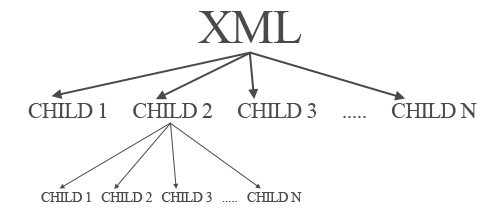
For thir reason, if we try to trace main_xml.firstChild, the result will be the entire file
First run Second run Because the first child of the XML is level_list that includes the entire file
If we trace main_xml.firstChild.firstChild instead the result will be
First run Because it's the first child of level_list.
To have all XML parsed, since we know its structure, we need this actionscript:
main_xml = new XML();
main_xml.ignoreWhite = true;
main_xml.load("http://emanueleferonato.com/downloads/level_list.xml");
main_xml.onLoad = function() {
	main_xml = main_xml.firstChild.firstChild;
	do {
		xml_output.text += (main_xml.childNodes+"\n");
		main_xml = main_xml.nextSibling;
	} while (main_xml != null);
};
Line 5: Select the first child of the first child of the XML file (the row containing the level name)
Lines 6-9: Output the child nodes of the XML file selected (in this case, the level name) and move though the children of the same level until there are not children left
The difference between firstChild and nexSibling is explained in this picture
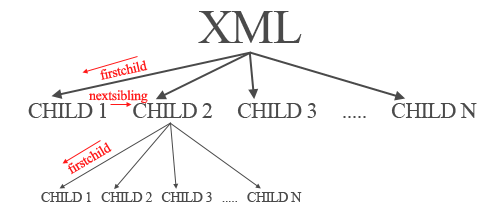
and this is the swf file:
Now it's time to make levels selectable by the user.
I inserted a ComboBox component instanced as xml_combo and changed the actionscript this way:
main_xml = new XML();
main_xml.ignoreWhite = true;
main_xml.load("http://emanueleferonato.com/downloads/level_list.xml");
main_xml.onLoad = function() {
	xml_combo.addItem("Select a level");
	main_xml = main_xml.firstChild.firstChild;
	do {
		xml_combo.addItem(String(main_xml.firstChild),String(main_xml.attributes.filename));
		main_xml = main_xml.nextSibling;
	} while (main_xml != null);
};
This is basically the same actionscript as before, with the only change that lines 5 and 8 add an item to the combo box.
That main_xml.attributes.filename is the name of the XML file we want to load when the item is selected.
Consider that actionscript xml_combo.addItem("label",value) is the same of html
Now the final touch... we want to load a XML level when the user selects a level.
First of all we need... the level(s)...
This is level 1
And it's located here, while level 2 is this one:
And you can find it here
Obvioulsy there isn't a standard rule about coding levels into XML, and the one I used is one of many rules you may use.
Just try to remember which rule you used when you'll add levels in a later time...
Let's see the actionscript:
main_xml = new XML();
main_xml.ignoreWhite = true;
main_xml.load("http://emanueleferonato.com/downloads/level_list.xml");
main_xml.onLoad = function() {
	xml_combo.addItem("Select a level");
	main_xml = main_xml.firstChild.firstChild;
	do {
		xml_combo.addItem(String(main_xml.firstChild), String(main_xml.attributes.filename));
		main_xml = main_xml.nextSibling;
	} while (main_xml != null);
};
xml_combo.addEventListener("change", this);
function change() {
	level_xml = new XML();
	level_xml.ignoreWhite = true;
	pos_brick_y = 0;
	item_selected = xml_combo.getSelectedItem();
	level_xml.load("http://emanueleferonato.com/downloads/"+item_selected.data);
	level_xml.onLoad = function() {
		level_name = (level_xml.firstChild.attributes.name);
		level_xml = level_xml.firstChild.firstChild;
		do {
			pos_brick_x = 0;
			brick_xml = level_xml.firstChild;
			do {
				place_brick = attachMovie("brick", "brick_"+_root.getNextHighestDepth(), _root.getNextHighestDepth(), {_x:pos_brick_x, _y:pos_brick_y});
				place_brick.gotoAndStop(brick_xml.attributes.value);
				pos_brick_x += 50;
				brick_xml = brick_xml.nextSibling;
			} while (brick_xml != null);
			level_xml = level_xml.nextSibling;
			pos_brick_y += 15;
		} while (level_xml != null);
	};
}
Line 12: Listener added to the combo box that triggers when an item is selected
Line 13: Function called every time a combobox item is selected
Lines 14-15: Creation of a new XML instance
Line 16: Declaration of the y position of next brick we are going to place
Line 17: Get the combo box selected item
Line 18: Loading the XML level according to the selected combo box item (this may give an error if you select the "Select a level" item because it has not data assigned, but you can easily avoid this with an if...then statement)
Lines 19-34: Parsing of the level XML file in the same way explained before and placing the bricks in the same way explained before. The only glitch is that when you load a new level, the existing one isn't removed, but since you are supposed to destroy all bricks before moving onto next level...
And that's all with XML loading levels.
It's not that much hard than array method, but is much much more professional and will let users to publish their levels in that "Web 2.0" style.
Download all source codes and give me feedback
