Creation of realistic spheres in Flash with textures and masking
Filed Under Flash •
I was preparing a new tutorial involving a visual from above, with a ball rolling on a tile map, and that's what I coded first, applied to an object linkaged as "ball" in the first frame:
-
power = 0.3;
-
yspeed = 0;
-
xspeed = 0;
-
friction = 0.95;
-
_root.attachMovie("ball", "ball", 1, {_x:250, _y:175});
-
ball.onEnterFrame = function() {
-
if (Key.isDown(Key.LEFT)) {
-
xspeed -= power;
-
}
-
if (Key.isDown(Key.RIGHT)) {
-
xspeed += power;
-
}
-
if (Key.isDown(Key.UP)) {
-
yspeed -= power
-
}
-
if (Key.isDown(Key.DOWN)) {
-
yspeed += power
-
}
-
-
xspeed *= friction;
-
-
this._y += yspeed;
-
this._x += xspeed;
-
};
This code is already explained in this tutorial, and it's almost the same except it has no gravity since the "camera" is above the objects.
This is the result:
If you play with arrow keys you should be able to have a sphere rolling through the stage.
I wrote that "should" because you... should be able to see the sphererolling... but the only thing you really see is a red circle. I can't see any sphere.
A sphere should be more... let's say... spherical... so I played with gradients and that's what I got:
This is more likely a sphere, but it seems to float in the air. A sphere on a plane should drop a shadow.
I need a shadow.
Very easy, here it is the sphere with the shadow...
Now you should see a rolling sphere. I only see a skating sphere. A very polished sphere, moreover.
Time to add some tricks.
I want to map a texture on the sphere to make it looks like a marble sphere, or wooden sphere, or whatever.
So I need a seamless texture.
Seamless textures are textures that form a continuous texture when you tile the image over and over.
I will explain in a future tutorial how to create seamless textures, at the moment I googled for "samless texture" and I found those free images. Do the same, and be sure you are saving squared seamless textures.
I liked those 3 textures, and scaled down to 188x188 pixels since the circle diameter in my movie is 60 so the circumference is 60*Pi = 188

wooden texture
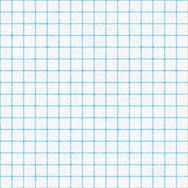
paper texture
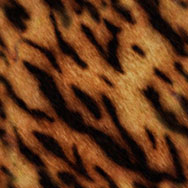
tiger texture
With the tiger texture, I imported it into the movie and linkaged all in this way:
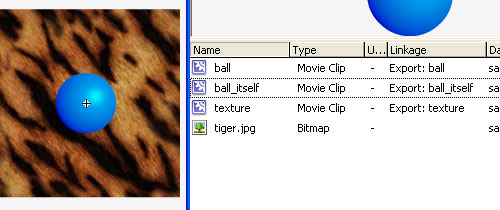
ball: it's the final ball, combining all objects
ball_itelf: it's the ball itself, I mean the blue circle
texture: it's the texture I imported
Now you should have a movie like this one:
The texture moves with the ball.
Next step will be adding a mask
-
power = 0.3;
-
yspeed = 0;
-
xspeed = 0;
-
friction = 0.95;
-
_root.attachMovie("ball", "ball", 1, {_x:250, _y:175});
-
ball.texture.setMask(ball.ball_itself);
-
ball.onEnterFrame = function() {
-
if (Key.isDown(Key.LEFT)) {
-
xspeed -= power;
-
}
-
if (Key.isDown(Key.RIGHT)) {
-
xspeed += power;
-
}
-
if (Key.isDown(Key.UP)) {
-
yspeed -= power
-
}
-
if (Key.isDown(Key.DOWN)) {
-
yspeed += power
-
}
-
-
xspeed *= friction;
-
-
this._y += yspeed;
-
this._x += xspeed;
-
};
Line 6: A mask with the shape of ball_itself is assigned to the object texture.e its own mask, for example mc.setMask(mc) . Masking is a very useful technique in Flash. By applying a mask on a movie clip, you can restrict the visible area of the target clip to the mask area. In this case, I restrict the visible area of the texture movieclip according to ball_itself movieclip shape.
This is the result
We have a textured circle (not a sphere yet).
In a real sphere, the texture would roll together with the sphere.
That's where we need another trick.
With your favourite photo editor you have to open your 188x188 images, double their x and y sizes (376x376) and fill them with old 188x188 texture. You should have an image tiled with 4 of your textures, like in this examples:
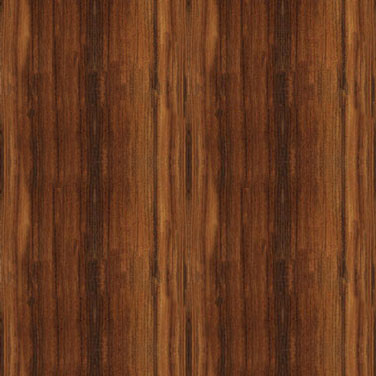
wooden texture
paper texture

tiger texture
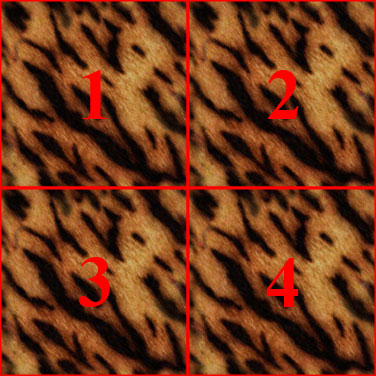
tiger texture with lines marking the tileset made with the old tiger texture
Now, replace the old texture in the actionscript with this new one, and add those lines:
-
power = 0.3;
-
yspeed = 0;
-
xspeed = 0;
-
friction = 0.95;
-
_root.attachMovie("ball", "ball", 1, {_x:250, _y:175});
-
ball.texture.setMask(ball.ball_itself);
-
ball.onEnterFrame = function() {
-
if (Key.isDown(Key.LEFT)) {
-
xspeed -= power;
-
}
-
if (Key.isDown(Key.RIGHT)) {
-
xspeed += power;
-
}
-
if (Key.isDown(Key.UP)) {
-
yspeed -= power;
-
}
-
if (Key.isDown(Key.DOWN)) {
-
yspeed += power;
-
}
-
xspeed *= friction;
-
yspeed *= friction;
-
this._y += yspeed;
-
this._x += xspeed;
-
this.texture._y += yspeed;
-
this.texture._x += xspeed;
-
if (this.texture._x>158) {
-
this.texture._x -= 188;
-
}
-
if (this.texture._x<-158) {
-
this.texture._x += 188;
-
}
-
if (this.texture._y>158) {
-
this.texture._y -= 188;
-
}
-
if (this.texture._y<-158) {
-
this.texture._y += 188;
-
}
-
};
Lines 24-25: The texture already moves with the ball, but I want it to move twice faster of ball's x and y speeds to simulate the effect of a rolling texture.
Lines 26-37: If the position of the texture relatively to the ball one is more than 158 (texture width/2 - ball radius) then make or less than -158, then adjust texture position shifting it by 188 pixels left, right, up, or down. The player won't realize the texture jumped because it is tiled and seamless.
Now, you should see a rolling sphere. What is see is a moving circle with a smart use of a texture sliding across the object.
In a real sphere, the perspective modifies texture appearance.
To achieve this, we'll need a displacement map. I will cover in a future tutorial.
Meanwhile, look what you can do adding a level with some shadows:
Download all the source codes and give me feedback

Tell me what do you think about this post. I'll write better and better entries.
They can be easily customized to meet the unique requirements of your project.
39 Responses to “Creation of realistic spheres in Flash with textures and masking”
Leave a Reply

Very cool!
the last example was look so cool!
Wow, very nice. I always wondered how to mimic 3D textures with movement.
The last example is cool indeed.
Hi Emanuele. Its very nice, i love it!
If you want some criticism, here it is:
What i think you should do, to get it look more realistic, is, to zoom the texture in the middle a little bit.
Thats because when you see a sphere the “texture” will be flatter and flatter, the more closer it is to the circumference.
//Frederik
What the hell? as soon as i click this i get 10 different exploit warnings about stuff in my temporary internet files, it asked me 3 times to run an active X thingy. are you trying to hack me?
Very nice.
After seing this, I think it’d be pretty cool to have a tutorial on how to make shadows.
I guess with some trigonometry I could get it working on this.
> the circle diameter in my movie is 60*Pi = 188
The diameter is 60; the circumference is 188.
[...] Line 22: Attaching the ball. I created the ball in the same way as in Creation of realistic spheres in Flash with textures and masking tutorial. [...]
HELP! Ican’t do the bit before the mapping it goes dodgy HELP!
everything works fine except the texture wont be attached to the ball, it might be because I’m using flash MX. if anyone knows how to help, please tell me. Thanks
Er, in Flash MX 6.0 the sources don’t open (Unexpected file format). Which version of Flash do I need?
ive heard of action script before. and im interested to learn some :)
Great tutorial.
I will make a post about it at http://www.beedigital.net/blog
Great stuff…
[...] Estube viendo un tutorial en http://www.emanueleferonato.com, me parecio muy interesante. [...]
[...] Line 3: Masking the ball as explained in Creation of realistic spheres in Flash with textures and masking. [...]
great look. i have a seriouse problem with the texture. i dont believe i linkeged the objects correctly and im abit confused about what each symbol consists of.. plz help
I couldn’t get thie mask code to work // ball.texture.setMask(ball.ball_itself);
//
So I just deleted ball_itself mc, added a mask to layer 1 in ball mc and deleted the code, works nice now.
[...] Johan van Mol on bouncing balls off vectors Micheal Battle on bouncing balls off other balls Emanuele Feronato on texture mapping on balls [...]
[...] you want to know more about masking, read Creation of realistic spheres in Flash with textures and masking. PLAIN TEXT [...]
Virtualism, Emanuele isn’t hacking you. It’s just that Internet Explorer is too secure in the wrong areas. SWFs are probably thought as a threat to IE. Use Firefox if you don’t want these unnecessary security alerts for things like just swfs or harmless javascript.
BUG, you forgot to implement friction on yspeed in some of the examples.
Hi,
I liked your turorial its very helpfull.
Can you help me
In my flash I am masking an object with a texture which is called dynalically through XML
Here the texture is get loaded but its not masking the object
What can I do for this ?
Thank You for reading this , Hope you will help me in this.
if i wanted to make this into a ball for pong how would i go about this
how do i make the shadows?? can any1 link a tutorial for it. thanks
hey i have a quiestion
i would really know how to do that masking thing im new i have no idea how to mask my ball_itself
if would be really cool if you can tell me how
thanks for reading this
hi i im making a pong game can u tell me how to use masking with that?
[...] is a standalone tutorial but it’s in some way connected with the Creation of realistic spheres in Flash with textures and masking [...]
Hi! Nice tut! I’m having trouble with this. When I’m rolling the ball around, something in the background just makes the ball disappear. Can you help me with this?
I didn’t see any movement!!!
Damm iT!!!! now I Saw!!!!!!! Thats great!
Im looking to make somthing like a tennis ball, what would the backround texture look like? any ideas?
Hi Emanuele. I really liked this tutorial but I can’t make the masking working??? When I test the movie the texture moves with the ball but like a square again. Any ideas??? Thanks in advance!!!
man, this is so cool!
hi Grex , may be you have to make an instane name for both texture and ball_itself movie clips wich are located in ball mc.
Hey I used your tutorial to create a game, you can check it out here: http://www.newgrounds.com/portal/view/441888
Thanks a lot for sharing your ideas.
If i wanted to make the letter A move the ball left, what would be the actionscript?
Left is
if (Key.isDown(Key.LEFT)) {
xspeed -= power;
}
what would be A?
I have never seen this technique before and I have to say it is amazingly clever — so convincing yet so simple! Thank you very much for the inspiration!
como eu faso para min gria um jogo
Cool tutorial i got it to work, but it took a few hours, longer than it should have. I think you need to add more details but im just starting out so maybe its not your fault. Anways its all good but i want to add a hitTest to the ball but i cant get it to work. how do i have the ball,the light, texture , and its shadow all stop when it hits a barrier. Thanks in advance.