Creation of a platform game with Flash – step 1
November 3rd update: part 2 released.
Back from my holidays, here I come with a brand new tutorial serial.
This time I will talk about platform games.
“Platform game, or platformer, is a video game genre characterized by jumping to and from suspended platforms or over obstacles. It must be possible to control these jumps and to fall from platforms or miss jumps. The most common unifying element to these games is a jump button.”
This is the beginning of a very interesting article taken from Wikipedia.
I strongly recommend you to read it… all in all it’s a piece of our history.
I think we can develop interesting Flash platform games.
The very first step is introducing the level. I decided to code the level as a tile-based level, so you should read How to load levels in a Flash tile based game tutorial before all.
Level creation
In this example I am going to use the array method.
In the first frame write the actionscript:
level = new Array();
_root.createEmptyMovieClip("lev", _root.getNextHighestDepth());
level[0] = new Array(1, 1, 1, 1, 1, 1, 1, 1, 1, 1, 1, 1, 1, 1, 1, 1, 1, 1, 1, 1, 1, 1, 1, 1, 1);
level[1] = new Array(1, 0, 0, 0, 0, 0, 0, 0, 0, 0, 0, 0, 0, 0, 0, 0, 0, 0, 0, 0, 0, 0, 0, 0, 1);
level[2] = new Array(1, 0, 0, 0, 0, 0, 0, 0, 0, 0, 0, 0, 0, 0, 0, 0, 0, 0, 0, 0, 0, 0, 0, 0, 1);
level[3] = new Array(1, 0, 0, 0, 0, 0, 0, 0, 0, 0, 0, 0, 0, 0, 0, 0, 0, 0, 0, 0, 0, 0, 0, 0, 1);
level[4] = new Array(1, 0, 0, 0, 0, 0, 0, 0, 0, 0, 0, 0, 0, 0, 0, 0, 0, 0, 0, 0, 0, 0, 0, 0, 1);
level[5] = new Array(1, 0, 0, 0, 0, 0, 0, 0, 0, 0, 0, 0, 0, 0, 0, 0, 1, 1, 1, 0, 0, 0, 0, 0, 1);
level[6] = new Array(1, 0, 0, 0, 0, 0, 1, 1, 1, 0, 0, 0, 1, 1, 0, 0, 0, 0, 0, 0, 0, 0, 0, 0, 1);
level[7] = new Array(1, 0, 0, 0, 0, 0, 0, 0, 0, 0, 0, 0, 0, 0, 0, 0, 0, 0, 0, 0, 0, 0, 0, 0, 1);
level[8] = new Array(1, 0, 0, 0, 0, 0, 0, 0, 0, 1, 0, 0, 0, 0, 0, 0, 0, 0, 0, 0, 0, 0, 0, 0, 1);
level[9] = new Array(1, 0, 0, 0, 0, 0, 0, 0, 0, 0, 1, 0, 0, 0, 0, 0, 0, 0, 0, 0, 0, 0, 0, 0, 1);
level[10] = new Array(1, 0, 0, 0, 0, 0, 0, 0, 0, 0, 0, 0, 0, 0, 0, 0, 0, 0, 0, 0, 0, 0, 0, 0, 1);
level[11] = new Array(1, 0, 0, 0, 0, 0, 0, 0, 0, 0, 0, 0, 1, 1, 1, 0, 0, 0, 0, 0, 0, 0, 0, 0, 1);
level[12] = new Array(1, 0, 0, 0, 0, 0, 0, 1, 1, 1, 0, 0, 0, 0, 0, 0, 0, 0, 0, 0, 0, 0, 0, 0, 1);
level[13] = new Array(1, 0, 0, 0, 0, 0, 0, 0, 0, 0, 0, 0, 0, 0, 0, 0, 0, 0, 0, 0, 0, 0, 0, 0, 1);
level[14] = new Array(1, 1, 1, 1, 1, 1, 1, 1, 1, 1, 1, 1, 1, 1, 1, 1, 1, 1, 1, 1, 1, 1, 1, 1, 1);
for (y=0; y<=14; y++) {
	for (x=0; x<=24; x++) {
		if (level[y][x] != 0) {
			place_brick = lev.attachMovie("block", "block_"+lev.getNextHighestDepth(), lev.getNextHighestDepth(), {_x:x*20+10, _y:y*20+10});
			place_brick.gotoAndStop(level[y][x]);
		}
	}
}
Line 1: Defining a new array called level that will contain the level data
Line 2: Creating a new empty movie clip that will contain the level
Lines 3-17: Populating the array with more arrays to design the level. We will have a zero for an empty spot or a one for a platform/wall
Lines 18-19: Loops that scan the entire array and sub-arrays
Lines 20-23: If the array at position (y,x) is different than zero (in this case it can only be one but this will be useful when we will introduce different types of platforms) then attach a movie previously created and linkaged as "block" in the right position according to y and x array position. The gotoAndStop instruction will be useful when we will have more platform tiles, one per frame in the same movieclip.
Now the level is complete, time to add the hero.
The Player
I linkaged another movieclip as player. In this first example, you should design your hero smaller than any other platform. We'll see in further tutorials how this won't be so important once the game engine will be finished, but at the moment it's very important.
The new actionscript is:
yspeed = 0;
max_yspeed = 16;
gravity = 1;
level = new Array();
_root.createEmptyMovieClip("lev", _root.getNextHighestDepth());
level[0] = new Array(1, 1, 1, 1, 1, 1, 1, 1, 1, 1, 1, 1, 1, 1, 1, 1, 1, 1, 1, 1, 1, 1, 1, 1, 1);
level[1] = new Array(1, 0, 0, 0, 0, 0, 0, 0, 0, 0, 0, 0, 0, 0, 0, 0, 0, 0, 0, 0, 0, 0, 0, 0, 1);
level[2] = new Array(1, 0, 0, 0, 0, 0, 0, 0, 0, 0, 0, 0, 0, 0, 0, 0, 0, 0, 0, 0, 0, 0, 0, 0, 1);
level[3] = new Array(1, 0, 0, 0, 0, 0, 0, 0, 0, 0, 0, 0, 0, 0, 0, 0, 0, 0, 0, 0, 0, 0, 0, 0, 1);
level[4] = new Array(1, 0, 0, 0, 0, 0, 0, 0, 0, 0, 0, 0, 0, 0, 0, 0, 0, 0, 0, 0, 0, 0, 0, 0, 1);
level[5] = new Array(1, 0, 0, 0, 0, 0, 0, 0, 0, 0, 0, 0, 0, 0, 0, 0, 1, 1, 1, 0, 0, 0, 0, 0, 1);
level[6] = new Array(1, 0, 0, 0, 0, 0, 1, 1, 1, 0, 0, 0, 1, 1, 0, 0, 0, 0, 0, 0, 0, 0, 0, 0, 1);
level[7] = new Array(1, 0, 0, 0, 0, 0, 0, 0, 0, 0, 0, 0, 0, 0, 0, 0, 0, 0, 0, 0, 0, 0, 0, 0, 1);
level[8] = new Array(1, 0, 0, 0, 0, 0, 0, 0, 0, 1, 0, 0, 0, 0, 0, 0, 0, 0, 0, 0, 0, 0, 0, 0, 1);
level[9] = new Array(1, 0, 0, 0, 0, 0, 0, 0, 0, 0, 1, 0, 0, 0, 0, 0, 0, 0, 0, 0, 0, 0, 0, 0, 1);
level[10] = new Array(1, 0, 0, 0, 0, 0, 0, 0, 0, 0, 0, 0, 0, 0, 0, 0, 0, 0, 0, 0, 0, 0, 0, 0, 1);
level[11] = new Array(1, 0, 0, 0, 0, 0, 0, 0, 0, 0, 0, 0, 1, 1, 1, 0, 0, 0, 0, 0, 0, 0, 0, 0, 1);
level[12] = new Array(1, 0, 0, 0, 0, 0, 0, 1, 1, 1, 0, 0, 0, 0, 0, 0, 0, 0, 0, 0, 0, 0, 0, 0, 1);
level[13] = new Array(1, 0, 0, 0, 0, 0, 0, 0, 0, 0, 0, 0, 0, 0, 0, 0, 0, 0, 0, 0, 0, 0, 0, 0, 1);
level[14] = new Array(1, 1, 1, 1, 1, 1, 1, 1, 1, 1, 1, 1, 1, 1, 1, 1, 1, 1, 1, 1, 1, 1, 1, 1, 1);
for (y=0; y<=14; y++) {
	for (x=0; x<=24; x++) {
		if (level[y][x] != 0) {
			place_brick = lev.attachMovie("block", "block_"+lev.getNextHighestDepth(), lev.getNextHighestDepth(), {_x:x*20+10, _y:y*20+10});
			place_brick.gotoAndStop(level[y][x]);
		}
	}
}
_root.attachMovie("player", "player", _root.getNextHighestDepth(), {_x:40, _y:40});
player.onEnterFrame = function() {
	yspeed += gravity;
	if (yspeed>max_yspeed) {
		yspeed = max_yspeed;
	}
	while (_root.lev.hitTest(this._x, this._y+this._height/2-1+yspeed, true)) {
		yspeed--;
	}
	this._y += yspeed;
};
Line 1: Initializing yspeed variable at zero. This is the vertical speed of the player
Line 2: Initializing max_yspeed variable at 16. This is the maximum vertical speed of the player. You will know what I mean in a minute or two.
Line 3: Initializing gravity variable at 1. This represents the gravity of the game.
Here I have to make a consideration: there should be two types of platforms: one with a so called "gravity" and one without it.
If you make a platform game with gravity, when the player steps off a platform, he will start falling down at increasing speed, just like in the real world. If you make the game without gravity, when the player steps off a platform, he will simply "move down" at a constant speed.
If you want the player to fall down at an increasing speed, use a low gravity value and a high max_yspeed value, like in my example. You will have to put a limit to yspeed anyway for a playability reason.
If you want the player to fall down at a constant speed, use a mid gravity value, such as 4 or 5 and do the same for the max_yspeed value. In this case, I suggest to set both values equals to the walking speed you will learn later.
Line 29: Putting the player on the stage, in a high place. You may need to reload the page to watch him fall.
Line 30: Routine to be executed at every frame
Line 31: yspeed variable is increased by gravity value
Lines 32-34: Checking if yspeed value exceeds max_yspeed value and if true, set yspeed value to max_yspeed value
Lines 35-37: These are the core lines for gravity management. Look: I perform an hit test between the platforms and the "feet" of the player plus yspeed value. In other words, I forecast next player's position as if there was no walls. Then, I check if there is a wall in that position. If there is a wall, I decrease yspeed value and repeat the whole operation.
This picture will explain how does it work.
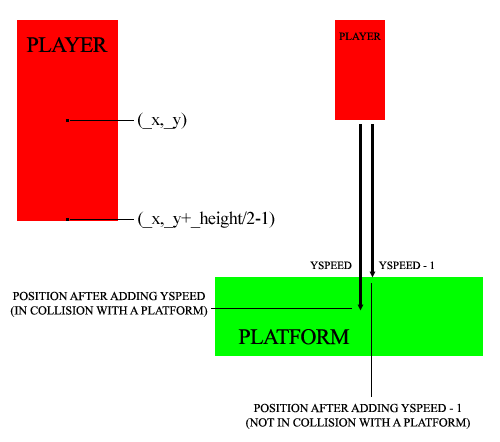
Line 38: Adding yspeed to _y position. As explained, yspeed can be zero if the player is already on a platform
Now we have a static player on the stage. Time to move him!
The moving player
We want now the player to move left and right
xspeed = 0;
yspeed = 0;
max_yspeed = 16;
gravity = 1;
walk_speed = 4;
level = new Array();
_root.createEmptyMovieClip("lev", _root.getNextHighestDepth());
level[0] = new Array(1, 1, 1, 1, 1, 1, 1, 1, 1, 1, 1, 1, 1, 1, 1, 1, 1, 1, 1, 1, 1, 1, 1, 1, 1);
level[1] = new Array(1, 0, 0, 0, 0, 0, 0, 0, 0, 0, 0, 0, 0, 0, 0, 0, 0, 0, 0, 0, 0, 0, 0, 0, 1);
level[2] = new Array(1, 0, 0, 0, 0, 0, 0, 0, 0, 0, 0, 0, 0, 0, 0, 0, 0, 0, 0, 0, 0, 0, 0, 0, 1);
level[3] = new Array(1, 0, 0, 0, 0, 0, 0, 0, 0, 0, 0, 0, 0, 0, 0, 0, 0, 0, 0, 0, 0, 0, 0, 0, 1);
level[4] = new Array(1, 0, 0, 0, 0, 0, 0, 0, 0, 0, 0, 0, 0, 0, 0, 0, 0, 0, 0, 0, 0, 0, 0, 0, 1);
level[5] = new Array(1, 0, 0, 0, 0, 0, 0, 0, 0, 0, 0, 0, 0, 0, 0, 0, 1, 1, 1, 0, 0, 0, 0, 0, 1);
level[6] = new Array(1, 0, 0, 0, 0, 0, 1, 1, 1, 0, 0, 0, 1, 1, 0, 0, 0, 0, 0, 0, 0, 0, 0, 0, 1);
level[7] = new Array(1, 0, 0, 0, 0, 0, 0, 0, 0, 0, 0, 0, 0, 0, 0, 0, 0, 0, 0, 0, 0, 0, 0, 0, 1);
level[8] = new Array(1, 0, 0, 0, 0, 0, 0, 0, 0, 1, 0, 0, 0, 0, 0, 0, 0, 0, 0, 0, 0, 0, 0, 0, 1);
level[9] = new Array(1, 0, 0, 0, 0, 0, 0, 0, 0, 0, 1, 0, 0, 0, 0, 0, 0, 0, 0, 0, 0, 0, 0, 0, 1);
level[10] = new Array(1, 0, 0, 0, 0, 0, 0, 0, 0, 0, 0, 0, 0, 0, 0, 0, 0, 0, 0, 0, 0, 0, 0, 0, 1);
level[11] = new Array(1, 0, 0, 0, 0, 0, 0, 0, 0, 0, 0, 0, 1, 1, 1, 0, 0, 0, 0, 0, 0, 0, 0, 0, 1);
level[12] = new Array(1, 0, 0, 0, 0, 0, 0, 1, 1, 1, 0, 0, 0, 0, 0, 0, 0, 0, 0, 0, 0, 0, 0, 0, 1);
level[13] = new Array(1, 0, 0, 0, 0, 0, 0, 0, 0, 0, 0, 0, 0, 0, 0, 0, 0, 0, 0, 0, 0, 0, 0, 0, 1);
level[14] = new Array(1, 1, 1, 1, 1, 1, 1, 1, 1, 1, 1, 1, 1, 1, 1, 1, 1, 1, 1, 1, 1, 1, 1, 1, 1);
for (y=0; y<=14; y++) {
	for (x=0; x<=24; x++) {
		if (level[y][x] != 0) {
			place_brick = lev.attachMovie("block", "block_"+lev.getNextHighestDepth(), lev.getNextHighestDepth(), {_x:x*20+10, _y:y*20+10});
			place_brick.gotoAndStop(level[y][x]);
		}
	}
}
_root.attachMovie("player", "player", _root.getNextHighestDepth(), {_x:40, _y:40});
player.onEnterFrame = function() {
	yspeed += gravity;
	if (yspeed>max_yspeed) {
		yspeed = max_yspeed;
	}
	if (Key.isDown(Key.LEFT)) {
		xspeed = -walk_speed;
	}
	if (Key.isDown(Key.RIGHT)) {
		xspeed = walk_speed;
	}
	while (_root.lev.hitTest(this._x, this._y+this._height/2-1+yspeed, true)) {
		yspeed--;
	}
	while (_root.lev.hitTest(this._x-this._width/2+1+xspeed, this._y, true)) {
		xspeed++;
	}
	while (_root.lev.hitTest(this._x+this._width/2-1+xspeed, this._y, true)) {
		xspeed--;
	}
	this._y += yspeed;
	this._x += xspeed;
	xspeed = 0;
};
Line 1: Defining xspeed in the same way yspeed was defined
Line 5: Initalizing walk_speed variable. This is the speed of the player when walking (later he will be able to run!)
Lines 37-39: If the left arrow key is pressed, then set xspeed to -walk_speed (the player will move to the left)
Lines 40-42: Same thing with the right key
Lines 46-51: Apllying the same principle seen when the player was falling to x and y movements. This time the "hot spot", the point where the collision is checked, is on the left (or right) side of the player in the middle of his height. This will work fine now, but will require some adjustments when we will have a "real" player on the stage instead of a red box.
Line 53: Updating player x position according to xspeed
Line 54: Set xspeed to zero. If you don't do that, the player won't stop walking when you release the arrow key.
Now we have a player running! Time to make him jump
The jumping player
When we want to make a player jump, we need to know two things:
1) The player can jump only when he has his feet on the ground
2) The player has a head so he cannot jump through platforms (he will be able to jump through some special platforms, called "clouds", in next tutorial)
We need too to decide if the player can change direction while in the air or not. This is your decision and will affect gameplay.
xspeed = 0;
yspeed = 0;
max_yspeed = 16;
gravity = 1;
walk_speed = 4;
can_jump = false;
jump_power = 10;
jump_walk = true;
level = new Array();
_root.createEmptyMovieClip("lev", _root.getNextHighestDepth());
level[0] = new Array(1, 1, 1, 1, 1, 1, 1, 1, 1, 1, 1, 1, 1, 1, 1, 1, 1, 1, 1, 1, 1, 1, 1, 1, 1);
level[1] = new Array(1, 0, 0, 0, 0, 0, 0, 0, 0, 0, 0, 0, 0, 0, 0, 0, 0, 0, 0, 0, 0, 0, 0, 0, 1);
level[2] = new Array(1, 0, 0, 0, 0, 0, 0, 0, 0, 0, 0, 0, 0, 0, 0, 0, 0, 0, 0, 0, 0, 0, 0, 0, 1);
level[3] = new Array(1, 0, 0, 0, 0, 0, 0, 0, 0, 0, 0, 0, 0, 0, 0, 0, 0, 0, 0, 0, 0, 0, 0, 0, 1);
level[4] = new Array(1, 0, 0, 0, 0, 0, 0, 0, 0, 0, 0, 0, 0, 0, 0, 0, 0, 0, 0, 0, 0, 0, 0, 0, 1);
level[5] = new Array(1, 0, 0, 0, 0, 0, 0, 0, 0, 0, 0, 0, 0, 0, 0, 0, 1, 1, 1, 0, 0, 0, 0, 0, 1);
level[6] = new Array(1, 0, 0, 0, 0, 0, 1, 1, 1, 0, 0, 0, 1, 1, 0, 0, 0, 0, 0, 0, 0, 0, 0, 0, 1);
level[7] = new Array(1, 0, 0, 0, 0, 0, 0, 0, 0, 0, 0, 0, 0, 0, 0, 0, 0, 0, 0, 0, 0, 0, 0, 0, 1);
level[8] = new Array(1, 0, 0, 0, 0, 0, 0, 0, 0, 1, 0, 0, 0, 0, 0, 0, 0, 0, 0, 0, 0, 0, 0, 0, 1);
level[9] = new Array(1, 0, 0, 0, 0, 0, 0, 0, 0, 0, 1, 0, 0, 0, 0, 0, 0, 0, 0, 0, 0, 0, 0, 0, 1);
level[10] = new Array(1, 0, 0, 0, 0, 0, 0, 0, 0, 0, 0, 0, 0, 0, 0, 0, 0, 0, 0, 0, 0, 0, 0, 0, 1);
level[11] = new Array(1, 0, 0, 0, 0, 0, 0, 0, 0, 0, 0, 0, 1, 1, 1, 0, 0, 0, 0, 0, 0, 0, 0, 0, 1);
level[12] = new Array(1, 0, 0, 0, 0, 0, 0, 1, 1, 1, 0, 0, 0, 0, 0, 0, 0, 0, 0, 0, 0, 0, 0, 0, 1);
level[13] = new Array(1, 0, 0, 0, 0, 0, 0, 0, 0, 0, 0, 0, 0, 0, 0, 0, 0, 0, 0, 0, 0, 0, 0, 0, 1);
level[14] = new Array(1, 1, 1, 1, 1, 1, 1, 1, 1, 1, 1, 1, 1, 1, 1, 1, 1, 1, 1, 1, 1, 1, 1, 1, 1);
for (y=0; y<=14; y++) {
	for (x=0; x<=24; x++) {
		if (level[y][x] != 0) {
			place_brick = lev.attachMovie("block", "block_"+lev.getNextHighestDepth(), lev.getNextHighestDepth(), {_x:x*20+10, _y:y*20+10});
			place_brick.gotoAndStop(level[y][x]);
		}
	}
}
_root.attachMovie("player", "player", _root.getNextHighestDepth(), {_x:40, _y:40});
player.onEnterFrame = function() {
	if (Key.isDown(Key.LEFT)) {
		if (jump_walk or can_jump) {
			xspeed = -walk_speed;
		}
	}
	if (Key.isDown(Key.RIGHT)) {
		if (jump_walk or can_jump) {
			xspeed = walk_speed;
		}
	}
	if (Key.isDown(Key.SPACE) and can_jump) {
		yspeed -= jump_power;
		can_jump = false;
	}
	yspeed += gravity;
	if (yspeed>max_yspeed) {
		yspeed = max_yspeed;
	}
	while (_root.lev.hitTest(this._x, this._y+this._height/2-1+yspeed, true)) {
		yspeed--;
		can_jump = true;
	}
	while (_root.lev.hitTest(this._x-this._width/2+1+xspeed, this._y, true)) {
		xspeed++;
	}
	while (_root.lev.hitTest(this._x+this._width/2-1+xspeed, this._y, true)) {
		xspeed--;
	}
	while (_root.lev.hitTest(this._x, this._y-this._height/2+1+yspeed, true)) {
		yspeed++;
	}
	this._y += yspeed;
	this._x += xspeed;
	if (jump_walk or can_jump) {
		xspeed = 0;
	}
};
Line 6: Initializing can_jump variable to false. This variable determines if the player can jump or not.
Line 7: Initializing the jump power. The higher the value, the higher the jump
Line 8: Variable that determines if the player can change direction while jumping
Line 37: Additional control when the player presses the left key. Before changing the xspeed I check that the player can walk while jumping or can jump = is not jumping
Line 43: Same thing with the right key
Lines 46-49: If the player presses the jump button (in this case the spacebar) then subtract jump_speed to yspeed and, since the player now is jumping, set can_jump to false (you can jump while jumping).
Line 56: If the player has the feet on the ground, then he can jump
Lines 64-66: Collision test as explained before with the "head" of the player
Lines 69-71: xspeed is resetted to zero only if the player can walk while jumping or can jump = is not jumping
And this is the very primitive first result. It has some glitches because player hot spots aren't fully defined. In next tutorial we will learn how to insert a real player and everything will work fine.
Download the source codes of this tutorial, experiment and give me feedback
Then, move to part 2.
