

Creation of the engine behind “Nodes” game with Flash
Talking about Nodes game, Actionscript 2, Flash and Game development.
I always surf the web looking for great Flash games. One site where you can find good ones is Newgrounds.
The #1 Daily Feature in 06/19/2007 was a simple game called Nodes. I suggest you to play it for a couple of minutes. The idea is very simple and the engine behind is very simple too.

You have to drag some “nodes” (actually some circles”) and there is a “laser” (actually a line) that connects all nodes.
Let’s see how can we made this engine in 20 lines of code, brackets included.
The only object we need to draw is the node itsef.
As you can see from the picture, I linkaged it as “laser” and aligned it to its center
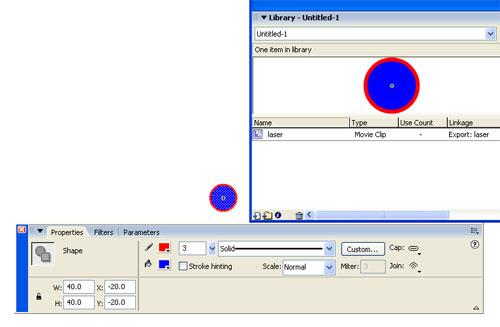
Then, on the first frame of the movie, I entered this actionscript:
laser_nodes = 4;
for (x=1; x<=laser_nodes; x++) {
	node = _root.attachMovie("laser", "laser_"+x, x, {_x:Math.random()*460+20, _y:Math.random()*310+20});
	node.onPress = function() {
		startDrag(this);
	};
	node.onRelease = function() {
		stopDrag();
	};
}
_root.createEmptyMovieClip("ray", _root.getNextHighestDepth());
ray.onEnterFrame = function() {
	this.clear();
	this.lineStyle(3, 0xff0000);
	this.moveTo(_root.laser_1._x, _root.laser_1._y);
	for (x=2; x<=laser_nodes; x++) {
		this.lineTo(_root["laser_"+x]._x, _root["laser_"+x]._y);
	}
	this.lineTo(_root.laser_1._x, _root.laser_1._y);
};
Line 1: Initializing the laser_nodes variable, that will contain the number of laser nodes on the stage
Line 2: Main loop that will place the nodes on stage
Line 3: Attaching the node, naming it laser_1 if it's the first node, laser_2 if it's the second, and so on. The _x and _y starting positions are randomly generated
Lines 4-6: If the node is pressed (if the player clicks and holds the mouse button) then drag the node. Notice that everything is done by startDrag function.
From Macromedia Flash Actionscript Dictionary:
startDrag(target,[lock,left,top,right,bottom])
Parameters:
target: The target path of the movie clip to drag.
lock: A Boolean value specifying whether the draggable movie clip is locked to the center of the mouse position ( true ), or locked to the point where the user first clicked on the movie clip ( false ). This parameter is optional.
left, top, right, bottom: Values relative to the coordinates of the movie clip's parent that specify a constraint rectangle for the movie clip. These parameters are optional.
Description: makes the target movie clip draggable while the movie is playing. Only one movie clip can be dragged at a time. Once a startDrag operation is executed, the movie clip remains draggable until explicitly stopped by a stopDrag action, or until a startDrag action for another movie clip is called.
Lines 7-9: If the node is released (if the player releases the mouse button) then stop dragging the node.
Line 11: Creation of the movie clip where we will draw the ray. The movieclip is called, with a lot of creativity... ray!
Line 12: Beginning of a set of actions to be executed on ray movieclip at every frame
Line 13: Cleaning the movieclip
Line 14: Defining the line style of the movieclip with a 3 pixel height and a bright red color
Line 15: Moving the line pointer to the first laser centre. At this point I recommed you to read Create a flash draw game like Line Rider or others - part 1 tutorial for more information about line drawing in Flash.
Lines 16-18: Loop that draws lines from the first node center to the second node center, from the second node center to the third node center and so on
Line 19: Connecting the last node center with the first one.
And that's it! 20 lines for this interesting entine, that will be used in some other projects. I am currently working to one or two... download it and enjoy
Never miss an update! Subscribe, and I will bother you by email only when a new game or full source code comes out.