Create a flash game like Security – part 3
Time to do what you asked for a while: the 3rd part of the Security Flash game creation, covering the exit and some more features.
First of all you should read parts 1 and 2, then follow me and learn to create some interesting things.
Exits
Most of you asked for exits, and here they are. First of all, it’s very important to consider one thing: when you design a game with more than one level, it’s very important you do not allow the player to skip levels with the “Forward” or “Step forward one frame” or whatever you call the Flash function to advance frames.
You can’t place levels on every frame or you are making levels that will give no fun because they may be skipped by the player.
There are several ways to do this, I’ll start with the easiest to code. Let’s proceed step by step
The first thing you need to do is designing the levels, with all the objects in them: hero, cops, exit, walls, and so on.
I am designing very simple levels because level design is not the aim of this tutorial.
These are the movieclips I have on my library:
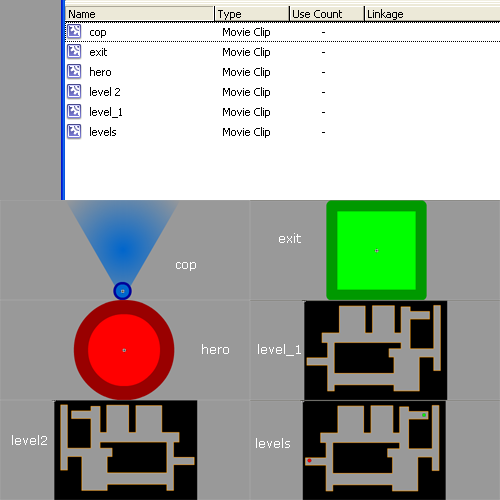
A brief explication:
Cop: the cop… actually unused in this tutorial but you will need it to design your own levels
Exit: the exit, the item that will bring you onto the next level
Hero: it’s you! it’s you!
Level 1: The WALLS of the first level. Read carefully: WALLS and nothing more.
Level 2: The WALLS of the second level. I flipped the first level because I am lazy. You should design your own.
Levels: This is the core of the game. It’s a movieclip where I put the levels themselves. I could have placed them on the main scene, but in that case the player would skip using the forward function I mentioned above. It’s very important that all your game is on one single frame. So I put all levels in the levels movieclip, then I dragged the levels movieclip in the stage.
Here it what I did:
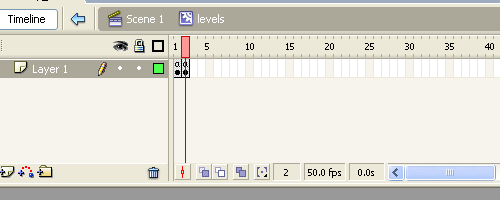
This is the timeline of levels movieclip. Every frame has just a “Stop()” on it.
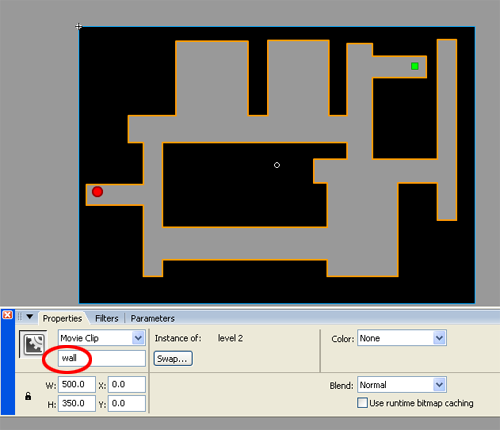
And this is the content of the 2nd fame in the levels movieclip. As you may notice, I dragged the level2 walls, the hero and the exit. It’s very important that you instance all the objects on the stage as I did, for example, for the walls (see the red circle).
Now that I have all (two) levels, it’s time to write down some actionscript.
The following actionscript are to be attached to the two heros… the one on the first frame and the one on the second frame
First level
onClipEvent (load) {
	power = 2;
	radius = 6;
}
onClipEvent (enterFrame) {
	if (Key.isDown(Key.LEFT)) {
		_x -= power;
	}
	if (Key.isDown(Key.RIGHT)) {
		_x += power;
	}
	if (Key.isDown(Key.UP)) {
		_y -= power;
	}
	if (Key.isDown(Key.DOWN)) {
		_y += power;
	}
	while (_root.levels.wall.hitTest(_x, _y+radius, true)) {
		_y--;
	}
	while (_root.levels.wall.hitTest(_x, _y-radius, true)) {
		_y++;
	}
	while (_root.levels.wall.hitTest(_x-radius, _y, true)) {
		_x++;
	}
	while (_root.levels.wall.hitTest(_x+radius, _y, true)) {
		_x--;
	}
	if (_root.levels.exit.hitTest(_x, _y, true)) {
		_root.levels.gotoAndStop(2);
	}
}
Second level
onClipEvent (load) {
	power = 2;
	radius = 6;
}
onClipEvent (enterFrame) {
	if (Key.isDown(Key.LEFT)) {
		_x -= power;
	}
	if (Key.isDown(Key.RIGHT)) {
		_x += power;
	}
	if (Key.isDown(Key.UP)) {
		_y -= power;
	}
	if (Key.isDown(Key.DOWN)) {
		_y += power;
	}
	while (_root.levels.wall.hitTest(_x, _y+radius, true)) {
		_y--;
	}
	while (_root.levels.wall.hitTest(_x, _y-radius, true)) {
		_y++;
	}
	while (_root.levels.wall.hitTest(_x-radius, _y, true)) {
		_x++;
	}
	while (_root.levels.wall.hitTest(_x+radius, _y, true)) {
		_x--;
	}
	if (_root.levels.exit.hitTest(_x, _y, true)) {
		_root.levels.gotoAndStop(1);
	}
}
As you may notice, these scripts are the same of the ones you saw in previous tutorials, with the only exception at lines 30-32 where I check for a collision between the player and the exit to make the level advance.
Here it is the game, and you can’t skip levels!
2nd angent
As a bonus, I will introduce a new feature: the female agent! In every spy story there is a woman, and here it is… look how does her affect gameplay
The aim of the new game is simple: you control two spies, you will move the red one pressing Ctrl + arrow keys, and the pink one pressing Shift + arrow keys. If you press Ctrl + Shift + arrow keys, nothing will happen!
You pass the level when both spies reach the exit
Here it is the actionscript for the first level, for red and pink spies
Red spy
onClipEvent (load) {
	power = 2;
	radius = 6;
	can_exit = false;
}
onClipEvent (enterFrame) {
	if (Key.isDown(17) and !Key.isDown(16)) {
		if (Key.isDown(Key.LEFT)) {
			_x -= power;
		}
		if (Key.isDown(Key.RIGHT)) {
			_x += power;
		}
		if (Key.isDown(Key.UP)) {
			_y -= power;
		}
		if (Key.isDown(Key.DOWN)) {
			_y += power;
		}
	}
	while (_root.levels.wall.hitTest(_x, _y+radius, true)) {
		_y--;
	}
	while (_root.levels.wall.hitTest(_x, _y-radius, true)) {
		_y++;
	}
	while (_root.levels.wall.hitTest(_x-radius, _y, true)) {
		_x++;
	}
	while (_root.levels.wall.hitTest(_x+radius, _y, true)) {
		_x--;
	}
	if (_root.levels.exit.hitTest(_x, _y, true)) {
		can_exit = true;
		if (_root.levels.spy_woman.can_exit) {
			_root.levels.gotoAndStop(1);
		}
	}
}
Pink spy
onClipEvent (load) {
	power = 1.5;
	radius = 6;
	can_exit = false;
}
onClipEvent (enterFrame) {
	if (Key.isDown(16) and !Key.isDown(17)) {
		if (Key.isDown(Key.LEFT)) {
			_x -= power;
		}
		if (Key.isDown(Key.RIGHT)) {
			_x += power;
		}
		if (Key.isDown(Key.UP)) {
			_y -= power;
		}
		if (Key.isDown(Key.DOWN)) {
			_y += power;
		}
	}
	while (_root.levels.wall.hitTest(_x, _y+radius, true)) {
		_y--;
	}
	while (_root.levels.wall.hitTest(_x, _y-radius, true)) {
		_y++;
	}
	while (_root.levels.wall.hitTest(_x-radius, _y, true)) {
		_x++;
	}
	while (_root.levels.wall.hitTest(_x+radius, _y, true)) {
		_x--;
	}
	if (_root.levels.exit.hitTest(_x, _y, true)) {
		can_exit = true;
		if (_root.levels.spy.can_exit) {
			_root.levels.gotoAndStop(1);
		}
	}
}
Lines 2 (of both scripts): Notice how the pink speed is slower than the red one. Women always slow down men!
Lines 4 (of…): A boolean can_exit variable is set to false. It means the spy cannot leave the level
Lines 7 …: In order to move a spy, check if the Ctrl key is pressed and the Shift key is released or the Ctrl key is released and the Shift is pressed
Lines 33-38: When a spy reaches the exit, his can_exit flag is set to true, and I check if the other spy can exit. If both spies can exit, then advance the level.
Here it is. Play and have fun. Lots of features and code optimization will wait us, but at the moment I hope I gave you a good idea for a future game.
Download the source codes and have fun.
