Create a flash game like Security - part 3

Time to do what you asked for a while: the 3rd part of the Security Flash game creation, covering the exit and some more features.

First of all you should read parts 1 and 2, then follow me and learn to create some interesting things.

Exits

Most of you asked for exits, and here they are. First of all, it's very important to consider one thing: when you design a game with more than one level, it's very important you do not allow the player to skip levels with the "Forward" or "Step forward one frame" or whatever you call the Flash function to advance frames.

You can't place levels on every frame or you are making levels that will give no fun because they may be skipped by the player.

There are several ways to do this, I'll start with the easiest to code. Let's proceed step by step

The first thing you need to do is designing the levels, with all the objects in them: hero, cops, exit, walls, and so on.
I am designing very simple levels because level design is not the aim of this tutorial.

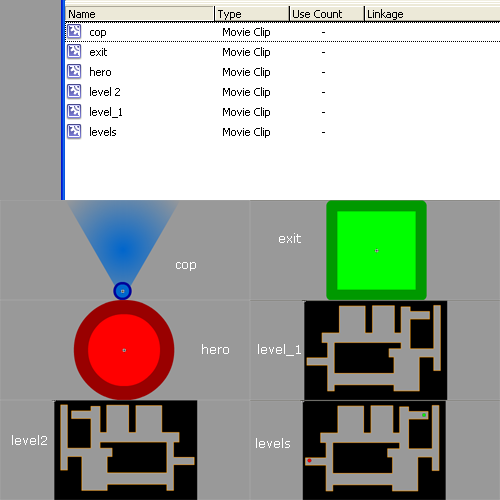
These are the movieclips I have on my library:
Security

A brief explication:

Cop: the cop... actually unused in this tutorial but you will need it to design your own levels

Exit: the exit, the item that will bring you onto the next level

Hero: it's you! it's you!

Level 1: The WALLS of the first level. Read carefully: WALLS and nothing more.

Level 2: The WALLS of the second level. I flipped the first level because I am lazy. You should design your own.

Levels: This is the core of the game. It's a movieclip where I put the levels themselves. I could have placed them on the main scene, but in that case the player would skip using the forward function I mentioned above. It's very important that all your game is on one single frame. So I put all levels in the levels movieclip, then I dragged the levels movieclip in the stage.

Here it what I did:
Security

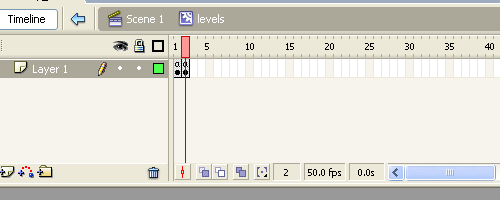
This is the timeline of levels movieclip. Every frame has just a "Stop()" on it.

Security

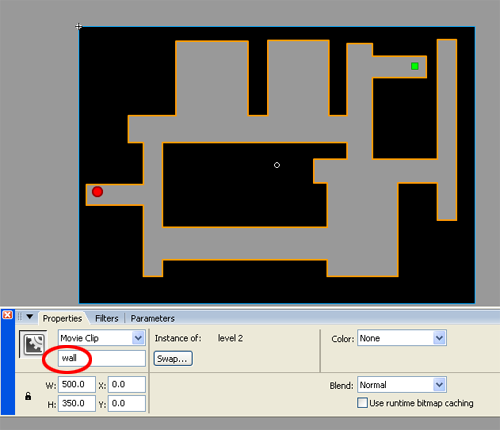
And this is the content of the 2nd fame in the levels movieclip. As you may notice, I dragged the level2 walls, the hero and the exit. It's very important that you instance all the objects on the stage as I did, for example, for the walls (see the red circle).

Now that I have all (two) levels, it's time to write down some actionscript.

The following actionscript are to be attached to the two heros... the one on the first frame and the one on the second frame

First level

ACTIONSCRIPT:
  1. onClipEvent (load) {
  2.     power = 2;
  3.     radius = 6;
  4. }
  5. onClipEvent (enterFrame) {
  6.     if (Key.isDown(Key.LEFT)) {
  7.         _x -= power;
  8.     }
  9.     if (Key.isDown(Key.RIGHT)) {
  10.         _x += power;
  11.     }
  12.     if (Key.isDown(Key.UP)) {
  13.         _y -= power;
  14.     }
  15.     if (Key.isDown(Key.DOWN)) {
  16.         _y += power;
  17.     }
  18.     while (_root.levels.wall.hitTest(_x, _y+radius, true)) {
  19.         _y--;
  20.     }
  21.     while (_root.levels.wall.hitTest(_x, _y-radius, true)) {
  22.         _y++;
  23.     }
  24.     while (_root.levels.wall.hitTest(_x-radius, _y, true)) {
  25.         _x++;
  26.     }
  27.     while (_root.levels.wall.hitTest(_x+radius, _y, true)) {
  28.         _x--;
  29.     }
  30.     if (_root.levels.exit.hitTest(_x, _y, true)) {
  31.         _root.levels.gotoAndStop(2);
  32.     }
  33. }

Second level

ACTIONSCRIPT:
  1. onClipEvent (load) {
  2.     power = 2;
  3.     radius = 6;
  4. }
  5. onClipEvent (enterFrame) {
  6.     if (Key.isDown(Key.LEFT)) {
  7.         _x -= power;
  8.     }
  9.     if (Key.isDown(Key.RIGHT)) {
  10.         _x += power;
  11.     }
  12.     if (Key.isDown(Key.UP)) {
  13.         _y -= power;
  14.     }
  15.     if (Key.isDown(Key.DOWN)) {
  16.         _y += power;
  17.     }
  18.     while (_root.levels.wall.hitTest(_x, _y+radius, true)) {
  19.         _y--;
  20.     }
  21.     while (_root.levels.wall.hitTest(_x, _y-radius, true)) {
  22.         _y++;
  23.     }
  24.     while (_root.levels.wall.hitTest(_x-radius, _y, true)) {
  25.         _x++;
  26.     }
  27.     while (_root.levels.wall.hitTest(_x+radius, _y, true)) {
  28.         _x--;
  29.     }
  30.     if (_root.levels.exit.hitTest(_x, _y, true)) {
  31.         _root.levels.gotoAndStop(1);
  32.     }
  33. }

As you may notice, these scripts are the same of the ones you saw in previous tutorials, with the only exception at lines 30-32 where I check for a collision between the player and the exit to make the level advance.

Here it is the game, and you can't skip levels!

2nd angent

As a bonus, I will introduce a new feature: the female agent! In every spy story there is a woman, and here it is... look how does her affect gameplay

The aim of the new game is simple: you control two spies, you will move the red one pressing Ctrl + arrow keys, and the pink one pressing Shift + arrow keys. If you press Ctrl + Shift + arrow keys, nothing will happen!

You pass the level when both spies reach the exit

Here it is the actionscript for the first level, for red and pink spies

Red spy

ACTIONSCRIPT:
  1. onClipEvent (load) {
  2.     power = 2;
  3.     radius = 6;
  4.     can_exit = false;
  5. }
  6. onClipEvent (enterFrame) {
  7.     if (Key.isDown(17) and !Key.isDown(16)) {
  8.         if (Key.isDown(Key.LEFT)) {
  9.             _x -= power;
  10.         }
  11.         if (Key.isDown(Key.RIGHT)) {
  12.             _x += power;
  13.         }
  14.         if (Key.isDown(Key.UP)) {
  15.             _y -= power;
  16.         }
  17.         if (Key.isDown(Key.DOWN)) {
  18.             _y += power;
  19.         }
  20.     }
  21.     while (_root.levels.wall.hitTest(_x, _y+radius, true)) {
  22.         _y--;
  23.     }
  24.     while (_root.levels.wall.hitTest(_x, _y-radius, true)) {
  25.         _y++;
  26.     }
  27.     while (_root.levels.wall.hitTest(_x-radius, _y, true)) {
  28.         _x++;
  29.     }
  30.     while (_root.levels.wall.hitTest(_x+radius, _y, true)) {
  31.         _x--;
  32.     }
  33.     if (_root.levels.exit.hitTest(_x, _y, true)) {
  34.         can_exit = true;
  35.         if (_root.levels.spy_woman.can_exit) {
  36.             _root.levels.gotoAndStop(1);
  37.         }
  38.     }
  39. }

Pink spy

ACTIONSCRIPT:
  1. onClipEvent (load) {
  2.     power = 1.5;
  3.     radius = 6;
  4.     can_exit = false;
  5. }
  6. onClipEvent (enterFrame) {
  7.     if (Key.isDown(16) and !Key.isDown(17)) {
  8.         if (Key.isDown(Key.LEFT)) {
  9.             _x -= power;
  10.         }
  11.         if (Key.isDown(Key.RIGHT)) {
  12.             _x += power;
  13.         }
  14.         if (Key.isDown(Key.UP)) {
  15.             _y -= power;
  16.         }
  17.         if (Key.isDown(Key.DOWN)) {
  18.             _y += power;
  19.         }
  20.     }
  21.     while (_root.levels.wall.hitTest(_x, _y+radius, true)) {
  22.         _y--;
  23.     }
  24.     while (_root.levels.wall.hitTest(_x, _y-radius, true)) {
  25.         _y++;
  26.     }
  27.     while (_root.levels.wall.hitTest(_x-radius, _y, true)) {
  28.         _x++;
  29.     }
  30.     while (_root.levels.wall.hitTest(_x+radius, _y, true)) {
  31.         _x--;
  32.     }
  33.     if (_root.levels.exit.hitTest(_x, _y, true)) {
  34.         can_exit = true;
  35.         if (_root.levels.spy.can_exit) {
  36.             _root.levels.gotoAndStop(1);
  37.         }
  38.     }
  39. }

Lines 2 (of both scripts): Notice how the pink speed is slower than the red one. Women always slow down men!

Lines 4 (of...): A boolean can_exit variable is set to false. It means the spy cannot leave the level

Lines 7 ...: In order to move a spy, check if the Ctrl key is pressed and the Shift key is released or the Ctrl key is released and the Shift is pressed

Lines 33-38: When a spy reaches the exit, his can_exit flag is set to true, and I check if the other spy can exit. If both spies can exit, then advance the level.

Here it is. Play and have fun. Lots of features and code optimization will wait us, but at the moment I hope I gave you a good idea for a future game.

Download the source codes and have fun.

Improve the blog rating this post
Tell me what do you think about this post. I'll write better and better entries.
1 Star2 Stars3 Stars4 Stars5 Stars (5 votes, average: 5 out of 5)
Loading ... Loading ...

» Flash Templates provided by Template Monster are pre-made web design products developed using Flash technology.
They can be easily customized to meet the unique requirements of your project.

35 Responses to “Create a flash game like Security - part 3”

  1. Danny on July 28th, 2007 3:22 am

    Really nice tutorial. You inspired me to create a multi player game like this. Again, good tutorial.

  2. Maxim-O on July 28th, 2007 11:27 am

    But if the girl hits the exit and then leaves and than the boy hits the exit they don’t both hit the exit and still go to the next level, so I think you should make a else statement that says: can_exit = false;

  3. Lepynet on July 29th, 2007 6:16 am

    wow, theres gonna be another tut right? This seriosly can’t be the last.

  4. abhilash on July 30th, 2007 4:25 am

    coool!!
    but i will be waiting for line rider 5

  5. abhilash on July 30th, 2007 4:26 am

    oops…line rider part 6

  6. LuizZak on August 3rd, 2007 8:08 pm

    I didin’t get the ‘how to not skip level’ thing, can you explain it better for me?

  7. David on August 18th, 2007 2:37 pm

    Great tutorial, could you show us how to put in mirros and other different types of walls.

  8. David on August 18th, 2007 2:38 pm

    sorry i meant mirrors not mirros, i’m bad at typing

  9. anonymys on August 20th, 2007 4:08 am

    the last example isnt working

  10. Goldfish on September 2nd, 2007 1:04 am

    My exit isn’t working and i have no idea why? any suggestions?

  11. hi on October 1st, 2007 4:22 am

    hey gold fish
    why dont you put the instance name as exit
    the one on the work area click on it then properties > instancename

  12. miguel(lito) on October 1st, 2007 5:17 am

    I finised making my game
    and emanuele,
    my dad wants to thank you for teaching me all this
    why?
    cuz i Am still 10 years old and i know how to make a game
    again thank you
    and i have finised making my game
    where can i host it?

  13. FaceBag on October 5th, 2007 2:09 pm

    How do I make it so when the cop sees the hero (meaning when the line is hitting the hero), how do I make it so that he resets..even better how can I make it so that once the cop sees him, if he sees him for like 2 seconds it resets…

  14. hello on October 16th, 2007 10:34 am

    nice tut. can you tell me how to create level passwords? that would be helpful =D

  15. Beans on November 8th, 2007 12:37 am

    Oh man you gotta finish this tut! Didn’t really feel like you where finished teaching us about the cop!

  16. Edd on November 23rd, 2007 4:51 am

    Love the tutorial but i can’t make my cop patrol please can you advice me on what i have to do?

  17. Daniel on November 24th, 2007 2:45 pm

    Hy thanx.
    Im still in college and for my final assignment im required to do a flash game, i had no idea where to start.
    your tutorial realy helped me alot

  18. Randomguy on December 12th, 2007 5:31 am

    Can you show me how to make the character have stealth? Im trying to make a level where if you press the CTRL key then the character partially disapears, but when i let go he doesn’t return to normal.
    thanks

  19. Randomguy on December 12th, 2007 12:42 pm

    I need Help!
    I have fixed up the glitch that you couldn’t return to normal but when I hit the cops nothing happens.
    can u tell me how to make it so if i hit the cops line of sight in stealth the stealth starts to disappear and if i hit the cop in stealth it restarts and if i hit the line of sight without stealth it restarts in the next tutorial?
    Thanks.

  20. Randomguy on December 12th, 2007 12:43 pm

    almost forgot.
    instanced cops body as “hitter” and cops line of sight as “los”

  21. Randomguy on December 12th, 2007 12:46 pm

    and their inside a movie clip instanced as “cop”

  22. Joseph on January 4th, 2008 8:40 pm

    Miguel, two good places to host your games are newgrounds and kongregate. You’re gonna need an account on one of them, but i personally prefer newgrounds because the rating/voting system is more organised. good luck!

  23. limpeh on January 10th, 2008 3:10 am

    Good tutorials, but I hope there will be another ‘Part 4′ for it that covers about the CCTV, switches, and some other features in security.

    Anyways, thanks for the tutorials :)

  24. Lepynet on February 3rd, 2008 5:37 am

    Hey, I’m trying to make 2 exits. Anyone know how to do that?

  25. kristina on March 10th, 2008 4:29 pm

    hi… i am doing your cool tutorial, but when i did it in the levels movieclip, the hero can walk throug the walls and i cant undestand why, becaurse i did everything as you wrote in the toturial…I have remembered to name all the instances i hope you will help me:-)

    (sorry for the bad english :-S)

  26. some dude on March 22nd, 2008 5:41 pm

    the same thing happened to me, its probobly that your characters size is too big, try making it smaller.

  27. Custard on March 25th, 2008 11:44 pm

    Hey. The “making it so you can’t skip though” thing didn’t work, so I decided not to use it, as it’s only for a school thing. However, I would like to know how to make it so that when he touches Exit, it takes him to the next level, as your code depends on the “making it so you can’t skip though” thing working, and mine is different. Please help.

  28. johnny on April 2nd, 2008 3:11 am

    hello i commented on part 1 i have a chracter that is slightly more sophisticated i need help creating shooting bulets in all 8 (or atleast 4) directions. also i need u to explain how o put a cop on a line route idk how to do that.
    but shooting i cant make him shoot i have a bullet but all the actionscripts ive tryed when i hit fire my bullet sits in the middle of my character and doesnt go forward!!! i really needyou help and i wud greatly appreciate it if u cud reply by turs..2 day from now as i am on spring break and trying to make headway on my game. thank you sincerly johnny
    johnnyracket@yahoo.com

  29. johnny on April 2nd, 2008 3:24 pm

    hey anybody no how to make a character shoot bullets in 1 dif directions? if so plz paste action scripts or email me them i need for my game. thank you johnny
    johnnyracket@yahoo.com

    p.s. sorry for posting so much emanuele and others but i really ned help ive hit a major stal and it stinks

  30. TimeSniper on June 21st, 2008 2:08 pm

    Hi Emanuele!

    I’ve recently made a flash game with help from you tutorials forthe security game.

    I hope you like it!

    The link below leads to the game itself.

    http://www.ebaumsworld.com/games/play/601156/

  31. Nixxus on July 14th, 2008 3:35 pm

    Hey, nice game TimeSniper:) It was kinda addictive so i had to play it through. What about the highscore in the end? Is it some kind of high score module or is it in your game?

    Nice tutorials too, maybe i will make a security game some day :)

  32. Ignus rhus on September 2nd, 2008 10:00 pm

    miguel(lito), try kongregate ;)
    (http://www.kongregate.com)
    (you will ned to create an account there)

  33. BO-dum on September 4th, 2008 5:43 pm

    is there any coding you can use to make the cop follow you i need help plezeeeeeeee

Leave a Reply


Trackbacks

  1. Create a flash game like Security - part 1 at Emanuele Feronato on July 27th, 2007 11:16 pm

    [...] April 29th update: part 2 released July 27th update: part 3 released [...]

  2. Create a flash game like Security - part 2 at Emanuele Feronato on July 27th, 2007 11:23 pm

    [...] July 27th update: part 3 released [...]