

Create a Flash game like Mass Attack
Talking about Mass Attack game, Actionscript 2 and Flash.
If you love to stay updated with latest addicting Flash games, probably you already know Mass Attack.

Mass Attack is based on the very simple idea of balancing weights on a scale. Just press the mouse button to create a spheric weight. The longer you hold down the mouse the larger the weight that is created.
Maybe you are thinking about physics, but I am showing you how easy can be the engine behind this game.
Let’s start with the object we are using:
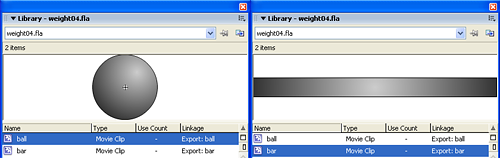
ball: it’s… the ball
bar: represents the bar where balls will fall
The first step consists in creating some balls that will grow as long as I keep the mouse pressed
placed = false;
balls_placed = 0;
_root.onMouseDown = function() {
	if (!placed) {
		will_grow = true;
		bubu = _root.attachMovie("ball", "ball_"+balls_placed, _root.getNextHighestDepth(), {_width:1, _height:1, _x:_root._xmouse, _y:_root._ymouse});
		bubu.will_grow = true;
		bubu.onEnterFrame = function() {
			if ((_root.will_grow) and (this.will_grow)) {
				this._width++;
				this._height++;
			}
			else{
				this.will_grow = false;
				}
		};
		placed = true;
	}
};
_root.onMouseUp = function() {
	_root.will_grow = false;
	balls_placed++;
	placed = false;
}
Line 1: A boolean representing the “placed” status of the game. Determines if the last ball is still being placed (so I can’t create a new one) or not
Line 2: A simple counter, to keep in mind how many balls I have placed
Line 3: Beginning of the function to be called every time I press the mouse key
Line 4: If placed is false… (if I can place a new ball….)
Line 5: A flag called will_grow is created and set to true. When this variable is true, all balls in the stage will grow (this may come handy in future, if I want to have more than one ball growing at the same time)
Line 6: Attaching the ball movie with its center at the current mouse position and its width and height to 1 (the smallest ball ever!), ad giving it the name bubu (I promised myself to change this name but…)
Line 7: Boolean saying bubu will grow
Line 8: Beginning of the actions to be executed for bubu at every frame
Line 9: If balls in the movie are growing and this ball can grow…
Lines 10-11: Increasing bubu‘s width and height
Lines 13-14: If not, bubu will cease growing forever
Line 17: Setting placed to true, so I cannot place another ball at the moment (that’s because the last one is still growing)
Line 20: Actions to be executed every time the player releases the mouse
Line 21: Balls stop growing
Line 22: Increment the number of balls placed
Line 23: Setting placed to false, so I can add another ball next time I’ll press the mouse
Now try to click in the movie and place some balls. As you can see, they are no balls… they are bubbles! They float! Let’s add a bit of gravity…
placed = false;
balls_placed = 0;
_root.onMouseDown = function() {
	if (!placed) {
		will_grow = true;
		bubu = _root.attachMovie("ball", "ball_"+balls_placed, _root.getNextHighestDepth(), {_width:1, _height:1, _x:_root._xmouse, _y:_root._ymouse});
		bubu.will_grow = true;
		bubu.will_fall = true;
		bubu.onEnterFrame = function() {
			if ((_root.will_grow) and (this.will_grow)) {
				this._width++;
				this._height++;
			} else {
				this.will_grow = false;
				if (this.will_fall) {
					this._y += 10;
					if (this._y>400-this._height/2-1) {
						this._y = 400-this._height/2-1;
						this._will_fall = false;
					}
				}
			}
		};
		placed = true;
	}
};
_root.onMouseUp = function() {
	_root.will_grow = false;
	balls_placed++;
	placed = false;
}
Line 8: Assigning another flag to bubu. This will determine if the ball will fall
Line 15: The ball stopped growing. Now, if it has to fall…
Line 16: The lamest gravity in the world! I simply move it down by 10 pixels
Lines 17-20: Checking if the ball hits the “ground” (the bottom of the movie), in this case make it stop falling
Well done! Now balls fall, but I have to make them fall on a balance
placed = false;
balls_placed = 0;
weight_on_left = 0;
weight_on_right = 0;
_root.attachMovie("bar", "bar1", _root.getNextHighestDepth(), {_x:0, _y:190});
_root.attachMovie("bar", "bar2", _root.getNextHighestDepth(), {_x:250, _y:190});
_root.onMouseDown = function() {
	if (!placed) {
		will_grow = true;
		bubu = _root.attachMovie("ball", "ball_"+balls_placed, _root.getNextHighestDepth(), {_width:1, _height:1, _x:_root._xmouse, _y:_root._ymouse});
		bubu.will_grow = true;
		bubu.will_fall = true;
		if (_root._xmouse<250) {
			bubu.bar = "left";
		} else {
			bubu.bar = "right";
		}
		bubu.onEnterFrame = function() {
			if ((_root.will_grow) and (this.will_grow)) {
				this._width++;
				this._height++;
				if (this.bar == "left") {
					weight_on_left++;
				}
				if (this.bar == "right") {
					weight_on_right++;
				}
			} else {
				this.will_grow = false;
				if (this.will_fall) {
					this._y += 10;
					if (this.bar == "left") {
						if (this._y>bar1._y-this._height/2) {
							this._y = bar1._y-this._height/2;
							this._will_fall = false;
						}
					}
					if (this.bar == "right") {
						if (this._y>bar2._y-this._height/2) {
							this._y = bar2._y-this._height/2;
							this._will_fall = false;
						}
					}
				}
			}
		};
		placed = true;
	}
};
_root.onMouseUp = function() {
	_root.will_grow = false;
	balls_placed++;
	placed = false;
};
_root.onEnterFrame = function() {
	trace("left: "+weight_on_left+" - right: "+weight_on_right);
}
Lines 3-4: Two new varabiles to know the weight on the left side of the balance and the on the right side
Lines 5-6: Attaching balance sides
Lines 13-17: Determining if the ball will fall on the left side or on the right side according to its x position
Lines 22-27: Updating the weight on the left or on the right according to the side where the ball will fall and its size
Lines 32-43: Replacing the check if the ball hit the end of the movie with the check if the ball hit the left (or right) side of the balance
Line 55: Function to be executed at every frame
Line 56: Output a debug string displaying weights on each side of the balance
Now we have balls falling on the balance and we keep in mind how many weight we have on each side of the balance. It’s time to make them move!
placed = false;
balls_placed = 0;
weight_on_left = 0;
weight_on_right = 0;
_root.attachMovie("bar", "bar1", _root.getNextHighestDepth(), {_x:0, _y:190});
_root.attachMovie("bar", "bar2", _root.getNextHighestDepth(), {_x:250, _y:190});
_root.onMouseDown = function() {
	if (!placed) {
		will_grow = true;
		bubu = _root.attachMovie("ball", "ball_"+balls_placed, _root.getNextHighestDepth(), {_width:1, _height:1, _x:_root._xmouse, _y:_root._ymouse});
		bubu.will_grow = true;
		bubu.will_fall = true;
		if (_root._xmouse<250) {
			bubu.bar = "left";
		} else {
			bubu.bar = "right";
		}
		bubu.onEnterFrame = function() {
			if ((_root.will_grow) and (this.will_grow)) {
				this._width++;
				this._height++;
				if (this.bar == "left") {
					weight_on_left++;
				}
				if (this.bar == "right") {
					weight_on_right++;
				}
			} else {
				this.will_grow = false;
				if (this.will_fall) {
					this._y += 10;
					if (this.bar == "left") {
						if (this._y>bar1._y-this._height/2) {
							this._y = bar1._y-this._height/2;
							this._will_fall = false;
						}
					}
					if (this.bar == "right") {
						if (this._y>bar2._y-this._height/2) {
							this._y = bar2._y-this._height/2;
							this._will_fall = false;
						}
					}
				}
			}
		};
		placed = true;
	}
};
_root.onMouseUp = function() {
	_root.will_grow = false;
	balls_placed++;
	placed = false;
};
_root.onEnterFrame = function() {
	difference = weight_on_left-weight_on_right;
	bar1._y = 190+difference;
	bar2._y = 190-difference;
}
Line 56: Determining the weight difference between the left and the right balances
Line 57: Updating left bar vertical position. That 190 is its default position, the one it will have if left and right bars have the same weight on them
Line 58: Same thing with the right one
And now the main engine is done. You can create balls of different sizes and make them fall on the balance. This will react according to the weight it has on each side.
There are some issues like the balance is updating its position before balls hit it, and you can’t throw balls under the balance, but at the moment the main work of this beautiful one day game is done.
If you want to convert it in a real game feel free to send me your examples and I’ll publish it on the site.
About this engine, I have one idea or two that I will discuss in a future tutorial.
Meanwhile, take the full sources and give me feedback.
Never miss an update! Subscribe, and I will bother you by email only when a new game or full source code comes out.