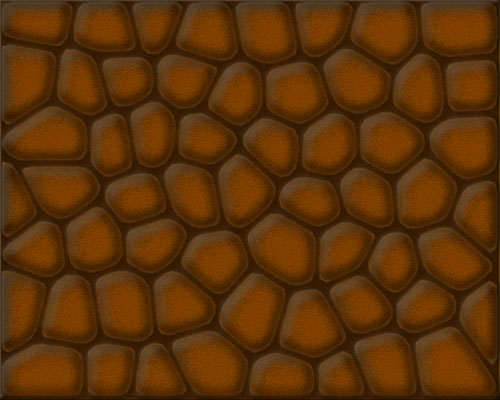
Photoshop action to create an arcade stone background
Today I was playing a bit with Photoshop to create a stone background for a one-week game I am developing for the experiment.
I wanted something random, with a style that reminds old style arcades.
I found this tutorial and I modified it to fit to my needs.
Then I developed an action to optimize and speed up the entire process.
This is the result of the action, obviously always random.

It’s not a state-of-the-art action but is what I need, and you can custom some level styles to use it in a profitable way.
Download the action and give it a try
» Take a look at Photoshop Templates offered by Template Monster. They can be definitely useful if you want to start your own website.
These templates can be easily edited so you are able to customize them to serve you particular needs.
7 Responses to “Photoshop action to create an arcade stone background”
Leave a Reply
Posts
- Rick Triqui: my first PlayCrafter game
- Prototype of a Flash game like Meeblings
- Games for the game developers!
- The art of debugging
- How to embed a text file in Flash
- Create a Flash game in minutes with PlayCrafter
- Upgrade your Flash CS4 to 10.0.2
- Play Mazeroll, my latest Box2D game
- Triqui MochiAds Arcade plugin for WordPress Released!!
- The MochiAds funnel
- Flash game creation tutorial - part 1
- Create a Lightbox effect only with CSS - no javascript needed
- Flash game creation tutorial - part 2
- Make a Flash game like Flash Element Tower Defense - Part 2
- Flash game creation tutorial - part 3
- Create a flash draw game like Line Rider or others - part 1
- Create a Flash Racing Game Tutorial
- Make a Flash game like Flash Element Tower Defense - Part 1
- Create a flash artillery game - step 1
- Create a flash draw game like Line Rider or others - part 5
- Flash game creation tutorial – part 5.2


(4.9 out of 5) - Flash game creation tutorial – part 3


(4.86 out of 5) - Creation of a platform game with Flash – step 2


(4.84 out of 5) - Create a survival horror game in Flash tutorial – part 1


(4.82 out of 5) - Create a flash artillery game – step 1


(4.82 out of 5) - Create a Flash Racing Game Tutorial


(4.8 out of 5) - Create a flash artillery game – step 2


(4.75 out of 5) - New tile based platform engine – part 6 – ladders


(4.74 out of 5) - Flash game creation tutorial – part 2


(4.73 out of 5) - The experiment – one year later


(4.7 out of 5)


That’s a pretty nice effect, I might want to use it in one of my games.
wicked!
woohooo!!! ps! psds! actions! complicated uis!
it’s photoshop!!
great work btw!
hi emanuele!
Did u really quit sleeping for these cooooool tuts?
It doesn’t work for me, if i use the settings for the stained glass effect it just turns all black.
nevermind it works
I really think that i saw this pic for the background for a game called slingfire, its on miniclip.Looks like the author is a fan of Emanuele.
This background is fantastic.I love you photoshop.