
Prototype of a Flash game like Poux
November 17th update: part 2 released
November 22nd update: part 3 released
November 28th update: Finished project released
Ok, I know, you are asking for full tutorials and not prototypes, but you have to know that a prototype is the first step to a tutorial and some of you realized nice games starting from prototypes or “incomplete” tutorials.
Anyway, I promise I’ll continue all “open” tutorials.
Today I am introducing you the prototype of a Flash game like Poux
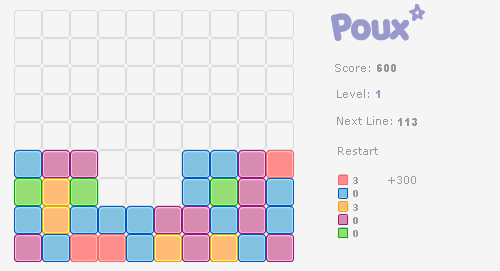
Poux is a fast and challenging board game you have to click on contiguous same colored tiles to remove them.
Time is running fast and adds a new line of tiles at the bottom. Bombs can eliminate a whole line of tiles. Use them wisely.
You can play a nice version of Poux at LightForce.
In this prototype I have only an object linked as “tile” that contains all tiles, one per frame.
In the first and only frame of the main stage, the code is:
1 2 3 4 5 6 7 8 9 10 11 12 13 14 15 16 17 18 19 20 21 22 23 24 25 26 27 28 29 30 31 32 33 34 35 36 37 38 39 40 41 42 43 44 45 46 47 48 49 50 | // declaration of the array that will contain the game
field = Array();
// number of frames to pass before inserting a new row
interval = 50;
// tiles placed so far
tiles_placed = 0;
// loop that initializes the field
for (x=0; x<10; x++) {
field[x] = Array();
for (y=0; y<10; y++) {
field[x][y] = 0;
}
}
// function that places a line of tiles in the bottom of the field
function place_line() {
for (x=0; x<10; x++) {
tiles_placed++;
// if the spot is not empty, must shift the colum
if (field[x][0] != 0) {
push_blocks(x);
}
tile = attachMovie("tile", "tile_"+tiles_placed, tiles_placed, {_x:10+32*x, _y:300});
num = Math.floor(Math.random()*8)+1;
tile.gotoAndStop(num);
field[x][0] = tiles_placed;
}
}
// function to be executed at every frame
_root.onEnterFrame = function() {
interval--;
if (interval == 0) {
interval = 50;
place_line();
}
};
// function that shifts the column of blocks
function push_blocks(col_number) {
for (i=9; i>=0; i--) {
if (field[col_number][i] != 0) {
if (i != 9) {
field[col_number][i+1] = field[col_number][i];
_root["tile_"+field[col_number][i]]._y -= 32;
} else {
// if I have more than 10 blocks in a column, remove the 10th block
// In a normal game, it would be "game over"
_root["tile_"+field[col_number][i]].removeMovieClip();
}
}
}
} |
… and in only 50 lines (comments and brackets included) we have the field populating with a new row of tiles every 50 frames.
I will complete the game very soon. Or maybe one of you will have a clue and complete the game for me. I will be happy to host his tutorial.
This is the source code… then move to part 2.
They can be easily customized to meet the unique requirements of your project.
16 Responses to “Prototype of a Flash game like Poux”
Leave a Reply
Trackbacks
-
Prototype of a Flash game like Poux - Part 2 : Emanuele Feronato - italian geek and PROgrammer on
November 17th, 2007 2:52 am
[...] this is the quickest prototype update ever. Yesterday I came with the Prototype of a Flash game like Poux, a bit incomplete because you could merely watch tiles [...]
-
Prototype of a Flash game like Poux - Part 3 : Emanuele Feronato - italian geek and PROgrammer on
November 22nd, 2007 1:55 am
[...] update of the prototype. Remember to read part 1 and [...]
- Get up to $100,000 for your next Flash game with Mochi GAME Developer Fund
- Create a dynamic content animated footer ad for your site in just 9 jQuery lines – 17 lines version
- Sell sitelocked version of your Flash games and even .fla sources to Free Online Games
- Protect your work from ActionScript code theft with SWF Protector
- Create a dynamic content animated footer ad for your site in just 9 jQuery lines
- Understanding Box2D’s one-way platforms, aka CLOUDS
- Triqui MochiAds Arcade plugin for WordPress upgraded to 1.2
- Box2D Flash game creation tutorial – part 2
- 11 Flash isometric engines you can use in your games
- Monetize your Flash games with GamesChart
- Create a Lightbox effect only with CSS - no javascript needed
- Flash game creation tutorial - part 1
- Create a Flash Racing Game Tutorial
- Flash game creation tutorial - part 2
- Make a Flash game like Flash Element Tower Defense - Part 2
- Flash game creation tutorial - part 3
- Make a Flash game like Flash Element Tower Defense - Part 1
- Create a flash draw game like Line Rider or others - part 1
- Triqui MochiAds Arcade plugin for WordPress official page
- Create a flash artillery game - step 1
- Flash game creation tutorial – part 5.2 (4.88/5)
- Create a flash artillery game – step 1 (4.79/5)
- Create a Flash Racing Game Tutorial (4.76/5)
- Create a flash artillery game – step 2 (4.74/5)
- Create a survival horror game in Flash tutorial – part 1 (4.73/5)
- Creation of a Flash arcade site using WordPress – step 2 (4.73/5)
- Flash game creation tutorial – part 2 (4.71/5)
- Flash game creation tutorial – part 1 (4.70/5)
- Create a flash draw game like Line Rider or others – part 1 (4.69/5)
- Creation of a platform game with Flash – step 2 (4.68/5)

(2 votes, average: 4.50 out of 5)


Interesting to watch, but it doesn’t do anything yet. Can’t wait for the follow up though!
What I can say? Colored:P
I think that that may be useful for preloaders, ya know, to give them something to look at?
Like a screensaver!
How do you make a reset button?
hi emanuele,
whats up?
Great tutorial and I even played poux.
Your prototype idea is great like you, and I appreciate it.
Anyways, I completed my first ever complete game in flash actionscript and its a funny 7 level game. I want to submit this game to you before submitting it to mochiads.
Can you spare little time for my first attempt?
hOw Do I eMaIl EmAnUeLe FeRoNato?
Send me your game at info@emanueleferonato.com
thanks emanuele!
anyways when i tried to submit my game to mochiads, following all their instructions, they said that they did not got a “ping” from my game and i did not see any development after that.
Whats the fuss?
Probably Mochi server does not “see” your game.
Do you see Mochi ads when you run your game?
LOL!! I love your new header.
I see a Mochi loading bar but not their logos.
That bar does not even fill even half and the game begins.
WhAt ShOuLd Be DoNe?
Whenever I try to open your source codes, I get an “Unexpected File Format” message. This is probably because I’m using MX 2004, but I need to know something, how large are your tiles(does it matter?) and how many different ones are there(I counted seven, but does this matter)?
never mind, i got both questions figured on my own
Emanuel,
I know this sounds like a stupid question, but here goes: In this prototype I have only an object linked as “tile” that contains all tiles, one per frame.
That is what you wrote? How can I make all the tiles on one from come togehter? Please email me or reply in detail, I’m lost at that first part.