

Shuffle an image with BitmapData
Talking about Flash.
December 4th update: part 2 released
December 7th update: part 3 released
Today I played a bit with BitmapData because I have a concept for a future game.
Look what I did:
The only thing I have in my library is an image representing the Scream by Munch.
This one:
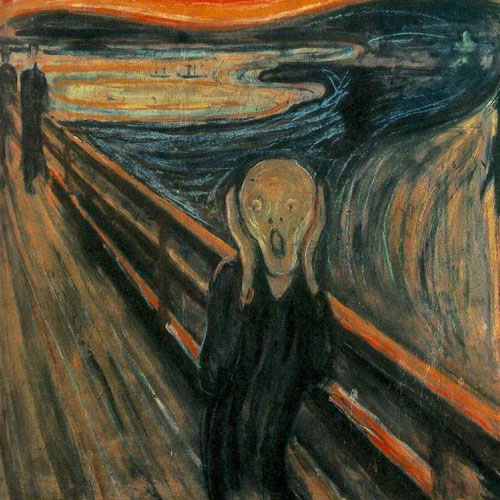
I linked it as “scream” of course…
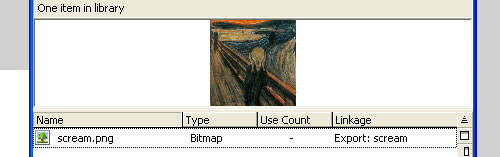
…and then entered a few actionscript lines in the1st frame of the main (and only) scene:
import flash.display.BitmapData;
import flash.geom.Rectangle;
import flash.geom.Point;
big_picture = BitmapData.loadBitmap("scream");
_root.createEmptyMovieClip("big_pic_obj", _root.getNextHighestDepth());
big_pic_obj.attachBitmap(big_picture, _root.getNextHighestDepth());
pictures = new Array();
sequence = new Array();
for (x=0; x<25; x++) {
	pictures[x] = _root.createEmptyMovieClip("small_pic_obj_"+x, _root.getNextHighestDepth());
	sequence[x] = x;
	small_picture = new BitmapData(100, 100);
	pictures[x].attachBitmap(small_picture, _root.getNextHighestDepth());
	small_picture.copyPixels(big_picture, new Rectangle(0+(x%5)*100, 0+Math.floor(x/5)*100, 100, 100), new Point(0, 0));
	pictures[x]._alpha = 0;
}
Array.prototype.shuffle = function() {
	for (x=0; x<24; x++) {
		var from = Math.floor(Math.random()*25);
		var to = this[x];
		this[x] = this[from];
		this[from] = to;
	}
};
_root.onMouseDown = function() {
	sequence.shuffle();
	for (x=0; x<25; x++) {
		_root["small_pic_obj_"+sequence[x]]._x = (x%5)*100;
		_root["small_pic_obj_"+sequence[x]]._y = Math.floor(x/5)*100;
		_root["small_pic_obj_"+sequence[x]]._alpha = 100;
	}
};
Let's examine those lines:
Lines 1-3: Importing required libraries
Line 4: Defining a BitmapData and load the scream in it
What is a BitmapData?
From the official Flash 8 documentation: The BitmapData class lets you create arbitrarily sized transparent or opaque bitmap images, then manipulate them in various ways at runtime. When you manipulate a BitmapData instance directly by using ActionScript, you can create very complex images without incurring the overhead of constantly redrawing the content from vector data in Flash Player. The methods of the BitmapData class support a variety of effects that are not available through the Filters tab in the Flash workspace.
Line 5: Creating an empy movie clip called big_pic_obj. I will use it to store my BitmapData
Line 6: Attaching the big_picture bitmapData to the big_pic_obj object . attachBitmap attaches a bitmap image to a movie clip.
Line 7: Creating a new array called pictures
Line 8: Creating a new array called sequence
Line 9: I decided to split the scream into 25 pieces, so I am starting a loop from 0 to 24
Line 10: Creating a new empty movie clip and storing into the pictures array
Line 11: Assigning x value to sequence[x]
Line 12: Creating a new BitmapData measuring 100x100 pixels
Line 13: Attaching the BitmapData created at line 12 to the movie clip created at line 10
Line 14: This is the core of the script: I am using the copyPixels function to copy/paste a part of the big picture into the small movieclip I created. Look how does it work: I give the source BitmapData (big_picture, the Scream picture), the rectangle of the source to copy (in this case a 100x100 square that begins at the upper left point that you will find if you divide the big picture into 25 parts). Then a point is defined. What does this point mean? It means the upper left point of the destination BitmapData (in this case small_picture) where the source image will be copied. You may think about it as an offset.
So I am defining a square into the big image and pasting it into the small movieclip. The only formula involved is the one to determine the coordinates of the upper left corner of the x-th square.
Line 15: I am leaving the small movieclip transparent at the moment.
Line 17: Time to define a prototype... a new function that will work on an array. I called it "shuffle" because I will use it to shuffle the array of pictures.
Line 18: Another loop to be executed 25 (number of tiles) times
Line 19: Generating a random number between 0 and 24
Lines 20-22: Swapping the value at the x-th position with the one at the from-th position. This is only one of a million ways to shuffle an array
Line 25: Beginning of the routine to be executed every time I press the mouse in the stage
Line 26: Shuffling the sequence array (basically: shuffling the tiles)
Line 27: Loop to be executed 25 times to scan all sequence array
Lines 28-29: Adjusting the x-th tile according to its new position into the shuffled array
Line 30: Making it visible
And... here it is!
You can shuffle the tiles pressing the mouse.
I hope this will be useful for some screen saver or for the creation of a puzzle game. I made this with a clear idea in my mind... hope you will like the final result.
Take the source code and enjoy.
There is a prototype of a game based on this "engine"... take a look here
Never miss an update! Subscribe, and I will bother you by email only when a new game or full source code comes out.