
5 tips for a better dynamic text management in Flash
I am starting the new year with a post about commons mistakes when using a dynamic text in Flash, and how to manage it
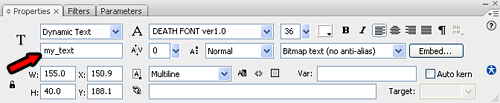
1) Give your text an instance name
Giving your text an instance name will make your dynamic text to be changed more easily than using the Var field.
For instance, if you instanced your text as my_text, you can simply change its content with _root.my_text.text = "Hello World", and you text will be independent from any variable
If you use the Var field, your text depends on the variable you will assign.
It’s not a big difference, but I prefer to change the text no matter any other variable has changed
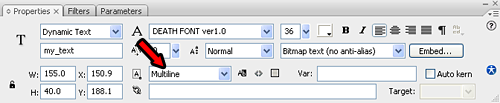
2) Make it Multiline
Even if you don’t plan to have a multiline text, it’s better to have a Multiline text with a single line than a Single line text with multiple lines. To write on a new line, simply use the \n, for example _root.my_text.text = "Hello World\nLine 2".
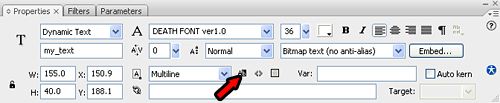
3) Don’t make it selectable
This is a very common mistake… in almost all cases you don’t need selectable text. The problem is Flash sets a dynamic text to be selectable by default.
This is the result… I am showing you the issue on a game of a blog reader but it’s full of these errors in Flash games… mine too…
The game is Wobble Dodge and the error is the one marked in red.

There is no need to make the score selectable… isn’t it?
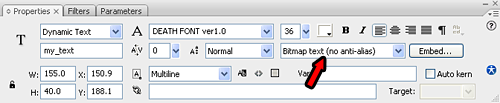
4) Think about antialiasing
Talking about antialiasing, there are two types of fonts: pixel fonts and non-pixel fonts. On pixel fonts you don’t have to use antialiasing, while on non-pixel fonts you must use it.
Look at the example for a better understanding

So choose wisely when to make a text with or without antialiasing
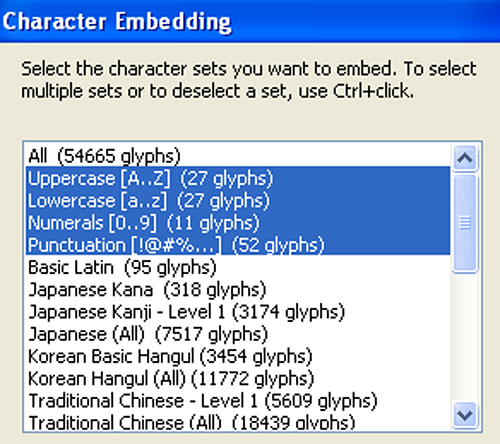
5) Embed the fonts
Ok, you found a really good-looking font and want to use it in your next project… very well… too bad you are the only one to have that font. You must embed the font, or at least the characters you plan to use or in most cases your font will lose antialiasing (that means looking bad) or in some players will be replaced by a default font (that means looking even worse)

In most cases embedding Uppercase, Lowercase, Numbers and Punctuation should be enough
Ok, that’s all. Let’s make our texts look better
How many times did you mess up fonts?
They can be easily customized to meet the unique requirements of your project.
11 Responses to “5 tips for a better dynamic text management in Flash”
Leave a Reply
Trackbacks
-
Text in Flash | Welcome Flash World on
October 8th, 2008 6:01 pm
[...] Read more [...]
-
Text in Flash | Lemlinh.com on
October 10th, 2008 10:16 am
[...] Read more [...]
- Get up to $100,000 for your next Flash game with Mochi GAME Developer Fund
- Create a dynamic content animated footer ad for your site in just 9 jQuery lines – 17 lines version
- Sell sitelocked version of your Flash games and even .fla sources to Free Online Games
- Protect your work from ActionScript code theft with SWF Protector
- Create a dynamic content animated footer ad for your site in just 9 jQuery lines
- Understanding Box2D’s one-way platforms, aka CLOUDS
- Triqui MochiAds Arcade plugin for WordPress upgraded to 1.2
- Box2D Flash game creation tutorial – part 2
- 11 Flash isometric engines you can use in your games
- Monetize your Flash games with GamesChart
- Create a Lightbox effect only with CSS - no javascript needed
- Flash game creation tutorial - part 1
- Create a Flash Racing Game Tutorial
- Flash game creation tutorial - part 2
- Make a Flash game like Flash Element Tower Defense - Part 2
- Flash game creation tutorial - part 3
- Make a Flash game like Flash Element Tower Defense - Part 1
- Create a flash draw game like Line Rider or others - part 1
- Triqui MochiAds Arcade plugin for WordPress official page
- Create a flash artillery game - step 1
- Flash game creation tutorial – part 5.2 (4.88/5)
- Create a flash artillery game – step 1 (4.79/5)
- Create a Flash Racing Game Tutorial (4.76/5)
- Create a flash artillery game – step 2 (4.74/5)
- Create a survival horror game in Flash tutorial – part 1 (4.73/5)
- Creation of a Flash arcade site using WordPress – step 2 (4.73/5)
- Flash game creation tutorial – part 2 (4.71/5)
- Flash game creation tutorial – part 1 (4.70/5)
- Create a flash draw game like Line Rider or others – part 1 (4.69/5)
- Creation of a platform game with Flash – step 2 (4.68/5)

(4 votes, average: 4.00 out of 5)


Nice tips!
I’ll update my Wobble Dodge ASAP.
Hi emanuele!
Great tips..
Cool tips, good idea by explaining the common mistakes with dynamic text. Maybe you could also cover up other common mistakes. :)
I’ll have to update my games!
Thanks!
Wow, I never knew most of those things. Definitely the most helpful post in a long time. ^^
Also how do I get the ‘Character Embedding’ box up? And why is the pic on step 5 the same as on step 1?
Ed: there was an error in the images.
Check the post again and you will find the right image that will guide you through the character embedding
In my opinion, the most useful tip was the one about making the text selectable, I hate my texts being selectable, but I didn’t know how to avoid it. The 5th tip is also useful
Thanks, EF
At Flash On The Beach, I attended a really good session on text and embedding. One of the best tips in the session was to embed two selections in the “Character embedding” dialogue: Basic Latin and Latin 1. If you embed these two, you’re safe for all European languages while embedding as few characters as possible (including scandinavian/german characters such as æ, ø, Ã¥, ö, ü and more).
The URL for this sessions notes are: http://www.flashmagazine.com/1457.htm and Dave Williamson was the speaker (a little down the page). Includes a surefire Font Embedding method for Flash.
J
Hey Emanuele! Thank you so much for these tips! I am self taught in Flash so I am still learning the ropes. Never thought to embed the fonts, though. Built great looking percentage preloaders and, you guessed it, default fonts seemed to show up on all other computers than mine. I fixed it, so again MANY THANKS and your site is already bookmarked!