

Prototype of a Flash game like Biggification
Talking about Biggification game, Flash and Game development.
Do you know a game called Biggification?
It’s the perfect example of an one-day game that made a great success, scoring a 3.78 on Newgrounds and being reviewed by 151 people with an average score of 8.3
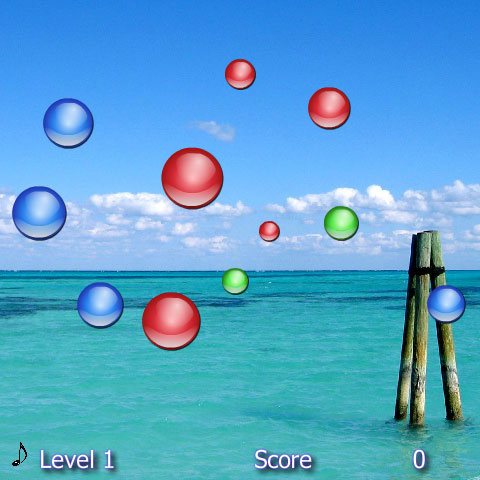
The aim of the game is very simple, as shoud be any one-day game: collect expanding orbs by hitting them with your orb before they hit another orb and end the game. Collecting same color orbs consecutively give you a multiplier.
That’s all.
Well, I created a prototype of this game in 64 rows
Mouse.hide();
delay_in_frames = 5;
frames_passed = 0;
game_over = false;
balls_array = new Array();
_root.onEnterFrame = function() {
	if (!game_over) {
		can_place = true;
		frames_passed++;
		if (frames_passed == delay_in_frames) {
			frames_passed = 0;
			x_pos = Math.floor(Math.random()*400)+50;
			y_pos = Math.floor(Math.random()*300)+50;
			for (x in balls_array) {
				dist_x = x_pos-_root[balls_array[x]]._x;
				dist_y = y_pos-_root[balls_array[x]]._y;
				distance = Math.sqrt(dist_x*dist_x+dist_y*dist_y);
				if (distance-_root[balls_array[x]]._width<50) {
					can_place = false;
				}
			}
			if (can_place) {
				balls_array.push("ball_"+_root.getNextHighestDepth());
				ball = _root.attachMovie("ball", "ball_"+_root.getNextHighestDepth(), _root.getNextHighestDepth(), {_x:x_pos, _y:y_pos, _width:1, _height:1});
				ball.gotoAndStop(Math.floor(Math.random()*3)+1);
				ball.onEnterFrame = function() {
					if (!game_over) {
						this._width += 0.25;
						this._height = this._width;
						dist_x = this._x-_root.my_ball._x;
						dist_y = this._y-_root.my_ball._y;
						distance = Math.sqrt(dist_x*dist_x+dist_y*dist_y);
						if (distance<(this._width+my_ball._width)/2) {
							my_ball.gotoAndStop(this._currentframe);
							remove = this.getDepth();
						}
						for (x in balls_array) {
							if (_root[balls_array[x]].getDepth() == remove) {
								_root[balls_array[x]].removeMovieClip();
								balls_array.splice(x, 1);
							}
							if (this.getDepth()>_root[balls_array[x]].getDepth()) {
								dist_x = this._x-_root[balls_array[x]]._x;
								dist_y = this._y-_root[balls_array[x]]._y;
								distance = Math.sqrt(dist_x*dist_x+dist_y*dist_y);
								if (distance-(_root[balls_array[x]]._width+this._width)/2<0) {
									game_over = true;
								}
							}
						}
					}
				};
			}
		}
	}
};
_root.attachMovie("ball", "my_ball", _root.getNextHighestDepth(), {_width:25, _height:25});
my_ball.gotoAndStop(1);
my_ball.onEnterFrame = function() {
	if (!game_over) {
		this._x = _root._xmouse;
		this._y = _root._ymouse;
	}
};
Line 1: Hiding the mouse
Line 2: Defining the interval, in frames, between the creation of a ball and the next one
Line 3: Counting frames passed from the creation of the last ball
Line 4: Defining a variable to check if it's game over or not
Line 5: Creating the array that will store all balls in game
Line 6: Function to be executed at every frame
Line 7: If it's not game over...
Line 8: The core variable of the game. The game is playable because every new ball is placed at a distance from existing balls that allows the player to run and chatch it. So I am going to create a variable that will state if I can place a new ball in the random position I will create or not.
Line 9: Incrementing the number of frames passed since the creation of the last ball
Line 10: Checking if it's time to create a new ball
Line 11: Resetting the frame counter
Lines 12-13: Generating a random x and y position
Line 14: Scanning the array of the balls. For more information about this concept, refer to Managing multiple collision detection with Flash
Lines 15-17: Calculating the distance from the x-th ball and the ball that's about to be created
Line 18: If the distance between the balls is less than 50 (a number decided by me, changing it will affect gameplay)...
Line 19: ... then the new ball cannot be placed... a new one will be created in the next frame, in another position
Line 22: If the ball can be placed...
Line 23: Pushing the new ball in the balls array
Line 24: Creating the ball
Line 25: Stopping the ball timeline to a frame that ranges from 1 to 3. Every frame contains a color
Line 26: Functions that the ball will execute at every frame
Line 27: If it's not game over...
Line 28: Increase ball width by 0.25
Line 29: Set the height to the same value of the width
BUG?: In Flash Professional 8.0 if you change this._height = this._width; with this._height += 0.25;, you will notice a strange behavior
Lines 30-32: Calculating the distance from the ball and the and the one controlled by the player
Line 33: If the distance is less than the sum of both balls radius...
Line 34: Stop the timeline of the ball controlled by the player to the same frame of the ball just touched. In this way, the ball controlled by the player will have the same color as the ball just touched
Line 35: Setting a variable called remove to the ball's depth. Why am I doing this instead of simply removing the ball? I have to remove the ball and splice the array with all the balls in game, or the array will continue growing and making the game slower. In this way, I am marking the ball and I will remove its movieclip and its reference in the array next time I will scan the array
Line 37: Scanning the array of balls
Lines 39-41: As explained at line 35, if the ball's depth is the one to be removed, then remove the ball movieclip and splice the array with all balls in game.
Lines 42-49: Checking collisions between a ball and the remaining ones in the same way as explained at Managing multiple collision detection with Flash. If there is a collision, then set the game_over flag to true
Line 57: Attaching the movieclip of the ball controlled by the player
Line 58: Stopping the ball's timeline to the 1st frame (1st color)
Lines 59-64: If it's not game over, make the ball follow the mouse
And that's all. The game does not include score, but it's a quite good replica of Biggification
When it's game over, you can't move anything and you must reload the page.
Now I am going to change some gameplay parameters, add a couple of powerups and another one-day game will be ready to hit the masses. Download the source code and do the same
Never miss an update! Subscribe, and I will bother you by email only when a new game or full source code comes out.