MochiAds Leaderboards released – let’s see how does it work

If you read MochiAds release log, you should have noticed the new entry:

Leaderboards
We launched a new MochiAds service. Developers can now add one or more leaderboards to a game. We also included an easy to use in-game widget to display scores to users.

In my opinion Leaderboards are the best highscore management system for Flash games at the moment.

Let’s see how does it work.

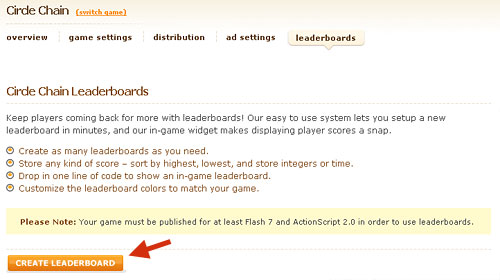
When you are in MochiAds game info panel, you will notice a new menu tab called leaderboard

MochiAds Leaderboards

Click on it and you will see an info page resuming leaderboard features. When you’re ready, click on CREATE LEADERBOARD
MochiAds Leaderboards

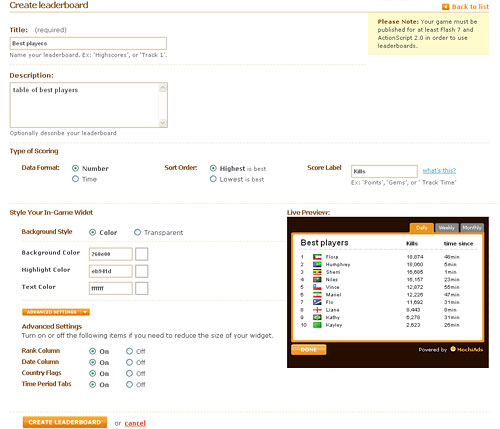
You are only one page away from the creation of your first leaderboard.
MochiAds Leaderboards

Let’s see all options:

Title: The title of the leaderboard, this will be displayed in game as you can see in the live preview

Description: Just an optional description

Type of Scoring: You can choose if the score is a number or a time, and if lower is better or higher is better. You can also assign a label to the score that will be shown in game as you can see in the live preview

The remaining options allow to style your leaderboard to fit your game color scheme. With the live preview you can play with colors until you are satisfied.

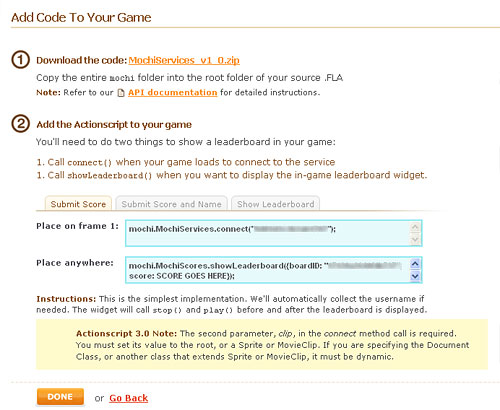
Click again on CREATE LEADERBOARD and you’ll see the final page with instructions about embedding leaderboards into your game.
MochiAds Leaderboards

In this page you will also find the MochiServices ZIP Package. Navigate inside its folders choosing the right folder according to your Actionscript version, and you will see a folder called mochi. Just copy this folder and paste it into the root classpath of your game. In almost all cases, it’s the same path where you saved the FLA source file of your game.

It’s very easy, anyway shouldn’t be enough easy, there is a step by step documentation in the MochiAds Help Center

Let’s see how did I embed leaderboards in the first game ever created with this new API: Glomb

In the 1st frame, in the same layer where I wrote the code for displaying MochiAds ads, I added this line:

mochi.MochiServices.connect("xxxxxxxxxxxxxxxx");

That 16 figures xxxxxxxxxxxxxxx is the MochiAd ID, and must be the same as the one provided with the ads

As an example, if your MochiAds code is MochiAd.showPreGameAd({id:"0123456789ABCDEF", res:"500x500"});, then the connection line will be mochi.MochiServices.connect("0123456789ABCDEF");

Then, in your game code, when the game is over and it’s time to submit score and show leaderboard, I used this line

mochi.MochiScores.showLeaderboard({boardID:"0123456789ABCDEF", score:my_score,onClose:function ():Void { show_splash()}});

let’s see the parameters:

boardID:"0123456789ABCDEF" is the MochiAd ID explained before

score:my_score passes the score to store in the leaderboard. Just replace my_score with the variable actually used to calculate your score during the game.

onClose:function ():Void { show_splash()} this is not necessary for the leaderboard to work, but if you want you can track when the player closes the leaderboard. In my case, when the player closes the leaderboard, I call the show_splash function, a custom function I made to show the splash screen of the game.
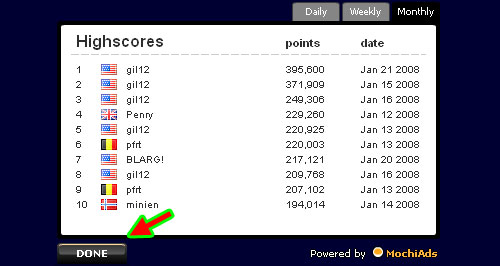
MochiAds Leaderboards

That’s all… yes, it was an easy tutorial with only two lines to explain, but including leaderboards into your Flash games now it’s really easy.

When you’ll have your leaderboard up and running with thousands of players trying to beat the record, you can manage it with a simple administration panel. You can also ban players or clear highscores.
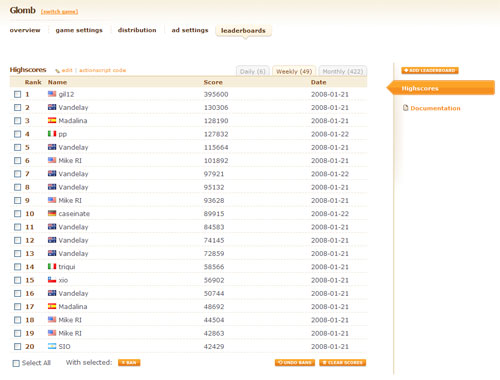
MochiAds Leaderboards

Least but not last, you can create more leaderboards for the same game… let’s think about a racing game where each track has its own leaderboard… or a game with different difficulty levels, each one with its leaderboard…

With such a complete leaderboards to promote, I think we should expect a competition very soon… meanwhile try to beat highscores in Glomb

Rate this post: 1 Star2 Stars3 Stars4 Stars5 Stars (2 votes, average: 5 out of 5)
Loading ... Loading ...
If you found this post useful, please consider a small donation.
» Flash Templates provided by Template Monster are pre-made web design products developed using Flash technology.
They can be easily customized to meet the unique requirements of your project.

24 Responses to “MochiAds Leaderboards released – let’s see how does it work”

  1. Ed on January 22nd, 2008 7:29 pm

    It’s getting shifty again… ;)

    Leaderboards have been around since you started this blog anyway, but I must admit these do have a nice interface.

  2. RJ on January 22nd, 2008 7:50 pm

    I was just looking for the leaderboards and how to include them.

    Thanks

  3. RJ on January 22nd, 2008 7:58 pm

    After some time of thinking, I have a question:

    Does your game need to be published with MochiAds before you can add the leaderboards? What happends if I want to finish it before publishing it, is there any way to include the leaderboards before publishing?

    Thanks

  4. Emanuele Feronato on January 22nd, 2008 8:08 pm

    Very good question
    I know Bob reads this blog
    Let’s wait 4 the answer

  5. Josh on January 22nd, 2008 10:18 pm

    Hey i have a game i am makeing and i am trying to use the wasd keys for movement i can get forward to move him forward in the direction he is rotated(he is roteated by the mouse)but i cant get him to strafe. Right now i have this
    x = Math.sin(Math.PI/180*this._rotation)*30;
    y = Math.cos(Math.PI/180*this._rotation)*-30;
    this._x += x;
    this._y += y;

    and i have no idea what to do for strafe he kinda strafes when i put it as

    x = Math.sin(Math.PI/90*this._rotation)*30;
    y = Math.cos(Math.PI/90*this._rotation)*-30;
    this._x += x;
    this._y += y;

    but he strafes in like a circle.

    help would be awsome but if it doesnt work i can just make a left and d right basic stuff.

  6. Josh on January 22nd, 2008 10:21 pm

    opps all of this is in a onClipEvent(enterframe) thing in the movieclip
    just if that helps

  7. Bob Ippolito on January 22nd, 2008 11:01 pm

    You can create a leaderboard at any point, you don’t need to distribute your game with MochiAds (ever).

  8. Kesh on January 23rd, 2008 8:19 am

    hey you should make a tutorial on how to take the back and forward buttons on the right click go away. It’s pretty simple, but I can mess up your glomb game using this. it looks cheap that way. It would help people out with levels on each frame and people can skip.

  9. Gabriel on January 23rd, 2008 2:02 pm

    Hope they do an EVER highscore… Just monthly and weekly and daily isn’t too good….

  10. Wackiedk on January 23rd, 2008 2:49 pm

    Yeaaa! I will try to make a 1-3 days with leaderboard inside. :D

  11. RJ on January 23rd, 2008 11:36 pm

    Hi, I have a question for you, guys

    As title, does “Nitro platform” sound good?

    Does it make sense?

    Thanks for your help

  12. Emanuele Feronato on January 24th, 2008 12:59 am

    It’s a good title for a platform, a bad one for a MMORPG

  13. Shiv on January 24th, 2008 11:17 am

    Great leaderboards out there. Only thing is we need is an alltime leaderboard.

  14. RJ on January 24th, 2008 3:27 pm

    Thanks, Emanuele

    Shiv, Bob said in mochi forums they’re developing all time highscores.

  15. Bradley lecomte on January 25th, 2008 1:42 am

    The leaderboards are awesome, so simple to use!The only thing I don’t like about the them, is there is no way(that I know of) to have two scores per name, so like, the level the player made it to, and their score, all on one board. Other than that, its great!

  16. Kesh on January 30th, 2008 6:24 am

    when you view highscores via the code they give, and you push done to say your done with the highscore table, it goes to the next frame, rather than going back to the main menu. How do i get around this.

    also how do I put in decimal scores. Like 2.34 seconds. It didnt let me. It put it as 2.

  17. Kesh on January 30th, 2008 6:26 am

    and brad, you could just add that to their name… like for name var you could same name = name + “level” + onLevel

  18. Harry on February 7th, 2008 9:34 pm

    I cant get this to work, could anybody help? i can add to creds and my game as a 2.74 on newgrounds

  19. Scott on March 13th, 2008 9:14 pm

    I have created a game (still in beta) with the MochiAd leaderboards. When a player gets a high score and submits it, the submit button remains there and the player can fill the board with their score. Anyone else running into this>

    I’m guessing some code can be added to an event like onSubmit make the submit button invisible, but I’m not sure what that code should be.

    Is this happening to anyone else?

  20. Scott on March 14th, 2008 12:36 am

    Ugh! I would retract my earlier question if I could.

    The problem was in me displaying a button to submit the high score. It has nothing to do with the MochiAds Leaderboards. *I* needed to make *my* high score submit button go away. MochiAds already does this.

    SOrry for any confusion (I know I had some!)

  21. DamionKutaeff on March 23rd, 2008 1:12 am

    Hello everybody, my name is Damion, and I’m glad to join your conmunity,
    and wish to assit as far as possible.

  22. Frogger on August 31st, 2008 8:29 am

    This looks neato. I’ll have to put it in my beta Game (I used a design similar to the “Classroom” tut you made Emanuele Feronato) =)

    You get to go in the Credits Mate!

  23. JJ on November 27th, 2008 9:34 am

    very good tutorial, thank you!

Leave a Reply


Trackbacks

  1. Glomb - The first Flash game to use MochiAds Leaderboards : Emanuele Feronato - italian geek and PROgrammer on January 23rd, 2008 11:10 am

    [...] MochiAds Leaderboards released – let’s see how does it work – read this post [...]

Posts
