

Some Flash preloading issues you’d better know
Talking about Flash.
I never used a preloader in a game… all my games are quite light, and I used to preload movies only in some heavy website intros.
Heavy, as I said, but 100% timeline and 0% actionscript
Today, I was making a preloader for Glomb, because I am dealing with a sponsor (yes… maybe I am giving Glomb for an exclusive sponsorship) when I come into a problem.
The preloader started loading when the movie was at 99% loaded.
I don’t think the sponsor would like his logo to be shown only at the 1% of the loading time, so I was wondering what was wrong with the preloader.
This was the code, in the 1st frame:
stop();
onEnterFrame = function () {
	already_loaded = _root.getBytesLoaded()/_root.getBytesTotal();
	// show some fancy preloading graphics
	if (already_loaded == 1) {
		delete onEnterFrame;
		play();
	}
};
It’s a very common preloader, you may find it on a lot of tutorial sites and books.
But it did not work for me.
After a while, I solved the issue: most of the graphics and sounds in the game are not in the timeline… they are called dynamically by the actionscript with attachMovie or attachSound.
The problem is Flash compiler does not know when you are going to use those graphics and sounds, so it preloads all this stuff before the 1st frame. So when my preloader comes in action, the 99% of the movie (graphics and sounds) are loaded, then the remaining 1% (actionscript itself) is loaded showing the preloader.
This happens because you have this checkbox enabled
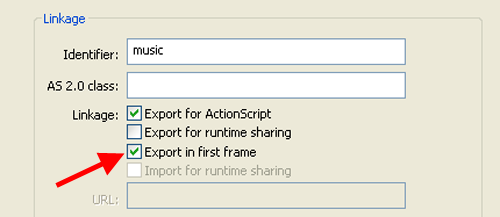
This checkbox determines the object must be loade before the 1st frame.
Never mind! Just uncheck it and everything will work fine!
This is not the solution… if you uncheck the checkbox, when the compiler scans the timeline and does not find the resource, it simply ignores it and your game will be compiled without graphics/sounds.
What can you do?
If your preloader is on frame 1, you should made your game start on frame 3, and put all your dynamically created objects at frame 2. This way, the movie will compile the objects because it finds them on frame 2, but the first thing to be loaded will be the preloader, and everything will work fine. Obviously, the Export in first frame mark has to be unchecked.
Never miss an update! Subscribe, and I will bother you by email only when a new game or full source code comes out.