How to create a WordPress Widget
I think it’s time to learn how to create a WordPress Widget. WordPress (WP from now on) is the most used blogging platform, and I want to help everybody to code their favorite widgets.
From the official site (where you can find a lot of widgets): WordPress Widgets (WPW) is like a plugin, but designed to provide a simple way to arrange the various elements of your sidebar content (known as “widgets”) without having to change any code.
From a geeky point of view, a widget is a php file. Fullstop. Being a php file, you can make whatever you want. You “just” need to master php and follow some guidelines given by WP guys.
To make the simplest widget ever, you have to know only two WP functions:
The first is register_sidebar_widget($name, $function): adds your widget in the widget admin panel. You simply have to change $name with the name of your widget and $function with the function that your widget will execute.
The second one is add_action($event, $function): $event tells what event your $function should be associated with.
Ok, now let’s write some php
Triqui widgetI love Emanuele Feronato";
}

function init_triqui(){
	register_sidebar_widget("Triqui", "triqui_widget");
}

add_action("plugins_loaded", "init_triqui");

?>
Lines 2-9: This commented code is needed to show WP users who made the plugin, what does the plugin do, where to download updates, and so on. Look at this picture:

It represents your plugin management page, and you can see how your information is displayed according to what you write in lines 2-9
Line 11: Beginning of the widget itself
Line 12: The widget… just writing the title (between h2 tags) and a link to my blog
Line 15: Function to initialize the widget
Line 16: As explained before, I am registering the sidebar widget calling it Triqui, and want it to execute the triqui_widget function, the one at lines 11-13
Line 19: When the plugins are loaded, I want init_triqui to be executed. Doing this way, once plugins are loaded, I register the sidebar widget that will display the link at my blog.
And that’s all.
Now you have to save your file with a php extension (for example triqui.php) and upload it in your wp-content/plugins directory you will find in your WP installation.
Then you will find your Triqui plugin in your plugin management page and once you activate it you will find the Triqui widget in your Sidebar Arrangement page (Presentation -> Widgets in your admin panel)
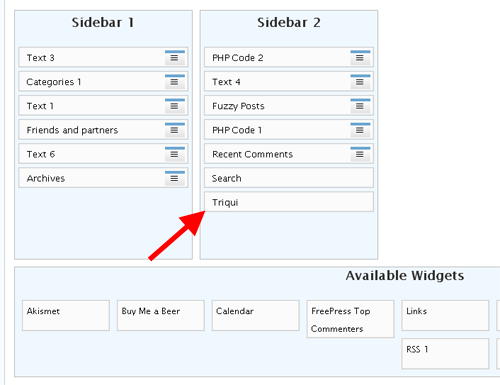
… and… that’s it… now drag your widget into your sidebar and you will display my link in your blog.
This was the very first widget… but soon I will teach you how to develop more complex and interactive widgets, and, why not, widgets that could you earn some money.
Meanwhile, why don’t you display my widget for a day or two? If you do it…
