
How to create a WordPress Widget

I think it's time to learn how to create a WordPress Widget. WordPress (WP from now on) is the most used blogging platform, and I want to help everybody to code their favorite widgets.

From the official site (where you can find a lot of widgets): WordPress Widgets (WPW) is like a plugin, but designed to provide a simple way to arrange the various elements of your sidebar content (known as "widgets") without having to change any code.

From a geeky point of view, a widget is a php file. Fullstop. Being a php file, you can make whatever you want. You "just" need to master php and follow some guidelines given by WP guys.

To make the simplest widget ever, you have to know only two WP functions:

The first is register_sidebar_widget($name, $function): adds your widget in the widget admin panel. You simply have to change $name with the name of your widget and $function with the function that your widget will execute.

The second one is add_action($event, $function): $event tells what event your $function should be associated with.

Ok, now let's write some php

PHP:
  1. <?php
  2. /*
  3. Plugin Name: Triqui
  4. Plugin URI: http://www.emanueleferonato.com/
  5. Description: Test widget
  6. Author: Emanuele Feronato
  7. Version: 1
  8. Author URI: http://www.emanueleferonato.com/
  9. */
  10.  
  11. function triqui_widget() {
  12.     echo"<h2>Triqui widget</h2>I love <a href = \"http://www.emanueleferonato.com\">Emanuele Feronato</a>";
  13. }
  14.  
  15. function init_triqui(){
  16.     register_sidebar_widget("Triqui", "triqui_widget");     
  17. }
  18.  
  19. add_action("plugins_loaded", "init_triqui");
  20.  
  21. ?>

Lines 2-9: This commented code is needed to show WP users who made the plugin, what does the plugin do, where to download updates, and so on. Look at this picture:

WordPress widget

It represents your plugin management page, and you can see how your information is displayed according to what you write in lines 2-9

Line 11: Beginning of the widget itself

Line 12: The widget... just writing the title (between h2 tags) and a link to my blog

Line 15: Function to initialize the widget

Line 16: As explained before, I am registering the sidebar widget calling it Triqui, and want it to execute the triqui_widget function, the one at lines 11-13

Line 19: When the plugins are loaded, I want init_triqui to be executed. Doing this way, once plugins are loaded, I register the sidebar widget that will display the link at my blog.

And that's all.

Now you have to save your file with a php extension (for example triqui.php) and upload it in your wp-content/plugins directory you will find in your WP installation.

Then you will find your Triqui plugin in your plugin management page and once you activate it you will find the Triqui widget in your Sidebar Arrangement page (Presentation -> Widgets in your admin panel)
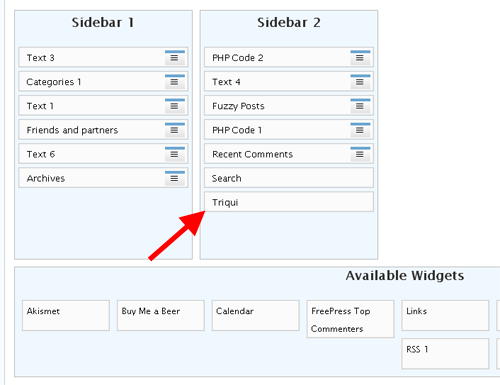
WordPress widget

... and... that's it... now drag your widget into your sidebar and you will display my link in your blog.

This was the very first widget... but soon I will teach you how to develop more complex and interactive widgets, and, why not, widgets that could you earn some money.

Meanwhile, why don't you display my widget for a day or two? If you do it...

Improve the blog rating this post
Tell me what do you think about this post. I'll write better and better entries.
1 Star2 Stars3 Stars4 Stars5 Stars (14 votes, average: 4.36 out of 5)
Loading ... Loading ...

» WordPress themes are designs for WordPress - one of the most popular blogging software nowadays.
You will be pleasantly surprised by WordPress Themes provided by Template Monster. All of them are of professional design and high quality.

19 Responses to “How to create a WordPress Widget”

  1. Graham Kaemmer on February 18th, 2008 5:08 pm

    Just out of curiosity, what do you use to syntax highlight your scripts? Is it something that comes with wordpress?

  2. Emanuele Feronato on February 19th, 2008 10:33 am

    It’s called syntax highlighter, google for wordpress syntax highlighter and you will find a lot

  3. Graham Kaemmer on February 19th, 2008 3:30 pm

    Thanks

  4. Dmitry on February 19th, 2008 4:59 pm

    Thank for for interesting widget ideas.

  5. Cahyo on February 24th, 2008 2:07 am

    Thanks for the tutorial…

  6. EagleVision on February 26th, 2008 4:27 pm

    LOVE IT! :D

  7. Jogos on March 9th, 2008 3:49 pm

    I was looking for this type of articles. Now I have got some ideas about creating WordPress widget. Great!

  8. stratos on May 12th, 2008 11:00 pm

    man nice tutorial. stress out somewhere that the comments are usefull! :D it took me 15 minutes to figure out what was going on… nice one man!!

  9. Mister Chief on May 27th, 2008 9:41 pm

    Just what I’m looking for. You seem to be able to code in all sorts of languages, your very skilled.

  10. bmattb on June 7th, 2008 5:09 am

    thanks for the great tutorial!

  11. bobman on July 8th, 2008 1:01 am

    Thank you for this tutorial, but one concern:

    I’ve done exactly what you said, but when I activate the plugin and add it to a sidebar in WP 2.5.1, I then get a blank screen following a save of my new settings.

    Refreshing the page or using the back button let’s me see the admin side of things again, but everytime I change a setting (essentially submitting a form), I get a blank screen…any ideas why?

    Thanks

  12. tektok on July 29th, 2008 7:35 pm

    Nice, I like it. Keep up the good work.

  13. Joe on August 23rd, 2008 6:15 am

    Thanks for the tutorial. I wish the guys at WP would learn to write tutorials this simple and concise.

  14. Nishanthan S. on August 31st, 2008 12:08 pm

    It was really simple to understand. Thanks for the good work. I’m going to start to write a widget now itself. :-)

  15. Steve on September 9th, 2008 12:43 pm

    Great article thanks. I have used it to code up my own widget that I use to display the latest uploads I do through ShoZu in the sidebar of my wordpress web site.

  16. Travis on September 17th, 2008 9:13 pm

    Thanks for a great tutorial for beginner plugin developers! Best “first step” resource I could find!

  17. The DarkStar on September 22nd, 2008 12:37 pm

    Penso che ora mi scrivero da solo un widget per il login con tanto di avatar e link utili, grazie dell’articolo ;)

Leave a Reply


Trackbacks

  1. Plugin olarak widget yapmak. | WebListele on August 7th, 2008 3:48 pm

    [...] Biraz araştırma yapınca plugin ve beraberinde widget yapmanın sanıldığından daha kolay olduğunu gördüm.  Öncelikle yararlandığım kaynağı göstermeliyim ki merak edenler kaynağından bakabilirler. http://www.emanueleferonato.com/2008/02/15/how-to-create-a-wordpress-widget/ [...]

  2. c h u o n g n g u y e n » Blog Archive » Meta-Lite Widget: my first WordPress plugin on August 11th, 2008 4:12 am

    [...] on tutorials from Widgetizing Plugins, Lisa Stewart, Emanuele Feronato, and especially Hrw website; here is my first plugin for WordPress: Meta-Lite Widget for your [...]