
Create a nice Flash photogallery with gridNavigation component

Today I'll show you a Flash component that you will find very useful for a photogallery or an interactive portfolio.

Remember that there are thousands of sites showing their best photos/works, and you must show your work in an interesting way if you want to get noticed.

Personally, I don't click anymore on the classic "click here to open the image in a popup". We are in 2008, and we are looking for something new.

That's why I am going to recommend you the gridNavigation component by Flashloaded.

The gridNavigation is a thumbnail based navigational system or a portfolio/photo gallery in a grid or pyramid style layout. The thumbnail content is clickable and zooms in to display the selected full size content while the other thumbnails are pushed aside. Content can be external images, animated SWFs or movie clips. Content can be added or changed directly in the Component Inspector, through ActionScript or using an external XML file.

Ok... that was a simple cut/paste. When I review something, I do a test drive.

Like all components, you can install gridNavigation with a double click on the .mxp file provided in the package.

There is not any manual in the zip file provided by Flashloaded but you can find an complete guide at this link.

Let's start our fancy example!

First, from the Components window, drag and drop the component on the stage and set its size as you like.
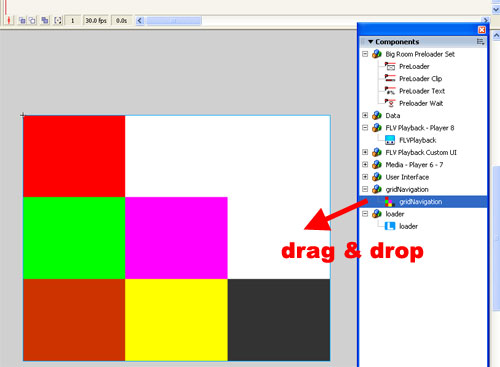
Then, you can just play with the parameters in the component inspector like in the other million galleries released in these years, or feed the component with an XML file (much, much better).

Let's see this XML

XML:
  1. <?xml version="1.0" encoding="utf-8"?>
  2. <grid_navigation>
  3.     <config>
  4.         <layout_style>Bottom Left</layout_style>
  5.         <items_type>Images</items_type>
  6.         <navigation_mode>Pyramid</navigation_mode>
  7.         <thumbnail_size>
  8.             <width>99</width>
  9.             <height>77</height>
  10.         </thumbnail_size>
  11.         <image_size>
  12.             <width>450</width>
  13.             <height>350</height>
  14.         </image_size>
  15.         <easing>linear</easing>
  16.         <zoom_speed>700</zoom_speed>
  17.         <preloader>false</preloader>
  18.     </config>
  19.     <images>
  20.         <image>
  21.             <files>
  22.                 <thumbnail></thumbnail>
  23.                 <image>/images/grid02.jpg</image>
  24.             </files>
  25.         </image>
  26.         <image>
  27.             <files>
  28.                 <thumbnail></thumbnail>
  29.                 <image>/images/grid03.jpg</image>
  30.             </files>
  31.         </image>
  32.         <image>
  33.             <files>
  34.                 <thumbnail></thumbnail>
  35.                 <image>/images/grid04.jpg</image>
  36.             </files>
  37.         </image>
  38.         <image>
  39.             <files>
  40.                 <thumbnail></thumbnail>
  41.                 <image>/images/grid05.jpg</image>
  42.             </files>
  43.         </image>
  44.         <image>
  45.             <files>
  46.                 <thumbnail></thumbnail>
  47.                 <image>/images/grid06.jpg</image>
  48.             </files>
  49.         </image>
  50.         <image>
  51.             <files>
  52.                 <thumbnail></thumbnail>
  53.                 <image>/images/grid07.jpg</image>
  54.             </files>
  55.         </image>
  56.     </images>
  57. </grid_navigation>

And this is the result.

I used only images, but you can use swf movies if you prefer. Thumbnails are generated on-the-fly if not specified in the XML

Moreover, you can define grid alignment (top right, top left, and so on), navigation mode (grid or pyramid, like in my example), number of rows and columns, thumbnails easing (you can choose among a wide number of easings), zoom speed and even more options.

But what makes my example different than the one you can find on Flashloaded site is the dynamic actionscript control of which thumbnail I just clicked on.

With this code

ACTIONSCRIPT:
  1. var listener = new Object();
  2. listener.onOpen = function(event) {
  3.     switch (event.item) {
  4.     case _level0.grid.page_0_0 :
  5.         caption.text = "BallBalance";
  6.         break;
  7.     case _level0.grid.page_1_0 :
  8.         caption.text = "GuessNext";
  9.         break;
  10.     case _level0.grid.page_1_1 :
  11.         caption.text = "Glomb";
  12.         break;
  13.     case _level0.grid.page_2_0 :
  14.         caption.text = "TileBall";
  15.         break;
  16.     case _level0.grid.page_2_1 :
  17.         caption.text = "Christmas Couples";
  18.         break;
  19.     case _level0.grid.page_2_2 :
  20.         caption.text = "Circle Chain";
  21.         break;
  22.     }
  23. };
  24. grid.addEventListener("onOpen", listener.onOpen);

I can show you the name of the game I clicked in a text area.

Once you track which thumbnail you open, there are unlimited options... you are limited just by your imagination.

You can buy gridNavigation for $44.95, choosing if you prefer AS2 or AS3 version.

I think it's a valuable option if you are going to make a fancy gallery/portfolio, or maybe a game like Grid16...

Improve the blog rating this post
Tell me what do you think about this post. I'll write better and better entries.
1 Star2 Stars3 Stars4 Stars5 Stars (No Ratings Yet)
Loading ... Loading ...

» Flash Templates provided by Template Monster are pre-made web design products developed using Flash technology.
They can be easily customized to meet the unique requirements of your project.

5 Responses to “Create a nice Flash photogallery with gridNavigation component”

  1. Slasher145 on March 3rd, 2008 10:15 pm

    Wow really nice tutorial =] Will become very useful sometime.

  2. emanuel on March 3rd, 2008 11:06 pm

    cool! tnx a lot for ur tuts it will be great if it was free…well wathever . hey man i find a error in ur mochi ads games widget if u plz can fiz it…wen i click a game it opens the qindow but it doesnt appear the game

  3. EagleVision on March 4th, 2008 1:18 am

    Great tut! I like it…but not free?

    @emanuel:

    You do have flash player? I mean…right? you could try refreshing the game.

    @Emanuele:
    I fixed my game and made it better graphics and all, but I have not published it. I can give you the file if you want?

  4. frosty on March 4th, 2008 1:18 pm

    Looks interesting. I saw another Flash Gallery thing like this, but works in a Psuedo 3D space. Presumably this was another component, but does anyone know which one? The link to it is:

    http://www.marcobrivio.com/Best/alsace.html

    Regards
    Will

    p.s Emanuele love the site, top man. If you are ever in Reading UK I’ll buy you a beer ;)

  5. Jeroen on April 5th, 2008 3:48 pm

    @Frosty

    It is called TiltViewer. I was also looking for it to implement it into the website of a paint artist.

    link:
    http://www.airtightinteractive.com/projects/tiltviewer/app/

Leave a Reply