

Create a game like Perfectionism with Flash – Step 3
Talking about Perfectionism game, Flash and Game development.
Welcome to the 3rd step.
At the end of step 2, we left our buttons with a rollover effect. But a button it’s not a button if you can’t press it.
Pressing the buttons
When you press a button, I want the green line to stay on the field, and the button to change color to show it has been pressed.
_root.attachMovie("grid", "grid", 1, {_x:90, _y:90});
_root.createEmptyMovieClip("rays", 2);
horizontal_hover = new Array(0, 0, 0, 0, 0, 0, 0, 0);
vertical_hover = new Array(0, 0, 0, 0, 0, 0, 0, 0);
horizontal_click = new Array(0, 0, 0, 0, 0, 0, 0, 0);
vertical_click = new Array(0, 0, 0, 0, 0, 0, 0, 0);
for (x=1; x<=8; x++) {
	hs = grid.attachMovie("hswapper", "hswapper_"+x, grid.getNextHighestDepth(), {_x:-20, _y:40*x-20});
	hs.pos = x;
	hs.onEnterFrame = function() {
		if (this.hitTest(_root._xmouse, _root._ymouse, true)) {
			this.gotoAndStop(2);
			horizontal_hover[this.pos-1] = 1;
		} else {
			this.gotoAndStop(1);
			horizontal_hover[this.pos-1] = 0;
		}
		if (horizontal_click[this.pos-1] == 1) {
			(this.gotoAndStop(3));
		}
	};
	vs = grid.attachMovie("vswapper", "vswapper_"+x, grid.getNextHighestDepth(), {_x:40*x-20, _y:-20});
	vs.pos = x;
	vs.onEnterFrame = function() {
		if (this.hitTest(_root._xmouse, _root._ymouse, true)) {
			this.gotoAndStop(2);
			vertical_hover[this.pos-1] = 1;
		} else {
			this.gotoAndStop(1);
			vertical_hover[this.pos-1] = 0;
		}
		if (vertical_click[this.pos-1] == 1) {
			(this.gotoAndStop(3));
		}
	};
}
rays.onEnterFrame = function() {
	this.clear();
	this.lineStyle(2, 0x00ff00);
	for (x=0; x<8; x++) {
		if ((horizontal_hover[x] == 1) or (horizontal_click[x] == 1)) {
			this.moveTo(90, x*40+110);
			this.lineTo(410, x*40+110);
		}
		if ((vertical_hover[x] == 1) or (vertical_click[x] == 1)) {
			this.moveTo(x*40+110, 90);
			this.lineTo(x*40+110, 410);
		}
	}
};
_root.onMouseDown = function() {
	for (x=0; x<8; x++) {
		if (horizontal_hover[x] == 1) {
			horizontal_click[x] = 1-horizontal_click[x];
		}
		if (vertical_hover[x] == 1) {
			vertical_click[x] = 1-vertical_click[x];
		}
	}
};
Line 5: Declaring an array to store the position of the horizontal button I clicked (if any). 0 means the button is not clicked, 1 means I am over it
Line 6: Same thing for the vertical one
Line 18: If the (pos-1)-th element of the horizontal_click array is equal to 1 (the button has been clicked)...
Line 19: Show the 3rd frame of the button movieclip. The 3rd frame is the same as the 2nd one, just with a different background color
You will see later in this script how do I change horizontal_click (and vertical_click)elements
Lines 32-34: Same thing as for lines 18-20, just applied to vertical buttons
Line 41: I used to draw the horizontal line only if the button was rolled over, now I draw the horizontal line also if the button is clicked
Line 45: Same thing with the vertical line
Line 51: Beginning of the function to be executed everytime the mouse is pressed
Line 52: Cycle to scan all elements in horizontal_hover and vertical_hover arrays
Line 53: If the x-th element of the horizontal_hover is equal to 1... (if the mouse is over it and the player clicked the mouse...)
Line 54: Change the x-th value of the horizontal_click array from 0 (not pressed) to 1 or from 1 to 0
Lines 56-58: Same thing as lines 53-55, just applied to the vertical buttons.
In other words, the click routine works this way: when the mouse button is pressed, I check if there is any game button that has been rolled over. There can be only one button rolled over at the same time, just like with real buttons. If I click on a rolled over button, the button becomes pressed if it was unpressed, and unpressed if it was pressed.
And that's the result:
Now you can click the buttons and watch lines remain on the field
Adding elements
Now it's time to add some elements to the game... I'll add the square and the ring, this way:
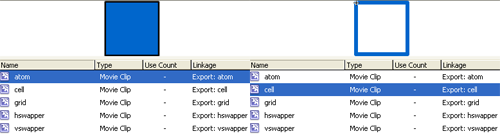
Then, the source code is:
_root.attachMovie("grid", "grid", 1, {_x:90, _y:90});
_root.createEmptyMovieClip("rays", 2);
horizontal_hover = new Array(0, 0, 0, 0, 0, 0, 0, 0);
vertical_hover = new Array(0, 0, 0, 0, 0, 0, 0, 0);
horizontal_click = new Array(0, 0, 0, 0, 0, 0, 0, 0);
vertical_click = new Array(0, 0, 0, 0, 0, 0, 0, 0);
level = new Array(0, 0, 0, 0, 0, 0, 0, 0, 0, 0, 0, 0, 0, 0, 0, 0, 0, 0, 0, 0, 0, 0, 0, 0, 0, 0, 0, 1, 0, 0, 0, 0, 0, 0, 0, 0, 0, 0, 0, 0, 0, 0, 0, 0, 0, 0, 0, 0, 0, 0, 0, 2, 0, 0, 0, 0, 0, 0, 0, 0, 0, 0, 0, 0);
for (x=0; x<64; x++) {
	if (level[x] == 1) {
		grid.attachMovie("cell", "cell_"+x, grid.getNextHighestDepth(), {_x:(x%8)*40, _y:Math.floor(x/8)*40});
	}
	if (level[x] == 2) {
		grid.attachMovie("atom", "atom"+x, grid.getNextHighestDepth(), {_x:(x%8)*40, _y:Math.floor(x/8)*40});
	}
}
for (x=1; x<=8; x++) {
	hs = grid.attachMovie("hswapper", "hswapper_"+x, grid.getNextHighestDepth(), {_x:-20, _y:40*x-20});
	hs.pos = x;
	hs.onEnterFrame = function() {
		if (this.hitTest(_root._xmouse, _root._ymouse, true)) {
			this.gotoAndStop(2);
			horizontal_hover[this.pos-1] = 1;
		} else {
			this.gotoAndStop(1);
			horizontal_hover[this.pos-1] = 0;
		}
		if (horizontal_click[this.pos-1] == 1) {
			(this.gotoAndStop(3));
		}
	};
	vs = grid.attachMovie("vswapper", "vswapper_"+x, grid.getNextHighestDepth(), {_x:40*x-20, _y:-20});
	vs.pos = x;
	vs.onEnterFrame = function() {
		if (this.hitTest(_root._xmouse, _root._ymouse, true)) {
			this.gotoAndStop(2);
			vertical_hover[this.pos-1] = 1;
		} else {
			this.gotoAndStop(1);
			vertical_hover[this.pos-1] = 0;
		}
		if (vertical_click[this.pos-1] == 1) {
			(this.gotoAndStop(3));
		}
	};
}
rays.onEnterFrame = function() {
	this.clear();
	this.lineStyle(2, 0x00ff00);
	for (x=0; x<8; x++) {
		if ((horizontal_hover[x] == 1) or (horizontal_click[x] == 1)) {
			this.moveTo(90, x*40+110);
			this.lineTo(410, x*40+110);
		}
		if ((vertical_hover[x] == 1) or (vertical_click[x] == 1)) {
			this.moveTo(x*40+110, 90);
			this.lineTo(x*40+110, 410);
		}
	}
};
_root.onMouseDown = function() {
	for (x=0; x<8; x++) {
		if (horizontal_hover[x] == 1) {
			horizontal_click[x] = 1-horizontal_click[x];
		}
		if (vertical_hover[x] == 1) {
			vertical_click[x] = 1-vertical_click[x];
		}
	}
};
Line 7: Declaring an array called level that stores the entire 8x8 grid. The top-left cell in the grid is at level[0], while the bottom-right element is at level[63]
I coded the level this way:
0: empty cell
1: ring
2: square
3 (2+1): ring + square
Line 8: Cycle scanning all 64 level array elements
Line 9: If the x-th element of level array is equal to 1...
Line 10: Attach the ring movieclip (linked as cell) as a child of grid movieclip, and put it in the right position according to x value
Lines 12-14: Same thing as lines 9-11, just using squares (linked as atom, don't ask me why do I use those stupid names)
And here it is:
Now we have all elements we need to make a working game... during next step I'll show you the most hardest part... making things move and swapping elements
Meanwhile, download the source code.
Never miss an update! Subscribe, and I will bother you by email only when a new game or full source code comes out.