

Create a game like Perfectionism with Flash – Step 5
Talking about Perfectionism game, Flash and Game development.
In this step we have to manage row/column swapping that in the previous step caused the game to crash if there was nothing to swap.
Moreover, until now I updated only the screen, while the level array containing the real game status is not updated. I’ll manage everything in this step
Swapping elements – part 2
_root.attachMovie("grid", "grid", 1, {_x:90, _y:90});
_root.createEmptyMovieClip("rays", 2);
swapping = false;
from = -1;
to = -1;
horizontal_swap = false;
vertical_swap = false;
horizontal_hover = new Array(0, 0, 0, 0, 0, 0, 0, 0);
vertical_hover = new Array(0, 0, 0, 0, 0, 0, 0, 0);
horizontal_click = new Array(0, 0, 0, 0, 0, 0, 0, 0);
vertical_click = new Array(0, 0, 0, 0, 0, 0, 0, 0);
level = new Array(0, 0, 0, 0, 0, 0, 0, 0, 0, 0, 0, 0, 0, 0, 0, 0, 0, 0, 0, 0, 0, 0, 0, 0, 0, 0, 0, 1, 0, 0, 0, 0, 0, 0, 0, 0, 0, 0, 0, 0, 0, 0, 0, 0, 0, 0, 0, 0, 0, 0, 0, 2, 0, 0, 0, 0, 0, 0, 0, 0, 0, 0, 0, 0);
for (x=0; x<64; x++) {
	if (level[x] == 1) {
		grid.attachMovie("cell", "cell_"+x, grid.getNextHighestDepth(), {_x:(x%8)*40, _y:Math.floor(x/8)*40});
	}
	if (level[x] == 2) {
		at = grid.attachMovie("atom", "atom_"+x, grid.getNextHighestDepth(), {_x:(x%8)*40, _y:Math.floor(x/8)*40});
		at.pos = x;
		at.moving = 0;
		at.onEnterFrame = function() {
			if (this.moving == 0) {
				if (swapping) {
					if (horizontal_swap) {
						if ((this.pos>=from*8) and (this.pos<=from*8+7)) {
							this.moving = (to-from)*40;
						}
						if ((this.pos>=to*8) and (this.pos<=to*8+7)) {
							this.moving = (from-to)*40;
						}
					}
					if (vertical_swap) {
						for (x=0; x<8; x++) {
							if (this.pos == x*8+from) {
								this.moving = (to-from)*40;
							}
						}
						for (x=0; x<8; x++) {
							if (this.pos == x*8+to) {
								this.moving = (from-to)*40;
							}
						}
					}
				}
			} else {
				if (this.moving>0) {
					if (horizontal_swap) {
						this._y += 10;
					}
					if (vertical_swap) {
						this._x += 10;
					}
					this.moving -= 10;
				}
				if (this.moving<0) {
					if (horizontal_swap) {
						this._y -= 10;
					}
					if (vertical_swap) {
						this._x -= 10;
					}
					this.moving += 10;
				}
				if (this.moving == 0) {
					level[this.pos] -= 2;
					this.pos = Math.round(this._x/40)+Math.round(this._y/40)*8;
					level[this.pos] += 2;
					reset_swap();
				}
			}
		};
	}
}
for (x=1; x<=8; x++) {
	hs = grid.attachMovie("hswapper", "hswapper_"+x, grid.getNextHighestDepth(), {_x:-20, _y:40*x-20});
	hs.pos = x;
	hs.onEnterFrame = function() {
		if (!swapping) {
			if (this.hitTest(_root._xmouse, _root._ymouse, true)) {
				this.gotoAndStop(2);
				horizontal_hover[this.pos-1] = 1;
				for (x=0; x<8; x++) {
					vertical_click[x] = 0;
				}
			} else {
				this.gotoAndStop(1);
				horizontal_hover[this.pos-1] = 0;
			}
			if (horizontal_click[this.pos-1] == 1) {
				(this.gotoAndStop(3));
			}
		}
	};
	vs = grid.attachMovie("vswapper", "vswapper_"+x, grid.getNextHighestDepth(), {_x:40*x-20, _y:-20});
	vs.pos = x;
	vs.onEnterFrame = function() {
		if (!swapping) {
			if (this.hitTest(_root._xmouse, _root._ymouse, true)) {
				this.gotoAndStop(2);
				vertical_hover[this.pos-1] = 1;
				for (x=0; x<8; x++) {
					horizontal_click[x] = 0;
				}
			} else {
				this.gotoAndStop(1);
				vertical_hover[this.pos-1] = 0;
			}
			if (vertical_click[this.pos-1] == 1) {
				(this.gotoAndStop(3));
			}
		}
	};
}
rays.onEnterFrame = function() {
	if (!swapping) {
		horizontal_swap = false;
		vertical_swap = false;
		this.clear();
		clicks = 0;
		this.lineStyle(2, 0x00ff00);
		for (x=0; x<8; x++) {
			if ((horizontal_hover[x] == 1) or (horizontal_click[x] == 1)) {
				this.moveTo(90, x*40+110);
				this.lineTo(410, x*40+110);
				if (horizontal_click[x] == 1) {
					clicks++;
					horizontal_swap = true;
				}
			}
			if ((vertical_hover[x] == 1) or (vertical_click[x] == 1)) {
				this.moveTo(x*40+110, 90);
				this.lineTo(x*40+110, 410);
				if (vertical_click[x] == 1) {
					clicks++;
					vertical_swap = true;
				}
			}
		}
		if (clicks == 2) {
			from = -1;
			to = -1;
			swapping = true;
			if (horizontal_swap) {
				for (x=0; x<8; x++) {
					if (horizontal_click[x] == 1) {
						if (from == -1) {
							from = x;
						} else {
							to = x;
						}
					}
				}
				if (!pieces_on_row(from) and !pieces_on_row(to)) {
					reset_swap();
				}
			}
			if (vertical_swap) {
				for (x=0; x<8; x++) {
					if (vertical_click[x] == 1) {
						if (from == -1) {
							from = x;
						} else {
							to = x;
						}
					}
				}
				if (!pieces_on_column(from) and !pieces_on_column(to)) {
					reset_swap();
				}
			}
		}
	}
};
_root.onMouseDown = function() {
	for (x=0; x<8; x++) {
		if (horizontal_hover[x] == 1) {
			horizontal_click[x] = 1-horizontal_click[x];
		}
		if (vertical_hover[x] == 1) {
			vertical_click[x] = 1-vertical_click[x];
		}
	}
};
function pieces_on_row(row) {
	res = false;
	for (x=0; x<8; x++) {
		if (level[row*8+x]>=2) {
			res = true;
		}
	}
	return (res);
}
function pieces_on_column(col) {
	res = false;
	for (x=0; x<8; x++) {
		if (level[col+x*8]>=2) {
			res = true;
		}
	}
	return (res);
}
function reset_swap() {
	for (x=0; x<8; x++) {
		horizontal_click[x] = 0;
		vertical_click[x] = 0;
		swapping = false;
	}
}
Line 65: This line is executed only when the square stopped moving. So before updating its pos value, we need to update the field array.
Remember in step 3 I coded the level this way:
0: empty cell
1: ring
2: square
3 (2+1): ring + square
So at line 65 to tell the array I don't have a square anymore I just subtract 2 to the pos-th element in the level array
Line 67: After updating the pos value according to square's position at line 66, now I add 2 to the new calculated pos-th element in the level array to tell the array I have a square at the pos-th element
Line 68: Calling a function named reset_swap that we'll see later in this script
Lines 153-155: The same reset_swap function is called if there aren't squares on the source row to swap and the destination row to swap. I can determine it with the pieces_on_row function that I will explain later in the script
Lines 167-169: And the same thing happens if I have no squares on the source column and the destination column, thanks to the pieces_on_column function
Line 184: Beginning of the pieces_on_row function, where you will pass the number of the row to check and will return true if there is at least one square on that row, false otherwise
Line 185: Declaring a res variable (the result) setting it to false
Lines 186-190: Scanning the entire row and setting res to true if a square has been found (when the element in the level array is greater of equal to 2)
Line 191: Returning res
Lines 193-201: pieces_on_column function, that works in the same way as pieces_on_row, just scanning a column
Line 202: Beginning of the reset_swap function
Lines 203-207: Turning off all clicks and setting swapping to false (again, I don't know why line 206 is inside the cycle)
And here it is: now you can safely swap rows and columns and have a completely playable level
Now, I must include in my game all the levels of the original one.
Adding levels
The game has 21 levels, and converting them in order to make them playable on my game was the most boring part
I also created two movieclips with the previous level and next level arrows, as shown here
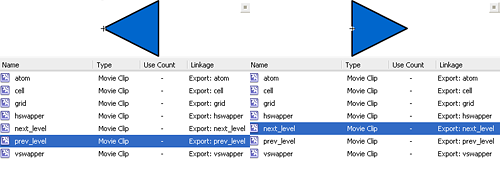
now, let's see how I changed the actionscript
_root.createEmptyMovieClip("rays",2);
_root.attachMovie("next_level","next_level",3,{_x:400, _y:450});
_root.attachMovie("prev_level","prev_level",4,{_x:50, _y:450});
level = new Array();
level[1] = new Array(0, 0, 0, 0, 0, 0, 0, 0, 0, 0, 0, 0, 0, 0, 0, 0, 0, 0, 0, 0, 0, 0, 0, 0, 0, 0, 0, 1, 0, 0, 0, 0, 0, 0, 0, 0, 0, 0, 0, 0, 0, 0, 0, 0, 0, 0, 0, 0, 0, 0, 0, 2, 0, 0, 0, 0, 0, 0, 0, 0, 0, 0, 0, 0);
level[2] = new Array(0, 0, 0, 0, 0, 0, 0, 0, 0, 0, 0, 0, 0, 0, 0, 0, 0, 0, 0, 0, 0, 0, 0, 0, 0, 0, 0, 1, 0, 0, 0, 0, 0, 0, 0, 0, 0, 0, 0, 0, 0, 0, 0, 0, 0, 0, 0, 0, 0, 0, 2, 0, 0, 0, 0, 0, 0, 0, 0, 0, 0, 0, 0, 0);
level[3] = new Array(0, 0, 0, 0, 0, 0, 0, 0, 0, 0, 2, 0, 0, 2, 0, 0, 0, 0, 0, 0, 0, 0, 0, 0, 0, 0, 1, 0, 0, 1, 0, 0, 0, 0, 0, 0, 0, 0, 0, 0, 0, 0, 0, 0, 0, 0, 0, 0, 0, 0, 0, 0, 0, 0, 0, 0, 0, 0, 0, 0, 0, 0, 0, 0);
level[4] = new Array(0, 0, 0, 0, 0, 0, 0, 0, 0, 2, 0, 0, 0, 0, 2, 0, 0, 0, 0, 0, 0, 0, 0, 0, 0, 0, 1, 0, 0, 1, 0, 0, 0, 0, 0, 0, 0, 0, 0, 0, 0, 0, 0, 0, 0, 0, 0, 0, 0, 0, 0, 0, 0, 0, 0, 0, 0, 0, 0, 0, 0, 0, 0, 0);
level[5] = new Array(0, 0, 0, 0, 0, 0, 0, 0, 0, 0, 0, 2, 0, 2, 0, 0, 0, 0, 0, 1, 2, 0, 0, 0, 0, 0, 1, 0, 1, 0, 0, 0, 0, 0, 0, 0, 0, 0, 0, 0, 0, 0, 0, 0, 0, 0, 0, 0, 0, 0, 0, 0, 0, 0, 0, 0, 0, 0, 0, 0, 0, 0, 0, 0);
level[6] = new Array(0, 0, 0, 0, 0, 0, 0, 0, 0, 0, 0, 0, 0, 0, 0, 0, 0, 0, 0, 0, 0, 0, 0, 0, 0, 0, 1, 1, 2, 0, 0, 0, 0, 0, 0, 1, 2, 2, 0, 0, 0, 0, 0, 0, 0, 0, 0, 0, 0, 0, 0, 0, 0, 0, 0, 0, 0, 0, 0, 0, 0, 0, 0, 0);
level[7] = new Array(0, 0, 0, 0, 0, 0, 0, 0, 0, 0, 0, 0, 0, 0, 0, 0, 0, 0, 0, 0, 0, 0, 0, 0, 1, 0, 2, 1, 0, 0, 0, 0, 0, 0, 2, 1, 0, 0, 2, 1, 0, 2, 0, 0, 0, 0, 2, 1, 0, 0, 0, 0, 0, 0, 0, 0, 0, 0, 0, 0, 0, 0, 0, 0);
level[8] = new Array(0, 0, 0, 0, 0, 0, 0, 0, 1, 2, 0, 1, 2, 0, 0, 0, 0, 0, 0, 1, 2, 0, 2, 2, 1, 0, 0, 1, 2, 0, 1, 1, 0, 0, 0, 1, 2, 0, 0, 0, 1, 1, 0, 1, 2, 0, 2, 0, 2, 2, 0, 1, 2, 0, 2, 1, 0, 0, 0, 0, 0, 0, 0, 0);
level[9] = new Array(2, 0, 0, 0, 2, 0, 0, 0, 0, 0, 0, 0, 0, 0, 0, 0, 0, 0, 1, 0, 0, 0, 0, 0, 0, 0, 1, 1, 1, 0, 0, 2, 0, 0, 0, 0, 1, 1, 0, 0, 0, 0, 0, 0, 0, 0, 0, 0, 0, 0, 0, 0, 0, 0, 0, 0, 2, 0, 0, 2, 0, 0, 0, 2);
level[10] = new Array(2, 0, 0, 0, 0, 2, 0, 0, 0, 0, 0, 0, 1, 1, 1, 0, 2, 0, 0, 2, 1, 0, 0, 2, 0, 1, 1, 1, 1, 0, 0, 2, 2, 0, 1, 2, 0, 0, 2, 2, 2, 0, 1, 1, 1, 0, 0, 0, 0, 0, 0, 0, 1, 1, 0, 0, 2, 2, 0, 0, 0, 2, 0, 0);
level[11] = new Array(1, 2, 0, 0, 0, 0, 2, 1, 0, 0, 1, 2, 1, 0, 0, 2, 0, 0, 2, 1, 0, 1, 0, 2, 1, 0, 0, 2, 1, 0, 2, 0, 2, 2, 0, 1, 0, 0, 1, 0, 0, 1, 0, 0, 2, 2, 0, 1, 2, 0, 1, 0, 0, 2, 1, 0, 0, 1, 2, 0, 2, 1, 0, 0);
level[12] = new Array(0, 0, 0, 0, 0, 0, 0, 0, 0, 2, 0, 0, 0, 0, 0, 0, 0, 0, 0, 0, 0, 0, 2, 0, 0, 0, 1, 0, 0, 1, 0, 0, 0, 0, 0, 0, 0, 0, 0, 0, 0, 0, 0, 0, 0, 0, 0, 0, 0, 0, 0, 0, 0, 0, 0, 0, 0, 0, 0, 0, 0, 0, 0, 0);
level[13] = new Array(0, 0, 0, 0, 0, 0, 0, 0, 0, 0, 0, 0, 0, 0, 0, 0, 0, 0, 0, 0, 0, 0, 0, 0, 0, 0, 2, 1, 1, 0, 0, 0, 0, 0, 0, 2, 1, 0, 0, 0, 0, 0, 0, 0, 2, 0, 0, 0, 0, 0, 0, 0, 0, 0, 0, 0, 0, 0, 0, 0, 0, 0, 0, 0);
level[14] = new Array(2, 2, 0, 2, 0, 0, 0, 2, 0, 0, 0, 0, 0, 0, 0, 0, 0, 0, 1, 1, 1, 1, 0, 0, 2, 0, 1, 2, 0, 1, 0, 0, 0, 0, 1, 0, 0, 1, 0, 0, 0, 0, 1, 1, 1, 1, 0, 0, 2, 0, 0, 2, 0, 0, 0, 0, 2, 2, 0, 2, 0, 0, 0, 2);
level[15] = new Array(2, 2, 2, 0, 0, 0, 0, 2, 2, 0, 0, 0, 0, 0, 0, 2, 2, 0, 1, 1, 1, 1, 0, 2, 0, 0, 1, 0, 0, 1, 0, 0, 0, 0, 1, 0, 0, 1, 0, 0, 0, 1, 1, 0, 0, 1, 1, 0, 0, 0, 0, 0, 0, 0, 0, 0, 2, 0, 0, 0, 0, 2, 2, 2);
level[16] = new Array(2, 0, 2, 2, 0, 0, 0, 2, 2, 0, 0, 0, 0, 0, 0, 2, 0, 2, 1, 0, 0, 1, 0, 2, 0, 0, 1, 0, 0, 1, 0, 0, 0, 0, 1, 0, 0, 1, 0, 0, 0, 0, 1, 1, 1, 1, 0, 0, 0, 0, 0, 0, 0, 0, 0, 0, 2, 0, 0, 0, 0, 0, 0, 2);
level[17] = new Array(0, 2, 2, 0, 1, 0, 2, 2, 2, 2, 0, 2, 0, 0, 2, 0, 1, 2, 1, 0, 1, 1, 0, 0, 0, 0, 1, 0, 0, 0, 0, 0, 2, 2, 1, 1, 1, 2, 0, 0, 2, 0, 0, 0, 1, 0, 0, 0, 1, 2, 0, 0, 1, 0, 2, 0, 1, 2, 0, 0, 1, 0, 1, 1);
level[18] = new Array(1, 2, 0, 0, 0, 0, 0, 1, 1, 0, 0, 0, 0, 0, 2, 2, 1, 0, 1, 2, 0, 0, 0, 2, 0, 0, 1, 2, 0, 1, 0, 2, 0, 2, 1, 2, 0, 1, 0, 0, 2, 0, 0, 0, 0, 1, 2, 1, 0, 0, 0, 0, 0, 0, 2, 1, 1, 2, 0, 0, 0, 0, 2, 1);
level[19] = new Array(1, 1, 2, 0, 0, 2, 1, 1, 1, 2, 0, 2, 0, 1, 2, 2, 1, 0, 1, 2, 2, 1, 0, 0, 2, 2, 1, 0, 2, 1, 2, 2, 1, 1, 1, 2, 1, 1, 0, 0, 2, 2, 0, 0, 2, 0, 2, 1, 0, 0, 2, 1, 0, 2, 2, 1, 1, 0, 2, 1, 1, 2, 0, 1);
level[20] = new Array(0, 2, 1, 0, 0, 2, 2, 2, 2, 1, 1, 1, 0, 0, 1, 0, 2, 0, 2, 0, 2, 2, 1, 0, 1, 2, 2, 1, 1, 0, 0, 2, 1, 0, 0, 0, 1, 2, 0, 0, 1, 0, 0, 0, 1, 1, 1, 2, 1, 2, 0, 0, 0, 0, 0, 2, 1, 1, 0, 0, 2, 1, 2, 2);
level[21] = new Array(0, 2, 2, 2, 2, 2, 1, 0, 0, 2, 1, 1, 1, 2, 1, 1, 2, 2, 1, 2, 2, 2, 0, 0, 1, 1, 1, 2, 1, 1, 1, 0, 1, 2, 2, 2, 2, 2, 1, 0, 0, 2, 1, 1, 1, 2, 1, 0, 0, 2, 2, 2, 1, 2, 0, 0, 1, 1, 1, 1, 0, 0, 0, 0);
current_level = 1;
play_level(current_level);
function play_level(current_level) {
	_root.attachMovie("grid","grid",1,{_x:90, _y:90});
	swapping = false;
	from = -1;
	to = -1;
	nextlevel = false;
	prevlevel = false;
	horizontal_swap = false;
	vertical_swap = false;
	horizontal_hover = new Array(0, 0, 0, 0, 0, 0, 0, 0);
	vertical_hover = new Array(0, 0, 0, 0, 0, 0, 0, 0);
	horizontal_click = new Array(0, 0, 0, 0, 0, 0, 0, 0);
	vertical_click = new Array(0, 0, 0, 0, 0, 0, 0, 0);
	for (x=0; x<64; x++) {
		if (level[current_level][x] == 1 or level[current_level][x] == 3) {
			grid.attachMovie("cell","cell_"+x,grid.getNextHighestDepth(),{_x:(x%8)*40, _y:Math.floor(x/8)*40});
		}
		if (level[current_level][x] == 2 or level[current_level][x] == 3) {
			at = grid.attachMovie("atom", "atom_"+x, grid.getNextHighestDepth(), {_x:(x%8)*40, _y:Math.floor(x/8)*40});
			at.pos = x;
			at.moving = 0;
			at.onEnterFrame = function() {
				if (this.moving == 0) {
					if (swapping) {
						if (horizontal_swap) {
							if ((this.pos>=from*8) and (this.pos<=from*8+7)) {
								this.moving = (to-from)*40;
							}
							if ((this.pos>=to*8) and (this.pos<=to*8+7)) {
								this.moving = (from-to)*40;
							}
						}
						if (vertical_swap) {
							for (x=0; x<8; x++) {
								if (this.pos == x*8+from) {
									this.moving = (to-from)*40;
								}
							}
							for (x=0; x<8; x++) {
								if (this.pos == x*8+to) {
									this.moving = (from-to)*40;
								}
							}
						}
					}
				} else {
					if (this.moving>0) {
						if (horizontal_swap) {
							this._y += 10;
						}
						if (vertical_swap) {
							this._x += 10;
						}
						this.moving -= 10;
					}
					if (this.moving<0) {
						if (horizontal_swap) {
							this._y -= 10;
						}
						if (vertical_swap) {
							this._x -= 10;
						}
						this.moving += 10;
					}
					if (this.moving == 0) {
						level[current_level][this.pos] -= 2;
						this.pos = Math.round(this._x/40)+Math.round(this._y/40)*8;
						level[current_level][this.pos] += 2;
						reset_swap();
					}
				}
			};
		}
	}
	for (x=1; x<=8; x++) {
		hs = grid.attachMovie("hswapper", "hswapper_"+x, grid.getNextHighestDepth(), {_x:-20, _y:40*x-20});
		hs.pos = x;
		hs.onEnterFrame = function() {
			if (!swapping) {
				if (this.hitTest(_root._xmouse, _root._ymouse, true)) {
					this.gotoAndStop(2);
					horizontal_hover[this.pos-1] = 1;
					for (x=0; x<8; x++) {
						vertical_click[x] = 0;
					}
				} else {
					this.gotoAndStop(1);
					horizontal_hover[this.pos-1] = 0;
				}
				if (horizontal_click[this.pos-1] == 1) {
					(this.gotoAndStop(3));
				}
			}
		};
		vs = grid.attachMovie("vswapper", "vswapper_"+x, grid.getNextHighestDepth(), {_x:40*x-20, _y:-20});
		vs.pos = x;
		vs.onEnterFrame = function() {
			if (!swapping) {
				if (this.hitTest(_root._xmouse, _root._ymouse, true)) {
					this.gotoAndStop(2);
					vertical_hover[this.pos-1] = 1;
					for (x=0; x<8; x++) {
						horizontal_click[x] = 0;
					}
				} else {
					this.gotoAndStop(1);
					vertical_hover[this.pos-1] = 0;
				}
				if (vertical_click[this.pos-1] == 1) {
					(this.gotoAndStop(3));
				}
			}
		};
	}

	rays.onEnterFrame = function() {
		if (!swapping) {
			horizontal_swap = false;
			vertical_swap = false;
			this.clear();
			clicks = 0;
			this.lineStyle(2,0x00ff00);
			for (x=0; x<8; x++) {
				if ((horizontal_hover[x] == 1) or (horizontal_click[x] == 1)) {
					this.moveTo(90,x*40+110);
					this.lineTo(410,x*40+110);
					if (horizontal_click[x] == 1) {
						clicks++;
						horizontal_swap = true;
					}
				}
				if ((vertical_hover[x] == 1) or (vertical_click[x] == 1)) {
					this.moveTo(x*40+110,90);
					this.lineTo(x*40+110,410);
					if (vertical_click[x] == 1) {
						clicks++;
						vertical_swap = true;
					}
				}
			}
			if (clicks == 2) {
				from = -1;
				to = -1;
				swapping = true;
				if (horizontal_swap) {
					for (x=0; x<8; x++) {
						if (horizontal_click[x] == 1) {
							if (from == -1) {
								from = x;
							} else {
								to = x;
							}
						}
					}
					if (!pieces_on_row(from) and !pieces_on_row(to)) {
						reset_swap();
					}
				}
				if (vertical_swap) {
					for (x=0; x<8; x++) {
						if (vertical_click[x] == 1) {
							if (from == -1) {
								from = x;
							} else {
								to = x;
							}
						}
					}
					if (!pieces_on_column(from) and !pieces_on_column(to)) {
						reset_swap();
					}
				}
			}
		}
	};
}
_root.onMouseDown = function() {
	for (x=0; x<8; x++) {
		if (horizontal_hover[x] == 1) {
			horizontal_click[x] = 1-horizontal_click[x];
		}
		if (vertical_hover[x] == 1) {
			vertical_click[x] = 1-vertical_click[x];
		}
	}
	if (nextlevel) {
		grid.removeMovieClip();
		current_level++;
		play_level(current_level);
	}
	if (prevlevel) {
		grid.removeMovieClip();
		current_level--;
		play_level(current_level);
	}
};
function pieces_on_row(row) {
	res = false;
	for (x=0; x<8; x++) {
		if (level[current_level][row*8+x]>=2) {
			res = true;
		}
	}
	return (res);
}
function pieces_on_column(col) {
	res = false;
	for (x=0; x<8; x++) {
		if (level[current_level][col+x*8]>=2) {
			res = true;
		}
	}
	return (res);
}

function reset_swap() {
	for (x=0; x<8; x++) {
		horizontal_click[x] = 0;
		vertical_click[x] = 0;
		swapping = false;
	}
}
next_level.onEnterFrame = function() {
	if (this.hitTest(_root._xmouse, _root._ymouse, true)) {
		this.gotoAndStop(2);
		nextlevel = true;
	} else {
		nextlevel = false;
		this.gotoAndStop(1);
	}
};
prev_level.onEnterFrame = function() {
	if (this.hitTest(_root._xmouse, _root._ymouse, true)) {
		this.gotoAndStop(2);
		prevlevel = true;
	} else {
		prevlevel = false;
		this.gotoAndStop(1);
	}
};
Lines 5-25: All 21 levels of the game have been transformed into arrays
Line 26: Declaring a variable called current_level that will host the current level number. It will obviously start at 1
Line 27: Calling the function play_level that will render the current_level-th level and make it playable
Line 28: Beginning of the play_level function. As you can see, almost all previously written code has been embedded into the play_level function
Line 33: Declaring a boolean variable called nextlevel that will tell me if I have to go to the next level or not
Line 34: Same thing with the previous level
Line 42: In this line, and wherever we had level[elelement] now we have level[current_level][element].
Line 213: When the mouse is pressed, I am checking if nextlevel is true (the player clicked on the next level button, as you will see later)
Line 214: Removing the grid movieclip, with all its children
Line 215: Increasing current_level variable
Line 216: call the play_level function with the new current_level value
Lines 218-222: Same thing as lines 213-217, but going to the previous level
Line 250: Function that the next_level movieclip will execute at every frame
Line 251: If the mouse is over it...
Line 252: Showing the second frame of the movieclip (to make a rollover effect)
Line 253: Setting nextlevel to true (I am ready to advance level and I will do it if the player clicks the mouse)
Line 254: If the mouse is not over it...
Line 255: Setting nextlevel to false
Line 256: Showing the first frame of the movieclip
Lines 259-267: Same thing as lines 250-258, but managing prev_level movieclip
And that's it! Now you can play all 21 levels!
The only thing still to be made is the moves/scoring system
Meanwhile download the sources.
Never miss an update! Subscribe, and I will bother you by email only when a new game or full source code comes out.