Creation of a sortable list with Ajax tutorial

One interesting Web 2.0 effect is the sortable list, and we are going to make one in less than five minutes thanks to Prototype and script.aculo.us libraries.

Prototype is a JavaScript Framework that aims to ease development of dynamic web applications and can be downloaded here, while script.aculo.us (scriptaculous from now on) provides you with easy-to-use, cross-browser user interface JavaScript libraries to make your web sites and web applications fly and can be downloaded here.

This tutorial is based on zen of shen's pseudocode found at script.aculo.us Ajax Sortable Lists Tutorial.

This tutorial will show real code and a step by step guide through MySql, php and Ajax coding in order to create your sortable list.

Of course your hosting plan must allow you to use php and MySql, so refer to your hosting provider if you don't know if your web space supports those features.

MYSQL

First we need to work on the database to create the table that will store our list. I made the simplest table ever, because it's just an example, but you can add as many columns as you want, in order to fit the table to your needs.

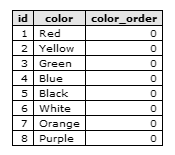
My table only has three fields: the primary key id, the name of the list element color and the core column, the one where you will save the order of the elements, called, in a lack of creativity, color_order.

MySQL:
  1. CREATE TABLE `sortable` (
  2. `id` INT NOT NULL AUTO_INCREMENT PRIMARY KEY ,
  3. `color` TEXT NOT NULL ,
  4. `color_order` INT NOT NULL
  5. ) ENGINE = MYISAM ;

Once we have the table, let's populate it. I am doing it directly with MySql, but again you are free to code your own application to populate it

MySQL:
  1. INSERT INTO `sortable` ( `color` )
  2. VALUES (
  3. 'Red'
  4. ), (
  5. 'Yellow'
  6. ), (
  7. 'Green'
  8. ), (
  9. 'Blue'
  10. ), (
  11. 'Black'
  12. ), (
  13. 'White'
  14. ), (
  15. 'Orange'
  16. ), (
  17. 'Purple'
  18. )

Now the table looks like this one

and our MySql task is completed. Now, let's write some php and html

PHP/HTML

PHP:
  1. <?php
  2.  
  3. $connection = mysql_connect (localhost, "your_login", "your_password");
  4. mysql_select_db("your_db",$connection) or die("no db found");
  5.  
  6. $sql = "select * from sortable order by color_order asc";
  7. $result = mysql_query($sql)or die(mysql_error());
  8. $number = mysql_num_rows($result);
  9.  
  10. for($x=1;$x<=$number;$x++){
  11.     $row = mysql_fetch_array($result);
  12.     $list.= "         <li id=\"item_$row[id]\">$row[color]</li>\n";
  13. }
  14.  
  15. ?>
  16. <!DOCTYPE html PUBLIC "-//W3C//DTD HTML 4.01 Transitional//EN">
  17. <html>
  18.     <head>
  19.         <script type="text/javascript" src="prototype-1.6.0.2.js"></script>
  20.         <script type="text/javascript" src="scriptaculous/src/scriptaculous.js"></script>
  21.         <style type = "text/css">
  22.             ul#sortlist{list-style:none;padding:0px;margin:0px}
  23.             ul#sortlist li{padding:5px;border:1px solid #666666;margin:1px;font:normal 10px verdana;width:200px;color:#666666;background-color:#f0f0f0;cursor:move}
  24.             #output{font:bold 10px verdana}
  25.         </style>
  26.     </head>
  27.     <body>
  28.         <ul id = "sortlist">
  29. <?php echo $list; ?>
  30.         </ul>
  31.         <div id = "output">Drag to sort your favourite colors</div>
  32.         <script type="text/javascript">
  33.             Sortable.create('sortlist',{
  34.                 onUpdate:function(){
  35.                     new Ajax.Updater('output','sort.php',{onComplete:function(request){}, parameters:Sortable.serialize('sortlist'), evalScripts:true, asynchronous:true})
  36.                 }
  37.             }) 
  38.         </script>
  39.     </body>
  40. </html>

Lines 3-4: Connecting to the database. If you don't know your username, password or database name, ask them to your hosting provider

Lines 6-8: Query to get all the colors ordered by their color order

Lines 10-13: Building the list from the result of the query just executed

Lines 19-20: Including Prototype and scriptaculous sources. Remember to include Prototype before Scriptaculous and also remember to change the path if you placed the scripts in a different location

Lines 21-25: Giving the list a touch of style

Lines 28-30: Displaying the list

Line 31: Creation of the div element to display Ajax output

Lines 32-38: Calling the Sortable.create function to initialize the sortable list. You can find more information about Sortable.create function in the scriptaculous wiki at this link

And the php/html is over.

Now, I should made the Ajax part. But it's already made by Prototype thanks to the Ajax.Updater object, so I just have to make the sort.php script called in the Ajax.Updater object

You can find more information about the Ajax.Updater object in the API Docs pages at this link

So it's basically php again, but I will call this part the Ajax part

AJAX

Create a file called sort.php and write:

PHP:
  1. <?php
  2.  
  3. $connection = mysql_connect ("62.149.150.49", "Sql92833", "0015025a");
  4. $db= mysql_select_db("Sql92833_5",$connection);
  5.  
  6. foreach ($_POST[sortlist] as $varname => $varvalue) {
  7.     $sql = "update sortable set color_order = ".mysql_real_escape_string($varname)." where id = ".mysql_real_escape_string($varvalue);
  8.     $result = mysql_query($sql) or die(mysql_error());
  9. }
  10.  
  11. echo "You just updated it on ".date("Y-m-d H:i:s");
  12.  
  13. ?>

Lines 3-4: Connecting to the database, just like in the php/html part

Lines 6-9: Scanning all the sortlist array passed with POST method by the Sortable.create and the Ajax.Updater and updating the color_order column of the sortable table according to sortlist names and values

Line 11: displaying an output message.

And that's it! Drag colors as you want, then reload the page in the iframe and the colors will be in the same position you just ordered... unless someone else changed their order while the page was reloading

That's all... hope you will find it useful as I did.

Improve the blog rating this post
Tell me what do you think about this post. I'll write better and better entries.
1 Star2 Stars3 Stars4 Stars5 Stars (8 votes, average: 4.63 out of 5)
Loading ... Loading ...

21 Responses to “Creation of a sortable list with Ajax tutorial”

  1. Sunil Patel on April 22nd, 2008 12:31 pm

    Awesome! Thats pretty cool. But, considering its Ajax you didnt really need an iframe :O

  2. Emanuele Feronato on April 22nd, 2008 12:43 pm

    Sure, but I did not want people to reload the entire page to see it saves color order

  3. Sunil Patel on April 22nd, 2008 2:23 pm

    No, thats not what I mean. You can use AJAX to fetch the data from the page and use innerHTML to modify the contents of the page - without reloading. Although I suppose thats getting more complicated than the tutorial should be. Sorry, I love the tutorial.

  4. Emanuele Feronato on April 22nd, 2008 3:14 pm

    That’s exactly what the script does.

    You never have to reload the page, the database is updated as soon as you release the list element, without reloading anything.

  5. Icecool on April 22nd, 2008 5:21 pm

    What is ajax Explain please?

  6. Harmen on April 22nd, 2008 5:28 pm

    PHP part is not safe…
    Go to: http://www.emanueleferonato.com/stuff/sortable/sort.php

    Change line 7 to:
    $sql = “UPDATE sortable SET color_order = ‘” . mysql_real_escape_string($varname) . “‘ WHERE id = ‘” . mysql_real_escape_string($varvalue) . “‘”;

    What if $varvalue is this: ” || a = a ?
    Take a look what happens:
    UPDATE sortable SET color_order = $varname WHERE id = ” || a = a
    If id is empty or if a = a, would return all id’s

  7. Emanuele Feronato on April 22nd, 2008 6:53 pm

    fixed

    thank you

  8. Sunil Patel on April 22nd, 2008 7:06 pm

    AJAX is basically any server side scripting language + javascript. And it allows scripts to run without the need to refresh the page or naviate away,

  9. Sodaplayer on April 23rd, 2008 6:10 am

    Hope ROYGBP will still be there when I come back

  10. Shaun on April 23rd, 2008 7:05 pm

    YOU SHOULD MAKE THAT INTO A GAME

  11. juha on May 5th, 2008 6:33 pm

    This seems neat!
    If I use this on table that have thousands of rows, but visible only 30 on the page does the ajax update each row’s order number or just couple?

    Does this work if data is presented on a multicolumn html table?

  12. jai on May 12th, 2008 2:28 pm

    ajax is cool especially if you have dreamweaver cs3 with spry widgets (using ajax) you can add, such as accordions and drop-down menus and tabs.
    have you used spry widgets before or do you just code it all?

  13. flo on June 6th, 2008 6:35 pm

    One of the BEST tutorials for sortable list with Ajax!!!

    … and i readed a lot of them.

    Thank you so much Emanuele!

  14. Marc Falk on June 18th, 2008 1:19 am

    Thanks Emanuele!

    The best tutorial so far, and I’ve too read and crawled a lot of these, damn. Anyway, can you explain how I use this with div’s and not ul and li’s ?

    Help is appreciated!

    Tanks!
    Marc

  15. Ame on June 25th, 2008 6:58 pm

    Is there an application that can be purchased that will do something like this for a business intranet?

  16. Rob on July 31st, 2008 8:37 pm

    How would you go about incorporating this code into a form?

    I am curious to know..

  17. Jessica on August 7th, 2008 3:42 am

    I currently have a JSP page containing a and s with a inside each to let the user re-sort their items’ orders. I’m trying to now use Ajax to replace this old way to sort items. But I don’t really know how.

    question 1: can I still use or does it have to be converted to in order to use Ajax ? I tried to keep my table, but it doesn’t seem to work.

    question 2: when I tried using and my list is long, the list items do not stay within the that i want the items to stay within. Is there something i can do to keep those items within the but of course being able to drag drop those items to resort and to update my database?

  18. Jessica on August 7th, 2008 3:45 am

    Sorry… re-posting same comment/question above…

    I currently have a JSP page containing a TABLE and TRs with a SELECT inside each TR to let the user re-sort their items’ orders. I’m trying to now use Ajax to replace this old way to sort items. But I don’t really know how.

    question 1: can I still use TABLE and TRs or does it have to be converted to UL and LIs in order to use Ajax ? I tried to keep my table, but it doesn’t seem to work.

    question 2: when I tried using UL and LIs and my list is long, the list items do not stay within the DIV box that i want the items to stay within. Is there something i can do to keep those items within the DIV box, but of course being able to drag drop those items to resort and to update my database?

  19. Erik on August 26th, 2008 2:18 am

    is it possible to use this with table rows?
    and if so what changes do I need to make to the code besides changins all li’s to tr’s and ul’s to table’s?

  20. Kelly on November 17th, 2008 7:14 pm

    I’ve copied all the code (tried Zen of Shens too) and for some reason the update script never gets executed. There are no js errors it just doesn’t execute the update script. Can you suggest anything I should look for?

  21. Alex Langley on November 21st, 2008 2:49 am

    Very helpful. More clear then zenofshen.

Leave a Reply