
What to do when you are looking for pixel graphics for your game and run out of ideas

You are trying to design some decent pixel graphics for your tile based game and all you have is a Photoshop document with some crap on it.

How many times did it happen in your life?

Here they are a couple of clues to help you in this task.

Once upon a time…

Look what I found on Wikipedia:

“RPG Maker (1st release: December 17, 1992) is a program that allows users to create their own role-playing games. Most versions include a tile set based map editor, (tilesets are called chipsets in pre-XP versions), a simple scripting language for scripting events, and a battle editor. All versions include initial premade tilesets, characters, and events which can be used in creating new games. An interesting feature of the PC Versions of RPG Maker programs is that a user can create new tilesets and characters, and add any new graphics he/she wants. Several sites have developed, dedicated to helping users share their creations.”

Now the question is: so what?

Well, read once again this: “An interesting feature of the PC Versions of RPG Maker programs is that a user can create new tilesets and characters, and add any new graphics he/she wants”.

So if you google for rpg maker chipset images or rpg maker tileset images, you will find a lot of sites with free tile based pixel art for your use or inspiration.

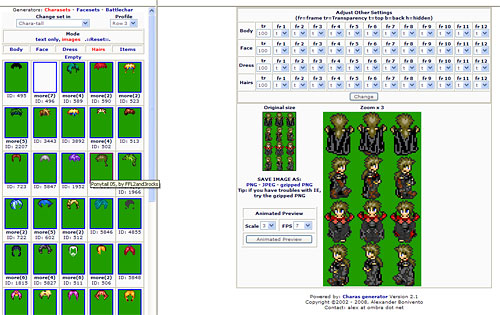
And it’s not over… there is a site called Charas containing an online character generator.

As you can see from the picture, it’s very easy to have your character with a 4 way walking animation in a matter of seconds, with thousands of options to custom it.
I hope this hint will make you save some time when you are looking for pixel graphics and run out of creativity. It saved mine for sure.

Improve the blog rating this post
Tell me what do you think about this post. I'll write better and better entries.
1 Star2 Stars3 Stars4 Stars5 Stars (No Ratings Yet)
Loading ... Loading ...

7 Responses to “What to do when you are looking for pixel graphics for your game and run out of ideas”

  1. EagleVision on June 18th, 2008 3:14 pm

    Hi everybody!
    This is very interesting, sadly, I don’t use pixel graphics.

    But I might be able to use it sooner or later. :D

    EV

  2. Jerry on June 18th, 2008 3:33 pm

    Thank you, this will come in real handy.

  3. Rich on June 18th, 2008 4:04 pm

    I agree that these graphics can be great to get you up and started really quickly, but you should not use them in your own games without checking the license first - lots of them are not free to use, and the artists should not have their work used without permission *especially* if you then go and stuff a MochiAd on the front of your game and make money from it, that is just lame.

  4. Emanuele Feronato on June 19th, 2008 8:13 am

    Sure, rich.

    But in most cases you can manage the license with a small paypal donation.

    I am using some of them in a game I am developing, and the author asked me $10 (ten dollars)

    Moreover, sprites generated with the character editor are free for any use.

  5. souled on June 19th, 2008 5:24 pm

    Hmm… although it is tempting to create graphics like this, I’d hate it if everyone started doing it - games would be too similar and boring.

    I like the look of hand drawn stuff, in Flash or others; just not “game makers”, it ruins the creative art side. :(

  6. JDog on June 20th, 2008 3:41 pm

    How do you load pixel graphics from a paint document into flash, whilst still having transparency. I sorted out the anti-aliasing problem myself.

  7. Flamingchook on July 4th, 2008 9:34 am

    @JDog: Import to stage, click on it and go

    Modify->Bitmap->Trace Bitmap

    you can play arround wih the settings but the settings

    1
    1
    pixles
    Many Corners

    give an almost exact representation

    then all you do is remove the background colour, and do whay you will with the sprites.

Leave a Reply