

Make a game like Lumines with Flash
Talking about Lumines game, Actionscript 2, Flash and Game development.
I have to admit it… I got completely addicted to this game… so I decided to make my own Flash version.
If you don’t know what is Lumines, it’s a casual game you can download from Steam.
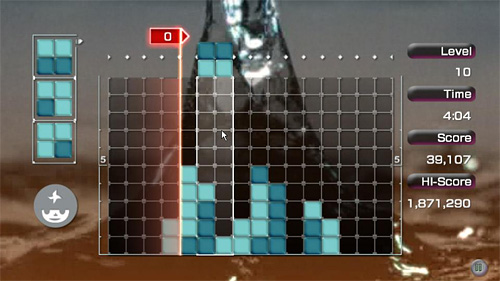
The game is simple: control squares made by 2×2 bricks of different colors falling from the top like in Tetris… as you create 2×2 squares in same color, the vertical time line wipes them away from left to right.
In this first part, I’ll create the game field, and the square made by 2×2 bricks, that can be moved and rotated with arrow keys.
There is nothing really hard… but I couldn’t make the entire 2×2 square as a single movieclip because later in the game the square can “break” if it falls over existring bricks.
So every 2×2 square is formed by four movieclips.
There is only one object in the library at the moment… a movieclip linked as brick that contains the graphics for the empty grid at frame 1 and the graphics for colored bricks at frames 2-5
Then, I wanted the bricks to move and rotate when the player taps (press and released) arrow keys, not just when he presses them.
The code is completely commented:
// declaring some setup variables
// number of horizontal cells
grid_width = 16;
// number of vertical cells
grid_height = 10;
// size of the cell
tile_size = 30;
// offset in pixels fron the left side of the stage
x_offset = 10;
// offset in pixels from the top side of the stage
y_offset = 10;
// number of different colors that can be displayed in a brick
different_colors = 3;
// boolean values saying if I should wait for the left (or right, up...) key to be released
// this is used to make the player move bricks tapping arrow keys instead of just pressing them
wait_left = false;
wait_right = false;
wait_up = false;
wait_down = false;
// array containing the game field data
field = new Array();
// array containing the bricks I can move
moveable_bricks = new Array();
// initializing and drawing the play field
for (x=0; x
	moveable_bricks[x] = brk.getDepth();
}
// main function, to be executed at every frame
_root.onEnterFrame = function() {
	// this is how I detect if a key was tapped:
	// when it's pressed, I wait for it to be released (in this case: not pressed)
	// thanks to the wait_ variable
	if (Key.isDown(Key.LEFT)) {
		wait_left = true;
	} else {
		if (wait_left) {
			// if the left key has been tapped, move the four bricks on the left
			for (x=0; x<4; x++) {
				// this "if" is used to determine if the bricks are still inside the game field
				if ((_root["brick_"+moveable_bricks[x]]._x-x_offset)/tile_size-_root["brick_"+moveable_bricks[x]].pos%2>0) {
					_root["brick_"+moveable_bricks[x]]._x -= tile_size;
				}
			}
			// reset variable, now I must wait again for a key to be pressed
			wait_left = false;
		}
	}
	// same routine for the right key
	if (Key.isDown(Key.RIGHT)) {
		wait_right = true;
	} else {
		if (wait_right) {
			for (x=0; x<=3; x++) {
				if ((_root["brick_"+moveable_bricks[x]]._x-x_offset)/tile_size-_root["brick_"+moveable_bricks[x]].pos%2<14) {
					_root["brick_"+moveable_bricks[x]]._x += tile_size;
				}
			}
			wait_right = false;
		}
	}
	// when the DOWN arrow is pressed, I must rotate the bricks clockwise
	// block 0: moves to the right and becomes block 1
	// block 1: moves down and becomes block 3
	// block 2: moves up and becomes block 0
	// block 3: moves to the left and becomes block 2
	if (Key.isDown(Key.DOWN)) {
		wait_down = true;
	} else {
		if (wait_down) {
			for (x=0; x<4; x++) {
				switch (_root["brick_"+moveable_bricks[x]].pos) {
				case 0 :
					_root["brick_"+moveable_bricks[x]].pos = 1;
					_root["brick_"+moveable_bricks[x]]._x += tile_size;
					break;
				case 1 :
					_root["brick_"+moveable_bricks[x]].pos = 3;
					_root["brick_"+moveable_bricks[x]]._y += tile_size;
					break;
				case 2 :
					_root["brick_"+moveable_bricks[x]].pos = 0;
					_root["brick_"+moveable_bricks[x]]._y -= tile_size;
					break;
				case 3 :
					_root["brick_"+moveable_bricks[x]].pos = 2;
					_root["brick_"+moveable_bricks[x]]._x -= tile_size;
					break;
				}
			}
			wait_down = false;
		}
	}
	// when the UP arrow is pressed, I must rotate the bricks counter-clockwise
	// block 0: moves down the right and becomes block 2
	// block 1: moves to the left and becomes block 0
	// block 2: moves to the right and becomes block 3
	// block 3: moves up and becomes block 1
	if (Key.isDown(Key.UP)) {
		wait_up = true;
	} else {
		if (wait_up) {
			for (x=0; x<4; x++) {
				switch (_root["brick_"+moveable_bricks[x]].pos) {
				case 0 :
					_root["brick_"+moveable_bricks[x]].pos = 2;
					_root["brick_"+moveable_bricks[x]]._y += tile_size;
					break;
				case 1 :
					_root["brick_"+moveable_bricks[x]].pos = 0;
					_root["brick_"+moveable_bricks[x]]._x -= tile_size;
					break;
				case 2 :
					_root["brick_"+moveable_bricks[x]].pos = 3;
					_root["brick_"+moveable_bricks[x]]._x += tile_size;
					break;
				case 3 :
					_root["brick_"+moveable_bricks[x]].pos = 1;
					_root["brick_"+moveable_bricks[x]]._y -= tile_size;
					break;
				}
			}
			wait_up = false;
		}
	}
};
and here it is the result: move and rotate the square with arrow keys.
here it is the source code for you to experiment.
Never miss an update! Subscribe, and I will bother you by email only when a new game or full source code comes out.