Create a Flash Game like Nano War
Some days ago I played a bit Nano War.
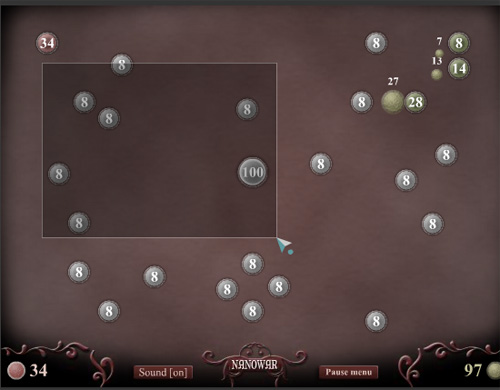
It’s an interesting RTS, and pretty easy to delvelop.
In this part we’ll analyze the unit selection system.
In Nano War your units are circles, and this helps a lot because it’s very easy to determine collisions knowing radius and center.
Anyway, you can select units in these ways:
Click on an unselected unit: you select the unit
Click on an selected unit: you keep selecting the unit (good!)
Click outside an unit: you deselect all units
Click outside an unit and drag mouse: you select all units whose center is inside the shape you are drawing bby dragging the mouse.
In this example, 10 units are randomly placed around the screen, avoiding them to overlap.
Then, you can select and deselect them in the way explained before.
Units are made by a circle object linked as “sphere” with two frames: frame 1 is a black circle and represents the unit when deselected, while frame 2 is a red circle and represents the unit when selected.
Now, a little commented actionscript:
1 2 3 4 5 6 7 8 9 10 11 12 13 14 15 16 17 18 19 20 21 22 23 24 25 26 27 28 29 30 31 32 33 34 35 36 37 38 39 40 41 42 43 44 45 46 47 48 49 50 51 52 53 54 55 56 57 58 59 60 61 62 63 64 65 66 67 68 69 70 71 72 73 74 75 76 77 78 79 80 81 82 83 84 85 86 87 88 89 90 91 92 93 94 95 96 97 98 99 100 101 102 103 104 105 106 107 108 109 110 111 112 113 114 115 116 117 118 119 120 121 122 | // variable stating if I clicked the mouse
clicked = false;
// variable stating if I am dragging the mouse
dragging = false;
// 10 times loop
for (x=1; x<=10; x++) {
// can_place = true: I can place the unit / false: I can't
// initializing it to false to force entering the while loop
can_place = false;
// while loop to look for an empty space where to place the unit
while (!can_place) {
// setting can_place to true
// you can always place an unit until you can't...
can_place = true;
// generating random x and y positions, and random width
px = Math.floor(Math.random()*400)+50;
py = Math.floor(Math.random()*300)+50;
w = Math.floor(Math.random()*20)+30;
// scanning all already placed units
for (y=x-1; y>=1; y--) {
// determining the distance between the y-th unit and the one I am trying to place
dist_x = px-_root["sphere_"+y]._x;
dist_y = py-_root["sphere_"+y]._y;
distance = Math.ceil(Math.sqrt(dist_x*dist_x+dist_y*dist_y));
// this is the minimum distance I want between two units:
// the sum of both radiuses plus 20 pixels
min_distance = (w+_root["sphere_"+y]._width)/2+20;
// if the new unit would be too close to an existing one...
if (distance<min_distance) {
// set can_place to false
can_place = false;
}
}
}
// I exited the while loop so I can place the unit...
// ... let's do it...
nano = _root.attachMovie("sphere", "sphere_"+x, x, {_x:px, _y:py, _width:w, _height:w});
// function to be executed at every frame for every unit
nano.onEnterFrame = function() {
// if I am dragging...
if (dragging) {
// if the center of the unit is inside the square I made dragging the mouse...
if ((this._x>Math.min(click_x, posx)) and (this._x<Math.max(click_x, posx)) and (this._y>Math.min(click_y, posy)) and (this._y<Math.max(click_y, posy))) {
// ... mark the unit as selected
this.gotoAndStop(2);
}
else {
// else mark the unit as unselected
this.gotoAndStop(1);
}
}
};
// start with unselected unit
nano.gotoAndStop(1);
}
// creation of a movieclip where I will draw the square made by mouse dragging
_root.createEmptyMovieClip("selmovie",_root.getNextHighestDepth());
// function to be executed every time I press the mouse
_root.onMouseDown = function() {
// saving mouse coordinates
click_x = _root._xmouse;
click_y = _root._ymouse;
// I clicked
clicked = true;
};
// function to be executed every time I move the mouse
_root.onMouseMove = function() {
// if I clicked...
if (clicked) {
// I am dragging
dragging = true;
// saving acutal x and y mouse positions
posx = _root._xmouse;
posy = _root._ymouse;
// clearing the movieclip I am about to draw on
selmovie.clear();
// setting the line style of the movieclip
selmovie.lineStyle(2,0x000000,50);
// setting the filling of the movieclip
selmovie.beginFill(0xff0000,30);
// drawing a square connecting the point I first clicked on and the point I am currently on
selmovie.moveTo(click_x,click_y);
selmovie.lineTo(posx,click_y);
selmovie.lineTo(posx,posy);
selmovie.lineTo(click_x,posy);
selmovie.lineTo(click_x,click_y);
// at this time the square is filled, and you can omit next line
selmovie.endFill();
}
};
// function to be executed every time I release the mouse
_root.onMouseUp = function() {
// clearing the drag square
selmovie.clear();
// saving mouse position
xmouse = _root._xmouse;
ymouse = _root._ymouse;
// if I am not dragging...
if (!dragging) {
// scanning for all units
for (x=1; x<=10; x++) {
// determining distance between the units and the mouse
dist_x = _root["sphere_"+x]._x-xmouse;
dist_y = _root["sphere_"+x]._y-ymouse;
distance = Math.floor(Math.sqrt(dist_x*dist_x+dist_y*dist_y));
// if the distance is less than unit's radius...
if (distance<_root["sphere_"+x]._width/2) {
// mark the unit as selected
_root["sphere_"+x].gotoAndStop(2);
}
else {
// else mark the unit as unselected
_root["sphere_"+x].gotoAndStop(1);
}
}
}
// I am not clicking
clicked = false;
// I am not dragging
dragging = false;
}; |
And this is the result… easy to play… just select unit clicking on them or dragging.
Deselect by clicking elsewhere.
I would like to spend two words on beginFill() that I never covered on the blog…
beginFill() indicates the beginning of a new drawing path. If an open path exists and it has a fill associated with it, that path is closed with a line and then filled.
During next part we’ll manage unit invasion.
Meanwhile download the source code.

They can be easily customized to meet the unique requirements of your project.


(20 votes, average: 3.60 out of 5)


This post has 13 comments
Xodus
Hey, im really excited about this game concept, i cant wait for the next tut. Good post.
Btw, i suddenly noticed that you dont have the line “if you liked this post, you can buy me a beer (or two)” Why did you take it off?
Questo
maybe you can fix a small bug that doesn’t matter thats in the actual game:
If you have a unit selected while it is taken over it still has a line coming out of it (it can’t shoot or do anything for you anything but still)
FrozenHaddock
Oh, nice.
I played this, a lot. I was -hoooooked-
I look forward to the rest of this.
Mr Sun
Thanks for the tutorial :)
I always wondered how I could do a selection sort of thing in actionscript
Gabriel Bianconi
Great Tut!
JDog
Looks good !
samedi
this game is a similar one with a twist
http://www.newgrounds.com/portal/view/449961
i like both ones… like tic tac toe on steroids
My problem with these games are that after you have found the right strategy its impossibles to loose.
I think explaining how to create an AI for a game like this would be a great tutorial
badben
Hi,
I’m surprised to see my game on this website :).
Regards.
Flash Tutorials | AS3, AS2 Flash game tutorials roundup part 2 | Lemlinh.com
[...] Read more [...]
Flash obstacle avoidance prototype : Emanuele Feronato
[...] the project there are 20 random obstacles placed in the same way as seen on Create a Flash Game like Nano War, and an object linked as runner running through [...]
cssdesigner
Wow I make this step-by-step and I played with it!
Nice tutorial!
Actionscript tutorial for RTS/Strategy Flash Game | PencilGym.com
[...] Have a deeper read over at the source article: http://www.emanueleferonato.com/2008/08/05/create-a-flash-game-like-nano-war/#more-381 [...]
future systemz
Where the next tutorial?