Understanding pixels and meters with Box2D and how to select an object with mouse – part 2
Filed Under Actionscript 3, Box2D, Flash, Game design • 9 Comments
Ok, time to learn once for all how does Box2D manages object sizes, and how to set them right when working with AS3
In previous step I used a 90×90 pixel crate.
The problem is Box2D does not works with pixels because it does not have a native pixel render engine. In other words, Box2D does not display anything on the screen, it just calculates position and rotation of all bodies. There is a built-in debug renderer but, as the name suggests, it should be used only for debugging purposes.
That’s why in the Update function (lines 63-72) I have to “manually” place every crate in the right place according to its position and rotation (lines 67-69).
Box2D works in meters, and there is an unwritten rule saying 1 meter = 30 pixels. That’s why at line 16 I have the pixels_in_a_meter variable.
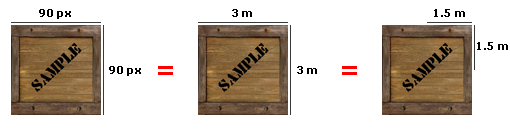
So when I think about the crate, I don’t have to think about it as a 90px crate but a 90/30 = 3 meters crate.
But if you look at lines 47 – 48 you’ll see I am assigning 1.5 (meters) to crate_width and crate_height variables. Why?
Because Box2D to create a box (but you will find the same concept applied to other shapes) uses SetAsBox (line 50) that wants width and height relative to the registration point placed in its center.
So that’s how you should think about pixels when you work with BOX2D:
I hope this will help you saving some time…

They can be easily customized to meet the unique requirements of your project.
9 Responses to “Understanding pixels and meters with Box2D and how to select an object with mouse – part 2”
Leave a Reply
Trackbacks
-
Dragging objects with Box2D Flash : Emanuele Feronato on
November 20th, 2008 7:10 pm
[...] is ideally the next part after Understanding pixels and meters with Box2D and how to select an object with mouse – part 2, but it’s so important understanding how to drag objects with Box2D that I decided to change the [...]
-
Understanding Box2D debug draw : Emanuele Feronato on
December 10th, 2008 4:23 pm
[...] (line 29) sets the drawing scale of the rendering. As seen in Understanding pixels and meters with Box2D and how to select an object with mouse – part 2, one meter is equal to 30 pixels, so setting m_drawscale to 30 allows me to use pixel [...]
-
Understanding custom polygons in Box2D : Emanuele Feronato on
December 19th, 2008 7:48 pm
[...] of the yet-to-be-created polygon, I am placing the vertex one unit (a meter, in this case, refer to Understanding pixels and meters with Box2D and how to select an object with mouse – part 2 for more information) above it. The 0 represents the horizontal distance from the center (positive: [...]
-
Box2D: tutorial for the absolute beginners : Emanuele Feronato on
January 27th, 2009 11:39 pm
[...] Lines 15-16 : Defining the upper and lower corners of the environment bounding box, in meters. 1 meter = 30 pixels. So our box has sides made by 6000 pixels. They’re pretty too much for a single-screen project, but if you are using scrolling, it could be useful to set up a big environment. For more information about pixels and meters refer to Understanding pixels and meters with Box2D and how to select an object with mouse – part 2. [...]
- Get up to $100,000 for your next Flash game with Mochi GAME Developer Fund
- Create a dynamic content animated footer ad for your site in just 9 jQuery lines – 17 lines version
- Sell sitelocked version of your Flash games and even .fla sources to Free Online Games
- Protect your work from ActionScript code theft with SWF Protector
- Create a dynamic content animated footer ad for your site in just 9 jQuery lines
- Understanding Box2D’s one-way platforms, aka CLOUDS
- Triqui MochiAds Arcade plugin for WordPress upgraded to 1.2
- Box2D Flash game creation tutorial – part 2
- 11 Flash isometric engines you can use in your games
- Monetize your Flash games with GamesChart
- Create a Lightbox effect only with CSS - no javascript needed
- Flash game creation tutorial - part 1
- Create a Flash Racing Game Tutorial
- Flash game creation tutorial - part 2
- Make a Flash game like Flash Element Tower Defense - Part 2
- Flash game creation tutorial - part 3
- Make a Flash game like Flash Element Tower Defense - Part 1
- Create a flash draw game like Line Rider or others - part 1
- Triqui MochiAds Arcade plugin for WordPress official page
- Create a flash artillery game - step 1
- Flash game creation tutorial – part 5.2 (4.88/5)
- Create a flash artillery game – step 1 (4.79/5)
- Create a Flash Racing Game Tutorial (4.76/5)
- Create a flash artillery game – step 2 (4.74/5)
- Create a survival horror game in Flash tutorial – part 1 (4.73/5)
- Creation of a Flash arcade site using WordPress – step 2 (4.73/5)
- Flash game creation tutorial – part 2 (4.71/5)
- Flash game creation tutorial – part 1 (4.70/5)
- Create a flash draw game like Line Rider or others – part 1 (4.69/5)
- Creation of a platform game with Flash – step 2 (4.68/5)


hey emanuele,
can you make a tutorial on how to make a game like
‘enless zombie rampage’? (by diseased prodcutions)
hello Sir
Can you please make tutorial of game like myrethia found on kongregate.com
Sir,if i make a flash game with two different language version(two .swf file but same game content),then what will happen?
A.Can I get two Mochi ID?
B.I have to use one Mochi ID in one version,and the other one is unuseful
Please tell me:)
Thanks
I am studying your tutorial, it is great,thanks to your good work.
i found that box2d world actually works in pixel units.
;==================================================
var worldAABB: b2AABB = new b2AABB ();
worldAABB.lowerBound.Set (0, 0);
worldAABB.upperBound.Set (stage.stageWidth, stage.stageHeight);
_b2World = new b2World (worldAABB, new b2Vec2 (0.0, 10), true);
// debug draw start
var m_sprite:Sprite;
m_sprite = new Sprite();
addChild(m_sprite);
var dbgDraw:b2DebugDraw = new b2DebugDraw();
var dbgSprite:Sprite = new Sprite();
m_sprite.addChild(dbgSprite);
dbgDraw.m_sprite=m_sprite;
dbgDraw.m_drawScale=1;
dbgDraw.m_alpha=1;
dbgDraw.m_fillAlpha=0.5;
dbgDraw.m_lineThickness=1;
dbgDraw.m_drawFlags=0xFFFFFFFF; _b2World.SetDebugDraw(dbgDraw);
//flash stage
var mcCircle: Sprite = new McCircle();//McCircle is a movie clip in the library identified as McCircle
mcCircle.width = 100;
mcCircle.height = 100;
mcCircle.x = 100;
mcCircle.y = 100;
addChild (mcCircle);
//box2d world
var rect: Rectangle = mcCircle.getBounds (mcCircle);
var circleDef: b2CircleDef = new b2CircleDef ();
circleDef.radius = rect.width / 2;
circleDef.density = 1;
circleDef.friction = 0.5;
circleDef.restitution = 1.1;
var bodyDef: b2BodyDef = new b2BodyDef ();
bodyDef.position.Set (mcCircle.x, mcCircle.y);
bodyDef.angle = mc.rotation * (Math.PI / 180);
bodyDef.userData = mcCircle;
var body: b2Body = _b2World.CreateBody (bodyDef);
body.CreateShape (circleDef);
body.SetMassFromShapes ();
;==================================================
but…calculations from box2d tend to be really slow when its units are set to 1:1 pixel ratio.
what i do is simply scale all units when inputing into box2d world…then i scale them all up when translating back to flash stage.
e.g.:
;==================================================
var _scale: Number = 0.1
var worldAABB: b2AABB = new b2AABB ();
worldAABB.lowerBound.Set (0, 0);
worldAABB.upperBound.Set (stage.stageWidth * _scale, stage.stageHeight * _scale);
_b2World = new b2World (worldAABB, new b2Vec2 (0.0, 10), true);
// debug draw start
var m_sprite:Sprite;
m_sprite = new Sprite();
addChild(m_sprite);
var dbgDraw:b2DebugDraw = new b2DebugDraw();
var dbgSprite:Sprite = new Sprite();
m_sprite.addChild(dbgSprite);
dbgDraw.m_sprite=m_sprite;
dbgDraw.m_drawScale=1/_scale;
dbgDraw.m_alpha=1;
dbgDraw.m_fillAlpha=0.5;
dbgDraw.m_lineThickness=1;
dbgDraw.m_drawFlags=0xFFFFFFFF; _b2World.SetDebugDraw(dbgDraw);
;and…
;…
circleDef.radius = rect.width / 2 * _scale;
;…
bodyDef.position.Set (mcCircle.x * _scale, mcCircle.y * _scale);
;…
;==================================================