Papervision3D for the absolute beginners
You should all know Papervision3D, one of the best open source 3D engine for the Flash platform.
The biggest problem with this library, in my opinion, is the lack of basics tutorials explaining how does it work.
Just like what’s happening with Box2D, this is scaring a lot of developers because they just think it’s impossible to make it work.
This is a very basic tutorials, for the absolute beginners, that will explain how to download, install and make Papervision3D work.
First, you will find the last version of the library at http://code.google.com/p/papervision3d/.
We are going to create a Flash project, so download the zip file and not the swc one.
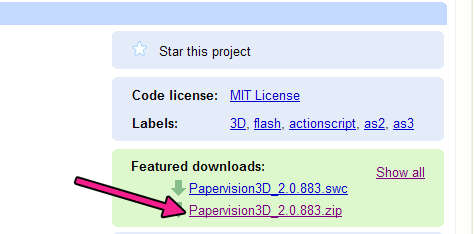
Unzip the org folder: it’s the one containing all needed files.
Then you just have to create your fla file in the same folder that contains the org folder you just unzipped.
Then let’s create the “hello world” of Papervision3D
1 2 3 4 5 6 7 8 9 10 11 12 13 14 15 16 17 18 19 20 | package { import flash.display.Sprite; import org.papervision3d.cameras.Camera3D; import org.papervision3d.render.BasicRenderEngine; import org.papervision3d.scenes.Scene3D; import org.papervision3d.view.Viewport3D; import org.papervision3d.objects.primitives.Plane; public class papervision extends Sprite { public var viewport:Viewport3D = new Viewport3D(); public var scene:Scene3D = new Scene3D(); public var camera:Camera3D = new Camera3D(); public var renderer:BasicRenderEngine = new BasicRenderEngine(); public var plane:Plane = new Plane(); public function papervision() { addChild(viewport); scene.addChild(plane); renderer.renderScene(scene, camera, viewport); } } } |
Now, let’s look at a Papervision3D project as a movie
Lines 2-7: importing necessary libraries
Line 9: creating a Viewport3D variable. Think about it as a nice cinema screen where you see what happens into the world of Papervision3D. The movie will start in a minute, just grab some junk food and a can of cola.
Line 10: creating a Scene3D variable. This is the world itself… so now you have a world and a screen to see what happens into the world
Line 11: creating a Camera3D variable. Like in a movie, the camera sees what happens in the world, and shows it on the screen
Line 12: creating a BasicRenderEngine variable. This is the “action” command the director gives when he wants te camera to capture the action
Line 13: creating a Plane variable. A default plane is our first and only actor
Line 15: adding the viewport to the stage
Line 16: adding the plane to the scene
Line 17: render the scene
And this the amazing result :)
Download the source code with all needed libraries.

They can be easily customized to meet the unique requirements of your project.


(12 votes, average: 3.83 out of 5)


This post has 23 comments
steve
If you’re interested in learning more, then take a look at these:
http://www.madvertices.com/
(with videos and source code)
Cyclone103
Cool!!! I had wanted to try to make my game in 3d, and now it actually has a chance. Thanks!
Endyl
This is a very useful tutorial on the very basics of papervision3D, might come in handy, when I’ll try to turn to 3D in flash actively.
Thanks!
[OFF]
My avast! antivirus alerts about your easytabs.js being infected by trojan malware. You might want to check out, and let me/us know if it’s a falsy alert or not.
(anyone else gets this with other antivirus software?)
[/OFF]
diamondTearz
Thanks. This is very useful. I enjoy papervision3D Tuts and am happy to see a recent one.
Questo
That just blew my mind. Nice tutorial
Colin Douch
Wow Ive been up for creating a 3D Game since I started learning Box2D definatly be following these tutorials
links for 2009-05-09 | diamondTearz
[...] Papervision3D for the absolute beginners : Emanuele Feronato (tags: papervision3d) [...]
Yasu
Nice Tutorial.
vitaLee
“The biggest problem with this library, in my opinion, is the lack of basics tutorials explaining how does it work.” – I have to truely diagree with you on this one. It’s completely untrue.
There are tons of valueble tutorials over the internet (with lots of in and outs) suitable for beginners and andvanced users.
People don’t be scared of papervision. It’s not as spooky as the box2d creature. :D
Jack
Nice tutorial indeed.
Can i do it with as2. I’m a newbie in as3.
so plz help me is it possible with as2?
Dean Mellis
““The biggest problem with this library, in my opinion, is the lack of basics tutorials explaining how does it work.†– I have to truely diagree with you on this one. It’s completely untrue.”
vitaLee, If you have links to tutorials and examples that are for Papervision 2 and for Flash, not Flex, please share.
Tobias
@Dean
http://www.dehash.com/?p=152 shows many tutorials for example…
Papervision3D: understanding Plane object - part 5 : Emanuele Feronato
[...] the uncommented code has been explained from part 1 to 4 1 2 3 4 5 6 7 8 9 10 11 12 13 14 15 16 17 18 19 20 21 22 23 24 25 26 27 28 29 30 31 32 33 34 [...]
David Beckwith
How is papervsion.as connected to papervision.fla? I’m assuming that papervision.as is imported into papervision.fla? But i don’t see how.
nirav
Yes. I can’t see how the FLA publishes that wireframe. There is no AS code or symbols in the library.
nirav
I see it now. It’s connect to the papervision.as file in the document class in publish settings. Thanks for posting up the tutorial.
Alex T.
Hi, Im really new to as3 & pv3d, and as i tried your tutorial some problems still occur.
1037: Packages cannot be nested.
Lilla
can you help me plz? where can i find the second and the third part of this tutorial?…it’s a grate one…i would like to see the continuation. thank’s
Hackaback
nice tutorial..and the comments are helpful too
Getting Started with Papervision 3D: Tutorials for Beginners. Part 2 | Papervision Tutorials
[...] Papervision 3D for the Absolute Beginners [...]
I am Flash - GaanZa
[...] to papervision tutorials that you would like to check out: Basic starting tutorials: http://www.emanueleferonato.com/2009/05/08/papervision3d-for-the-absolute-beginners/ All good tutorial: http://papervision2.com/ Simple 3D carousel: [...]
unique
Can someone please help me, I follow the steps, but for some reason I always get a compiler error saying packages can’t be nested. My file is in the folder with the org folder.
systemsky
Thanks Man!