How to make a Media RSS feed to help your games compete for SEO
Hi again, Michael Edlavitch here, ready to give away my secret to improving SEO placement for your games.
Just do me a favor and visit my blog, Top Five Blog or Swag Games as your donation :)
What is a Media RSS feed?
Media RSS was originally created by Yahoo so that people could send in there Videos, Images, etc.
More importantly: Google uses MRSS feeds for there Video Search. Google offers a format for video sitemaps, but those don’t seem to work like MRSS feeds.
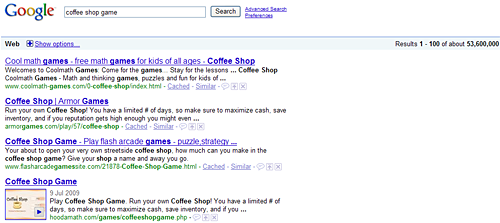
Have you noticed lately, that when you search for a game on google, some sites have a thumbnail image of the game? That is because some arcades are sending in MRSS feeds.
First of all, it took me forever to to figure out how to make one that actually works, reading numerous articles and many attempts. I did this first with Hooda Math, and it took only a few hours for the thumbnails to start showing up, probably because Hooda Math has a PR5.
Recently, I tried it with my sister site to Top Five Blog, Top Five Games, and it took about a week, but then I noticed my video thumbnails showing up on Google Web Search or at least in there video search.
Just today, I took the time to make a MRSS for my newest arcade: Swag Games, I’m pretty excited about this site, because the only Niche is my preferences for games. Finally I get to have some freedom in sponsoring and producing any type of games. So check to see if that MRSS worked in a few days, a week, or a month.
The example I will walk you all through is for “Line Bounder” a game recently featured on Addicting Games and “Coffee Shop Game” which I already had at about #6 on google search, but this bumped it up to #3, plus it now has a thumbnail next to it.
Feel free to google search the games for yourself, they should show up with thumbnails depending where in the world you are located.
Ok, here is an example of the feed.xml I use:
Math Games
http://hoodamath.com/games/
Cool Math Games like Bloxorz, Coffee Shops, Super Stackers 2. Fun Games get you an A Plus in Math.
Thu, 09 Jul 2009 23:00:00 EST
-
Line Bounder
http://hoodamath.com/games/linebounder.php
Play Line Bounder. Turn based strategy game, your aim is to reach enemy ground and stop him from reaching yours.
http://hoodamath.com/games/linebounder.php
Line Bounder
Play Line Bounder. Turn based strategy game, your aim is to reach enemy ground and stop him from reaching yours.
-
Coffee Shop Game
http://hoodamath.com/games/coffeeshopgame.php
Play Coffee Shop Game. Run your own Coffee Shop! You have a limited # of days, so make sure to maximize cash, save inventory, and if you reputation gets high enough you might even get a visit from a special guest. :D
http://hoodamath.com/games/coffeeshopgame.php
Coffee Shop Game
Play Coffee Shop Game. Run your own Coffee Shop! You have a limited # of days, so make sure to maximize cash, save inventory, and if you reputation gets high enough you might even get a
visit from a special guest.
Now I will take you through this step by step.
1) Save it as feed.xml
Let’s take a closer look at the code
Extremely, necessary, since Yahoo came up with the format. Needs to be closed at the end with
</rss>
You can have these separated into different categories, but I put them all under my main games page, rather than separating them out. Needs to be closed at the end with </channel>
Math Games This is the Title of my Main Games Page.
http://hoodamath.com/games/
this is the URL for my Games page, notice no quotations.
Cool Math Games like Bloxorz, Coffee Shops, Super Stackers 2. Fun Games get you an A Plus in Math. This is the exact same description located in the <meta tag> of my main games page.
IMPORTANT: Match up as much as possible to please the Google Bots
ALSO: You still want all of your urls located on your sitemap.xml
Thu, 09 Jul 2009 23:00:00 EST Again very important to update, every time you change your feed, it is also very hard to get this right, please feel free to copy my format, also the FEED Validator I recommend can check this for you.
This will be used for each individual game page. Remember to close each one with </item>
Line Bounder Again, make sure it matches the <title> tags on the URL you are about to add to <item>
http://hoodamath.com/games/coffeeshopgame.php
This is the URL for your page containing the .swf file. Whatever it says in your browser when you go to your game page.
Play Line Bounder. Turn based strategy game, your aim is to reach enemy ground and stop him from reaching yours. Ok, I know this sounds redundant, but remember to match your <meta description> and also make sure you have different <meta description> on all of your pages.
http://hoodamath.com/games/linebounder.php I repeated the URL again. Why? I don’t know, just do it. If you want more details read the Webmonkey link at the bottom of this post.
Finally we are at the meat of your new MRSS feed.
This <tag> does not use a closing </tag> all of the info is kept between the < and />
url="http://hoodamath.com/games/linebounder.swf"
Now we are finally at the .swf Flash file. Notice how it is in the /games/ folder. This is wrong, because I keep it in a /flash/ folder, but the MRSS feed seemed to work on Google anyways. I recommend doing it correctly though, and I probably will fix it soon, like in the next year.
fileSize="981080"
This is the Size of your .swf in bytes. This is optional I think, but I HIGHLY RECOMMEND IT. Give the Google Bots as much information as you can and they are more likely to include your pages in Google Search.
type="application/x-shockwave-flash"
Just add it, again giving full disclosure to Google, it also probably tells Google, that it needs to be played at your site, rather than in Google Video, this is VERY GOOD for you.
width="550" height="550"
Again take the time to give Google as much information as you can.
medium="video"
Well do you want it in Google Video or not?
/>
REMEMBER to close up the <tag>
Line Bounder
Just Get use to repeating everything twice, it may work without it, but why take the chance.
Play Line Bounder. Turn based strategy game, your aim is to reach enemy ground and stop him from reaching yours.
repeating twice again...

Oh, So Important, This will be the image that if you are lucky will show up in Google Web Search, with a higher rank than you probably deserve for your game page.
url="http://www.hoodamath.com/images/g-linebounder.gif"
I would get this right! Also notice I used .gif, I don't recommend, because google likes .jpg
width="160" height="120"
These are the minimum dimensions Google states on their site.
I HIGHLY RECOMMEND, you take the time to make a .jpg that is 160x120 and make sure it looks like something you would click.
/>
Again this is a different kind of <tag> so close it up properly. Also, notice everything is contained in quotations.

Finally, close up the <item>, but you aren't done on to the next game and the next game.
I included a second example, Coffee Shop Game.

DON'T FORGET TO CLOSE UP ALL YOUR OPEN <TAGS>
2) Upload it to the url of your site, for example: http://hoodamath.com/feed.xml
3) Validate it at: FEED Validator.
4) Submit it to Google, Yahoo, and where ever else you want to.
I highly recommend using Google Webmaster Tools to keep track of your MRSS feed's progress.
**Sources: I know there was one article out there that was a big help and I believe it was from Webmonkey, which can explain each  in more detail. Also Yahoo has a tutorial on Media RSS that even Google Help Recommends.
Now that the secret is out, and there goes a ton of SEO. Please donate by visiting my blog, Top Five Blog or my new arcade, Swag Games, or both.
