

Flash Decompiler Trillix review
Talking about Actionscript 3, Flash and Reviews.
When you compile a Flash project, you know you create a swf file.
Such file is created according to the SWF File Format Specification so you can create your IDE and develop your Flash projects without using the official Adobe Flash CS4 package.
Since you can compile your own swf file, there is also a way to decompile it.
Flash Decompiler Trillix is the most advanced tool to convert swf to fla, with full support of Flash 10 and AS3.
Legal and ethical dilemma
As you must know, different Countries have different laws about copyrights. Even Wikipedia does not provide enough information about reverse engineering legality.
On the ethical side, you should respect developers’ work and don’t try to decompile their projects and “get inspired” from their code or use their graphics.
But it would be a big hypocrisy saying I’d never take a look to someone else’s secrets. If I could access to Coca-Cola formula or Google’s PageRank algorithm, I would.
Definitively.
My personal experience
As some of you know, I am the co-founder of a web company… you know… hosting, web apps, web sites, SEO and all those things you normally can’t talk about with women.
Recently we acquired a new customer with a Flash site. A well designed Flash site, I have to say. The problem was the company behind the project did not survive the economy breakdown and closed some months ago.
The customer needed some minor changes in the site and renewing the domain (and changing the hosting) but he never got a reply at the emails he sent to the old company owners.
That’s what happen when you rely on cheap companies (hint)
So we made two proposals, at two (very) different prices
1 – Redesigning the site making it as close as possible to the original one
2 – Decompiling the site and making the required changes
You can imagine the choice and finally I am ready to start the review
Decompiling test
I am testing this tool on the movie you can see at Pure AS3 magnifying effect using Displacement Map Filter.
The interface is just brilliant:

you can preview the movie, look at its properties and browsing its assets at the same time.
You can export single images as well as chuncks of codes, but the most interesting feature is the conversion from swf to fla.
And that’s what I did
Do you remember my original library?
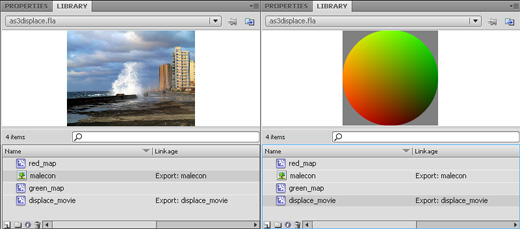
well, the one created by Flash Decompiler Trillix is even more organized…

but the most interesting test is performed on the scripts:
this is the original one:
package {
	import flash.display.Sprite;
	import flash.display.Bitmap;
	import flash.display.BitmapData;
	import flash.filters.DisplacementMapFilter;
	import flash.geom.Point;
	import flash.events.Event;
	public class as3displace extends Sprite {
		// creating a new Bitmap variable
		var the_bitmap:Bitmap = new Bitmap();
		// creating a variable to store "malecon" image.
		// notice you MUST specify width and height or you'll get an error
		// 1136: Incorrect number of arguments.  Expected 2.
		var the_image=new malecon(500,373);
		// creating a variable to store the "displace_movie" movieclip
		var the_displace:displace_movie=new displace_movie();
		// creating a point at the upper left corner
		var starting_point:Point=new Point(0,0);
		// creating a 100x100 bitmap data, that will contain the gradient movieclip
		var displacement_map:BitmapData=new BitmapData(100,100,true,0x808080);
		// creating the displacement map filter
		var displacement_filter:DisplacementMapFilter=new DisplacementMapFilter(displacement_map,starting_point,1,2,50,50,"color",0x000000,1);
		public function as3displace() {
			// assigning the "the_image" data (the photo) as bitmapData of "the_bitmap" variable
			the_bitmap.bitmapData=the_image;
			// in the displacement map, draw (copy) the content of "the_displace" movieclip
			// (the gradient sphere)
			displacement_map.draw(the_displace);
			// placing "the_bitmap" on the stage
			addChild(the_bitmap);
			// listener that triggers at every frame
			addEventListener(Event.ENTER_FRAME, onFrame);
		}
		public function onFrame(e:Event) {
			// changing the starting point of the displacement map filter according to mouse position
			starting_point.x=mouseX-50;
			starting_point.y=mouseY-50;
			displacement_filter.mapPoint=starting_point;
			// applying the displacement filter to "the_bitmap" (the photo)
			the_bitmap.filters=[displacement_filter];
		}
	}
}
and this is the one generated by Flash Decompiler Trillix
package
{
    import flash.display.*;
    import flash.events.*;
    import flash.filters.*;
    import flash.geom.*;

    public class as3displace extends flash.display.Sprite
    {
        public function as3displace()
        {
            this.the_bitmap = new flash.display.Bitmap();
            this.the_image = new malecon(500, 373);
            this.the_displace = new displace_movie();
            this.starting_point = new flash.geom.Point(0, 0);
            this.displacement_map = new flash.display.BitmapData(100, 100, true, 8421504);
            this.displacement_filter = new flash.filters.DisplacementMapFilter(this.displacement_map, this.starting_point, 1, 2, 50, 50, "color", 0, 1);
            super();
            this.the_bitmap.bitmapData = this.the_image;
            this.displacement_map.draw(this.the_displace);
            addChild(this.the_bitmap);
            addEventListener(flash.events.Event.ENTER_FRAME, this.onFrame);
            return;
        }

        public function onFrame(arg1:flash.events.Event):*
        {
            this.starting_point.x = mouseX - 50;
            this.starting_point.y = mouseY - 50;
            this.displacement_filter.mapPoint = this.starting_point;
            this.the_bitmap.filters = [this.displacement_filter];
            return;
        }

        var displacement_filter:flash.filters.DisplacementMapFilter;

        var the_displace:displace_movie;

        var the_image:*;

        var starting_point:flash.geom.Point;

        var displacement_map:flash.display.BitmapData;

        var the_bitmap:flash.display.Bitmap;
    }
}
It’s a bit different, but it works the same way
Final considerations
A personal license costs $79.95, both for PC and Mac OS, and all in all is a must-have if you are a Flash developer. Besides strange cases like the web company one I discussed before, it’s really a tool that can save you hours and hours should your fla file get damaged or lost.
Really recommended. For more information and purchase options, go to www.flash-decompiler.com.
Never miss an update! Subscribe, and I will bother you by email only when a new game or full source code comes out.