

flixel for absolute beginners – part 2
Talking about Actionscript 3, Flex and Game development.
In flixel for absolute beginners I showed you how to complile a flixel project with Flex Builder 3.
I was ready to make an “hello world” but I received some emails from people asking for a FlashDevelop step by step installation.
It seems FlashDevelop is more popular than FlexBuilder 3… anyway here it is:
First, you need to download the free Flex 3 SDK and unzip it anywhere in your hard disk.
Then, open FlashDevelop and follow these steps:

Select Project -> New Project

Select AS3 Project, give your project a name and a path
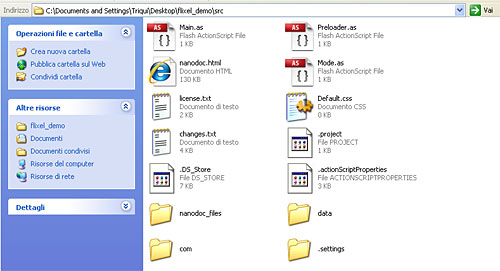
Copy the entire content of the flixel package into the src folder FlashDevelop just created

In the Project window, delete Main.as

Set the Always Compile property of Mode.as

Test the project

If it’s you first time running the project, set the Flex SDK Location attribute according to the path of your SDK, then test the project again, and you’ll see the demo platformer.
Never miss an update! Subscribe, and I will bother you by email only when a new game or full source code comes out.