

Understanding and creating on the fly Photoshop Color Swatches with php
Talking about Photoshop and Php.
This tutorial won’t cover basic Color Swatches information… I suggest you to follow Photoshop’s help if you don’t know what I am talking about.
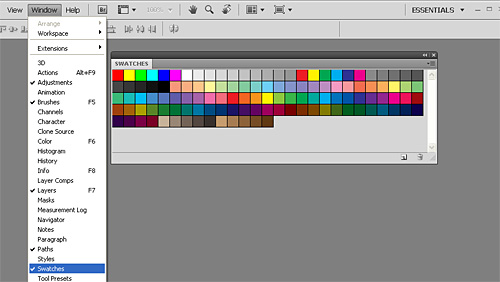
The interesting value of the Swatches palette is the ability to load custom swatch collections, so you can quickly access to specific colors without having to remember any numeric color values.
For instance, you can create a custom swatch with the colors you use in your project logo, and later use this swatch when designing the website layout, so you will be sure colors will match (all in all, they are the same ones!).
When you save a Swatch from Photoshop, it will create an Adobe Color .ACO file.
Knowing how Photoshop writes this file will allow us to create our custom swatches with php or another language.
Anatomy of a .ACO file
ACO files are binary files made by 16-bit integers made of two sections. All values are hexadecimal
The first section of the file is made this way:
0001: starts with 1 because it’s section 1…
number of colors: this represents the number of colors in the swatch, such as 0001, 0002, 000f… probably the limit is really 65535 (FFFF) even if I don’t see the point in having so much colors.
Then for each color, we have:
0000: let’s call it a separator…
red component: you have to write it twice, so if you red component is 0A, you must write 0A0A
green component: same thing as the red one
blue component: guess what?
0000: another separator
And the first section is over. Next section starts with
0002: being the second one…
number of colors: same thing as for the first section
Then for each color we have:
0000: separator
red component: same as before
green component: same as before
blue component: same as before
0000: separator
0000: separator (yes, another)
color name length + 1: do you want to call the color “my favourite red”? Then the length is 16 so the final value will be 17 = 0011 in hexadecimal
the name itself: this is the name itself coded in UTF-16, so if your color name is “c1” the name will be 0063 0031
0000: separator
Make a file following these rules, and you’ll have your .ACO file ready to be loaded in Photoshop.
Why should you do that? Well, in case you want to export color schemes you found somewhere in the web… and here it is a php function that starting with a string with one or more colors in hexadecimal format (such as 000000FFFFFF for black and white), returns the ACO format.
function hex_to_aco($hex){
$number_of_colors = strlen($hex)/6;
$n = sprintf('%04x',$number_of_colors);
$string = "0001".$n;
for($x=0;$x<$number_of_colors;$x++){
$string.= "0000";
$string.= substr($hex,$x*6,2).substr($hex,$x*6,2);
$string.= substr($hex,$x*6+2,2).substr($hex,$x*6+2,2);
$string.= substr($hex,$x*6+4,2).substr($hex,$x*6+4,2);
$string.= "0000";
}
$string.= "0002".$n;
for($x=0;$x<$number_of_colors;$x++){
$string.= "0000";
$string.= substr($hex,$x*6,2).substr($hex,$x*6,2);
$string.= substr($hex,$x*6+2,2).substr($hex,$x*6+2,2);
$string.= substr($hex,$x*6+4,2).substr($hex,$x*6+4,2);
$string.= "0000";
$string.= "0000";
$color_name = "pic2col $x";
$string.= sprintf('%04x',strlen($color_name)+1);
for($y=0;$y
You can find this function used in pic2col, at the end of the color sequence you will find a link to download it as a ACO file.
I tested it in CS4 on XP and Vista and it works. Waiting for feedback.
Never miss an update! Subscribe, and I will bother you by email only when a new game or full source code comes out.