Developing a Facebook Application for absolute beginners
With more than 300 million active users and 50% of them using it every day (source), Facebook can be an interesting way to make some viral marketing.
One of the most effective ways is developing an application users (and users friends – and friends of users friends – and…) will use every day.
This tutorial will guide you through the creation of a simple application that will display how many male and female friends do you have.
Requirements
To develop a Facebook application with this tutorial, you will need:
* An active Facebook account
* An hosting plan supporting php
* Being my fan
ehm, actually being my fan is not strictly required, but it’s strongly recommended :)
Getting started
Go to developers area and click on Set Up New Application
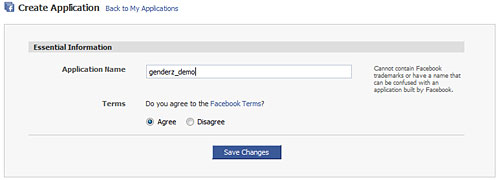
Give a name to your application and agree terms.

Then, Facebook will create an API key and a secret key. Write them down (well, it’s not necessary since you will always find them in this page, but having something to write down makes me feel like I’m dealing with something important).
At this time the application is ready to run, but you can add more information and icons.
When done, go to Canvas page
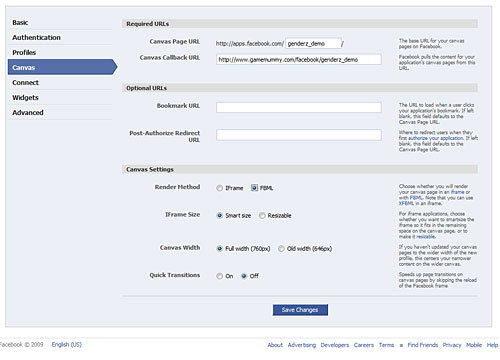
Here, you will b asked for a Canvas Page URL that is the unique url of your application. Being obviously unique, all best names have been already taken (just like .com domains). In Canvas Callback URL, you have to enter the URL of the page on your server that will host the application. Then set Render Method to FBML
FBML mode lets you quickly start building an application from scratch, which is good for a absolute beginners. We’ll see it more in depth during next tutorials

At this time your application is ready to be executed.
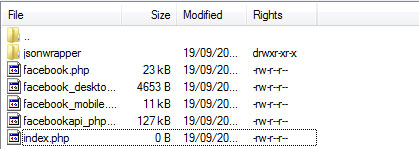
Download the client library and copy the content of facebook-platform -> php to the Facebook application directory in your server – the same path of Canvas Callback URL.
Your directory now should look like this:
Now, t’s time to create the application itself:
1 2 3 4 5 6 7 8 9 10 11 12 13 14 15 16 17 18 19 20 21 22 23 24 25 26 27 28 29 30 31 32 33 34 35 | <?php require_once 'facebook.php'; $appapikey = 'xxxx'; $appsecret = 'xxxx'; $facebook = new Facebook($appapikey, $appsecret); $user_id = $facebook->require_login(); $friends = $facebook->api_client->friends_get(); echo "<p>Hello <fb:name uid=\"$user_id\" useyou=\"false\" linked=\"false\" firstnameonly=\"true\"></fb:name>, you have ".count($friends)." friends"; foreach($friends as $friend){ $infos.=$friend.","; } $infos = substr($infos,0,strlen($infos)-1); $gender=$facebook->api_client->users_getInfo($infos,'sex'); $gender_array = array(); foreach($gender as $gendervalue){ $gender_array[$gendervalue[sex]]++; } $male = round($gender_array[male]*100/($gender_array[male]+$gender_array[female]),2); $female = 100-$male; echo "<ul><li>Males: $male%</li><li>Females: $female%</li></ul>"; ?> |
Line 3: including Facebook library
Lines 5-6: Declaring variables with API key and secret code… yes, the two codes seen before
Line 8: Initializing a Facebook API
Line 10: Requiring the user to be logged into Facebook before using the application. If they are not logged in they will first be directed to a Facebook login page and then back to the application’s page. Then save the user unique id into $user_id variable
Line 12: Storing in the $friends array the unique id of all friends of yours
Line 14: This is the first FBML tag we see: Fb:name renders the name of the user specified by uid attribute. In this case, it will display your name. More information about Fb:name at this page. You can see all available tags at this page
Lines 16-20: Creating a string with all of your friends ids separated by comma, such as uid1,uid2,uid3,...,uidn
Line 22: users_getInfo returns a wide array of user-specific information for each user id passed. As you can see, I pass the whole list of friends and I only want to know their sex. More information about users_getInfo at this page
Line 24: Creating an array where I will store all genders
Line 26-31: Determining the % of each gender (male or female) in my friends list. You can see some additional math because sex value can be blank
Line 33: Displaying the results
Now that your application is completed, you can submit it to the Application directory. Before you are able to do it, your application must have at least 5 total users or 10 monthly active user.
Take a look at the “finished” application.
It should output something like that
Hello Kirenia, you have 49 friends Males: 53.66% Females: 46.34%
Warning: During the latest day there is a known bug called facebook auth_token loop that won’t allow you to run the application. If you experience problems, simply check back later.

22 Responses to “Developing a Facebook Application for absolute beginners”
Leave a Reply
Trackbacks
-
Developing a Facebook Application for absolute beginners – step 2 : Emanuele Feronato on
September 28th, 2009 5:21 pm
[...] It’s time to add some features to the application we created in step 1. [...]
-
Developing a Facebook Application for absolute beginners – step 3 : Emanuele Feronato on
September 30th, 2009 10:04 pm
[...] step 1 we created a simple Facebook application, and in step 2 we made our application able to write on [...]
-
Developing a Facebook Application for absolute beginners – step 5 : Emanuele Feronato on
October 9th, 2009 4:33 pm
[...] Step 1: Creation of the application itself [...]
-
Creating a Flash Facebook application with the Facebook Actionscript API : Emanuele Feronato on
November 4th, 2009 2:11 am
[...] suggest you to read the Developing a Facebook Application for absolute beginners posts from 1 to 5 if you don’t know how to create a basic Facebook [...]
-
Horror Profile Facebook application source code released : Emanuele Feronato - italian geek and PROgrammer on
December 4th, 2009 11:25 am
[...] I suggest you to read “Developing a Facebook Application for absolute beginners” posts 1, 2, 3, 4 and [...]
- MoMo-Studio Development Blog » Blog Archive » Zetta Monster Plus….Facebook? on January 22nd, 2010 9:34 am
-
How I add facebook leaderboard to my Flixel Flash game. @ Life Is So IISD on
February 1st, 2010 8:05 am
[...] If you do not know how to get start with Flash Facebook application, I suggest you to read a 5 part articles by Emanuele first. You can find the first part of the series >> HERE << [...]
-
Adding an iFrame to your Facebook Application in 2010 on
March 9th, 2010 8:52 am
[...] Developing a Facebook App for Absolute Beginners – Emmanuele Feronato [...]
- Citrus Engine released for free for learning
- My epic fail with ClickBank
- Get up to $100,000 for your next Flash game with Mochi GAME Developer Fund
- Create a dynamic content animated footer ad for your site in just 9 jQuery lines – 17 lines version
- Sell sitelocked version of your Flash games and even .fla sources to Free Online Games
- Protect your work from ActionScript code theft with SWF Protector
- Create a dynamic content animated footer ad for your site in just 9 jQuery lines
- Understanding Box2D’s one-way platforms, aka CLOUDS
- Triqui MochiAds Arcade plugin for WordPress upgraded to 1.2
- Box2D Flash game creation tutorial – part 2
- Create a Lightbox effect only with CSS - no javascript needed
- Flash game creation tutorial - part 1
- Create a Flash Racing Game Tutorial
- Flash game creation tutorial - part 2
- Make a Flash game like Flash Element Tower Defense - Part 2
- Flash game creation tutorial - part 3
- Triqui MochiAds Arcade plugin for WordPress official page
- Make a Flash game like Flash Element Tower Defense - Part 1
- Create a flash draw game like Line Rider or others - part 1
- Create a flash artillery game - step 1
- Flash game creation tutorial – part 5.2 (4.88/5)
- Create a flash artillery game – step 1 (4.79/5)
- Create a Flash Racing Game Tutorial (4.76/5)
- Create a survival horror game in Flash tutorial – part 1 (4.74/5)
- Create a flash artillery game – step 2 (4.74/5)
- Creation of a Flash arcade site using WordPress – step 2 (4.73/5)
- Flash game creation tutorial – part 1 (4.71/5)
- Flash game creation tutorial – part 2 (4.71/5)
- Create a flash draw game like Line Rider or others – part 1 (4.69/5)
- Creation of a platform game with Flash – step 2 (4.68/5)

(28 votes, average: 4.75 out of 5)


woah emanuele, this one might be a start of a whole new hobby for me, thanks for a great simple tutorial c;
Hi,
The insideRIA blog provides also very nice tutorial in this very interesting facebook topic:
http://blogs.oreilly.com/cgi-bin/mt/mt-search.cgi?IncludeBlogs=34&tag=Facebook%20API&limit=20&IncludeBlogs=34
Thanks a lot for your tutorial!
Flo
hey thanks for this tutorial
how do you do this on wordpress
“Now that your application is completed, you can submit it to the Application directory. Before you are able to do it, your application must have at least 5 total users or 10 monthly active user.”
can you tell me solve this?i have problem about this..
1)how i want to invite other user?
2)until then..how i can view my app since it cannot submit to app directory yet..
sorry for this dumb question and thank you for the tutorial..
Mie, yes, I was confused by this as well. As to question 2, to view your app, go to the canvas page url. In the above example, this would be:
http://apps.facebook.com/genderz_demo
This talks about posting a facebook app, but it doesn’t really go into actually ‘creating’ it.
I’m not familiar with php. Is it only me that gets:
Parse error: syntax error, unexpected T_STRING, expecting T_OLD_FUNCTION or T_FUNCTION or T_VAR or ‘}’ in /usr/local/pem/vhosts/147748/webspace/httpdocs/mosh/facebook.php on line 38
Hmm. Trying to get the client library for php 4
but how do i do to publish this in the wall of the user how get this application?
I also get this error:
Parse error: parse error, expecting `T_OLD_FUNCTION’ or `T_FUNCTION’ or `T_VAR’ or `’}” in /3w/borec.cz/t/tibbi/facebook/facebook.php on line 38
also this one :P
Fatal error: Cannot instantiate non-existent class: facebook in /3w/borec.cz/t/tibbi/facebook/index.php on line 13
Im not familiar with these things yet, what can I do? thx
nevermind, my host had php on 3.3 :D, works fine now
So this app half works for me. I get this when i go to the app on facebook.
Hello Joey, you have 193 friends Notice:
Undefined variable: infos in /www/zxq.net/j/o/e/joe-morrone/htdocs/gender_app.php on line 17 Warning: stream_context_create() has been disabled for security reasons in /www/zxq.net/j/o/e/joe-morrone/htdocs/facebookapi_php5_restlib.php on line 3390 Warning: fopen() expects parameter 4 to be resource, null given in /www/zxq.net/j/o/e/joe-morrone/htdocs/facebookapi_php5_restlib.php on line 3391 Warning: Invalid argument supplied for foreach() in /www/zxq.net/j/o/e/joe-morrone/htdocs/gender_app.php on line 26 Notice: Use of undefined constant male – assumed ‘male’ in /www/zxq.net/j/o/e/joe-morrone/htdocs/gender_app.php on line 30 Notice: Undefined index: male in /www/zxq.net/j/o/e/joe-morrone/htdocs/gender_app.php on line 30 Notice: Use of undefined constant male – assumed ‘male’ in /www/zxq.net/j/o/e/joe-morrone/htdocs/gender_app.php on line 30 Notice: Undefined index: male in /www/zxq.net/j/o/e/joe-morrone/htdocs/gender_app.php on line 30 Notice: Use of undefined constant female – assumed ‘female’ in /www/zxq.net/j/o/e/joe-morrone/htdocs/gender_app.php on line 30 Notice: Undefined index: female in /www/zxq.net/j/o/e/joe-morrone/htdocs/gender_app.php on line 30 Warning: Division by zero in /www/zxq.net/j/o/e/joe-morrone/htdocs/gender_app.php on line 30
* Males: 0%
* Females: 100%
It correctly counts my total friends and knows my name, but I dont know what all that excess error data is and the percantages for males and femals is of course wrong. Been messing with this for hours now :(
I guess you do need to hide the application secret by using PHP or javascript, but can you do what you do above using just Actionscript?
It seems I do not need to embed my flash with a facebook tag.
Why not? What if I do? whats the benefit if any?
Please give us som clarification… cross the nation.