
Developing a Facebook Application for absolute beginners – step 2

It’s time to add some features to the application we created in step 1.

This time we’ll add some interaction with Facebook, such as publishing results on your wall.

The new script is this one:

1
2
3
4
5
6
7
8
9
10
11
12
13
14
15
16
17
18
19
20
21
22
23
24
25
26
27
28
29
30
31
32
33
34
35
36
37
38
39
40
41
42
43
44
45
46
<?php
 
require_once 'facebook.php';
 
$appapikey = 'xxxxxxxxxxxxxxxxxxxxxxxxx';
$appsecret = 'xxxxxxxxxxxxxxxxxxxxxxxxx';
 
$facebook = new Facebook($appapikey, $appsecret);
 
$user_id = $facebook->require_login();
 
$friends = $facebook->api_client->friends_get();
 
echo "<p>Hello <fb:name uid=\"$user_id\" useyou=\"false\" linked=\"false\" firstnameonly=\"true\"></fb:name>, you have ".count($friends)." friends";
 
foreach($friends as $friend){
     $infos.=$friend.",";
}
 
$infos = substr($infos,0,strlen($infos)-1);
 
$gender=$facebook->api_client->users_getInfo($infos,'sex');
 
$gender_array = array(); 
 
foreach($gender as $gendervalue){
     $gender_array[$gendervalue[sex]]++;
}
 
$male = round($gender_array[male]*100/($gender_array[male]+$gender_array[female]),2);
$female = 100-$male;
 
echo "<ul><li>Males: $male%</li><li>Females: $female%</li></ul>";
 
$message = "has ".count($friends)." friends. $male% of them are male. $female% are female";
 
$has_permission = $facebook->api_client->users_hasAppPermission("publish_stream");
 
if(!$has_permission){
     echo "<br /><fb:prompt-permission perms=\"publish_stream\">Publish results on your wall!!</fb:prompt-permission>";
}
else{
     $facebook->api_client->stream_publish($message);
}
 
?>

That is the same as Developing a Facebook Application for absolute beginners until line 33

So let’s take a look to the new lines:

35
36
37
38
39
40
41
42
43
44
$message = "has ".count($friends)." friends. $male% of them are male. $female% are female";
 
$has_permission = $facebook->api_client->users_hasAppPermission("publish_stream");
 
if(!$has_permission){
     echo "<br /><fb:prompt-permission perms=\"publish_stream\">Publish results on your wall!!</fb:prompt-permission>";
}
else{
     $facebook->api_client->stream_publish($message);
}

line 35: defining a simple message telling how many friends do you have

line 37: checking if the user allowed the application to publish on the wall. When you run a Facebook application, it cannot interact with your profile doing actions such as writing on your wall or sending emails.

Facebook offers some API functionality that requires the user to specifically opt in before your application or site can use that functionality. These methods are specific to certain use cases that require a greater level of trust from the user. Users express this trust by granting your application or site specific extended permissions.

The permission we need this time is publish_stream which lets your application post content, comments, and likes to a user’s profile and in the streams of the user’s friends without prompting the user.

You can check the whole list of permission at this page

line 40: if the user did not allow the application to publish, renders the content of the tag as a link that, when clicked, initiates a dialog requesting the specified extended permissions from the user.

This one:
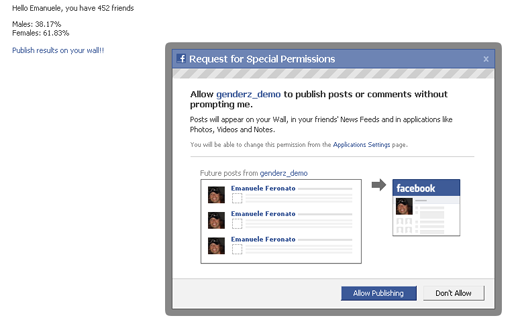
Once you click on allow, and reload the application, the message at line 35 will be published on your profile thanks to…

line 43: stream_publish method publishes a post into the stream on the user’s or Facebook Page’s Wall and News Feed.

There are various options we’ll meet during next tutorials, but at the moment you are able to publish content on users profile.

Take a look at the application and see how does it publish your friends gender stats on your profile.

Next time, we’ll add even more interaction.

Rate this post: 1 Star2 Stars3 Stars4 Stars5 Stars (19 votes, average: 4.79 out of 5)
Loading ... Loading ...
Be my fan on Facebook and follow me on Twitter! Exclusive content for my Facebook fans and Twitter followers

This post has 22 comments

  1. Guest

    on September 28, 2009 at 8:48 pm

    That’s Great! since we’re game developers, i also would like to see a ranking that shows the top-10 scores from your facebook buddies in the application

  2. Emanuele Feronato

    on September 28, 2009 at 9:07 pm

    nice idea!!!!!

  3. Caleb

    on September 29, 2009 at 3:40 pm

    Thanks! I’m looking forward to future posts!

  4. kegogrog

    on September 30, 2009 at 8:35 am

    Do you think that there is a possibility to send a message from flash via php to the fb connect? I mean, sending invitations or posting scores to the wall from within flash? That would give new ‘viral marketing power’ to the whole of it, methinks.

    Regards, and please keep on the great work.

  5. Spyros

    on September 30, 2009 at 7:28 pm

    This is very interesting, i always wanted to create a facebook game. This tutorial series will come in handy. Facebook apps are really the hit nowadays.

  6. Developing a Facebook Application for absolute beginners – step 3 : Emanuele Feronato

    on September 30, 2009 at 10:05 pm

    [...] step 1 we created a simple Facebook application, and in step 2 we made our application able to write on the [...]

  7. Chip

    on October 1, 2009 at 8:36 pm

    I noticed that it does not appear to be writing to my wall. Even the demo program you link to in article isn’t writing to my wall after granting permissions. Something change in the past couple days?

  8. Chip

    on October 1, 2009 at 8:53 pm

    Disregard previous comment. Started working, just very slow on the results displaying.

  9. Andrew Jacobs

    on October 6, 2009 at 10:57 pm

    Hey – just want to interject real quick. It’s a hard-learned lesson. Facebook API calls from PHP can be ridiculously slow (sometimes over 4 seconds). If your app takes over 8 seconds to render then Facebook will show the user an error and ignore the response from your app.

    I would strongly suggest the next post refactors the app to populate the male/female results using FBJS AJAX. Basic calls for userInfo seem to come back consistently but be extremely careful with many calls and/or friend list calls.

    Cheers. Thanks for keeping up the great posts.

  10. Murat

    on October 7, 2009 at 7:31 am

    Did you have to have the genderz_demo app white-listed for it to work?

    Thanks for a great post.

  11. Developing a Facebook Application for absolute beginners – step 5 : Emanuele Feronato

    on October 9, 2009 at 4:35 pm

    [...] Step 2: Publishing a text on the user’s status [...]

  12. Mehedi Hasan

    on October 20, 2009 at 7:13 pm

    thanks a lot for this help :)

  13. german

    on November 23, 2009 at 10:26 pm

    hi im using iframe method so if i write Publish results on your wall!! doesnt work i have to do it with the api how can i do that ?

  14. Horror Profile Facebook application source code released : Emanuele Feronato - italian geek and PROgrammer

    on December 4, 2009 at 11:29 am

    [...] suggest you to read “Developing a Facebook Application for absolute beginners” posts 1, 2, 3, 4 and [...]

  15. Patrick Curl: Social Media Consultant

    on March 8, 2010 at 10:41 am

    Hey, I had to do some searching for this post.. I found the step 1 post, but there’s no link to get from step 1 to step 2.

    Maybe you could update the post with a link, for others looking for this info.

    BTW great article, I can’t believe how simple it looks, I’ve done some twitter apps, and this looks a lot easier than that was, even. I’m wanting to eventually learn to develop an interactive facebook game, but baby steps first.

  16. Recep

    on March 30, 2010 at 6:01 pm

    hi.
    $facebook->api_client->users_hasAppPermission

    this is not working. why?

  17. Colin Brady

    on April 8, 2010 at 7:06 pm

    Hi,

    I want to add my own FBML code, where do I put it?

  18. Manas

    on May 28, 2010 at 12:52 pm

    Works perfectly with on minor flaw. The first time u use the app, and click on that link to publish on wall, it doesnt get published. However if u use the app again, the result gets published. How to solve this? I want to publish the data right on the first click of that publish on the wall link.

  19. robbye rob

    on June 29, 2010 at 6:25 pm

    I am working on an app and it seems that a lot of the FB functions are not working as expected.

    I used your example above and it worked up until the users_getInfo()…

    I get an empty string with every attempt that I make. I have looked at all of the blogging on this item across the internet and there seems to be an inconsistent functional outcome with this and many more api_client calls.

    Is there any settings that can be looked at when encountering this error, do you have magic_quotes_gpc set to on in your php.ini file.. ??

    just curious and not expecting an answer since all of this facebook php never gets attention.

  20. Naresh Kumar N

    on September 18, 2010 at 7:40 am

    Hi,

    I have to publish message(s) on my own wall (but multiple facebook accounts can be used)through cron job and I am doing like this:

    First I have implemented this code in one page and getting permission from user to publish:

    Publish results on your wall!!

    User inputs his/her application API, Secret, application ID, and facebook User ID.

    I am using following code in cron job to publish messages on particular time:

    if (isset($fb_api_key) && isset($fb_secret_key) && isset($fb_app_id) && isset($fb_user_id)) {
    $facebook = new Facebook($fb_api_key, $fb_secret_key);
    $facebook->set_user($fb_user_id, ”);
    $return_value = $facebook->api_client->stream_publish($message, null, null, $fb_user_id, $fb_user_id);
    }

    I am getting following error because of cron job:

    PHP Fatal error: Uncaught exception ‘FacebookRestClientException’ with message ‘Duplicate status message’ in /www/mysitename.com/fb_test/facebookapi_php5_restlib.php:3025
    Stack trace:
    #0 /www/mysitename.com/fb_wallpost_test/facebookapi_php5_restlib.php(916): FacebookRestClient->call_method(‘facebook.stream…’, Array)
    #1 /www/mysitename.com/PublishPostEventAll.php(216): FacebookRestClient->stream_publish(‘Come to see Ade…’, NULL, NULL, ’100000836757498′, ’100000836757498′)
    #2 {main}
    thrown in /www/v2dev.ecampusmanager.com/fb_wallpost_test/facebookapi_php5_restlib.php on line 3025

    Please let me know how to fix it.

    Also, could anyone please let me know how to get session key to use in the following statement (to publish messages dynamically/in cron job not with login method):

    $facebook->set_user($fb_user_id, $session_key);

    Thanks in advance.

    -Naresh Kumar

  21. AlexG

    on October 9, 2010 at 9:28 am

    Why you dont show the code for the notifications and friend selector? Is it on the site? Thanks

  22. Haseebp

    on April 9, 2011 at 6:14 pm

    I got this error
    Fatal error: Call to undefined method Facebook::require_login() in /home/comp6171/public_html/facebook/index.php on line 10

    Please Help me…