

Saving and storing your work
Talking about PROgramming.
No matter if you are a Flash game developer, a web designer, a video editor, a programmer or whatever… the more your work on your computer, the more files you will generate.
After a while, your hard disk will become a nasty place full of shattered project if you don’t follow some simple rules.
That’s how I organize, save and store my work.
1) I keep on the computer’s hard disk only the projects I am currently working on
With more than 10 years of work, keeping all projects, images, video and every other kind of file on the computer I am currently using would be really a nonsense. First, there is no reason to keep old projects on your hard disk, second I don’t want someone to rob my notebook and have access to an entire life of work. So I use to keep on my computer only the projects I am currently working on. When a project is finished, I move it on another hard disk. Should I work again on an old project, I copy it on my computer and start working on it, until it’s finished, then I move it on another hard disk.
Since you will access this hard disk once in a while (sometimes once a week, sometimes once a month), there isn’t any particular recommendation about the hard disk. I am using two USB 1TB iomega where I store almost all my work.
Why “almost”? Because I have some other USB 500GB hard disks with video projects. Videos can consume a lot of hard disk space, so it’s better to dedicate an entire hard disk to each project
2) I create a folder for each branch of my projects

In the picture you can see four directories. Two are obvious, while “Beta” contains all the abandoned projects and “No internet” contains all the projects I did not develop for the web, such as executable software, brochures, business cards, and so on. As said, videos are on other hard disks.
Obviously, the folders you will have may vary according to the type of projects you are working on… so you couldn’t have “Flash games” but you could have “Magazines”… this depends on your work.
Just remember: don’t delete anything. Never. That’s why I have a directory for abandoned projects. Hard disk are so inexpensive you can afford a lot of them
3) Inside each branch folder, I create folders with single projects

This is a screenshot of the “Websites” folder. As you can see, there are a lot of them! And they’re about four times the ones I was able to show you in the picture. Each folder is named with the site domain name, so I don’t have to remember if “Yeah inc.”‘s website is located at “yeahinc.com”, “yeah-inc.org” or “yeah-company.net”
Also, I don’t start folder names with “www.” because almost every website starts with “www.”… I won’t be able to find the right site in a couple of seconds.
Last but not least, when I redesign a site I made – let’s say – in 2007, create another folder with the same name, followed by the year, such as “yeahinc.com (2010)” so I can quickly get my hands on the right content
4) Inside each project folder, I create a folder for every topic
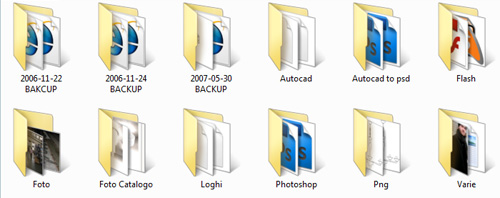
In the picture you can see all folders related to the websites divided by category. Sorry for some italian names, but as said this is my real way to store my work. As you can see, there is a folder for Photoshop files, one for Autocad ones, and so on.
Also notice the backups. Always keep both old versions of your projects and the last one. Using unix dates will make your life easier when you’re about to look for the right content.
If your site has a dynamic database, like a blog, an e-commerce site and so on, remember to backup your databases at least once a week
5) Inside a topic folder I store all files with the right names

Don’t call files “Untitled.psd” or “File01.fla”, but use the unix data followed by a name that will help you to remember what’s inside that file. This way, when you’re looking for the last header you’ll just have to look for the file with “header” in its name with the highest date.
6) Everything I showed you in this post is actually stored in TWO hard disks
I don’t want to see all your work destroyed because my daughter made the hard disk fall on the ground… so every month I spent a couple of hours to syncronize two hard disks. This will grant me a longer life because I won’t suicide in case one hard disk will cease to live.
Never miss an update! Subscribe, and I will bother you by email only when a new game or full source code comes out.