Loading WordPress posts with Ajax and jQuery
- April 1, 2010 by Emanuele Feronato
- Filed under Ajax, Javascript, Php, WordPress | 11 Comments
After seeing how to include jQuery Ajax calls in your WordPress blog, it’s time to load posts on the fly, without reloading the page.
As for the previous example I am using the standard Kubrick theme… without any plugin installed.
Look how I load the posts under the header by clicking on their titles… even the ones with “more” tag appear complete without reloading the page:
Let’s start with header.php modifications
This is the script I added under
<?php wp_head(); ?>
That is the JQuery part
1 2 3 4 5 6 7 8 9 10 11 12 | <script type="text/javascript" src="http://ajax.googleapis.com/ajax/libs/jquery/1.4.1/jquery.min.js"></script> <script type="text/javascript"> $(document).ready(function(){ $.ajaxSetup({cache:false}); $("h2 a").click(function(){ var post_id = $(this).attr("rel") $("#your_post_here").html("loading..."); $("#your_post_here").load("http://<?php echo $_SERVER[HTTP_HOST]; ?>/triqui-ajax/",{id:post_id}); return false; }); }); </script> |
I already explained the first 4 lines in the previous tutorial.
Line 5: Waiting for the user to click on an hypertext over an h2 heading. I am doing it because in Kubrick post titles are rendered this way:
<h2><a href="<?php the_permalink() ?>"....
This should change from theme to theme, but this works on Kubrick
Line 6: Retrieving the rel attribute of the link and saving it in a variable called post_id. You’ll see later in this tutorial how this attribute will contain the unique ID of the post we want to show.
Line 7: In an element with your_post_here id I am writing “loading…” because I’m starting to load the post. You’ll see later in this tutorial where to place the element
Line 8: Now thw ajax magic… in the your_post_here element this time I load the output of a page of the blog called triqui-ajax. You’ll se later in this tutorial how to create it. This will work if the permalinks of your blog aren’t the default ones. Go to Settings -> Permalinks and select Day and name
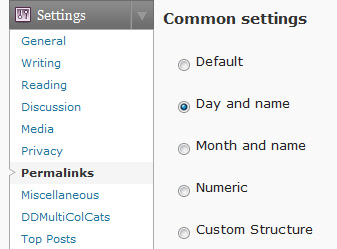
I am also passing in POST a variable called id with the content of post_id variable (the post unique id)
Line 9: I added this line to prevent the browser to jump to the link… remember? I want to load the post in the same page.
Now it’s time to make some changes to index.php
This is how I modified it:
1 2 3 4 5 6 7 8 9 10 11 12 13 14 15 16 17 18 19 20 21 22 23 24 25 26 27 28 29 30 31 32 33 34 35 36 37 38 39 40 41 42 43 44 45 | <?php /** * @package WordPress * @subpackage Default_Theme */ get_header(); ?> <div id="content" class="narrowcolumn" role="main"> <div id = "your_post_here"></div> <?php if (have_posts()) : ?> <?php while (have_posts()) : the_post(); ?> <div <?php post_class() ?> id="post-<?php the_ID(); ?>"> <h2><a href="<?php the_permalink() ?>" rel="<?php the_ID(); ?>" title="Permanent Link to <?php the_title_attribute(); ?>"><?php the_title(); ?></a></h2> <small><?php the_time('F jS, Y') ?> <!-- by <?php the_author() ?> --></small> <div class="entry"> <?php the_content('Read the rest of this entry »'); ?> </div> <p class="postmetadata"><?php the_tags('Tags: ', ', ', '<br />'); ?> Posted in <?php the_category(', ') ?> | <?php edit_post_link('Edit', '', ' | '); ?> <?php comments_popup_link('No Comments »', '1 Comment »', '% Comments »'); ?></p> </div> <?php endwhile; ?> <div class="navigation"> <div class="alignleft"><?php next_posts_link('« Older Entries') ?></div> <div class="alignright"><?php previous_posts_link('Newer Entries »') ?></div> </div> <?php else : ?> <h2 class="center">Not Found</h2> <p class="center">Sorry, but you are looking for something that isn't here.</p> <?php get_search_form(); ?> <?php endif; ?> </div> <?php get_sidebar(); ?> <?php get_footer(); ?> |
To tell the truth, I only added a line and changed a bit another one:
Line 10: This is the div that will contain the post, the one I change with jQuery (remember? lines 7 and 8 in the jQuery script)
Line 16: Here I changed the rel attribute to store the unique id of the post I want to load. I used it at line 6 in the jQuery script
And the template files do not need any other change.
Now it’s time to create a new page template with some code that will load the selected post.
In your template directory create a new php file, no matter its name… you can call it example.php and write this:
<?php /* Template Name: Triqui Ajax Post */ ?> <?php $post = get_post($_POST['id']); ?> <?php if ($post) : ?> <?php setup_postdata($post); ?> <div <?php post_class() ?> id="post-<?php the_ID(); ?>"> <h2><?php the_title(); ?></h2> <small><?php the_time('F jS, Y') ?> <!-- by <?php the_author() ?> --></small> <div class="entry"> <?php the_content('Read the rest of this entry »'); ?> </div> <p class="postmetadata"><?php the_tags('Tags: ', ', ', '<br />'); ?> Posted in <?php the_category(', ') ?> | <?php edit_post_link('Edit', '', ' | '); ?> <?php comments_popup_link('No Comments »', '1 Comment »', '% Comments »'); ?></p> </div> <?php endif; ?>
As you can see it’s almost the same code you can find in index.php at lines 15-24… because I just want to load a post in the same way the index file does. I just removed the anchor tag in the title, because I don’t want it to be clickable. And obviously I read the id value passed by the jQuery script at line 8
The only interesting lines are lines 2-4… yes, the comment… because this way I am giving the template page the name Triqui Ajax Post.
Now in your admin area create a new page, call it Triqui Ajax (do you remember the permalink url at line 8 in the jQuery script…) and select Triqui Ajax Post as template

And that’s it… you don’t need anything else, and the blog will work as in the video.
Enjoy

You will be pleasantly surprised by WordPress Themes provided by Template Monster. All of them are of professional design and high quality.
11 Responses
Leave a Reply
TUTORIAL SERIES:
- Una guida completa al gioco del poker online e una selezione dei migliori casino online.
- casino online
- migliori casino online
- BlackJack online
- casinò online


[...] Loading WordPress Post with AJAX and JQuery [...]
Nice, Thanks for share!
Very cool article, thanks Emanuele!
[...] you are looking for a real world example made with Loading WordPress posts with Ajax and jQuery or you haven’t played LineBall yet, or you played it, you loved it and you want to know who [...]
I couldn’t get this to work.
On line 8 of the header code I had to replace:
http://
with:
and it worked fine.
Thanks for the post! Very helpful.
Damnit, What was it that you replaced it with @samuel?
I have tried everything with this. It just doesn’t work.
I AM using 3.0
Please let readers know if this works on 3.0!
Thanks so much for your help,
Marc
That didn’t let me paste code sorry…
Hi,
This is a great tutorial. However I need to achieve something different. I have a list of categories that show initially in a certain page. When I click one category, the posts under that category should show via ajax in the same page. I already made this part working. So now that the posts under the category I selected are displayed, what I want to do is, when I click a post, the content of that post should also be loaded in the same page via ajax. So this should all happen without leaving the page that I was on from the start.
Please help. Im really stucked.
Thanks!
I get it now. I was sure that loaded links arent working using the “.click”. I found out about the “.live” and its working now. So I used the original code you provided for the initial links that I have – which are the categories, then I added another function for the links that are freshly loaded – the posts under the selected category:
$(“a.loaded-link”).live(‘click’, function(){
var post_id = $(this).attr(“rel”)
$(“#your_post_here”).html(“loading…”);
$(“#your_post_here”).load(“http:///my-other-php-file/”,{id:post_id});
return false;
});
Im now calling a different file that generates a different output.
Nice technique! But the downside is that the url doesn’t change so you can’t use the back and forward buttons of your browser. I want to use jQuery Address together with you code. How do I begin?
Thank you very much for the post!
Working great on WP3.0.1 as well.