Following a body with the camera in Box2D – The smart way
We are about to create an intelligent camera that will follow a body in Box2D. What’s the difference between an intelligent camera and a dumb one?
Simple… the intelligent camera follows the object keeping it in the middle of the screen as long as there are enough game area to fill the screen. The dumb one just keeps the object in the middle of the screen, sometime causing to have just a little part of the game on the screen.
Let me make things clearer with a real world example:
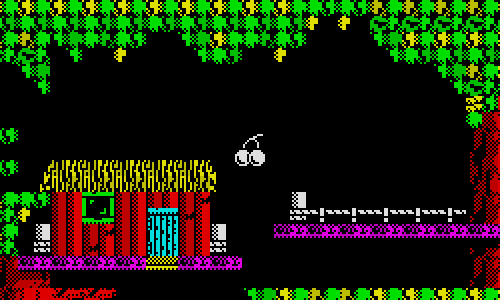
In this map, taken from Crystal Kingdom Dizzy, the cherry is followed by a smart camera, because the cherry is centered and the game area fills the entire screen.
Now look at this:
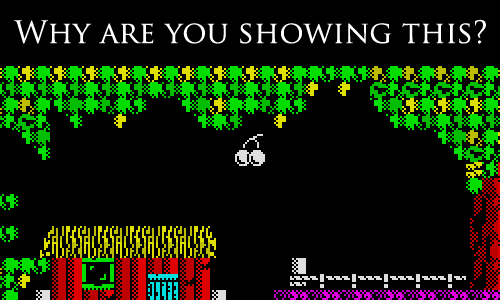
The cherry moved up and the camera followed it in a dumb way: the camera wanted to keep the cherry in the middle of the screen, but doing it will make the game scroll down even if there aren’t enough game area to fill the entire screen.
An intelligent camera should show the cherry this way:
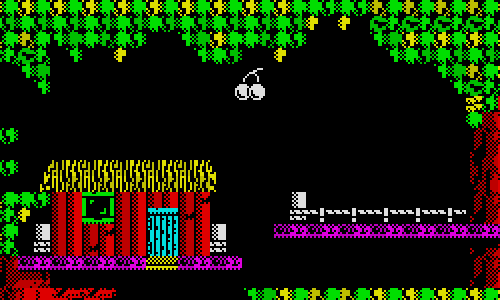
So when the cherry moves in a direction that would make the game scroll away from the screen, the camera has to release it and don’t keep it in the middle of the screen until there is enough gaming area to fill the entire screen.
How do we apply this concept to the catapult prototype?
This way:
package {
	import flash.display.Sprite;
	import flash.events.Event;
	import flash.events.KeyboardEvent;
	import Box2D.Dynamics.*;
	import Box2D.Collision.*;
	import Box2D.Collision.Shapes.*;
	import Box2D.Common.Math.*;
	import Box2D.Dynamics.Joints.*;
	public class main extends Sprite {
		public var world:b2World=new b2World(new b2Vec2(0,10.0),true);
		public var world_scale:int=30;
		var the_cannonball_itself:b2Body;
		var catapult_chassis_body:b2Body;
		var catapult_arm_body:b2Body;
		var rear_wheel_body:b2Body;
		var front_wheel_body:b2Body;
		var arm_revolute_joint:b2RevoluteJoint;
		var front_wheel_revolute_joint:b2RevoluteJoint;
		var rear_wheel_revolute_joint:b2RevoluteJoint;
		var left_key_pressed:Boolean=false;
		var right_key_pressed:Boolean=false;
		var following_catapult:Boolean=true;
		var bg:background_mc = new background_mc();
		public function main():void {
			addChild(bg);
			debug_draw();
			the_ground();
			the_catapult_body();
			the_catapult_arm();
			the_catapult_motor();
			the_wheels();
			the_wheel_motors();
			the_cannonball();
			addEventListener(Event.ENTER_FRAME, update);
			stage.addEventListener(KeyboardEvent.KEY_DOWN, key_down);
			stage.addEventListener(KeyboardEvent.KEY_UP, key_up);
		}
		public function the_cannonball():void {
			var cannonball:b2BodyDef= new b2BodyDef();
			cannonball.position.Set(90/world_scale, 90/world_scale);
			cannonball.type=b2Body.b2_dynamicBody;
			var ball:b2CircleShape=new b2CircleShape(10/world_scale);
			var cannonball_fixture:b2FixtureDef = new b2FixtureDef();
			cannonball_fixture.shape=ball;
			cannonball_fixture.friction=0.9;
			cannonball_fixture.density=20;
			cannonball_fixture.restitution=0.5;
			the_cannonball_itself=world.CreateBody(cannonball);
			the_cannonball_itself.CreateFixture(cannonball_fixture);
		}
		public function the_wheel_motors():void {
			var front_wheel_joint:b2RevoluteJointDef = new b2RevoluteJointDef();
			front_wheel_joint.enableMotor=true;
			front_wheel_joint.Initialize(catapult_chassis_body, front_wheel_body,new b2Vec2(0,0));
			front_wheel_joint.localAnchorA=new b2Vec2(80/world_scale,0);
			front_wheel_joint.localAnchorB=new b2Vec2(0,0);
			front_wheel_revolute_joint=world.CreateJoint(front_wheel_joint) as b2RevoluteJoint;
			front_wheel_revolute_joint.SetMaxMotorTorque(1000000);
			//
			var rear_wheel_joint:b2RevoluteJointDef = new b2RevoluteJointDef();
			rear_wheel_joint.enableMotor=true;
			rear_wheel_joint.Initialize(catapult_chassis_body, rear_wheel_body,new b2Vec2(0,0));
			rear_wheel_joint.localAnchorA=new b2Vec2(-80/world_scale,0);
			rear_wheel_joint.localAnchorB=new b2Vec2(0,0);
			rear_wheel_revolute_joint=world.CreateJoint(rear_wheel_joint) as b2RevoluteJoint;
			rear_wheel_revolute_joint.SetMaxMotorTorque(1000000);
		}
		public function the_wheels():void {
			var rear_wheel:b2BodyDef= new b2BodyDef();
			rear_wheel.position.Set(250/world_scale, 200/world_scale);
			rear_wheel.type=b2Body.b2_dynamicBody;
			var rear_wheel_shape:b2CircleShape=new b2CircleShape(40/world_scale);
			var rear_wheel_fixture:b2FixtureDef = new b2FixtureDef();
			rear_wheel_fixture.shape=rear_wheel_shape;
			rear_wheel_fixture.friction=0.9;
			rear_wheel_fixture.density=30;
			rear_wheel_fixture.restitution=0.1;
			rear_wheel_body=world.CreateBody(rear_wheel);
			rear_wheel_body.CreateFixture(rear_wheel_fixture);
			//
			var front_wheel:b2BodyDef= new b2BodyDef();
			front_wheel.position.Set(450/world_scale, 200/world_scale);
			front_wheel.type=b2Body.b2_dynamicBody;
			var front_wheel_shape:b2CircleShape=new b2CircleShape(40/world_scale);
			var front_wheel_fixture:b2FixtureDef = new b2FixtureDef();
			front_wheel_fixture.shape=front_wheel_shape;
			front_wheel_fixture.friction=0.9;
			front_wheel_fixture.density=30;
			front_wheel_fixture.restitution=0.1;
			front_wheel_body=world.CreateBody(front_wheel);
			front_wheel_body.CreateFixture(front_wheel_fixture);
		}
		public function the_catapult_motor():void {
			var arm_joint:b2RevoluteJointDef = new b2RevoluteJointDef();
			arm_joint.enableMotor=true;
			arm_joint.enableLimit=true;
			arm_joint.Initialize(catapult_chassis_body, catapult_arm_body,new b2Vec2(0,0));
			arm_joint.localAnchorA=new b2Vec2(-80/world_scale,-90/world_scale);
			arm_joint.localAnchorB=new b2Vec2(60/world_scale,0);
			arm_revolute_joint=world.CreateJoint(arm_joint) as b2RevoluteJoint;
			arm_revolute_joint.SetMotorSpeed(1000);
			arm_revolute_joint.SetLimits(-Math.PI,Math.PI/3);
			arm_revolute_joint.SetMaxMotorTorque(1);
		}
		public function the_catapult_arm():void {
			var catapult_arm:b2BodyDef = new b2BodyDef();
			catapult_arm.allowSleep=false;
			catapult_arm.position.Set(210/world_scale,110/world_scale);
			catapult_arm.type=b2Body.b2_dynamicBody;
			var arm_part:b2PolygonShape = new b2PolygonShape();
			arm_part.SetAsOrientedBox(150/world_scale, 10/world_scale, new b2Vec2(0,0),0);
			var arm_part_fixture:b2FixtureDef = new b2FixtureDef();
			arm_part_fixture.shape=arm_part;
			arm_part_fixture.friction=0.9;
			arm_part_fixture.density=5;
			arm_part_fixture.restitution=0.1;
			var stopper:b2PolygonShape = new b2PolygonShape();
			stopper.SetAsOrientedBox(10/world_scale, 20/world_scale, new b2Vec2(-140/world_scale,-30/world_scale),0);
			var stopper_fixture:b2FixtureDef = new b2FixtureDef();
			stopper_fixture.shape=stopper;
			stopper_fixture.friction=0.9;
			stopper_fixture.density=10;
			stopper_fixture.restitution=0.1;
			catapult_arm_body=world.CreateBody(catapult_arm);
			catapult_arm_body.CreateFixture(arm_part_fixture);
			catapult_arm_body.CreateFixture(stopper_fixture);
		}
		public function the_catapult_body():void {
			var catapult_body:b2BodyDef = new b2BodyDef();
			catapult_body.position.Set(350/world_scale,200/world_scale);
			catapult_body.type=b2Body.b2_dynamicBody;
			var main_part:b2PolygonShape = new b2PolygonShape();
			main_part.SetAsOrientedBox(125/world_scale, 20/world_scale, new b2Vec2(0,0),0);
			var chassis_fixture:b2FixtureDef = new b2FixtureDef();
			chassis_fixture.shape=main_part;
			chassis_fixture.friction=0.9;
			chassis_fixture.density=50;
			chassis_fixture.restitution=0.1;
			var fixed_arm:b2PolygonShape = new b2PolygonShape();
			fixed_arm.SetAsOrientedBox(20/world_scale, 60/world_scale, new b2Vec2(-80/world_scale,-40/world_scale),0);
			var fixed_arm_fixture:b2FixtureDef = new b2FixtureDef();
			fixed_arm_fixture.shape=fixed_arm;
			fixed_arm_fixture.friction=0.9;
			fixed_arm_fixture.density=1;
			fixed_arm_fixture.restitution=0.1;
			catapult_chassis_body=world.CreateBody(catapult_body);
			catapult_chassis_body.CreateFixture(chassis_fixture);
			catapult_chassis_body.CreateFixture(fixed_arm_fixture);
		}
		public function the_ground():void {
			var ground:b2BodyDef= new b2BodyDef();
			ground.position.Set(2500/world_scale, 400/world_scale);
			var my_box:b2PolygonShape = new b2PolygonShape();
			my_box.SetAsBox(2500/world_scale, 15/world_scale);
			var ground_fixture:b2FixtureDef = new b2FixtureDef();
			ground_fixture.shape=my_box;
			ground_fixture.friction=0.9;
			ground_fixture.restitution=0.1;
			//
			var my_box2:b2PolygonShape = new b2PolygonShape();
			my_box2.SetAsOrientedBox(15/world_scale, 350/world_scale, new b2Vec2(2485/world_scale,-335/world_scale),0);
			var right_wall_fixture:b2FixtureDef = new b2FixtureDef();
			right_wall_fixture.shape=my_box2;
			right_wall_fixture.friction=0.9;
			right_wall_fixture.restitution=0.1;
			//
			var my_box3:b2PolygonShape = new b2PolygonShape();
			my_box3.SetAsOrientedBox(15/world_scale, 350/world_scale, new b2Vec2(-2485/world_scale,-335/world_scale),0);
			var left_wall_fixture:b2FixtureDef = new b2FixtureDef();
			left_wall_fixture.shape=my_box3;
			left_wall_fixture.friction=0.9;
			left_wall_fixture.restitution=0.1;
			//
			var my_box4:b2PolygonShape = new b2PolygonShape();
			my_box4.SetAsOrientedBox(2500/world_scale, 15/world_scale, new b2Vec2(0,-670/world_scale),0);
			var roof_fixture:b2FixtureDef = new b2FixtureDef();
			roof_fixture.shape=my_box4;
			roof_fixture.friction=0.9;
			roof_fixture.restitution=0.1;
			//
			var the_ground_itself:b2Body=world.CreateBody(ground);
			the_ground_itself.CreateFixture(ground_fixture);
			the_ground_itself.CreateFixture(right_wall_fixture);
			the_ground_itself.CreateFixture(left_wall_fixture);
			the_ground_itself.CreateFixture(roof_fixture);
		}
		public function key_up(event:KeyboardEvent):void {
			switch (event.keyCode) {
				case 39 :
					right_key_pressed=false;
					break;
				case 37 :
					left_key_pressed=false;
					break;
			}
		}
		public function key_down(event:KeyboardEvent):void {
			switch (event.keyCode) {
				case 39 :
					right_key_pressed=true;
					left_key_pressed=false;
					break;
				case 37 :
					left_key_pressed=true;
					right_key_pressed=false;
					break;
				case 32 :
					arm_revolute_joint.SetMaxMotorTorque(10000);
					following_catapult=false;
					break;
			}
		}
		public function debug_draw():void {
			var debug_draw:b2DebugDraw = new b2DebugDraw();
			var debug_sprite:Sprite = new Sprite();
			addChild(debug_sprite);
			debug_draw.SetSprite(debug_sprite);
			debug_draw.SetDrawScale(world_scale);
			debug_draw.SetFlags(b2DebugDraw.e_shapeBit|b2DebugDraw.e_jointBit);
			debug_draw.SetFillAlpha(0.5);
			world.SetDebugDraw(debug_draw);
		}
		public function set_motor_speed():void {
			var current_speed:Number;
			if (right_key_pressed) {
				current_speed=1;
			}
			if (left_key_pressed) {
				current_speed=-1;
			}
			if (! right_key_pressed&&! left_key_pressed) {
				current_speed=rear_wheel_revolute_joint.GetMotorSpeed()*0.9;
				if (Math.abs(current_speed)<0.1) {
					current_speed=0;
				}
			}
			rear_wheel_revolute_joint.SetMotorSpeed(current_speed);
			front_wheel_revolute_joint.SetMotorSpeed(current_speed);
		}
		public function update(e:Event):void {
			var pos_x:Number;
			var pos_y:Number;
			set_motor_speed();
			world.Step(1/30,10,10);
			if (following_catapult) {
				pos_x=catapult_chassis_body.GetWorldCenter().x*world_scale;
				pos_y=catapult_chassis_body.GetWorldCenter().y*world_scale;
			} else {
				pos_x=the_cannonball_itself.GetWorldCenter().x*world_scale;
				pos_y=the_cannonball_itself.GetWorldCenter().y*world_scale;
			}
			pos_x=stage.stageWidth/2-pos_x;
			if (pos_x<0-4500) {
				pos_x=-4500;
			}
			if (pos_x>0) {
				pos_x=0;
			}
			x=pos_x;
			pos_y=stage.stageHeight/2-pos_y;
			if (pos_y<0-15) {
				pos_y=-15;
			}
			if (pos_y>285) {
				pos_y=285;
			}
			y=pos_y;
			world.ClearForces();
			world.DrawDebugData();
		}
	}
}
And this is the result:
Left and right arrows to move the catapult, spacebar to fire
Download the example and wait for the fully commented source code.
