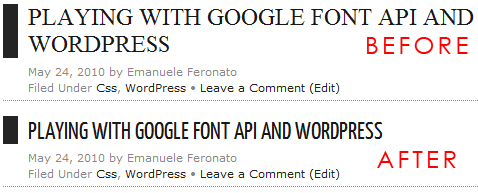
Playing with Google Font API and WordPress
With new webdesign trends, standard fonts such as Arial, Times and Verdana aren’t enough to give our blog/website the loon&feel we want.
That’s why today we’ll discover the magic of Google Font API.

The Google Font API lets you include in your pages high-quality web fonts provided by the Google Font Directory.
This means you can use custom fonts in your design, and they are hosted and served by Google.
That’s nothing new, since services like
But unlike cufòn, texts rendered with the Google Font API are selectable, and there isn’t any copyright issue, and unlike Typekit, Google Font API is free.
So let me show you the simplest example…
Let’s take the CSS of this blog post titles:
|
1 2 3 4 5 6 7 8 9 10 11 |
#content h1 { font-family: "Times New Roman"; font-size:24px; font-weight:normal; text-align: left; margin: 10px 0px 5px 0px; color: #181818; text-transform:uppercase; border-left:15px solid #242424; padding-left:10px; } |
and change the first line to
|
1 |
font-family: "Yanone Kaffeesatz", "Times New Roman"; |
and then just add somewhere between <head> and </head> (normally in the header.php file located in your theme directory)
|
1 |
<link href='http://fonts.googleapis.com/css?family=Yanone+Kaffeesatz' rel='stylesheet' type='text/css'> |
and… see the difference:

Nice, elegant and without any important downside, if you can bare with a small number of fonts (but don’t forget we are talking about Google, so expect the number to grow fast) and the lack of iPhone/iPad compatibility (hey… shouldn’t CSS heroes design a i/whatever specific layout anyway?)

They can be a great start to launch a website of your own and meet the individual needs of your project.


(4 votes, average: 4.25 out of 5)


This post has 12 comments
Andreas Renberg
That’s a great way to standardize the use of fonts online.
Some sites look funny for me in Linux since Times New Roman is a proprietary format, so font defaults to something else (and usually doesn’t show up right, so it gets cut off or bleeds over to a new row in some instances when using manually set width).
However, if people are able to link to the font on Google code, they ensure that it will show up regardless if you have that font installed or not, and if enough websites link directly to the Google code fonts, they will be cached in the browser.
There were some suspicions on the Kirupa forums who argued that because of the amount of time it takes to design one font, people will be reluctant to release it for free; unlike Wikipedia articles which take relatively little effort to write and publish.
However, as you said, it’s Google, and if the users won’t contribute enough (which I still feel they will), Google will find a way to increase their repertoire of fonts.
Will Moyer
I think I may have found a hack to stop the aliasing (jagged edges) on Windows machines. It only works in WebKit though, so I don’t know how useful it is.
Check it out here: http://willmoyer.com/plato/
uint
I love google! especially the upcoming “App Store”!.Just take a look here:
http://code.google.com/intl/de-DE/chrome/apps/docs/index.html
and here:
https://chrome.google.com/webstore
Goodbye Mochi:-)
Tony
Thanks Man,
This is awesome. I’m definitely going to have to look at using this feature in my blog posts ;)
Using Google Font API - Tony Lea
[...] BTW, for a thorough intro of this feature, check out Emanuele Feronato’s Blog Post at: http://www.emanueleferonato.com/2010/05/24/google-font-api-and-wordpress/ [...]
defensive netball zone
[...] Playing with Google Font API and WordPress – Emanuele Feronato [...]
Lorenzo
it’s also can be used on flash?
Jorgen
Google just launched a nice preview function for the Font API that makes it even easier to use the API.
See more here: http://tips4php.net/2010/07/google-font-api-new-preview-function/
Naushad
Thanks a lot for sharing this..its the Best Solution for My Websites and My Clients Websites..
Vlad
What I don’t understand is the direction. They will be for free or paid as on TypeKit. We can see on Google Fonts Webpage that they are partners with TypeKit.
Tom
If you are WordPress user you can use Ultimate Google Fonts plugin for WordPress with beqautiful CSS text effect tips http://www.sramekdesign.com/wordpress/plugins/ultimate-google-fonts-with-beautiful-css3-effects/
Pacifista
wow…great.thanks for your sharing,buddy :D