Worms-like destructible terrain in Flash

Do you remember Worms game and its destructible terrain?
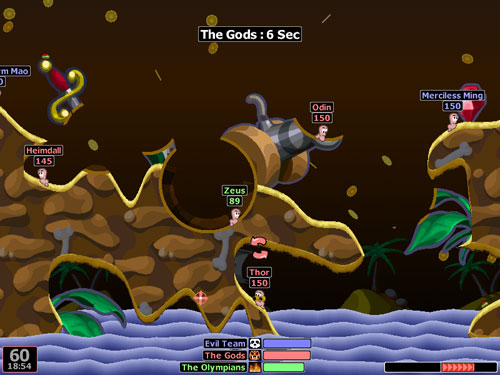
Jordi Sanglas Molist explains us how to create a basic destructible terrain with AS3

« Today, browsing the “most popular” posts, I found “Create a flash artillery game – step 1“, where you talked about making a game similar to Worms.

Then, I thought: “How will I make a destructible terrain?”

After looking for some information, I realized I should use a Bitmap. So I started with a really basic prototype:

- The character falls if he doesn’t touch the ground
- You can press at any point of the terrain to make a hole (because I don’t still have weapons)

The code is fully commented (and there are only 59 miserable lines), so you won’t have any problem to understand it.

I’ll be three days on holiday, so on Sunday I’ll start writing the next part, which I think it may talk about moving the character.

I think I’ll do it in that way: if you press the right arrow and in the right the obstacle is less than X
pixels height, you can move. I’ll try if that works. »

I am looking forward for character movement, meanwhile this is the script:

1
2
3
4
5
6
7
8
9
10
11
12
13
14
15
16
17
18
19
20
21
22
23
24
25
26
27
28
29
30
31
32
33
34
35
36
37
38
39
40
41
42
43
44
45
46
47
48
49
50
51
package {
	import flash.display.Sprite;
	import flash.display.Bitmap;
	import flash.display.BitmapData;
	import flash.display.BlendMode;
	import flash.geom.Point;
	import flash.geom.Matrix;
	import flash.events.Event;
	import flash.events.MouseEvent;
	public class worms extends Sprite {
		public var terrain_bmpd=new BitmapData(550,200,true,0xFF00FF00);//This is the Bitmap of the terrain
		public var terrain_bmp=new Bitmap(terrain_bmpd);//and this the BitmapData
		public var character=new Sprite();//The character will work as a worm
		public var hole=new Sprite();//That's the hole we need
		public var hole_matrix:Matrix;//The hole_matrix is used to set the position of the hole
		public var left_foot:Point;
		public var right_foot:Point;//These are the feet of the character. We will use it to check collisions
		public function worms() {
			draw_objects();//This function draws the character, the terrain and the hole.
			stage.addEventListener(Event.ENTER_FRAME,fall);
			stage.addEventListener(MouseEvent.MOUSE_UP,mouse_up);
		}
		public function fall(e:Event) {
			/*This function will move down the character if there isn't a collision
			between the terrain and the "feet" of the character*/
			for (var i:int=0; i<10; i++) {//We want to check every pixel if there's acollision, so we won't move the character 10 pixels all at once
				left_foot=new Point(character.x-5,character.y+10);
				right_foot=new Point(character.x+5,character.y+10);
				if (!(terrain_bmpd.hitTest(new
				Point(terrain_bmp.x,terrain_bmp.y),0x01,left_foot))&&!(terrain_bmpd.hitTest(new Point(terrain_bmp.x,terrain_bmp.y),0x01,right_foot))) {
					character.y++;//If there aren't any collisions, make the character fall one pixel
				}
			}
		}
		public function mouse_up(e:MouseEvent) {
			hole_matrix=new Matrix();//We need to reset the matrix each new hole
			hole_matrix.translate(e.stageX-terrain_bmp.x,e.stageY-terrain_bmp.y);//and setthe coordinates of the hole
			terrain_bmpd.draw(hole,hole_matrix,null,BlendMode.ERASE);//Then, we can draw the hole in the BitmapData
		}
		public function draw_objects() {
			terrain_bmp.y=200;//The terrain shouldn't be at the top of the stage!
			stage.addChild(terrain_bmp);//We can make the terrain visible
			character.graphics.beginFill(0x0000FF);//Let's draw the character. It will be a blue rectangle.
			character.graphics.drawRect(-5,-10,10,20);
			character.x=250;
			stage.addChild(character);
			hole.graphics.beginFill(0x000000);//Now we draw the hole. It doesn't matter the colour.
			hole.graphics.drawCircle(0,0,30);
		}
	}
}

And this is the result:

Click on the terrain to create holes and watch your “worm” falling down.

Download the source code.

Rate this post: 1 Star2 Stars3 Stars4 Stars5 Stars (27 votes, average: 4.52 out of 5)
Loading ... Loading ...
Flash Templates provided by Template Monster are pre-made web design products developed using Flash technology.
They can be easily customized to meet the unique requirements of your project.
Be my fan on Facebook and follow me on Twitter! Exclusive content for my Facebook fans and Twitter followers

This post has 32 comments

  1. Alexandre Colella

    on June 25, 2010 at 1:17 pm

    Wonderfull!
    And a bit difficulty.

    The Matrix and translate commands… hmmmm… I don´t know.
    :)

  2. Monkios

    on June 25, 2010 at 4:23 pm

    Very nicely translated into Flash.

    I hope to see your game soon.

  3. Poupi

    on June 25, 2010 at 4:37 pm

    I’m reading this blog since a long time, and your work is just amazing.
    I can’t believe that the basics of Worms’ engine are so… easy !

  4. Bivis

    on June 26, 2010 at 5:26 pm

    Nice! I always though that it was difficult… but is very easy!!!

    I have a question on a thing: How is the performance of the BlendMode.ERASE ???
    I’ve clicked a lot on terrain and didn’t have any problem with performance. But in a more complex game can we have some problems?

    If yes.. there’s a way to build again the terrain, but this time with the holes in itself?

    Thanks by nice tutorial!

  5. Allan

    on June 27, 2010 at 5:20 am

    Nice tutorial. Looking foward to seeing your progress.
    I created a worms style game not too long ago, similar process. If you like, you can see my game at http://portfolio.allanbishop.com/bin/load.html?url=Orbot.swf

  6. Kaustav

    on June 27, 2010 at 1:20 pm

    Hey nice tut!

    A while ago i did a worms-like destructible terrain too. I didnt use bitmaps though, only vectors. It may be simpler.

    All i did, was create a ball over the place where one clicks. Every time one clicks, a new ball is placed. All of the balls are part of the same movieclip.

    Then, the hero would ‘hit the ground’ when he is touching the ground AND NOT the balls. Voila! Destructible terrain!

    It worked pretty well, and you can destroy terrain in any shape. No need for bitmaps! It seems to be fast also.

    What do you think?

  7. Jordi Sanglas Molist

    on June 27, 2010 at 7:00 pm

    I was also worried about the performance, but I think that the function BitmapData.draw() calculates only the final pixels: it doesn’t matter how you got to them.

    I’m not sure, but I guess that flash would have included a method to delete again the circles if they were still there. However, that’s a good observation.

  8. Jordi Sanglas Molist

    on June 27, 2010 at 7:04 pm

    That’s also a great idea (it may be easier). I didn’t think about that strategy. However, as I started using bitmaps, I’ll continue with it. If you use bitmaps, the result is the same (you can also destroy the terrain in any shape). Speed? I think in both cases it’s fast: as I said in Bivis’ reply, I guess that the circles disappear after the BitmapData.draw() function.

    I’m only 15 and I hardly ever find good tutorials to learn programming languages, so I always miss lots of things.

  9. Emanuele Feronato

    on June 27, 2010 at 7:26 pm

    Kaustav’s idea should work, but you’ll need to apply a mask to the terrain if you have a background image… and it won’t work if you simply use the “holes” movieclip as a mask… interesting idea anyway…

  10. Kaustav

    on June 28, 2010 at 6:03 am

    True, the images do make a problem. And bitmap is probably faster once you start to use many circles, since you still have to check through each one, while on a bitmap, once a pixel is destroyed, its done.

    On the plus side, it might be easier for collision detection, since you can easily make physics for the inside of circles.

    In any case, i still think bitmap is better. I want to see how you make the character move, it was difficult for make to make smooth movement.

  11. Jodi Houareau

    on July 2, 2010 at 9:35 am

    Awesome tut, exactly what I’ve been looking for!

    I’ve been trying to empliment the stardust particle engine for the explosion when terrain is destroyed, its quite tricky though. Maybe you can include something like that in one of you future tuts.

    Great work, Thanks

  12. Jodi Houareau

    on July 28, 2010 at 8:49 am

    So wheres part two? I’ve been on the edge of my seat for like a month :-)

  13. Jordi Sanglas Molist

    on July 29, 2010 at 10:52 am

    I sent part 2 to Emanuele Feronato two or three weeks ago, I’m also waiting. Part 2 is about character movement (I also solved a bug). Part 3 will be about the explosion impulse.

    Well, I’m sorry. I don’t know when is he going to post that.

  14. Jodi Houareau

    on July 29, 2010 at 1:48 pm

    Ah okay, thanks Jordi. Appreciate the feedback. Interested to see how this develops. Keep up the good work!

  15. Jordi Sanglas Molist

    on August 2, 2010 at 9:02 pm

    As I don’t know when Emanuele will post my second part, maybe you can give me your e-mail address or tell me how to send the tutorial to you.

    I’m stuck in part 3. I looked for some information about the explosion impulse and how to calculate it, but I didn’t find anything.

  16. Emanuele Feronato

    on August 2, 2010 at 9:18 pm

    I am sorry, I did not receive anything.

    Send me the 2nd part and I’ll publish it at once.

    Emanuele

  17. Jordi Sanglas Molist

    on August 3, 2010 at 8:14 am

    I sent you two e-mails, so I thought you were busy.

    I sent the 2nd part again. Did you receive it now?

  18. Jodi Houareau

    on August 4, 2010 at 1:35 pm

    Still no part two… Would be great if you could send it to me Jordi, can use this address jh.spammer@gmail.com

  19. Jordi Sanglas Molist

    on August 4, 2010 at 4:51 pm

    I sent you part 2, but I don’t know if you’ll receive it (I tried to send other e-mails to my family, and they got them).

  20. Emanuele Feronato

    on August 4, 2010 at 10:02 pm

    I am still not receiving the file. If someone has received it, can you please forward to info[at]emanueleferonato.com?

  21. Jodi Houareau

    on August 5, 2010 at 7:53 am

    Alas, I also hav’nt recieved it. Must be lost in the intertubes somewhere.

  22. Jordi Sanglas Molist

    on August 5, 2010 at 9:33 am

    I really don’t know what’s happening. I received Emanuele’s mail (about freewebspace), but it seems that you don’t receive my messages. I did a last try, using a hotmail account (instead of telefonica). If it doesn’t work, I’ll upload it on freewebspace.

  23. Jodi Houareau

    on August 5, 2010 at 10:58 am

    Yay! got it! thanks bud! will forward it to you emanuele. Super keen to see your progress.

  24. Worms-like destructible terrain in Flash – Part 2 - Emanuele Feronato

    on August 5, 2010 at 11:49 pm

    [...] After having some troubles with the email, I am finally able to post Jordi Sanglas Molist‘s second step of Worms-like destructible terrain in Flash. [...]

  25. satya

    on August 26, 2010 at 1:39 pm

    i got the point and now i am able to use .as file, previously i was using to write code in .fla only.

  26. rise4peace

    on October 14, 2010 at 4:35 pm

    Hi Emanuele,

    Your tutorials are extremely helpful and I appreciate the knowledge you’ve provided.

    I’ve been trying to figure out how to use the translate function in order to achieve a slicing effect with a game I am developing.

    In a nutshell, I’m trying to replicate the functionality of a missile falling from the sky and penetrating through a users shield, just like what happens in space invaders, and for the life of me I’m coming up short.

    Using your tutorial I’ve gone ahead and added code that makes the blue rectanle fall from the top of the screen. I then use the fall event to which I’ve added a penetrateBase() function which gets triggered when the missile touches the base using your hitTest checks.

    The penetrateBase() function looks like this:
    public function penetrateBase()
    {
    trace(“hitting shield”);
    character.y++;
    characterMatrix = new Matrix();
    characterMatrix.translate(character.x, character.y);
    terrain_bmpd.draw(character, characterMatrix, null, BlendMode.ERASE);
    }

    Unfortunately when I run the code, the missile falls correctly and penetrates the base, but instead of removing a vertical slice from the base, the base is left untouched.

    I know I’m pretty close, I’m almost positive I’m getting hung up on translating the coordinates properly for the falling missile and its intersection with the base.

    Any suggestions would be greatly appreciated.

    cheers,

    rise4peace

  27. Gabi Barrientos

    on November 4, 2010 at 11:45 pm

    This is so awesome!
    I’ve been waiting for this tutorial for so long!

    I’ve been working on a multi player game engine which is supposed to be a mix between worms and lemmings, and i could not get this part right myself.

    Thank you so much!

  28. Ben

    on January 13, 2011 at 8:19 pm

    I was working on something similar based on the game DeathTank that came with Duke Nukem on the Saturn.

    This was only an exercise, but managed to get something similar. I never got round to implementing the movement restriction based on the angle, and the angle of the “tank” is not offset…

    http://flashpimp.co.uk/flashtank/

    note the nuke takes longer than the shell to charge. The game also works with multiple players, and I built a SocketServer in AIR to broadcast movement to all players. Haven’t got round to finishing it yet as I have been busy on other stuff!

  29. Christian Scholz-Flöter

    on February 14, 2011 at 8:01 pm

    Thanks for sharing!

    Somehow I can click 24 times to generate a hole in my Bitmap. After that, a click does not have any effect any more. Does anyone have an explanation for this strange behaviour?

    Code:

    var hole:Sprite = new Sprite();
    var hole_matrix:Matrix;
    var polyData:Poly = new Poly(0,0);
    var polyBmp:Bitmap = new Bitmap(polyData);
    stage.addChild(polyBmp);
    stage.addEventListener(MouseEvent.CLICK, onClick);
    function onClick(e:MouseEvent):void {
    hole_matrix=new Matrix();
    hole.graphics.beginFill(0x000000, 1);
    hole_matrix.translate(e.stageX-polyBmp.x,e.stageY-polyBmp.y);
    hole.graphics.drawCircle(0,0,30);
    polyData.draw( hole, hole_matrix, null, BlendMode.ERASE);
    }

    Poly is a PNG-Bitmap symbol in my library with a linkage class name “Poly”.

  30. How to create a destructible Texture in XNA « Bayinx

    on November 2, 2011 at 12:53 am

    [...] Emanuel Feronato’s Destructible Terrain in Flash [...]

  31. How to create a destructible Texture in XNA | XNA Hero

    on November 18, 2011 at 12:34 pm

    [...] Emanuel Feronato’s Destructible Terrain in Flash [...]

  32. Cloudy Pixel Games » Tutorial #1:Pixel Perfect Collision with Flixel Part 1

    on January 29, 2012 at 3:46 am

    [...] two tutorials that had the code is here and [...]
