Create a contact page in WordPress 3.0

We know there are hundreds of plugins to let you host a contact form in WordPress, but I am going to show you how to create your own one.

We are about to create a custom contact page that will work under WP 3.0, and more precisely with Twenty Ten theme. Obviously, with some minor changes you will be able to do the same in your theme.

The script

Let’s start: in your theme folder, create a new file called contact.php (or whatever other name with php extension) and write this code:

1
2
3
4
5
6
7
8
9
10
11
12
13
14
15
16
17
18
19
20
21
22
23
24
25
26
27
28
29
30
31
32
33
34
35
36
37
38
39
40
41
42
43
44
45
46
47
48
49
50
51
52
53
54
55
56
57
58
59
60
61
<?php
/*
Template Name: Contact me
*/
if($_POST[sent]){
	$error = "";
	if(!trim($_POST[your_name])){
		$error .= "<p>Please enter your name</p>";
	}
	if(!filter_var(trim($_POST[your_email]),FILTER_VALIDATE_EMAIL)){
		$error .= "<p>Please enter a valid email address</p>";
	}                        
	if(!trim($_POST[your_message])){
		$error .= "<p>Please enter a message</p>";
	}
	if(!$error){
		$email = mail(get_option("admin_email"),trim($_POST[your_name])." sent you a message from ".get_option("blogname"),stripslashes(trim($_POST[your_message])),"From: ".trim($_POST[your_name])." <".trim($_POST[your_email]).">\r\nReply-To:".trim($_POST[your_email]));
	}
}
?>
<?php get_header(); ?>
<div id="container">
	<div id="content" role="main">
		<?php if ( have_posts() ) while ( have_posts() ) : the_post(); ?>
		<div id="post-<?php the_ID(); ?>" <?php post_class(); ?>>	
			<h1 class="entry-title"><?php the_title(); ?></h1>
			<div class="entry-content">
			<?php if($email){ ?>
				<p><strong>Message succesfully sent. I'll reply as soon as I can</strong></p>
			<?php } else { if($error) { ?>
				<p><strong>Your messange hasn't been sent</strong><p>
				<?php echo $error; ?>
			<?php } else { the_content(); } ?>
				<form action="<?php the_permalink(); ?>" id="contact_me" method="post">
					<input type="hidden" name="sent" id="sent" value="1" />
					<ul class="contactform">
						<li>
							<label for="your_name">Name</label>
							<input type="text" name="your_name" id="your_name" value="<?php echo $_POST[your_name];?>" />
						</li>
						<li>
							<label for="your_email">Email</label>
							<input type="text" name="your_email" id="your_email" value="<?php echo $_POST[your_email];?>" />
						</li>
						<li>
							<label for="your_message">Message:</label>
							<textarea name="your_message" id="your_message"><?php echo stripslashes($_POST[your_message]); ?></textarea>
						</li>
						<li>
							<input type="submit" name = "send" value = "Send email" />
						</li>
					</ul>
				</form>
				<?php } ?>
			</div><!-- .entry-content -->
		</div><!-- #post-## -->
		<?php endwhile; ?>
	</div><!-- #content -->
</div><!-- #container -->
<?php get_sidebar(); ?>
<?php get_footer(); ?>

Now let’s see what we’ve done:

Lines 2-4: This is the way we assign a template name to the page. In this case, the name is Contact me

We’ll see later what lines 5-19 do, and let’s jump to…

Lines 21-27: this is the same content you can find in page.php file into Twenty Ten theme folder, and if you’re using a different theme it should be the same content you can find in your theme page.php file until the beginning of the content of the page (typically the_content()).

In my case, I just replaced

1
2
3
4
5
<?php if ( is_front_page() ) { ?>
	<h2 class="entry-title"><?php the_title(); ?></h2>
<?php } else { ?>	
	<h1 class="entry-title"><?php the_title(); ?></h1>
<?php } ?>

with

<h1 class="entry-title"><?php the_title(); ?></h1>

because I know a contact page can’t be the front page.

Lines 28-33: Here come to play two variables, called $error and $email, you’ll see later how to set their values, meanwhile you have to know $error is an empty string or a string with an error (something like “You email address is not valid”) and $email is true if the email has been successfully sent.

The code proceeds this way:

* If the email has been sent, show a “Thank you message” and nothing else

* If the email has not been sent and there is an error, show the error and the form

* If the email has not been sent and there isn’t an error, show the page content (something like “Hello!! This is my fancy contact page!! Drop me a mail!!) and the form

Lines 34-53: The form itself, the easiest possible, it’s up to you to add some more fields, if needed, and some styling.

Lines 55-61: The end of the page, like in the normal Twenty Ten page.

Now it’s time to see the php that handles emails and errors

Line 5: If “Send email” button (line 50) has been pressed…

Line 6: set $error variable to empty string

Lines 7-9: creating an error message if the user did not enter his name

Lines 10-12: same as before, looking for a valid email address

Lines 13-15: same as before, looking for a message

Lines 16-18: if I did not find any error, I send the email with a basic formatting and sanitizing.

The setup

Once you created this file, create a new page this way:
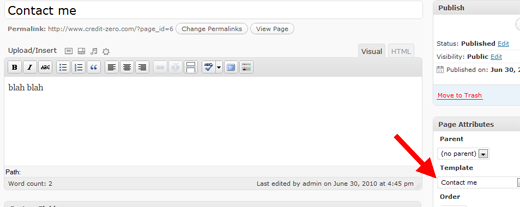
Look how I assign the page template according to the file recently created.

And this is what you’ll get:
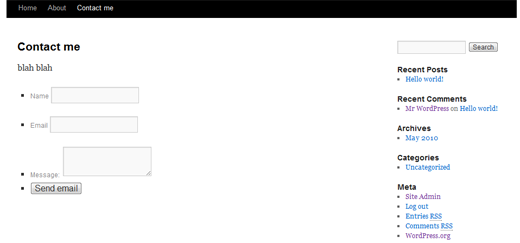
Your own custom contact page. It’s just a basic one, but if I receive good feedback, I can improve it with some jQuery magic…

Rate this post: 1 Star2 Stars3 Stars4 Stars5 Stars (11 votes, average: 5.00 out of 5)
Loading ... Loading ...
WordPress themes are designs for WordPress - one of the most popular blogging software nowadays.
You will be pleasantly surprised by WordPress Themes provided by Template Monster. All of them are of professional design and high quality.
Be my fan on Facebook and follow me on Twitter! Exclusive content for my Facebook fans and Twitter followers

This post has 17 comments

  1. Andrew

    on July 1, 2010 at 10:44 am

    VERY nice!!!! Simple, easy to customize and get’s the job done! You create some amazing things! Keep it up!

  2. srikanth

    on July 1, 2010 at 6:46 pm

    Thanks, it works!

  3. Mau

    on July 2, 2010 at 5:56 am

    i will love to see Jquery magic!!! great!

  4. KrazyBig

    on July 2, 2010 at 6:48 am

    Very timely too with the release of WordPress 3.0. I’ve just set-up a new site with WordPress and I was wondering how to create my own templates.

    It’s like you’re reading my mind.

  5. Francesco

    on July 2, 2010 at 10:25 am

    Ciao Emanuele,

    sono un tuo fan Italiano e seguo praticamente tutti i giorni il tuo blog… qualcosa di eccezionale, davvero :)

    Ho un sito che porta il mio nome, francescomalatesta.net, dove pubblico dei tutorials in Italiano, a volte scritti da me, a volte realizzati traducendo altre guide (con i dovuti credits).

    Nel caso mi dovesse servire, posso tradurre qualcuna delle tue guide in Italiano? Ovviamente con credit e rimandando al tuo blog per la versione originale :)

    Sarebbe bello collaborare e conoscersi tra persone dello stesso paese, in questo ambiente.

    Grazie,
    Francesco

  6. Dee Wilcox

    on July 9, 2010 at 6:23 pm

    Thanks for posting this! I’ve been wrestling with WP 3.0 compatible plugins for the last few days, and thanks to you, I’m just going to create my own form. However, I’d like to set the form to redirect to another URL if it submits successfully. How can I do that?

    Thanks for your help!

  7. Dee Wilcox

    on July 9, 2010 at 6:28 pm

    It also looks like you’ve defined a CSS class for “contactform.” I’d like to set up the form so that it does not show bullet points. I assume I just need to add the appropriate class to my CSS stylesheet? Are there any other variables that your CSS class “contactform” includes that I should also include?

    Thanks!!

  8. Theresa Wagar

    on July 13, 2010 at 9:24 pm

    wOOt! Just in time! For a PHP novice this was excellent! Tahnks for sharing this quick and easy way to make a form. Now to make it look pretty, too. You can see mine at:
    http://www.prostrategies.com/prostrategies/
    Click on CONTACT :)

  9. Theresa Wagar

    on August 4, 2010 at 8:06 am

    Quick question . . . how do you get rid of those silly dots in front of each line in the form? I’ve tried about every CSS item I could think of and they’re still there. Help!!!

  10. Neru Tu Kaze

    on August 16, 2010 at 1:52 pm

    Doing stuff without plugins?… Me like :D …I love making stuff myself because i have the ability to change whatever i like and design it how i like it myself :D Theres no limit on anything. Except on some stuff but thats just basic.

  11. Gameezfun

    on September 29, 2010 at 3:03 pm

    Wow, great! But can it be customized to be compatible with a non-WP arcade site?

  12. # Create Simple Contact Page in Wordpress 3+ Without Any Plugin

    on November 7, 2010 at 6:40 pm

    [...] found this guide at emanueleferonato who explains this whole very easily. This way you can create other specific pages for your [...]

  13. Sattar

    on January 5, 2011 at 8:14 am

    Thanks for the code. It helps allot and very useful.to me.

  14. rohit rox

    on April 19, 2011 at 4:11 pm

    awesome !! exactly what i was searching for !!! thanks a lot !!

  15. Paolo

    on May 21, 2011 at 2:00 am

    Grazie mille, davvero utile!

  16. kraks

    on October 12, 2011 at 5:27 pm

    i am getting this error. what should i do
    Warning: mail() [function.mail]: SMTP server response: 501 Syntax error in parameters or arguments: (-132) in C:\xampp\htdocs\gapresbytery\wp-content\themes\gapresbytery\Contact.php

  17. Mitch

    on January 13, 2012 at 1:52 am

    This is great! How would i go about making it send to a different email?