
Basic Box2D editor using Flash movieclips
When you are about to design a level or whatever else in Box2D, you have to face some design issues due to different unit measurements (Flash works with pixels while Box2D uses meters) and the common problems in level design: the need to have a WYSIWYG interface.
Some frameworks such as Citrus Engine, have a built in editor, but what if you are making a Box2D project on your own?
I am making a little Box2D editor to be used in a couple of games I am making, and it’s based on… Flash movieclips.
It’s the easiest solution if you don’t need a lot of features. The best solution for simple games such as Totem Destroyer.
It works this way: first, we need a movieclip with a box, centered in its origin:

Then using this movieclip, we start building the level in another movieclip just adding and transforming the original box movieclip:
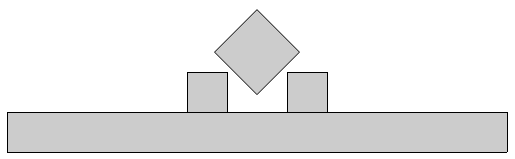
Finally, we need to tell the movieclip which boxes are static and which ones are dynamic: I am giving a d instance name for dynamic boxes and a s instance name for static boxes.
Then it’s just actionscript:
|
1 2 3 4 5 6 7 8 9 10 11 12 13 14 15 16 17 18 19 20 21 22 23 24 25 26 27 28 29 30 31 32 33 34 35 36 37 38 39 40 41 42 43 44 45 46 47 48 49 50 51 52 53 54 55 56 57 58 |
package { import flash.display.Sprite; import flash.events.Event; import Box2D.Dynamics.*; import Box2D.Collision.*; import Box2D.Collision.Shapes.*; import Box2D.Common.Math.*; public class b2ded extends Sprite { // this is the size of the original box movieclip public var box_original_size:int=40; // importing the editor movieclip public var editor:editor_mc = new editor_mc(); public var world:b2World=new b2World(new b2Vec2(0,10.0),true); public var world_scale:int=30; public function b2ded():void { debug_draw(); // placing the editor movieclip in transparency to show its precision addChild(editor); editor.alpha=0.2 // looping through all children in the editor movieclip for (var i:int=0;i<editor.numChildren;i++) { with (editor.getChildAt(i)) { // calling the function to fraw a Box2D oriented box // just notice how I use scaleX and scaleY instead of width and height // because it would give wrong results when dealing with rotated movieclips draw_box(x,y,box_original_size*scaleX,box_original_size*scaleY,rotation*0.0174532925,name=="d"); } } addEventListener(Event.ENTER_FRAME, update); } public function draw_box(x_origin:Number,y_origin:Number,box_width:Number,box_height:Number,angle:Number,is_dynamic:Number):void { var my_body:b2BodyDef= new b2BodyDef(); if (is_dynamic) { my_body.type=b2Body.b2_dynamicBody; } var my_box:b2PolygonShape = new b2PolygonShape(); my_box.SetAsOrientedBox(box_width/2/world_scale, box_height/2/world_scale, new b2Vec2(x_origin/world_scale,y_origin/world_scale),angle); var my_fixture:b2FixtureDef = new b2FixtureDef(); my_fixture.shape=my_box; var world_body:b2Body=world.CreateBody(my_body); world_body.CreateFixture(my_fixture); } public function debug_draw():void { var debug_draw:b2DebugDraw = new b2DebugDraw(); var debug_sprite:Sprite = new Sprite(); addChild(debug_sprite); debug_draw.SetSprite(debug_sprite); debug_draw.SetDrawScale(world_scale); debug_draw.SetFlags(b2DebugDraw.e_shapeBit); world.SetDebugDraw(debug_draw); } public function update(e : Event):void { world.Step(1/30,10,10); world.ClearForces(); world.DrawDebugData(); } } } |
And this is the result:
As you can see I perfectly recreated the Box2D environment I made in the editor movieclip.
Obviously it’s far from being complete, but you can add more features just playing with instance name, adding attributes such as density, restitution and so on. If I receive a good feedback, I can improve the editor or share the one I am making for my games.
They can be easily customized to meet the unique requirements of your project.


This post has 13 comments
Alexandre Colella
Well my friend! Let’s do it! :)
Please, improve or share it!
I will love it!
Great!
Miguel Klitgaros
Hey Emmanuele! I love your tutorials, im trying to get a better grasp on the whole box2d engine, and I would love if you would make more box2d tutorials, and/or I would also love to see the engine you mention in the ending.
MC
as you said,.. it’s great and useful for creating levels… it does not work if you’re planning to let users create their own levels, but it works for creating the main levels. i’d like to see some improvements. Suggestions: the actionscript should export the level code (box2d_Object parameters: x, y, angle, etc),… allow to click on objects and modify parameters as: movieclip, density, restitution, etc… Good work and good luck!
Pepe
Hey thats awesome dude! Following your site for long time and this tends to become a awesome feature on your blog.
Great!
JS
I’m just going to leave this here:
http://www.sideroller.com/wck/
Not to dissuade anyone from building their own framework, but after working on this for a couple years maybe at least some inspiration can be found ;)
Emanuele Feronato
hey it looks gerat, I’ll definitvely take a look at it
Emanuele
Luiz Fernando
I use a similar method, but I use a .JSFL to compile the thing down to a string. Much more flexibillity over code :)
Dharshan Venkadesan
Really nice tutorial..i was looking for this !
Can you tell me why you are using this code please ?
rotation*0.0174532925
what is the point of multiplying by “0.0174532925″ ?
And how can I make it rotating ? now it have fixed rotation ?
Create Box2D levels in a quick with Bison Kick - Emanuele Feronato
[...] Some time ago I published a Basic Box2D editor using Flash movieclips. [...]
longfengabc
0.0174532925 = Math.PI/180
Rocky
Hi, Emanuele! Thanks for all the tutorials/examples. I’m such a big fans of this site. By the way, is there any way that I can separate the function into different class? Such as put all the create body/bodydef into a child class, so that it’s more readable and organized.
Love you works!
Marios
Hi, Emanuele your tutorials are great! I have a question about this. I have tried to attach a box movie clip on the boxes. They move like the physics debug draw but the middle one is not rotated. Also if i trace the rotation of the middle box it is also 0. Why is this happening?
Thank you.
Eddie
This took me forever to figure out but box2d’s registration points are centered. You will need to center your mc’s otherwise the positioning won’t be the same.