Worms-like destructible terrain in Flash – Part 2
After having some troubles with the email, I am finally able to post Jordi Sanglas Molist‘s second step of Worms-like destructible terrain in Flash.
Now the character can jump and move. I’ve also solved a bug: in the last script I checked a collision using the feet, so if the terrain was between both feet the character would fall.

Now, instead of using a hitTest between a BitmapData and a point I use a hitTest between a BitmapData and a Rectangle.
We have to check more collisions, so I used four rectangles:
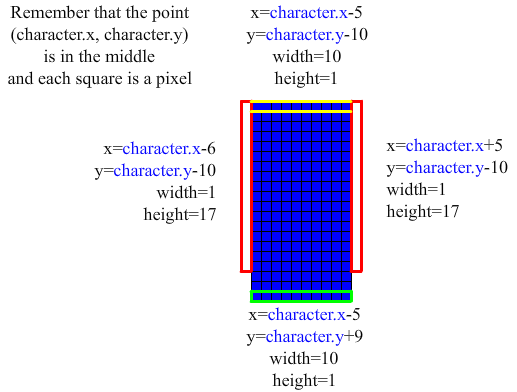
* The rectangle below the character is used to check if the character must fall
* The rectangle above the character is used to check if the character hit the ground (while he was jumping)
* The rectangles at the sides are used to check if the character can move.
These rectangles aren’t as long as the character, they’re 17 pixels height instead of 20. That’s because, if the character wants to move left and the obstacle isn’t high enough (high enough to reach the rectangle), the character will be able to move. A similar strategy is used in “Create a flash draw game like line rider or others – part 5“, where a point (the knee point) is used to check if the character can move.
I renamed the function “fall”: now it’s “move_character”. I only commented the new lines. Now I’m working on part 3, but I still don’t know how to calculate the explosion impulse. I looked for some information, but now I’m thinking about maths (an explosion is a growing circle).
This is the script:
1 2 3 4 5 6 7 8 9 10 11 12 13 14 15 16 17 18 19 20 21 22 23 24 25 26 27 28 29 30 31 32 33 34 35 36 37 38 39 40 41 42 43 44 45 46 47 48 49 50 51 52 53 54 55 56 57 58 59 60 61 62 63 64 65 66 67 68 69 70 71 72 73 74 75 76 77 78 79 80 81 82 83 84 85 86 87 88 89 90 91 92 93 94 95 96 97 98 99 100 101 102 103 104 105 106 107 108 109 110 111 112 113 114 115 116 117 118 119 120 121 122 123 124 125 126 127 128 129 130 | package { import flash.display.Sprite; import flash.display.Bitmap; import flash.display.BitmapData; import flash.display.BlendMode; import flash.geom.Point; import flash.geom.Rectangle; import flash.geom.Matrix; import flash.events.Event; import flash.events.MouseEvent; import flash.events.KeyboardEvent; public class worms extends Sprite { public var terrain_bmpd:BitmapData=new BitmapData(550,200,true,0xFF00FF00); public var terrain_bmp:Bitmap=new Bitmap(terrain_bmpd); public var character:Sprite=new Sprite ; public var character_speed:Number=0;//That number is the y speed that the character has public var hole:Sprite=new Sprite ; public var hole_matrix:Matrix; public var left_key:Boolean; public var right_key:Boolean; public var space_key:Boolean; public var jumping:Boolean=true;//When that variable is true, the character is in the air public var i:int;//We will use this variable to make a loop public function worms() { draw_objects(); stage.addEventListener(Event.ENTER_FRAME,move_character); stage.addEventListener(MouseEvent.MOUSE_UP,mouse_up); stage.addEventListener(KeyboardEvent.KEY_DOWN,key_down); stage.addEventListener(KeyboardEvent.KEY_UP,key_up); } public function move_character(e:Event) { //If left key is pressed, we'll move the character to the left if (left_key) { for (i=0; i<3; i++) {//Do you remember when we made the character fall? We had to move the character pixel by pixel if (! terrain_bmpd.hitTest(new Point(terrain_bmp.x,terrain_bmp.y),0x01,new Rectangle(character.x-6,character.y-10,1,17))) { character.x--; /*If the character doesn't hit the ground, we can move left. However, the character may be sunk under the ground. We have to lift it*/ while (terrain_bmpd.hitTest(new Point(terrain_bmp.x,terrain_bmp.y),0x01,new Rectangle(character.x-5,character.y+9,10,1))) { character.y--; } } } } if (right_key) {//Well, that's the same for the right key for (i=0; i<3; i++) { if (! terrain_bmpd.hitTest(new Point(terrain_bmp.x,terrain_bmp.y),0x01,new Rectangle(character.x+5,character.y-10,1,17))) { character.x++; while (terrain_bmpd.hitTest(new Point(terrain_bmp.x,terrain_bmp.y),0x01,new Rectangle(character.x-5,character.y+9,10,1))) { character.y--; } } } } if (space_key&&! jumping) {//That's easy: if he isn't jumping and you press space, his speed will be negative and he'll jump character_speed=-10; jumping=true;//Now the character can't jump again } character_speed++;//Every frame we will increase character's speed if (character_speed>0) { //If the speed is positive, we will check a collision between the terrain and the rectangle below the character for (i=0; i<character_speed; i++) {//We check the collision pixel by pixel... if (! terrain_bmpd.hitTest(new Point(terrain_bmp.x,terrain_bmp.y),0x01,new Rectangle(character.x-5,character.y+9,10,1))) { character.y++;//If there isn't a collision, the character will fall } else { jumping=false;//If there's a collision with the ground, the character isn't jumping character_speed=0;//The speed is 0, because the character hit the ground } } } else { for (i=0; i<Math.abs(character_speed); i++) {//If the speed is negative, the for loop won't work. We have to use Math.abs(). //Now we will check the collision between the terrain and the rectangle above the character if (! terrain_bmpd.hitTest(new Point(terrain_bmp.x,terrain_bmp.y),0x01,new Rectangle(character.x-5,character.y-10,10,1))) { character.y--; } else { character_speed=0;//Well, that's the same: the character hit the ground } } } } public function mouse_up(e:MouseEvent) { hole_matrix=new Matrix ; hole_matrix.translate(e.stageX-terrain_bmp.x,e.stageY-terrain_bmp.y); terrain_bmpd.draw(hole,hole_matrix,null,BlendMode.ERASE); } public function key_down(e:KeyboardEvent) { if (e.keyCode==37) { left_key=true; } if (e.keyCode==39) { right_key=true; } if (e.keyCode==32) { space_key=true; } } public function key_up(e:KeyboardEvent) { if (e.keyCode==37) { left_key=false; } if (e.keyCode==39) { right_key=false; } if (e.keyCode==32) { space_key=false; } } public function draw_objects() { terrain_bmp.y=200; stage.addChild(terrain_bmp); character.graphics.beginFill(0x0000FF); character.graphics.drawRect(-5,-10,10,20); character.x=250; stage.addChild(character); hole.graphics.beginFill(0x000000); hole.graphics.drawCircle(0,0,30); } } } |
And this is the result:
Move the player with left – right arrow keys and click on the terrain to create an explosion.
Download the source code. Now Jordi is trying to manage explosion impulse but he’s having some problems. Any blog-bomber reader willing to read?

They can be easily customized to meet the unique requirements of your project.


(10 votes, average: 4.70 out of 5)


This post has 24 comments
jose
i’m the first to comment and i think this is a great idea. This original and the weapons made Worms the famous game we now today. I had always asked myself how to now i only thank Jordi Snaglas.
Kaustav
Hey, great tut and code!
What exactly do you mean by ‘explosion impulse’? I may be able to help =)
Jordi Sanglas Molist
When there’s an explosion near a worm, that one will move away from the centre. But how is this related to the distance?
I first thought that: the distance from the explosion centre to the worm is inversely proportional to the impulse. But that doesn’t work: the explosion at 1cm from the worm wouldn’t move it at twice the speed that the explosion at 2cm.
Sorry if there are mistakes, I haven’t revised the text.
MC
@Jordi: you should use an explosion radio… if the enemy is between this radio it will explode… then, you should calculate “how close” is inside the radio (50% distance = half damage… 25% near= 75% damage, and so on… ) there are many ways, this is just one idea
Jordi Sanglas Molist
Well, the problem was the impulse speed; however, your idea can also be applied: if the worm is 25% near, the speed will be 75%…
Thanks, MC! Part 3 is coming.
Jordi Sanglas Molist
I forgot some parentheses!
new Sprite ; –> new Sprite();
new Matrix ; –> new Matrix();
I don’t know why it works without them.
Jesús
I think that 2d character behaivor would be more easy to implement using box2d for example, what do you think about this?
Kaustav
Oh that?? That’s simple. You just use the intensity formula:
Force = constant/(Distance^2);
(The constant is the power of the explosion)
Now, the force is turned into acceleration through:
Acc = Force/mass
(mass is weight of character)
So you just add the acc to the character_speed variable of your character on that frame.
Jodi Houareau
nice code Jordi,
I am trying to do the same thing with movieclips/vectors and am a bit stuck with getting the hittest from a new rectangle
this is part of my move player function so far…
if (!ground.hitTestPoint(player.x-6, player.y-30, true)) {
but it needs to look more like this i think…
if (!ground.hitTestPoint(0×01,new Rectangle(player.x-6,player.y-10,1,17))) {
I’ve imported flash.geom.Rectangle. keep getting errors, any help would be appreciated!
yura_never_sleeps
nice tutorial man!
i know there it is just draft of the game but i m gonna say that there is a little bug:
when u fall u can press space and the character will make a jump from air.
i hope u understood my english :D
Jordi Sanglas Molist
I think you’re right, but if I wanted to get good results I would have to use that formula every frame (the explosion lasts some miliseconds). Otherwise, it will happen that:
Explosion 1 pixel away from the character: speed=x;
Explosion 2 pixels away from the character: speed=x/4;
And the difference is only one pixel.
However, I think I’ll use MC’s formula (less real, but enough for a game).
Thank you, Kaustav. Sometimes I need help. Keep commenting!
Jordi Sanglas Molist
I think that using movieclips you can’t do that kind of hitTest.
MovieClip can use two hit tests:
- hitTestPoint: to check a collision between a point and a MovieClip.
- hitTestObject: to check a collision between two MovieClips (well, between the bounding boxes).
If you want, you can use a for loop and the hitTestPoint method to check one by one the rectangle points, but maybe it will be much CPU consuming (I don’t know, I haven’t tried it).
Jordi Sanglas Molist
Thank you (I didn’t notice)! I’ll try to solve it in part 3.
Jordi Sanglas Molist
Sorry I pressed ENTER before I finished my comment (and I copied part of my e-mail address to “website”). As I said, I’ll try to solve it in part 3. I think it may be easy: we won’t check if the character is jumping, but we will check if it’s in the air.
I’ll also add the forgotten parentheses.
Jordi Sanglas Molist
If you use Box2d, you’ll be able to do more things. However, as I don’t want to create dynamic boxes (or something similar), I think that “custom physics” are simpler and less CPU consuming.
But you can use Box2d, if you find it easier (or if you want to add special objects); although I don’t know how to “make holes” in Box2d boxes. Well, I don’t use Box2d.
I wrote this text really quickly, so forgive me if there are mistakes.
Worms-like destructible terrain in Flash â?? Part 2 – Emanuele Feronato « Worms
[...] KeyboardEvent; public class worms extends Sprite { public var terrain_bmpd:BitmapData=new BitmapData(550,200,true,0xFF00FF00); public var terrain_bmp:Bitmap=new Bitmap(terrain_bmpd); public var character:Sprite=new Sprite ; public var …Read full article [...]
Someone
How would you make platforms (i.e, two levels) of ground, or at least custom shapes? I tried, but it filled in the blank space with a white bitmap…
Games Up
Brilliant. I always wanted to make a worms type game. This will be very useful to me. Now just need to sit and pull it apart. Thanks again.
Jordi Sanglas Molist
You could create a transparent bitmap and use the same function: BitmapData.draw(). Instead of ERASE, the BlendMode would be NORMAL. For example, you can try this code in a *.fla document:
//Create the bitmap. It must be transparent.
var terrain_bmpd:BitmapData=new BitmapData(500,500,true,0×00000000);
var terrain_bmp:Bitmap=new Bitmap(terrain_bmpd);
stage.addChild(terrain_bmp);
//The terrain will be a circle
var circle:Sprite=new Sprite();
circle.graphics.beginFill(0x00FF00);
circle.graphics.drawCircle(0,0,30);
var circle_matrix:Matrix=new Matrix();
circle_matrix.translate(50,50);
terrain_bmpd.draw(circle,circle_matrix,null,BlendMode.NORMAL);
If you want platforms, you can use rectangles instead of circles.
You can also use setPixel32() to set individual pixels.
simranzenov
Your collision rectangle should not have a gap. I tested it and got myself stuck on a piece of land. Just thought I would let you know.
simranzenov
Strange I cant seem to duplicate it again. Maybe it was just my browser freezing up. :S
lionel
hey im working with the same thing on flashpunk but am using tilemaps instead of bitmap data, would i beable to get the same kind of detection with tile maps?
Tony
I love you Emanuele!! Thank you so much for posting all of these tutorials. It’s like a one stop learn-gasm for all of my action script programming needs. Keep up the good work!
Cloudy Pixel Games » Tutorial #1:Pixel Perfect Collision with Flixel Part 1
[...] The two tutorials that had the code is here and here. [...]