
Worms-like destructible terrain in Flash – Part 3

After another truck of Aspirin, Jordi Sanglas Molist is back with the 3rd step of his Worms tutorial.

I’ve finished part 3. I almost got a headache. Forgive me if there are some mistakes, I wrote this post and the comments quickly.

Now the character is affected by the explosions. To do that, I added an horizontal speed and a friction. However, I don’t want the character to slide when I’m using the arrow keys, so:

* The arrow keys won’t use horizontal speed
* If the horizontal speed is different than 0 (an explosion is moving the character), I can’t use the arrow keys

To calculate the impulse, we will need to use trigonometry:
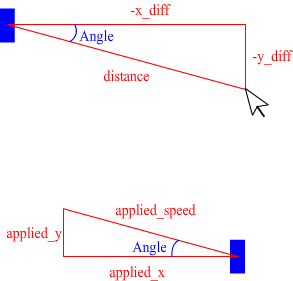
I’ve also solved another bug: if the character was falling (without using the space bar), it could jump in the air. Here I removed the jumping variable and I check if the character is on the ground.

Pay attention!!! Sometimes I check if the character is ON the ground (character.y+10) and sometimes I check if the character is TOUCHING the ground (character.y+9).

KNOWN BUGS:

* The horizontal speed won’t decrease faster or more slowly if the character is on a slope.
* The for loop isn’t exact when the horizontal speed is a decimal number (I think).

What should I do in the next part? I must do it before I start school, or I won’t have time.

While you think about the next part to request, here it is the script:

1
2
3
4
5
6
7
8
9
10
11
12
13
14
15
16
17
18
19
20
21
22
23
24
25
26
27
28
29
30
31
32
33
34
35
36
37
38
39
40
41
42
43
44
45
46
47
48
49
50
51
52
53
54
55
56
57
58
59
60
61
62
63
64
65
66
67
68
69
70
71
72
73
74
75
76
77
78
79
80
81
82
83
84
85
86
87
88
89
90
91
92
93
94
95
96
97
98
99
100
101
102
103
104
105
106
107
108
109
110
111
112
113
114
115
116
117
118
119
120
121
122
123
124
125
126
127
128
129
130
131
132
133
134
135
136
137
138
139
140
141
142
143
144
145
146
147
148
149
150
151
152
153
154
155
156
157
158
159
160
161
162
163
164
165
166
167
168
169
170
171
172
173
174
175
176
177
178
179
180
181
182
183
184
package {
	import flash.display.Sprite;
	import flash.display.Bitmap;
	import flash.display.BitmapData;
	import flash.display.BlendMode;
	import flash.geom.Point;
	import flash.geom.Rectangle;
	import flash.geom.Matrix;
	import flash.events.Event;
	import flash.events.MouseEvent;
	import flash.events.KeyboardEvent;
 
	public class worms extends Sprite {
 
		public var terrain_bmpd:BitmapData=new BitmapData(550,200,true,0xFF00FF00);
		public var terrain_bmp:Bitmap=new Bitmap(terrain_bmpd);
		public var character:Sprite=new Sprite();
		public var x_speed:Number=0;
		public var y_speed:Number=0;
		public var hole:Sprite=new Sprite();
		public var hole_matrix:Matrix;
		public var left_key:Boolean;
		public var right_key:Boolean;
		public var space_key:Boolean;
		public var i:int;
		public var x_diff:Number;//x_diff and y_diff will be the difference between the character and the explosion centre
		public var y_diff:Number;
		public var explosion_radius:Number=100;//That's the radius of the explosion. If the character is inside the radius, it will move away.
		public var explosion_intensity:Number=10;//The explosion intensity is the speed (pixels/frame) that the character will
		//get if the distance between the explosion and the character is 0 (the closest one).
		public var distance:Number;//We will use that variable to store the distance between the character and the explosion
		public var angle:Number;//and that one to store the angle
		public var applied_speed:Number;//That will be the total speed we need to apply (the vector length).
		public var applied_x:Number;//Then, we will separate the applied_speed in applied_x
		public var applied_y:Number;//and applied_y
		public var ground_friction:Number=0.2;//The ground has more friction than the air,
		public var air_friction:Number=0.05;//so I have used different variables
		public function worms() {
			draw_objects();
 
			stage.addEventListener(Event.ENTER_FRAME,move_character);
			stage.addEventListener(MouseEvent.MOUSE_UP,mouse_up);
			stage.addEventListener(KeyboardEvent.KEY_DOWN,key_down);
			stage.addEventListener(KeyboardEvent.KEY_UP,key_up);
		}
 
		public function move_character(e:Event) {
			if (left_key&&x_speed==0) {//If the player is moving, we won't be able to control it
				for (i=0; i<3; i++) {
					if (! terrain_bmpd.hitTest(new Point(terrain_bmp.x,terrain_bmp.y),0x01,new Rectangle(character.x-6,character.y-10,1,17))) {
						character.x--;
						while (terrain_bmpd.hitTest(new Point(terrain_bmp.x,terrain_bmp.y),0x01,new Rectangle(character.x-5,character.y+9,10,1))) {
							character.y--;
						}
					}
				}
			}
			if (right_key&&x_speed==0) {//Let's do the same with the right key...
				for (i=0; i<3; i++) {
					if (! terrain_bmpd.hitTest(new Point(terrain_bmp.x,terrain_bmp.y),0x01,new Rectangle(character.x+5,character.y-10,1,17))) {
						character.x++;
						while (terrain_bmpd.hitTest(new Point(terrain_bmp.x,terrain_bmp.y),0x01,new Rectangle(character.x-5,character.y+9,10,1))) {
							character.y--;
						}
					}
				}
			}
			if (x_speed<0) {//This block is similar; however, we don't know the speed,
				for (i=0; i<Math.abs(x_speed); i++) {//so the for loop will use x_speed (there's a bug, read KNOWN BUGS)
					if (! terrain_bmpd.hitTest(new Point(terrain_bmp.x,terrain_bmp.y),0x01,new Rectangle(character.x-6,character.y-10,1,17))) {
						character.x--;
						while (terrain_bmpd.hitTest(new Point(terrain_bmp.x,terrain_bmp.y),0x01,new Rectangle(character.x-5,character.y+9,10,1))) {
							character.y--;
						}
					} else {//If the player hits a wall, it must stop(!). Otherwise, when the wall is removed,
						//the player will continue moving
						x_speed=0;
					}
				}
			} else {//That's the same, but with left key
				for (i=0; i<x_speed; i++) {
					if (! terrain_bmpd.hitTest(new Point(terrain_bmp.x,terrain_bmp.y),0x01,new Rectangle(character.x+5,character.y-10,1,17))) {
						character.x++;
						while (terrain_bmpd.hitTest(new Point(terrain_bmp.x,terrain_bmp.y),0x01,new Rectangle(character.x-5,character.y+9,10,1))) {
							character.y--;
						}
					} else {
						x_speed=0;
					}
				}
			}
			if (space_key&&terrain_bmpd.hitTest(new Point(terrain_bmp.x,terrain_bmp.y),0x01,new Rectangle(character.x-5,character.y+10,10,1))) {
				y_speed=-10;//Instead of using the jumping variable, I check if the character is on the ground
			}
			if (terrain_bmpd.hitTest(new Point(terrain_bmp.x,terrain_bmp.y),0x01,new Rectangle(character.x-5,character.y+10,10,1))) {
				x_speed*=1-ground_friction;//Again, I check if the character is on the ground (to apply ground or air friction)
			} else {
				x_speed*=1-air_friction;
			}
 
			if (Math.abs(x_speed)<0.1) {
				x_speed=0;
			}/*I don't want the character to move at 0.0000000001 pixels/frame,
			so if the x_speed is less than 0.1 we will stop it*/
			y_speed++;
			if (y_speed>0) {
				for (i=0; i<y_speed; i++) {
					if (! terrain_bmpd.hitTest(new Point(terrain_bmp.x,terrain_bmp.y),0x01,new Rectangle(character.x-5,character.y+10,10,1))) {//I changed character.y+9--> character.y+10
						character.y++;
					} else {
						y_speed=0;
					}
				}
			} else {
				for (i=0; i<Math.abs(y_speed); i++) {
					if (! terrain_bmpd.hitTest(new Point(terrain_bmp.x,terrain_bmp.y),0x01,new Rectangle(character.x-5,character.y-10,10,1))) {
						character.y--;
					} else {
						y_speed=0;
					}
				}
			}
		}
 
		public function mouse_up(e:MouseEvent) {
			hole_matrix=new Matrix();
			hole_matrix.translate(e.stageX-terrain_bmp.x,e.stageY-terrain_bmp.y);
			terrain_bmpd.draw(hole,hole_matrix,null,BlendMode.ERASE);
			//Let's calculate the impulse. You'll have to understand trigonometric functions
			x_diff=character.x-e.stageX;//If we invert that, the character will move to the centre of the explosion instead of moving away
			y_diff=character.y-e.stageY;
			angle=Math.atan2(y_diff,x_diff);//We calculate the angle
			distance=Math.sqrt(x_diff*x_diff+y_diff*y_diff);//Then, we use Pythagorean theorem
			if (distance<explosion_radius) {
				applied_speed = (1 - distance / explosion_radius) * explosion_intensity;
				//Maybe that's difficult to understand:
				//How_far_is_the_character = distance / explosion_radius
				//How_near_is_the_character = 1 - How_far_is_the_character
				//applied_speed = How_near_is_the_character * explosion_intensity
 
				applied_x=Math.cos(angle)*applied_speed;//We separate the applied_speed in x...
				applied_y=Math.sin(angle)*applied_speed;//... and y
				y_speed+=applied_y;
				x_speed+=applied_x;
			}
		}
 
		public function key_down(e:KeyboardEvent) {
			if (e.keyCode==37) {
				left_key=true;
			}
			if (e.keyCode==39) {
				right_key=true;
			}
			if (e.keyCode==32) {
				space_key=true;
			}
		}
		public function key_up(e:KeyboardEvent) {
			if (e.keyCode==37) {
				left_key=false;
			}
			if (e.keyCode==39) {
				right_key=false;
			}
			if (e.keyCode==32) {
				space_key=false;
			}
		}
 
		public function draw_objects() {
			terrain_bmp.y=200;
			stage.addChild(terrain_bmp);
 
			character.graphics.beginFill(0x0000FF);
			character.graphics.drawRect(-5,-10,10,20);
			character.x=250;
			stage.addChild(character);
 
			hole.graphics.beginFill(0x000000);
			hole.graphics.drawCircle(0,0,30);
		}
	}
}

And this is the result:

As usual, left and right to move the character, spacebar to make it jump and mouse click to create explosions.

Download the source code and don’t forget to request the next part.

Rate this post: 1 Star2 Stars3 Stars4 Stars5 Stars (27 votes, average: 4.89 out of 5)
Loading ... Loading ...
Flash Templates provided by Template Monster are pre-made web design products developed using Flash technology.
They can be easily customized to meet the unique requirements of your project.
Be my fan on Facebook and follow me on Twitter! Exclusive content for my Facebook fans and Twitter followers

This post has 27 comments

  1. Colin Douch

    on August 18, 2010 at 9:57 pm

    Looks Really Nice. Good Job!

  2. Fighterlegend

    on August 19, 2010 at 1:26 am

    Awesome!
    I like it!

  3. MC

    on August 19, 2010 at 2:23 am

    cool, thanks
    :)

  4. Jason

    on August 19, 2010 at 4:36 pm

    A nice thing to see next is a background picture like in the real worms game.

  5. Chesteer

    on August 19, 2010 at 10:42 pm

    Nice part, but explosion impulse could be done little easier :).

    Graphics? Let’s see AS, sth like life bar( ~5min) and shooting :)

  6. Arkshija

    on August 21, 2010 at 2:29 pm

    ufff i cant understand as3, i worked only with as2 and i dont know how to start to practice with as3, as3 is much better than as2???

  7. Jordi Sanglas Molist

    on August 21, 2010 at 5:21 pm

    Well, I’ll be on holiday again. On tuesday 31st I’ll be back, so I won’t be able to code anything until then.

    However, I can’t write a new tutorial about a background picture.

  8. Arkshija

    on August 21, 2010 at 11:49 pm

    Eh jordi no seras catala??

  9. Jason

    on August 23, 2010 at 2:45 pm

    You know I meant that instead of a green colored terrain I meant a terrain background seen in the worms games?

  10. Jared

    on August 23, 2010 at 3:47 pm

    I perfer to use as2, I want to make pixel perfect collision detection like in this game. How would I do this? Can you post a subject with that? Thanks.

  11. Jordi Sanglas Molist

    on August 28, 2010 at 4:26 pm

    Efectivament. De moment estic fora, de vacances. Ja parlarem la propera setmana.

  12. Jordi Sanglas Molist

    on August 31, 2010 at 9:01 pm

    Sorry, I thought you were talking about the “sky”. I’ll try it, if you want. Thanks, Jason.

  13. Airish

    on September 5, 2010 at 3:09 pm

    Thanks! I have an excellent idea for the following game where I can use the given approach.

  14. Jeric

    on September 6, 2010 at 10:01 am

    Very nice! Can you post as2 version for this one? that would be really great! Cheers :D

  15. kareem

    on October 7, 2010 at 10:58 pm

    very nice , waiting for the next part..

    but i have a question ,, how to put an image instead of these green terrain ??

  16. saber

    on November 3, 2010 at 6:34 am

    Thanks!
    but how can do this in actionscript 2?

  17. Marz

    on November 8, 2010 at 12:44 am

    For those of you asking for an image it’s really simple.

    Put a bitmap type source in your library and export it to actionscript and give it a class name: mine was “tan_brown”.

    Then in the variable definitions I did this:


    public var fill_bmpd:BitmapData = new tan_brown();
    public var terrain_spr:Sprite = new Sprite();

    After you place this with the remainder of the variables, go into your constructor and do the next couple of lines:


    terrain_spr.graphics.beginBitmapFill(fill_bmpd, null, true, false);
    terrain_spr.graphics.drawRect(0, 0, 550, 200);
    terrain_bmpd.draw(terrain.spr);

    This will put the background in as a texture of sorts and then swap it over to a bitmap so that it will allow the blendmodes. The nice thing about using this is that you can use the vector drawing methods described under the ‘mysprite’.graphics area and use those to create a random terrain to begin with.

    Let me know if this helped any of you. If you are still using actionscript 2.0, I’d recommend doing the switch and learning as3.0, it’s got a lot of improvements that are worth the jump and their are loads of tutorials out there on how to make the switchover.

    Cheers. godofwarmarz at gmail dot com
    Email me if you have some more questions. :)

  18. Richard Muthwill

    on November 11, 2010 at 10:07 pm

    Just make it a mask for some random picture

  19. EirĂșn

    on November 27, 2010 at 11:07 pm

    This is awesome!

    But I’d love to see some weapons at work – Especially grenade types that bounce off by the correct angle. Is that even possible? Maybe leaving invisible vector “craters” that decide the mirror axis for the impact? Or can a reflection axis be calculated by a few surrounding pixels, i.e. 9×9 grid? Or is it enough to mirror the angle by X and Y axis upon top/bottom and left/right collision?

    I look forward to the continuation of this tutorial!

  20. rex

    on December 15, 2010 at 4:05 pm

    I’d see the gravity here so there are no gaps in the terrain, everything taht has gaps falls down

  21. Raphael Santos

    on January 21, 2011 at 5:17 am

    now… how do you align the object to the terrain?

  22. dennis

    on February 15, 2011 at 11:21 am

    Great tutorial!

    I’d like to know how to change the character graphics though.
    (Maybe Marz also knows how to do this?:D)

  23. Don

    on February 24, 2011 at 5:20 am

    @dennis – I’d suggest making the current character .visible = false, then adding your own sprite with the same size and alignment point, and moving it over the top of your invisible programmer art – this way you can always switch programmer art back on to see your boundaries.

  24. Don

    on February 26, 2011 at 12:38 pm

    so I started playing with this as a base for a casual game, and I have a quick tip for you – instead of using “new Point(x,y)” and similarly for Rectangles, use a global temp variable for each (one set per function is how I’m using it) and set the temp value Point to new values rather than spawning new Points all the time – I believe that will increase your speed alot, especially where you use it in a for / while loop.

    (you’ll notice the speed difference if you add a few more characters :P)

    Don
    have a great day

  25. Jorge

    on February 28, 2011 at 12:23 am

    What about a colapsing terrain like in the game Scorched Earth? How would it be? I’m trying hard with that.

  26. gaffkins

    on June 13, 2011 at 4:15 pm

    Hey. you could write a tutorial descriptive on the change of velocity on slope. Please :)

  27. Artemman

    on June 15, 2011 at 1:43 pm

    Would there be the next tutorial?