Box2d Flash Alchemy Port + World Construction Kit

I already showed you two ways of editing Box2D environments with Bison Kick and simply using the Flash IDE.

Today I’ll show you the most advanced editor at the moment: World Construction Kit made with Box2D C++ 2D physics engine compiled with Adobe Alchemy.

The demos on the official site are really awesome and the creators say “World Construction Kit is is a toolset / framework for rapidly developing physics based games / websites within the Flash IDE. WCK allows you to layout your 2d worlds / game levels entirely within Flash and have them hook into the physics simulation without writing any code.”

Obviously you’ll have to write (more than) some code to mak a complete game, but at the moment let me show how to create a World Construction Kit (WCK from now on) “Hello World”.

The following project is almost the same you can create from the official step by step guide, just better explained with images.

1) Create a new Flash file, save it on your computer and in the same path create a folder called wck-lib which will contain Box2D, Box2DAS, extras, gravity, misc, shapes and wck folders of the package you can download fromthe official site.

2) In your Publish Settings select Flash and check Export SWC, then click Settings..., set wck.WCK as your Document class and in your Source Path include the wck-lib folder you created in step 1.

Then move to Library path label and include Box2DAS/Box2D.swc file from the folder you created in step 1.

Now draw a square on the stage and convert it to Symbol. Check Export for Actionscript and set its Base Class as shapes.Box

In your library window, locate the square Symbol, right click on it and select Component Definition... then set Class as wck.BodyShape.
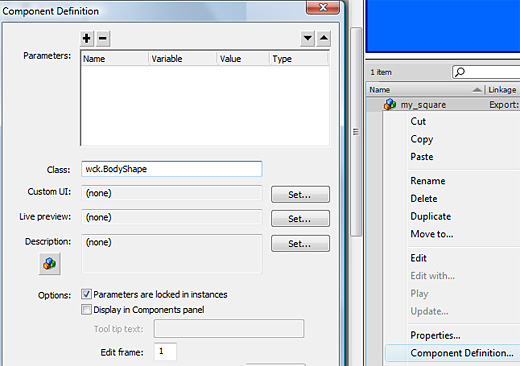
Back to the stage, select the square and convert it again to Symbol. This time the Base Class will be wck.World.

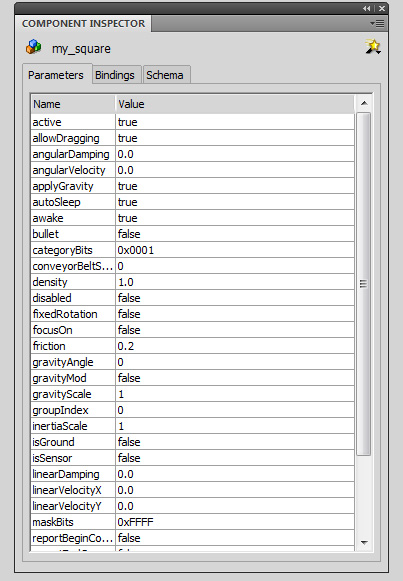
Now with a double click on the square, you will be able to work with the Symbol. Select it and go to Component Inspector window. You will be able to set all its Box2D attributes.
Doing a couple of times this stuff, I managed to create a draggable dynamic little square over a large static square which acts as floor.

Download the source code with all required libraries.

Next time I’ll show you how to create a basic platform game.

Rate this post: 1 Star2 Stars3 Stars4 Stars5 Stars (18 votes, average: 4.78 out of 5)
Loading ... Loading ...
Flash Templates provided by Template Monster are pre-made web design products developed using Flash technology.
They can be easily customized to meet the unique requirements of your project.
Be my fan on Facebook and follow me on Twitter! Exclusive content for my Facebook fans and Twitter followers

This post has 31 comments

  1. LeoYeh

    on September 7, 2010 at 11:27 am

    Awesoooooooooooooooooome !!
    i love you ~
    Now I can easy make a physics World !

  2. uint

    on September 7, 2010 at 1:12 pm

    i am really impressed!

  3. Jegolas

    on September 7, 2010 at 8:36 pm

    Is there a way to export the elements to xml or is there a way to view the generated box2d code? I would love to use this if that would be possible. Thank you!

  4. mayobutter

    on September 7, 2010 at 9:42 pm

    Awesome write up. I added a link to this from the WCK Wiki.

  5. derek knox

    on September 7, 2010 at 10:50 pm

    This is an awesome tool. Just curious how efficient it is when creating a level with many of the same objects. Does it recycle shape definitions at all? Or reuse anything for that matter? Or does each body have unique shapes in it that are not reused?

  6. Nouvelles pour Flexeurs ! | Adobe Flex / AIR : exemples, tutoriels, veille sur les Nouvelles Applications Internet

    on September 8, 2010 at 8:18 pm

    [...] Box2D C++ 2D compilé avec Adobe Alchemy pour la création de mondes virtuels.En savoir plus chez @alecmce J’ai eu l’occasion de faire quelques traitements sur des images avec Alchemy et [...]

  7. neo

    on September 9, 2010 at 3:38 am

    Um… it said it is missing cmodule.box2D :(

  8. matakukos

    on September 9, 2010 at 1:13 pm

    does it have a little lag or its just me?

  9. Wallace "Wakko" Morais

    on September 18, 2010 at 4:04 pm

    Fuck Yeah!!! Ema, you save many non-programmers life, I´m sure about that!!!

  10. jones

    on September 25, 2010 at 2:40 am

    Your fla has a compile error. Even with no modifications it fires an error.I downloaded Jesse’s version instead which works fine.

  11. Colin Holgate

    on September 27, 2010 at 9:08 pm

    Is there any hope for this working on iPhone? I try it, and doing a test movie in adl works fine, but on an iPhone it doesn’t do any movement.

  12. Kowboy

    on September 29, 2010 at 2:08 pm

    To neo and anyone else who had the cmodule missing problem, make sure you add the Box2D.swc file to the library.

  13. Aaron

    on October 18, 2010 at 11:58 pm

    Adding the Box2D.swc does not fix the missing cmodule for me… any other ideas? Thanks!

  14. zihyfw

    on October 20, 2010 at 8:09 am

    can’t worded on iphone!
    :(

  15. browser game

    on October 28, 2010 at 5:51 am

    it is great.

  16. cot45

    on November 2, 2010 at 6:30 pm

    Is it possible to speed up compile time for this project? When I make a game with Box2d I add Box2d.swc to build path to speed up the game creation time. And when using WCK, are there any ways to add some swcs for quick development?

  17. JoshB

    on November 4, 2010 at 3:08 am

    It requires you to use Flash player 10. It resolves the index out of list and possibly the missing cmodule.

  18. Ivan

    on November 4, 2010 at 5:58 pm

    It’s awesome, i try but i have a doubt someone know how move this object with keyboard

  19. diego

    on December 30, 2010 at 5:23 am

    ExcelenT… I did examples similar this, but…. could not use this method for shapes, line or polygons… how must do?

  20. diego

    on December 30, 2010 at 5:28 am

    when you download the class, can you find on folder “demo”, the file: boxMan.as. This file show how to do for move an object with keyboard

    i need help, too. if someone want share info, can write an email…

  21. chris

    on January 11, 2011 at 1:54 pm

    I wonder: what is the difference between the as port of box2d by adobe alchemy and the manual port?

  22. brandon flowers

    on February 3, 2011 at 7:06 pm

    this walk-through is very good but the source doesn’t work with Flash CS5 — just an FYI

    After you update the Component Definition, you should see the symbol in the library change from a movieclip to a component.

    http://www.box2d.org/forum/viewtopic.php?f=8&t=5002

  23. mr mr

    on March 1, 2011 at 3:12 am

    github seems to be down as of 2/20/11. Is there another server to download the WCK files? I haven’t been able to find anything.

    Thanks

  24. Patrick McDonald

    on March 3, 2011 at 12:24 am

    Be sure you are adding the .SWC to the Library Path rather than the Source Path.

  25. mr mr

    on March 3, 2011 at 9:31 pm

    sigh… i feel dumb. wck was linked to on this page. thanks.

  26. Johaannes

    on June 8, 2011 at 10:24 pm

    If you get the cmodule.box2D error. Just copy the Box2D.swc to the same folder as your .fla and swc and then link the Box2d.swc in flash.

  27. WCK « AS3????

    on August 15, 2011 at 5:59 am

    [...] Quickstart Guide With Screenshots at emanueleferonato.com [...]

  28. Brian Lachniet » Diving Into World Construction Kit

    on November 2, 2011 at 3:58 am

    [...] Box2d Flash Alchemy Port + World Construction Kit –Feronato [...]

  29. Math dude

    on November 7, 2011 at 8:49 pm

    Great tutorial, this save me a lot of research… Now its time to make experiments with this framework to do some physics games. Thank you!!

  30. Wenamun

    on December 2, 2011 at 10:57 pm

    So awesome! Thank you so much for the helpful tutorial! this will make my game creation go 200% faster!
    Merci!!!

  31. Arvin

    on January 10, 2012 at 9:07 am

    I like it, very nice ,this is a new method for doing with box2d