
Protect you SWF files online with SWFLOCK

Every Flash developer is facing security risks because of the fairly easy ways an Adobe Flash SWF file can be decompiled and reverse engineered. Without protection, anyone can easily reconstruct your SWF files stealing your work.

I already blogged about Flash Thieve and SWF Protector as a remedy, but this time I want you to know there is an online solution to protect your SWF files: SWFLOCK
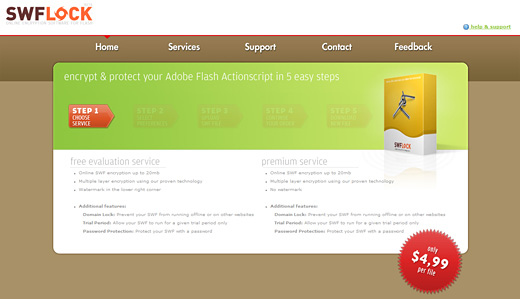
SWFLOCK main features are:

* Protection of your valuable sourcecode
* Domain Lock
* Allow users to run the SWF file for a given trial period only
* Protect the SWF file with a password

Protecting a SWF file is very easy: select the type of service among the free (with a watermark) and a premium one (without watermark) at $4.99 per file

Then choose the options: preloader and domain lock in my case

Finally upload and download the file (warning: you will get the same filename as the file you uploaded… it would be better to add someting like “_protected” to the file you download).

I tried to decompile it with a common decrypter tool, and once loaded I realized that the domain lock worked…

Then when I opened the source code, that’s what I got:

1
2
3
4
5
6
7
8
9
10
11
12
13
14
15
16
17
18
19
20
21
22
23
24
25
26
27
28
29
30
31
32
33
34
35
36
37
38
39
//class Main
package 
{
    import flash.display.*;
    import flash.system.*;
    import flash.utils.*;
 
    public class Main extends flash.display.Sprite
    {
        public function Main()
        {
            var loc3:*=0;
            this.Content = Main_Content;
            super();
            var loc1:*=new this.Content();
            if (loc1) 
            {
                loc1.uncompress();
                loc3 = loc1.length;
                for (;;) 
                {
                    var loc4:*;
                    loc3 = loc4 = loc3 - (64 >= 0);
                    if (!loc4) 
                    {
                        break;
                    }
                    loc1[loc3] = loc1[loc3] ^ 32 % 8;
                }
            }
            var loc2:*=new Loader();
            loc2.loadBytes(loc1, new LoaderContext(false, new ApplicationDomain()));
            this.addChild(loc2);
            return;
        }
 
        private var Content:Class;
    }
}

Definitively not my code, and I could not my find my assets too… probably hidden somewhere around the web.

A good choice if you don’t have to protect a large number of files (unless SWFLOCK provides price plans for large number of protections) or you want to protect your sprites too.

Rate this post: 1 Star2 Stars3 Stars4 Stars5 Stars (5 votes, average: 4.20 out of 5)
Loading ... Loading ...
Flash Templates provided by Template Monster are pre-made web design products developed using Flash technology.
They can be easily customized to meet the unique requirements of your project.
Be my fan on Facebook and follow me on Twitter! Exclusive content for my Facebook fans and Twitter followers

This post has 23 comments

  1. SWFLOCK

    on September 8, 2010 at 5:50 pm

    Hi Emanuele,

    First of all, thank you for your review. I hope people will find it useful.

    As for the price plan. Right now we’re working on a third package for a large number of files with a reduced package price.

    Please leave your comments, questions, suggestions or complaints.

    Sincerely,

  2. Pedram

    on September 8, 2010 at 6:51 pm

    It’s very cool.
    but maybe 5$ per file is a little expensive for many projects/SWFs.
    However I like it.

  3. SWFLOCK

    on September 8, 2010 at 10:26 pm

    Hi Pedram,

    Yes, we understand it may be a bit expensive for projects with multiple SWF files. We are working on a third package, ‘Professional’, that has a reduced price for these kind of projects.

  4. fudo

    on September 8, 2010 at 11:05 pm

    > I could not my find my assets too… probably hidden somewhere around the web.

    SWFLock does not hide anything around the web. Your original swf file was embedded as byte array in this new file. There’s a special tag in Flex for this.

  5. Paranoid Bastard

    on September 9, 2010 at 10:56 am

    And how do I know my original swf’s aren’t being saved somewhere on SWFLOCK ?
    The product and the site look OK but I’m sticking to my currejt encryption software … because I know the unencrypted swf never leaves my computer.

  6. Bruce Jawn

    on September 9, 2010 at 1:48 pm

    Try this swf protection tool:
    http://bruce-lab.blogspot.com/2010/05/swf-cry-free-online-swf.html
    It’s free and safer!

  7. SWFLOCK

    on September 9, 2010 at 4:00 pm

    Hi ‘Paranoid Bastard’,

    Files are stored on our servers for approximate 1 hour before automatically being deleted using a cronjob service. Ofcourse you have to take our word for it that we do not alter or save files uploaded by our customers.

    Sincerely,

  8. Kort Pleco

    on September 9, 2010 at 4:40 pm

    I’m something of a flash novice (or noob depending on your social circle) so would this work for helping to prevent unauthorized copying of a flash object that I want to embed on my site? I plan to expose the SERVICES that the flash object accesses as a paid item, but I want a demo on my site for free.

  9. SWFLOCK

    on September 9, 2010 at 4:58 pm

    Hi Kort,

    You can add a domain lock to prevent the SWF from running on other websites or offline.

    Please contact us for questions or specific requirements:
    http://www.swflock.com/contact/

    Sincerely,

  10. MC

    on September 9, 2010 at 11:30 pm

    What if you need to update your file (the same game)
    you have to pay again?

  11. SWFLOCK

    on September 10, 2010 at 8:17 am

    Hi MC,

    Yes, SWFLock works per file.

    You can use the Test Evaluation service while in development stage. Use the Premium service only when your game/application is finished and ready to go live.

    In the near future there will be a license-based service for an unlimited amount of files.

  12. vitaLee

    on September 10, 2010 at 11:38 am

    5$ per file is wayyy too much.
    to me your price list (offer)is unrealistic and definetely not flexible.

  13. SWFLOCK

    on September 10, 2010 at 12:16 pm

    Hi vitaLee,

    It really depends how often you’re planning to use it. SWFLock is especially ment for developers that encrypt files only a few times a year. Because it’s online, you don’t have to buy a 150 dollar software package to be able to protect your files.
    If you’re planning to use it more often, a third package, as mentioned above, is in development.

  14. Harry

    on September 12, 2010 at 11:27 am

    The site certainly look professional. Will look into using this for my next game.

  15. Chris

    on September 14, 2010 at 11:09 pm

    I just want to say that I think $5 to pay per file is quite reasonable. The tool stops people from pirating your work. If your software is popular enough that piracy is a problem, then $5 is a drop in the bucket.

    Everything can’t be free. I’d rather pay a little for a stable full-featured product than get something unstable and difficult to use for free.

  16. Eljo

    on September 17, 2010 at 9:57 am

    Hey Paranoid,

    I’m looking into different encryption methods at the moment. SWFLock is on my radar, but do you mind me asking which encryption package you’re using at the moment?

  17. Eljo

    on September 17, 2010 at 10:01 am

    I’ve fiddled around with the latest version and it now includes code obfuscation, meaning you’ll never see the source code as mentioned in this article when decompiling.

    As for the $4,99 price tag: I can only understand this being too much if your projects are worth less than a few hundred bucks (which probably means you’re doing something wrong).

  18. Jos

    on September 23, 2010 at 4:07 pm

    Can you guarantee that protected swf’s run exactly the way the non protected swf’s would run? I’m thinking communication with e.g. soap services, posting data, embedding other swf’s, etc.

  19. SWFLOCK

    on September 24, 2010 at 8:41 pm

    Hello Jos,

    We have thoroughly tested SWFLock and never had any problems.
    If you’re still not confident, then please use the ‘Free Evaluation Service’ to see if our product fits your needs.

    Sincerely,

  20. SWFLOCK

    on September 24, 2010 at 8:43 pm

    Hi Eljo,

    You are right. We updated SWFLock last week to support code obfuscation.

  21. kazem

    on January 31, 2011 at 12:48 pm

    I use Flash Secure Optimizer from eramsoft.com

  22. SWFLOCK

    on May 15, 2011 at 2:48 pm

    Hello everyone,

    Just wanted to let you all know that SWFLock left beta and that we lowered the price to one dollar.

    Thank you all for the kind feedback, we really appreciate it.

    Regards,
    SWFLock

  23. Patrick

    on October 24, 2011 at 9:50 am

    $1 per one encrypted file is a high price. You can encrypt only 40 files for $40 whereas you can pay $40 for Dcomsoft SWF Protector and protect an unlimited number of files.